Content Planner
Plan social posts on a month calendar, check each caption against the Facebook, Instagram, Pinterest and X rules, and export the plan as a calendar file or a CSV.
Updated

How do you plan social media content?
Put each post on the day it should go out, with its platforms, time, caption, hashtags and link, and check it against each platform's rules before the day comes. This planner does that on a month calendar in your browser: it counts every caption the way HueFold's social scheduler does and warns you about anything the scheduler would refuse.
Load the sample week to try it: six posts for a café across four platforms, two of which would be refused (a 286-character caption for X, and a link on Instagram). When a post is ready, the planner copies its caption and opens the scheduler, which posts it to your connected accounts.
How to plan a month of posts
- Add a post to a day Click a day on the calendar and choose the platforms, the time and the status.
- Write and check it Write the caption, hashtags and link; the checks for each platform update as you type.
- Arrange the month Drag posts between days and duplicate the ones that repeat each week.
- Export or schedule Save the plan as a calendar file or a CSV, or copy a ready post into HueFold’s scheduler.
Planning a week of social posts
A café’s week of posts loaded onto the calendar, a caption checked against X’s limit and shortened until it fits, and the plan saved as a calendar file.
- The sample week appears on the calendar: six posts across Facebook, Instagram, Pinterest and X.
- The weekend market post is opened: ready for Facebook, too long for X.
- The caption is shortened, and the X check turns from refused to ready.
- The plan is saved as a calendar file to import into a calendar app.
How do I plan a month of posts?
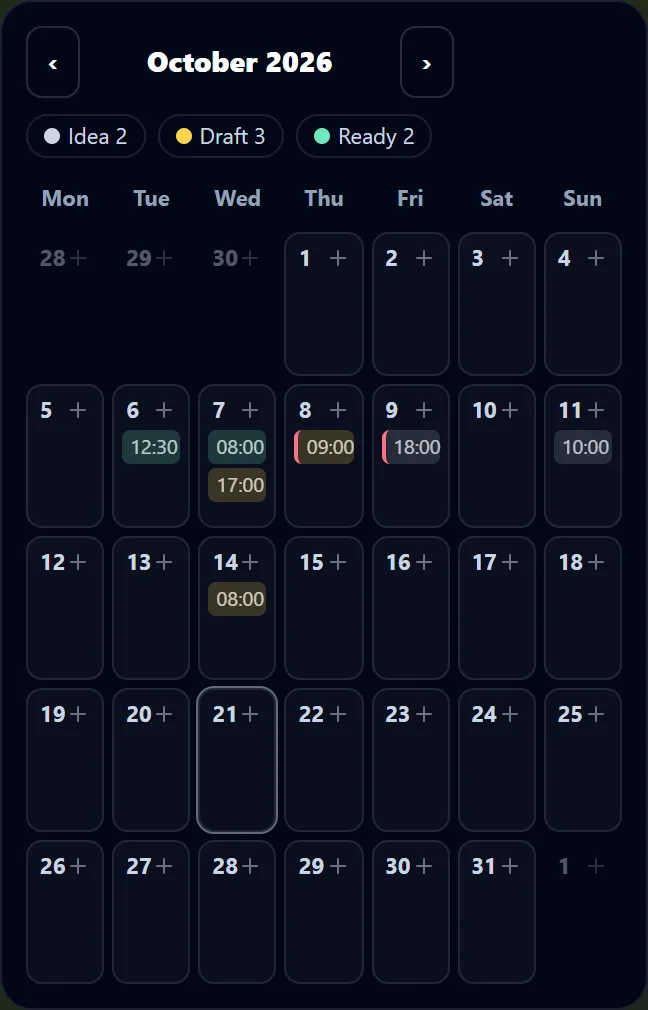
Click a day on the calendar to add a post to it, choose the platforms it is for, the time, and whether it is an idea, a draft or ready, and write its caption, hashtags and link. Each post shows on its day with its time, coloured by how far along it is, and you can drag it to another day. The month's totals per platform and how many days have nothing planned sit under the calendar.
Everything is kept in your browser on this device, so the plan is still there when you come back, and nothing is sent anywhere. Load the sample week to see a café's week of posts across Facebook, Instagram, Pinterest and X.
What does the planner check?
Every post is checked as you type against the rules HueFold's own social scheduler applies before it will schedule a post: the length of what will be posted, which is the caption with the hashtags after it, counted in characters the way the scheduler counts them (an emoji is one character, not four bytes); the number of hashtags; whether the platform takes a link; and Pinterest's title.
In the sample week two posts would be refused. “Weekend market” has a 286-character caption and two hashtags: fine for Facebook, too long for X (Caption and hashtags come to 304 characters; X takes 280.). “Meet the baker” has a link, and Instagram posts cannot carry one.
| Platform | Text, in characters | Hashtags | Link |
|---|---|---|---|
| 63,206 | No limit | Only as a link post | |
| 2,200 | 30 | No | |
| 800 (the pin description) and a 100-character title | 20 | Yes | |
| X | 280 | No limit | Yes |
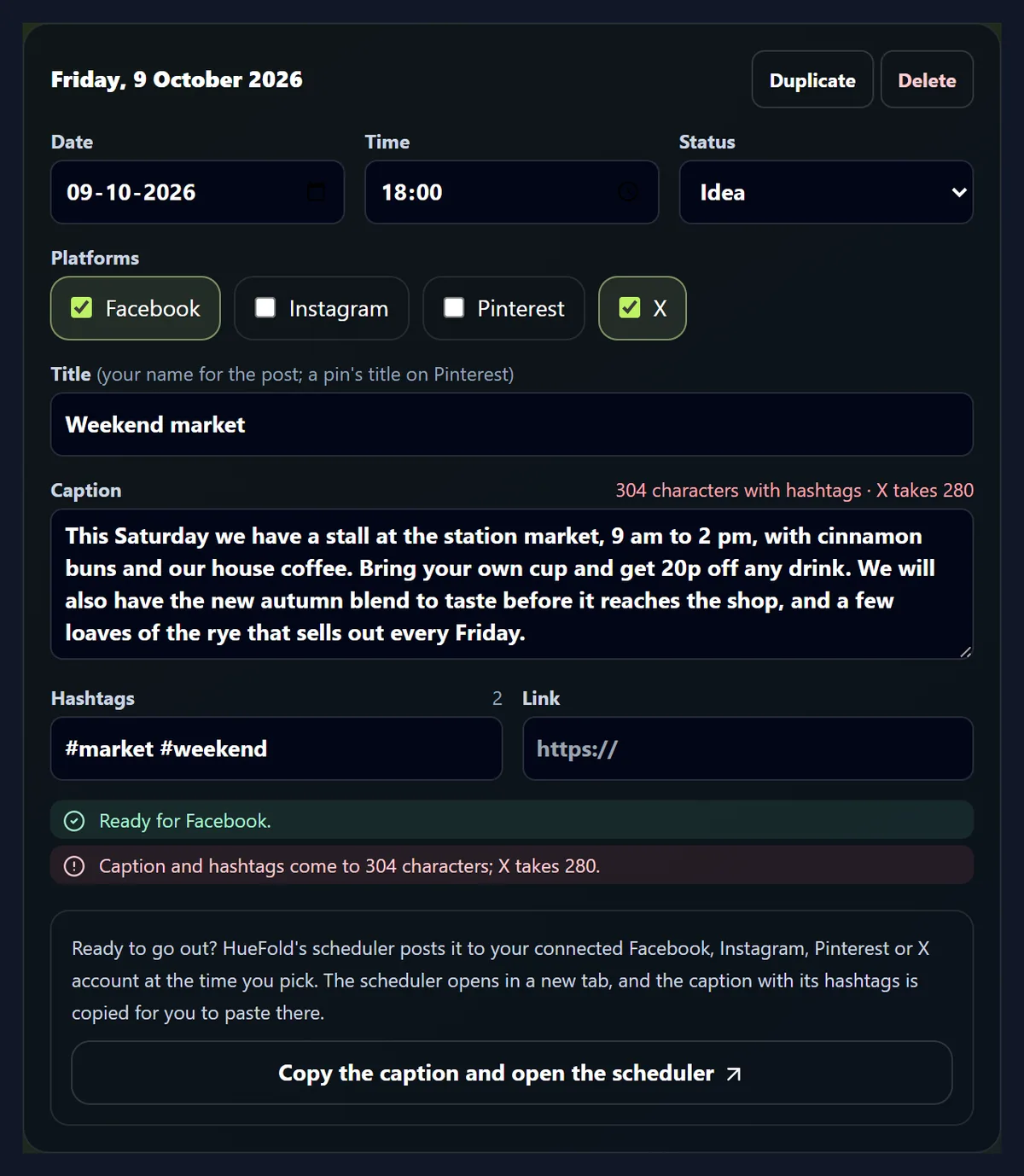
How long are the sample week’s captions?
The planner counts every caption as you type and shows the tightest limit of the platforms you ticked next to the count. The sample week has posts from a 34-character Sunday line to a long market announcement, so it shows both ends.
Short is not always better: a Facebook post can carry a whole announcement, while X needs the same news in 280 characters. Plan one post per platform when the versions need to differ, and duplicate a post to start the second version from the first.
| Day | Post | Platforms | Caption characters | Checks |
|---|---|---|---|---|
| Monday | Monday loaves | Facebook, Instagram | 99 | OK |
| Tuesday | Lunch special | X | 77 | OK |
| Wednesday | Autumn latte art | 80 | OK | |
| Thursday | Meet the baker | 73 | Instagram posts cannot carry a link. | |
| Friday | Weekend market | Facebook, X | 286 | Caption and hashtags come to 304 characters; X takes 280. |
| Sunday | Sunday slow morning | 34 | OK |
Why can’t an Instagram post have a link?
Instagram does not turn links in post captions into clickable links, and HueFold's scheduler refuses a link for an Instagram post rather than publish one that does nothing. The planner warns you as soon as a link is added to a post with Instagram ticked.
Put the link where Instagram allows one, such as your profile, and mention it in the caption, or post the link on the platforms that take one: X and Pinterest always do, Facebook as a link post.

How does Pinterest differ?
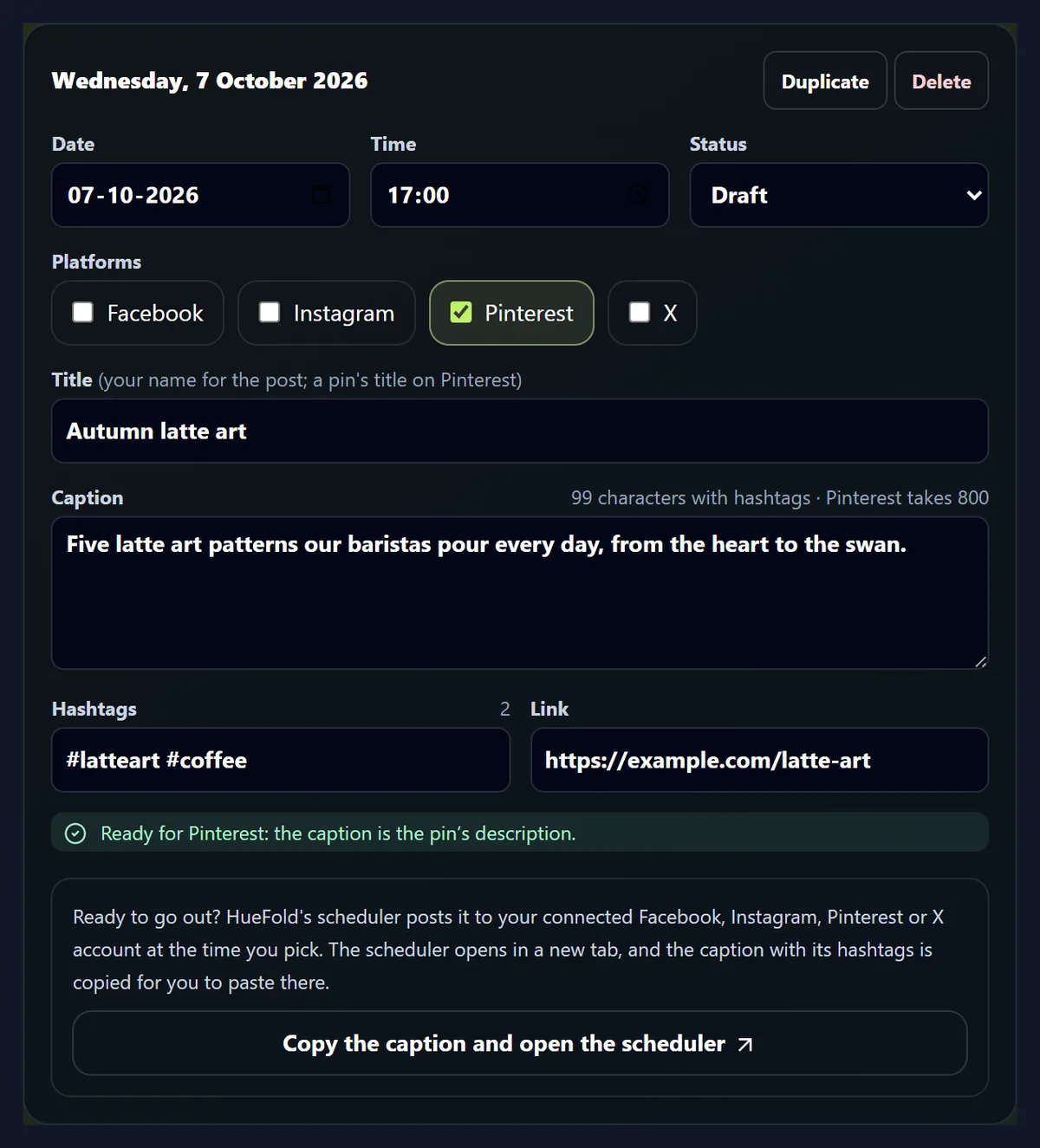
A pin has no caption: it has a title of up to 100 characters and a description of up to 800, and HueFold's scheduler asks for the title. In the planner, the post's title is the pin's title and its caption, with its hashtags, is the pin's description, and both are checked against those limits.
Pinterest also takes up to 20 hashtags and a link, which is where a pin sends people when they click it, so a pin usually carries one.
What do idea, draft and ready mean?
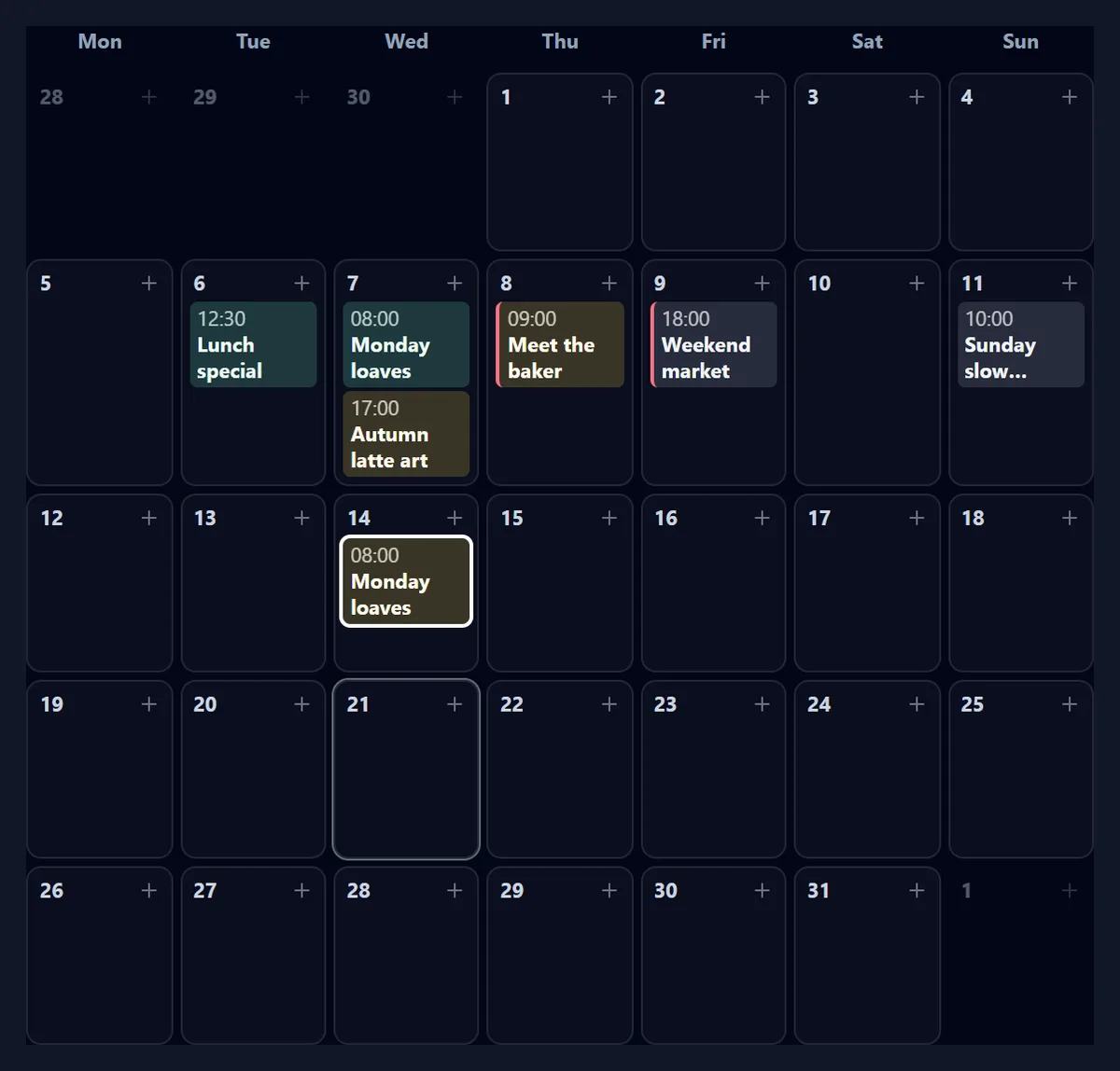
They are for you: idea is a post you might make, draft is one you are writing, ready is one that is checked and can be scheduled. The calendar colours each post by its status, and the counts next to the month show how many of each you have.
Whatever its status, a post that fails a platform's check has a red edge on the calendar, so you can see which ones need another look before you schedule them; in the sample week that is the market post and the baker post.
Can I move posts around?
Drag a post to another day; it keeps its time. In our test, dragging the sample's Monday post (2026-10-05) two days on moved it to 2026-10-07 with one drag. You can also change a post's date and time in its own fields, which works with a keyboard and on phones.
Duplicate copies a post a week later as a draft, which is a quick way to plan a weekly series: the Monday loaves post, duplicated, landed on 2026-10-14 as a draft. Delete removes a post from the plan.
Can I put the plan in my calendar?
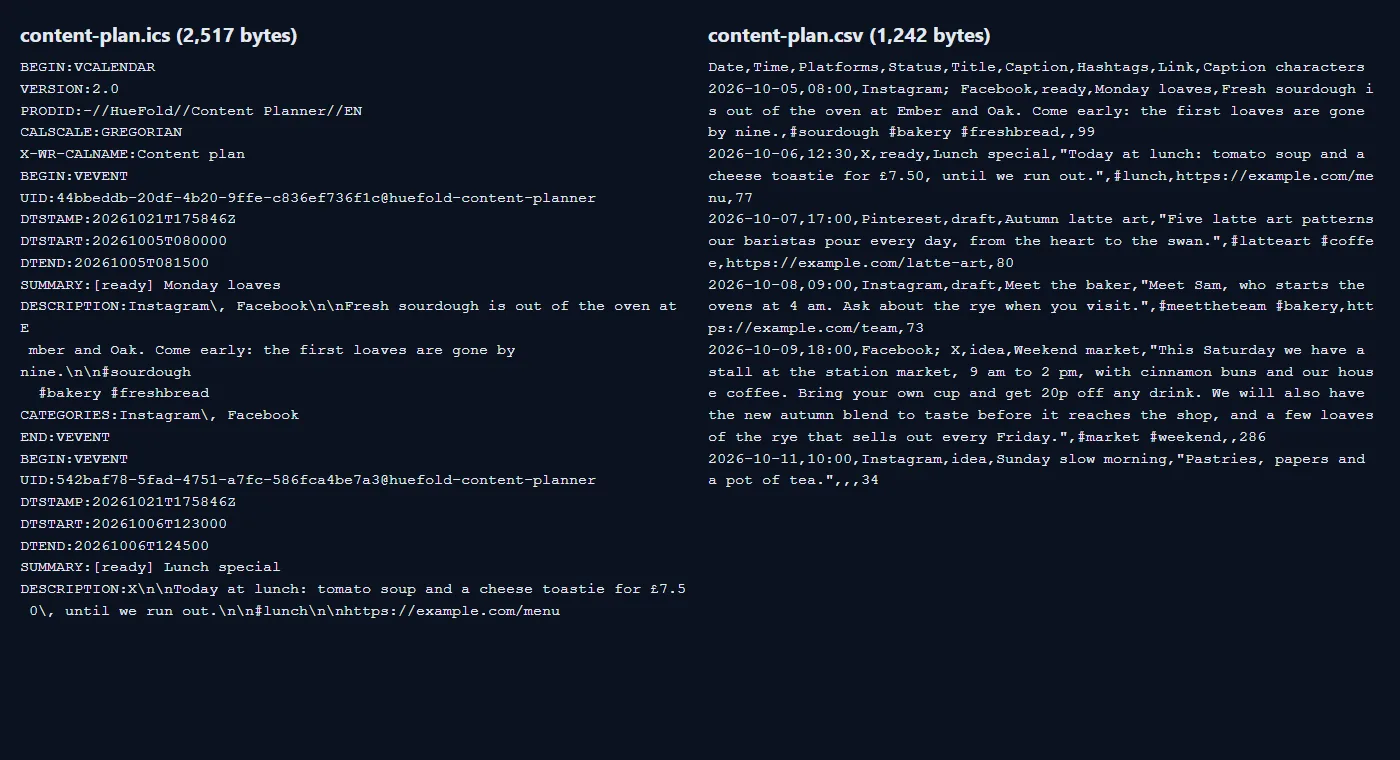
Yes. Calendar file (.ics) saves every post as a 15-minute event at its time, with its platforms, status and caption in the event, which Google Calendar, Apple Calendar and Outlook can import. The sample week's file held 6 events in 2,517 bytes, with lines folded as the iCalendar standard asks.
Spreadsheet (.csv) saves one row per post, with the caption's length, for Excel, Numbers or Google Sheets; the sample week came to 6 rows in 1,242 bytes. The events use the time as written, with no time zone, so a 9:00 post shows at 9:00 in whatever time zone the calendar uses.
How do I schedule the posts?
In HueFold's scheduler, which posts to your connected Facebook, Instagram, Pinterest or X account at the time you pick: open a ready post and press Copy the caption and open the scheduler. The scheduler opens in a new tab and the caption (with its hashtags) is on your clipboard, ready to paste.
Scheduling needs a HueFold account and a connected social account; the planner itself needs neither. The scheduler checks the post again, with the account you connect, before it accepts it.
Where is my plan kept?
In this browser's storage on this device. It is not uploaded, so it is not on your other devices, and clearing the browser's site data removes it. Export the plan to keep a copy or to share it with someone.
The planner works without an account and without a connection once the page has loaded. On a phone, the month fits the screen without scrolling sideways; each post shows its time, and tapping it opens the post.
How do I see the month at a glance?
Under the calendar, the month is counted for you: how many posts it holds for each platform, how many are ideas, drafts and ready, and how many of its days have nothing planned. Change month with the arrows and the counts follow, so a quiet week or a platform you have forgotten stands out at once.
The line under the counts also names the time zone the times are in: your device's own clock. If your audience is somewhere else, plan the times in their clock and say so in the post's title, or schedule them in the scheduler, which asks for the time zone.
How do I plan content that keeps going?
Plan the posts you know are coming first: openings, launches, events. Then fill the gaps with a few repeating kinds of post, such as a weekly behind-the-scenes post or a tip, so you are never starting from nothing. The empty-days count under the calendar shows where the gaps are.
Write the platform's version of each post, not one caption for all: the sample week's market post fits Facebook but needs a shorter version for X. Mark posts ready only when they pass every check, and you can schedule the whole week in one sitting.
Frequently asked questions
Is the content planner free?
Yes. It runs in your browser and needs no account.
Which platforms does it check?
Facebook, Instagram, Pinterest and X, with the same caption, hashtag, title and link rules as HueFold’s social scheduler.
How long can a caption be?
X takes 280 characters, Instagram 2,200 and Facebook 63,206. A Pinterest pin has a 100-character title and an 800-character description.
How many hashtags can I use?
Up to 30 on Instagram and 20 on Pinterest; Facebook and X set no number. On every platform the hashtags count towards the length, because they are posted after the caption.
Does the planner post for me?
No. It plans and checks. Posting is done by HueFold’s scheduler, which needs a connected social account; the planner copies the caption and opens it for you.
Where is my plan saved?
In this browser on this device. Export it as a calendar file or a CSV to keep or share a copy.
Can I import the plan into Google Calendar?
Yes: the calendar file (.ics) imports into Google Calendar, Apple Calendar and Outlook, one 15-minute event per post. The sample week made 6 events.
Can I open the plan in Excel?
Yes: the CSV has one row per post with its date, time, platforms, status, title, caption, hashtags, link and caption length.
Can I move a post to another day?
Yes: drag it on the calendar, or change its date in the post’s fields.
Does it work on a phone?
Yes. The month shows as a grid of days; tap a day to add a post and tap a post to edit it.
Do hashtags count towards X’s 280 characters?
Yes. They are posted after the caption, with a blank line between, so the planner counts them with the caption, as the post will go out.
Related tools
- Instagram resize — Videos in the sizes Instagram expects, from Reels to the feed.
- Caption — Captions on a video, typed or pasted, for silent autoplay.
- Facebook hashtags — Ideas for hashtags to go with a post.
- Sticky Notes — A board for the ideas before they become posts.
- Animator — Make a short animated post for the plan.
- Brand Kit — Your colours and fonts, for posts that look like you.