Facebook Hashtag Generator
Paste your Facebook post and get hashtags for it: from the words you wrote, free and in your browser, or suggested by AI in three groups, from broad topics to what this one post is about. Every hashtag is cleaned to the one-word form Facebook links, and the post comes back with them added, ready to copy.
Updated
How do you find hashtags for a Facebook post?
Write or paste the post, choose how many hashtags you want, and press Suggest hashtags with AI or From my words (no AI). The AI groups its ideas into broad topics, your niche and this post; the free option picks the words your post uses most. Tap any hashtag to leave it out, then copy the post with the hashtags under it.
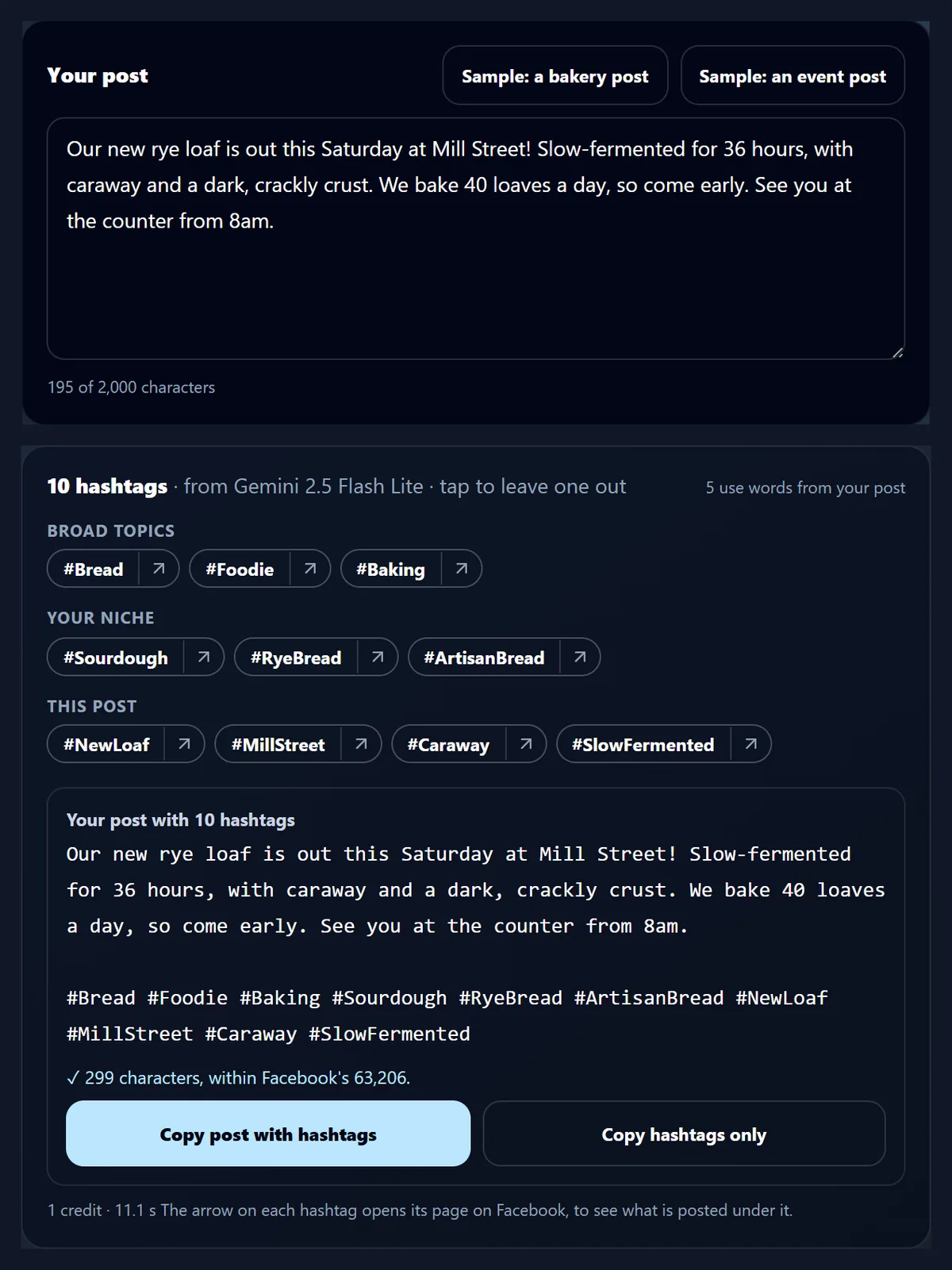
For the page's sample bakery post, the AI suggested ten hashtags in 11.1 seconds, from #Bread to #SlowFermented, five of them built from words in the post itself.
How to add hashtags to a post
- Paste your post Or try one of the samples.
- Get hashtags With AI, or from your words.
- Copy the post Leave out any you do not want.
Get hashtags for a Facebook post
A real recording of this tool: a sample post given hashtags from its own words, then hashtags suggested by AI in three groups, and the post copied with them.
- The sample bakery post is put in the box.
- From my words (no AI) picks ten hashtags from the words the post uses most.
- Suggest hashtags with AI returns ten hashtags in three groups: broad topics, your niche and this post.
- The post with its hashtags is copied, ready to paste into Facebook.
How do I get hashtags for my post?
Paste the text of your Facebook post into the box, or press one of the two sample posts. Choose 5, 10 or 15 hashtags, then press Suggest hashtags with AI. A few seconds later the hashtags appear in three groups, each with a small arrow that opens that hashtag's page on Facebook, and under them is your post with the hashtags added after a blank line. Every hashtag starts switched on; tap one to leave it out, and the post below changes with it.
The figure shows the sample bakery post, about a rye loaf out on Saturday at Mill Street, with the ten hashtags the AI suggested for it.
What did it suggest for the sample posts?
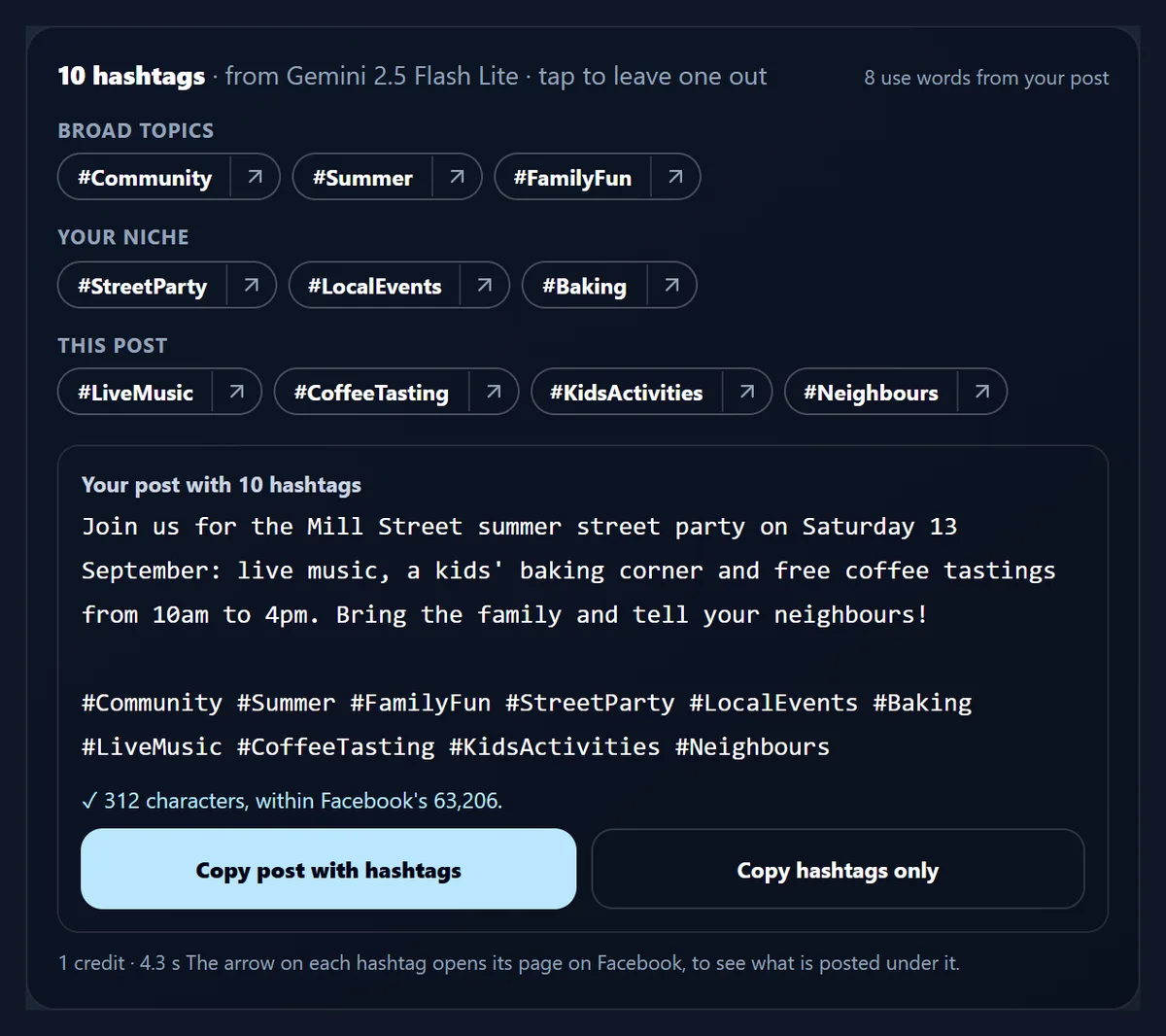
Each sample post was given hashtags twice, once by Gemini 2.5 Flash Lite and once from its own words without AI, ten hashtags each time. For the bakery post the AI's ten included #RyeBread, #MillStreet and #SlowFermented, made from the post's own words, alongside wider ones such as #Foodie and #ArtisanBread; five of the ten used words from the post. For the event post, about a street party with live music and coffee tastings, eight of ten did, from #StreetParty to #CoffeeTasting. The table shows each set and the post's length with every hashtag added.
Each AI set cost one AI credit and took 11.1 and 4.3 seconds. None of its hashtags needed cleaning, and none repeated another.
| Sample post | Made by | Hashtags using the post's words | Post length with all ten (characters) |
|---|---|---|---|
| Bakery: a new rye loaf | Gemini 2.5 Flash Lite | 5 | 299 |
| Bakery: a new rye loaf | Its own words, no AI | 10 | 270 |
| Event: a street party | Gemini 2.5 Flash Lite | 8 | 312 |
| Event: a street party | Its own words, no AI | 10 | 269 |
What are broad, niche and post hashtags?
They are the three groups the AI is asked for. Broad topics are subjects many people follow, such as #Community and #Summer for the street party. Your niche is the narrower community the post belongs to, such as #StreetParty and #LocalEvents. This post covers what this one post shows: #LiveMusic, #CoffeeTasting, #KidsActivities and #Neighbours. A mix lets a post be found both by people browsing a big subject and by people looking for something specific.
The groups are a guide, not a rule: keep the ones that fit and leave the rest out.
Can I get hashtags without AI?
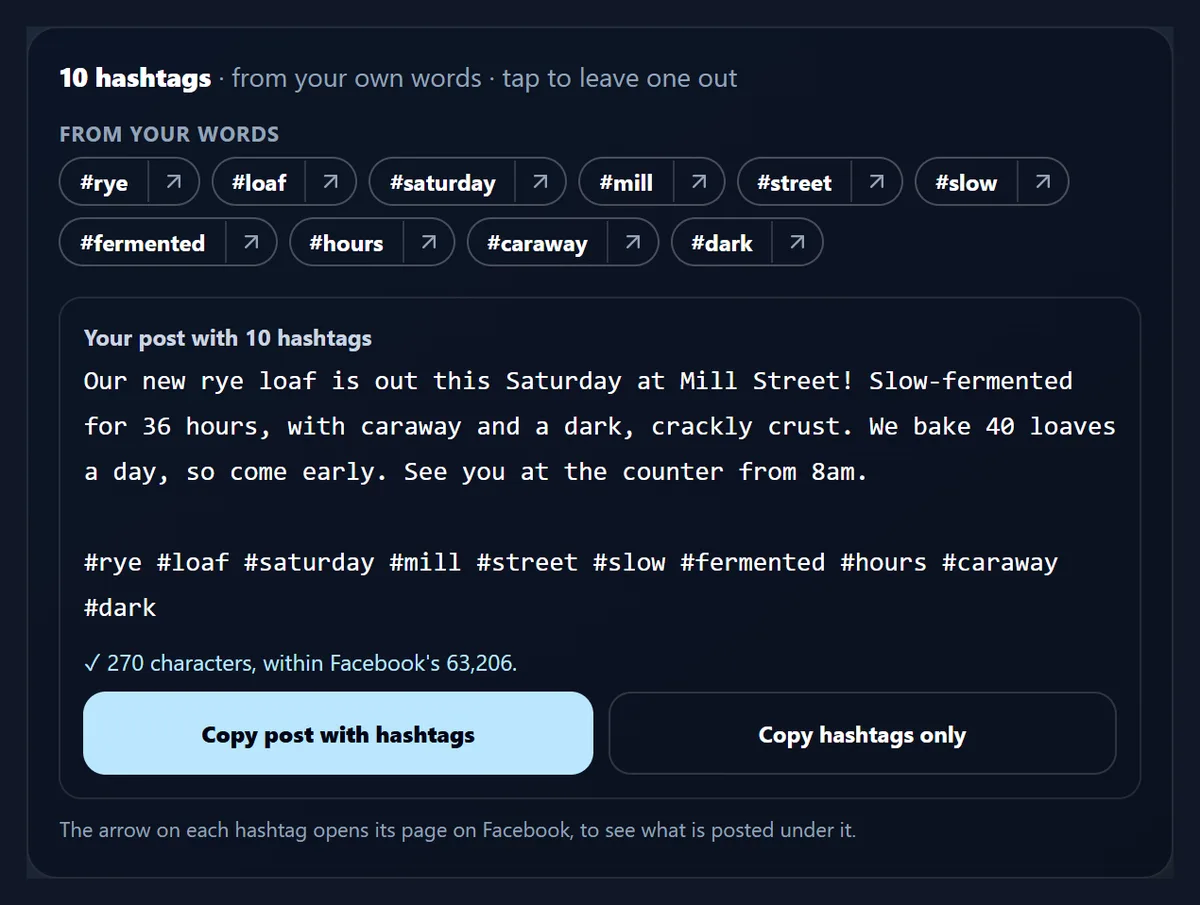
Yes. From my words (no AI) works in your browser, costs nothing and needs no account. It reads your post, leaves out common words such as "the", "and" and "this", and picks the words used most, with earlier words counting a little more; two words that stand together more than once become one hashtag. Mill Street appears only once in the bakery post, so for it the picker gave #rye, #loaf, #saturday, #mill, #street, #slow, #fermented, #hours, #caraway and #dark.
As that list shows, not every word makes a useful hashtag: #hours or #dark say little on their own. Tap those to leave them out, or use the AI, which joins words into hashtags such as #SlowFermented.
What makes a hashtag work on Facebook?
Facebook's Help Centre says a hashtag must be written as one word, without spaces. Numbers can be used, but punctuation and special characters such as $ and % will not work. So every hashtag here, whether the AI wrote it or it came from your words, is cleaned to letters and numbers only: spaces and symbols are taken out, and words that were apart are joined with each one starting with a capital letter, so #Sourdough bread! becomes #SourdoughBread, which stays readable. A cleaned hashtag is marked with a star.
Letters with accents, and letters from other alphabets, are kept as they are.
What if my post already has hashtags?
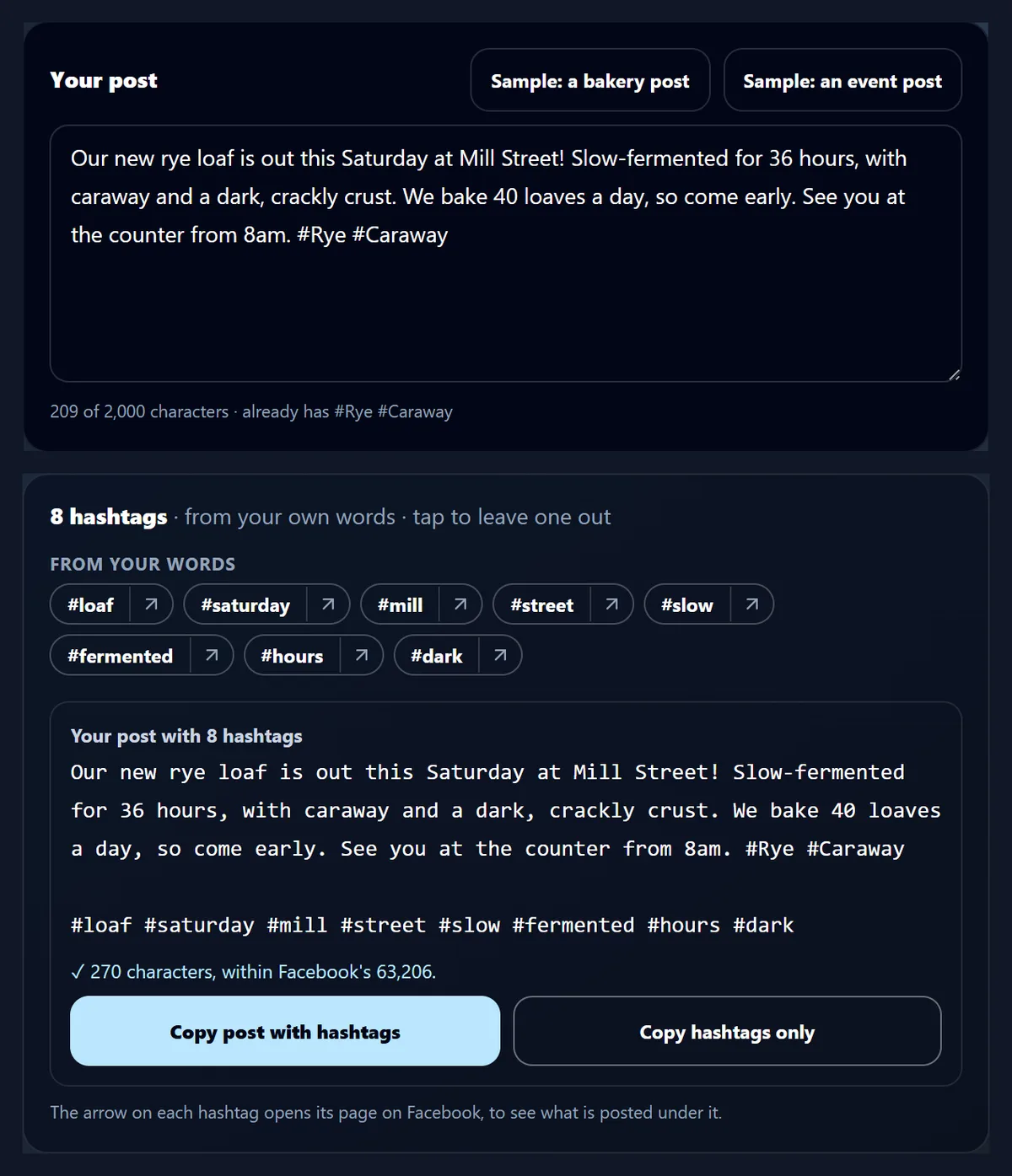
They are found and left alone. The line under the box names the hashtags already in your post, and neither the AI nor the word picker suggests them again, so nothing is doubled when the new ones are added. The figure shows the bakery post with #Rye and #Caraway typed at its end. Both are named under the box, and the hashtags from its words, which included #rye and #caraway when the post had no hashtags, now leave them out: eight are suggested instead of ten. Capitals make no difference to the match.
The new hashtags go after a blank line at the end, below the ones you wrote.
How do I add the hashtags to my post?
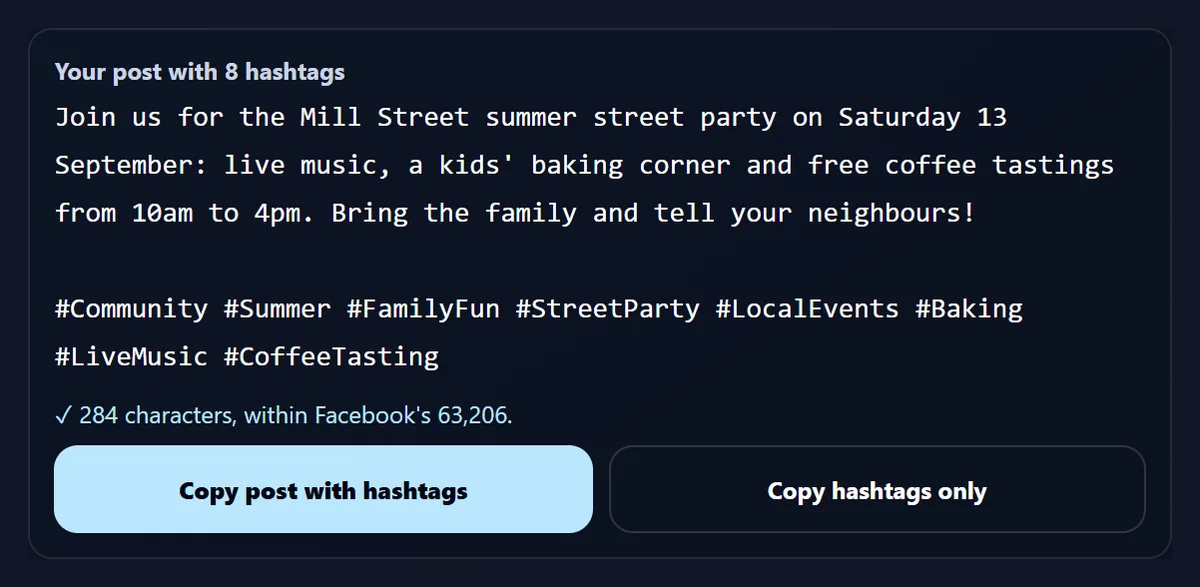
Under the hashtags is your post as it will look, with the chosen hashtags after a blank line. Tap any hashtag above to take it out or put it back, and the post changes at once. Copy post with hashtags copies the whole thing to paste into Facebook; Copy hashtags only copies just the hashtags, for a post you have already written there. The length is counted as you go: with all ten AI hashtags the event post was 312 characters, and with #KidsActivities and #Neighbours left out it was 284.
HueFold's own Facebook publishing takes posts of up to 63,206 characters, so the length check rarely matters for a post; it is there for long ones.
Does it show how popular a hashtag is?
No. Facebook does not publish how many posts use a hashtag through anything this page could read, so the tool shows no counts or trend scores, and the AI is told not to make any up. Instead, each hashtag has a small arrow that opens its page on Facebook, facebook.com/hashtag/ and the hashtag, where you can see what people post under it before you use it.
That is the surest test: a hashtag full of posts like yours is a good fit, and an empty or unrelated one is not.
What is sent to the AI, and what does it cost?
Only when you press Suggest hashtags with AI, your post (up to 2,000 characters) and the number you asked for are sent to HueFold, which has Gemini 2.5 Flash Lite suggest the hashtags. The AI is asked for broad, niche and post hashtags, each one word, in the language of the post, with no repeats and no claims about popularity. Each suggestion uses one AI credit, and the first time you are asked to sign in and accept the AI policy.
From my words (no AI) sends nothing: it runs entirely in your browser.
How many hashtags should I use?
This page does not tell you a number to use, because no number it could measure would be true for every post. Choose 5, 10 or 15, then keep the ones that describe the post well and leave out the rest; tapping one out costs nothing. A few accurate hashtags read better than a long list of loose ones, and on Facebook they sit under your words, where people see them.
If you post the same thing on TikTok, the TikTok Hashtag Generator checks the caption against TikTok's 2,200 limit.
What can it not do?
It works from the words of your post, so it cannot see a photo or video you attach; describe it in the post if it matters. It does not know what is trending today and does not check whether a hashtag is in use; the arrow to Facebook does that. Like any AI, it can suggest a hashtag that is too general, such as #Foodie, or one that does not fit your post, which is why each one can be taken out. And it does not post anything for you.
Read the final post before copying it, as you would anything you publish.
What else helps with social posts here?
The TikTok Hashtag Generator does the same for video captions, with TikTok's caption limit checked. The YouTube Description Generator writes a video description with chapters that follow YouTube's rules. The AI Caption Generator puts timed captions on a video, Link In Bio gives you one page for all your links, and the Username Generator finds a handle that fits X, YouTube and Discord.
All of them run in your browser, and only the AI parts use credits.
Frequently asked questions
Is the Facebook hashtag generator free?
Hashtags from your post's own words are free; AI suggestions use one AI credit each.
Do I need an account?
Not for hashtags from your words; AI suggestions need you to sign in.
How many hashtags does it suggest?
5, 10 or 15, as you choose; tap any to leave it out.
What makes a valid Facebook hashtag?
One word with no spaces; numbers work, punctuation and symbols such as $ and % do not.
Does it show how popular a hashtag is?
No. Facebook does not publish counts it could read; each hashtag links to its page on Facebook instead.
Will it repeat hashtags already in my post?
No. Hashtags already in the post are named and not suggested again.
Which AI writes the hashtags?
Gemini 2.5 Flash Lite, through HueFold.
Does it work in other languages?
Yes. The AI writes hashtags in the language of your post, and accented letters are kept.
Can I use the hashtags on Instagram too?
They are plain one-word hashtags, so they can be pasted anywhere; this page checks Facebook's rule.
Does it post to Facebook for me?
No. Copy the post with its hashtags and paste it into Facebook.
Related tools
- TikTok Hashtag Generator — Hashtags for video captions.
- YouTube Description Generator — Descriptions with chapters.
- AI Caption Generator — Timed captions on a video.
- Link In Bio — One page for all your links.
- Username Generator — Handles for X, YouTube and Discord.
- Resize Video For Instagram — Reels, Stories and feed sizes.