Link In Bio
One address for your Instagram, TikTok or YouTube bio that leads to all your links: your shop, menu, latest video, booking page and newsletter. Choose your address, add your photo and up to 20 links, pick a look, and see how many people open the page and tap each link.
Updated
What is a link in bio page?
Most social apps give you room for a single link in your profile. A link in bio page is that link: a small page with your name, photo and a button for each place you want to send people. Here it lives at www.huefold.com/bio/ and the name you choose, it is free with a HueFold account, and it changes the moment you save, without changing the link in your bio.
The sample page made for this guide, a bakery's five links and photo, is 25.4 KB in all: two files, the page and the photo, and nothing else for a phone to download.
How to make your page
- Choose your address huefold.com/bio/ and a name of your own.
- Add your links Up to 20, each with the words on its button.
- Pick a look Five looks; add your photo after publishing.
- Publish and share Put the address in your bio.
Make a link in bio page
A real recording of this tool: an address and name typed, four links added, three looks tried, the page published and then opened at its address.
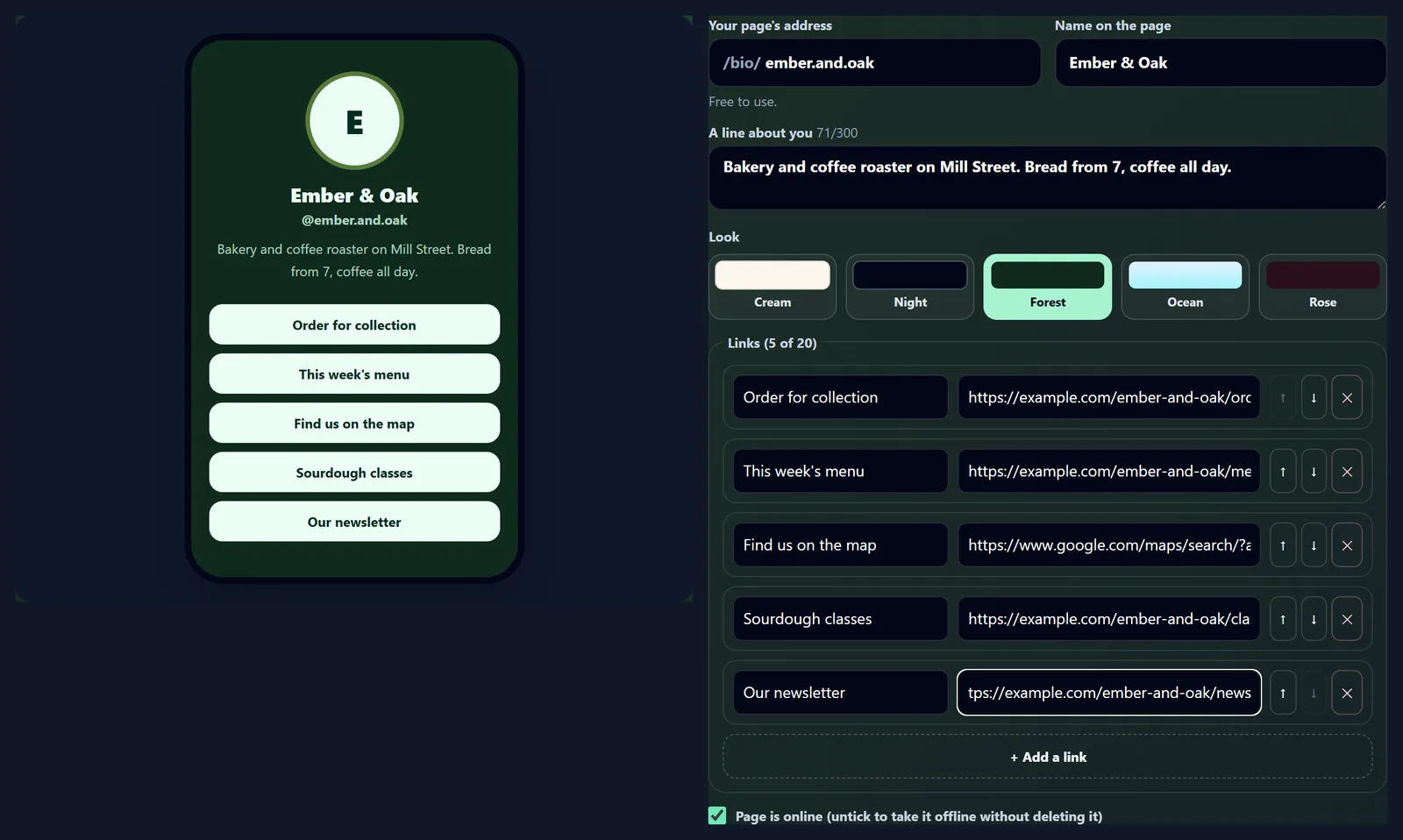
- The address ember.and.oak, the name Ember & Oak and a line about the bakery are typed.
- Four links are added, each with its button text and address.
- Night, Ocean and Forest are tried in the preview.
- Publish my page puts it online.
- The published page opens at its address.
How do I make a link in bio page?
Type the address you want after /bio/, the name to show at the top, and a line about you if you like. Fill in each link: the words on its button and the address it goes to. Pick one of five looks, then press Publish my page. The phone beside the settings shows the page as you type, so you see each change before anyone else does.
If you are not signed in, a sign-in box opens when you publish, and the page goes live as soon as you are in. Each account has one page; publishing again saves your changes to it.
What address can I have?
Any free name of 3 to 30 characters made of lower-case letters, numbers, dots and underscores, starting and ending with a letter or number, such as ember.and.oak or maya_bakes. Capitals are made small as you type and other characters are dropped: typing Ember & Oak! gives emberoak. The line under the box says whether the name is free, already someone's, or one kept for HueFold, such as admin, help or pricing.
You can change your address later, but the old one stops working at once, so update your bios when you do.
How many links can I add?
Up to 20. Each has the words shown on its button, up to 80 characters, and the address it goes to. The arrows move a link up or down, and the cross removes it; the button text is what people read, so make it say where the link goes: Order for collection, This week's menu, Find us on the map.
Every link is checked as you type and again when you save, as on HueFold's URL Shortener: web links to public sites only. A link to a home router, 192.168.1.1, was refused with Link 6: Links to private or local addresses cannot be used.
What can the page look like?
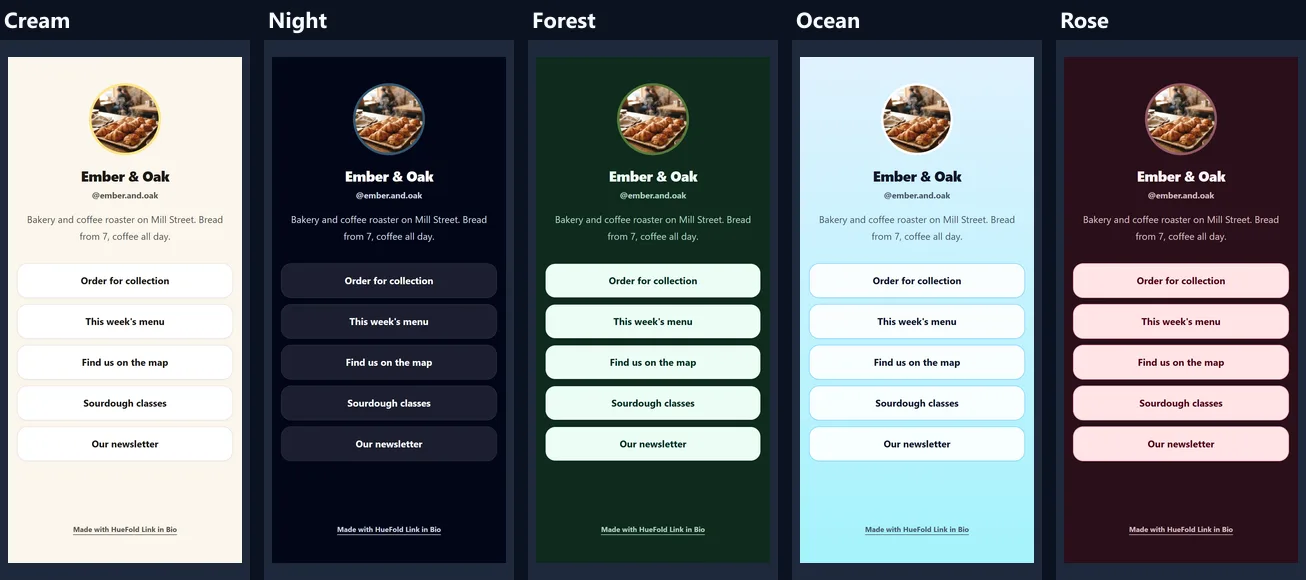
Five looks, each a background, button and text colour chosen to be easy to read: Cream, a warm off-white; Night, near black with see-through buttons; Forest, dark green with pale buttons; Ocean, a light blue fade; and Rose, a deep red with pink buttons. The figure shows the same page in all five, as a phone shows them.
Your photo is shown in a circle with a ring in the look's accent colour, and without a photo the circle shows the first letter of your name.
How is my photo used?
After publishing, press Add a photo and choose a JPEG, PNG or WebP. Your browser cuts the middle square out of it and makes it 336 pixels across, three times the size it is shown, so it stays sharp on the sharpest phone screens, and saves it as WebP before uploading. The sample photo, a 768 × 1376 JPEG of 161.3 KB, became a 336 × 336 WebP of 21.3 KB.
The photo is also what apps show when your page's address is shared in a chat, next to your name and your line about you.
What do visitors see?
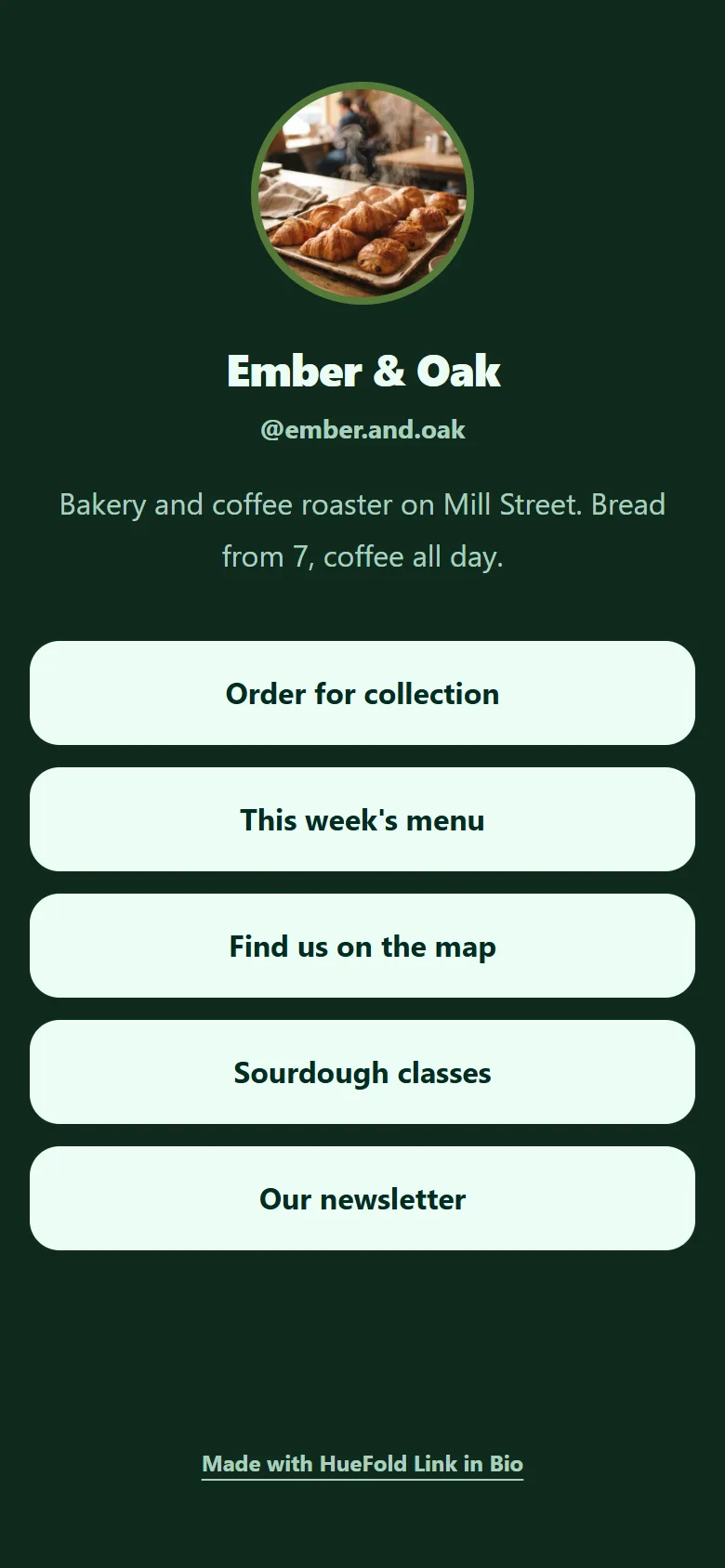
Your photo, your name, your @address, your line about you and a button for each link, stacked down the middle of the screen, with Made with HueFold Link in Bio at the bottom. The figure is the published sample page, drawn by a phone-sized browser at 390 pixels wide.
Buttons fill the width of a phone, 56 pixels tall, so they are easy to tap with a thumb; on a computer the page stays a narrow column in the middle.
How fast does the page open?
As fast as two small files can arrive: the page itself, which carries its own few lines of styling, and your photo. There is no script, no separate stylesheet and no web font to fetch; the text uses the phone's own font. The table shows the sample page with 3, 5, 10 and 20 links: the page grew from 3.8 KB to 6.2 KB, and the photo added 21.3 KB to each.
A phone opening the 5-link sample made exactly two requests, the page (4.1 KB) and the photo (21.3 KB). Sizes are as sent, before any compression on the way.
| Page | Page itself | Photo | Total |
|---|---|---|---|
| 3 links | 3.8 KB | 21.3 KB | 25.1 KB |
| 5 links | 4.1 KB | 21.3 KB | 25.4 KB |
| 10 links | 4.8 KB | 21.3 KB | 26.1 KB |
| 20 links, the most | 6.2 KB | 21.3 KB | 27.5 KB |
Can I see who visits?
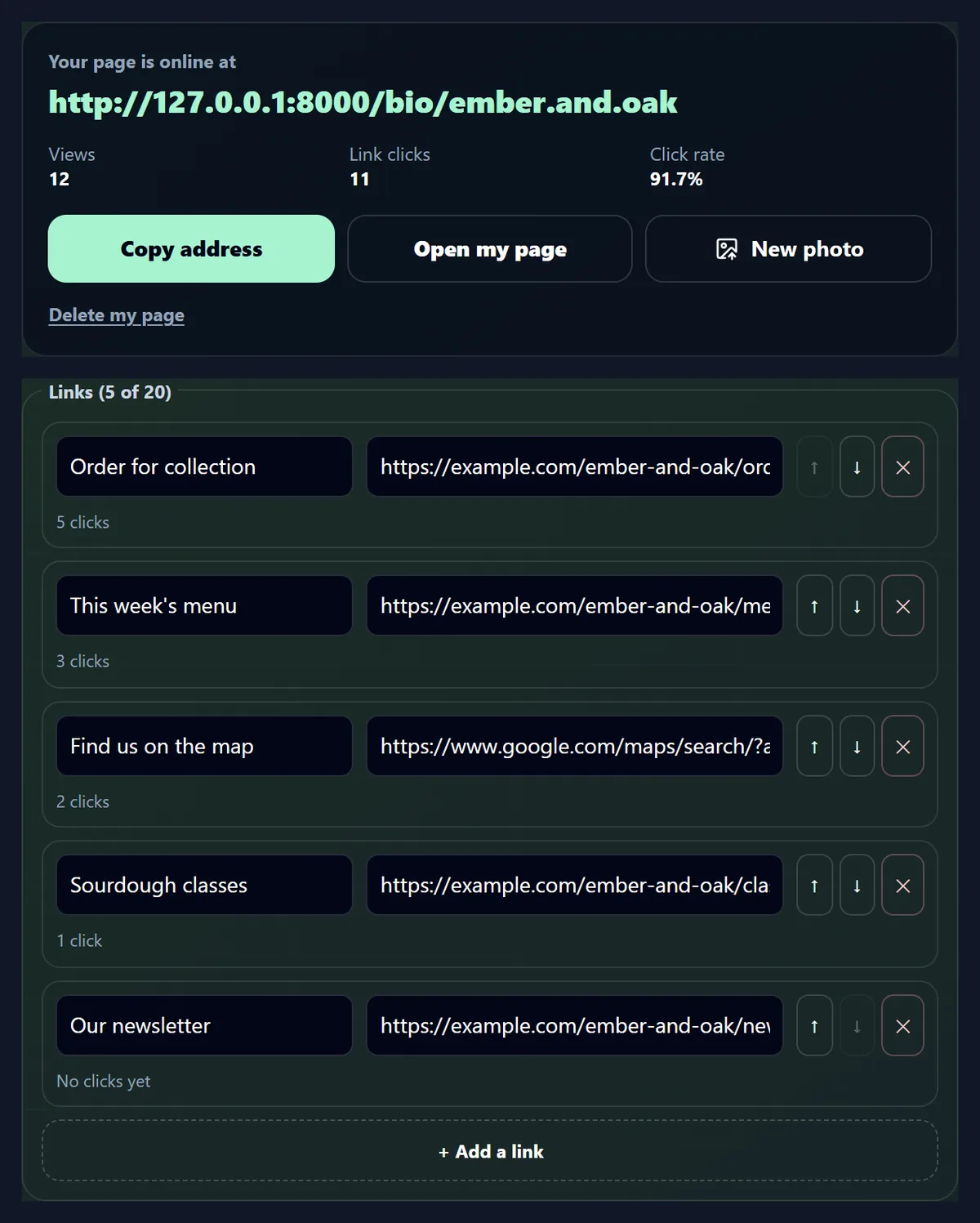
You see how many times your page was opened and how many times each button was tapped, not who did it. Each opening adds one view; each tap goes through HueFold, which adds one to that link's clicks and sends the visitor on. The editor shows views, all link clicks and the click rate (clicks for every 100 views), with each link's clicks under it.
The figure shows the sample after 12 test visits and 11 taps from the script that made this page: 5 on Order for collection, 3 on the menu, 2 on the map, 1 on classes and none on the newsletter, a click rate of 91.7%. Editing or moving a link keeps its count.
What do people see when I share the address?
Chat apps and social sites that show a preview of a link read it from the page itself: the page names your name as its title, your line about you as its description and your photo as its picture. So a message with your address shows a small card with your photo and name rather than a bare link. Without a line about you, the description is your name and the word links, such as Ember & Oak’s links.
Apps keep their own copy of a preview for a while, so a new photo can take some time to show in a chat where the address was shared before.
What makes a good link in bio page?
Few buttons, each saying where it goes. Put the link most people want first, since that is the one a visitor sees without scrolling. The taps on the sample were set by the script that made this page, so they say nothing about order; on a real page, the counts tell you which order works. Words on a button such as This week's menu say more than Click here or a bare web address.
Check the counts after a week or two: a link nobody taps can go, and one that many tap can move up.
Will my page show up in Google?
No, on purpose. Each page tells search engines not to list it (X-Robots-Tag: noindex, follow), so people reach it through the link in your bio rather than finding a copy of your links in search results. Search engines may still follow its buttons to your own sites, which is the point of follow.
Your own website, shop and profiles stay the pages that appear in search, with your bio page as the way in from social apps.
Can I take my page down?
Yes, two ways. Untick Page is online and save: the page answers as not found (a 404) but keeps its address, links, photo and counts for when you tick it again; the sample page did exactly that. Or press Delete my page and confirm: the page, its photo and its counts are deleted, and the address is free for anyone.
Your HueFold account and anything else in it are not touched either way.
What is kept about visitors?
Only the counts: views of the page and clicks on each link. No address, location, device or cookie is stored for a visit, and the page runs no scripts and no trackers. When someone taps a button, their browser goes from HueFold straight to your link.
What you put on the page, your name, line, photo and links, is public, so leave out anything you would not put on a poster.
Where do I put the address?
In the website or link field of your Instagram, TikTok, YouTube, X, Threads or Pinterest profile, in your email signature, on a business card or on a printed menu. Copy address in the editor copies it ready to paste. Because the address never changes when you edit the page, you can swap a link for this week's offer without touching any bio.
For a single link of your own somewhere else, the URL Shortener makes a short one that counts its clicks the same way.
What does it not do?
It does not offer colours beyond the five looks, embedded videos, a shop, email sign-up forms or scheduled links, and it counts views and clicks without breaking them down by day, country or app. It is one simple page per account, built to open quickly on a phone.
If you need a full website, link to it from your page: it can be the first button.
What else helps with a social profile?
The URL Shortener makes short links that count clicks; Content Planner plans posts for a month; Brand Kit keeps your colours and fonts together; Resize Video for Instagram sizes reels and stories.
Background remover and the photo tools can make the round photo for your page from any picture.
Frequently asked questions
Is Link in Bio free?
Yes, with a free HueFold account: one page with up to 20 links.
What will my address be?
www.huefold.com/bio/ followed by the name you choose, such as ember.and.oak.
How many links can I add?
Up to 20, in any order.
Can I see how many people tap my links?
Yes: the page's views and each link's clicks, with the click rate.
Is anything stored about visitors?
No: only the counts of views and clicks.
Can I add my photo?
Yes: a JPEG, PNG or WebP, cut to a square and made small in your browser before upload.
Does my page appear in Google?
No: it asks search engines not to list it, so people reach it from your bio.
Can I change my links later?
Yes, any time; the address stays the same and each link keeps its count.
How do I take my page down?
Untick Page is online, or delete the page with its photo and counts.
Related tools
- URL Shortener — Short links that count their clicks.
- Content Planner — Plan a month of posts.
- Brand Kit — Your colours and fonts together.
- QR Code — Your page's address as a code to print.
- Resize Video for Instagram — Reels, posts and stories at the right size.
- Share Video — A video small enough to send.