Username Generator
Type your name and a few things you like, pick a style, and get a dozen usernames at a time, each marked with whether it fits the rules X, YouTube and Discord publish for usernames. Check any name you already have in mind the same way, then look it up on each site.
Updated
How do you come up with a good username?
Start from words that are yours, your name or nickname and something you love, and combine them with a short word that gives them a style; keep it easy to say, spell and remember. This tool does the combining for you: it mixes your words with word lists for four styles, shows twelve ideas at a time, and marks each one against the rules X, YouTube and Discord publish, so you do not fall in love with a name a site will refuse.
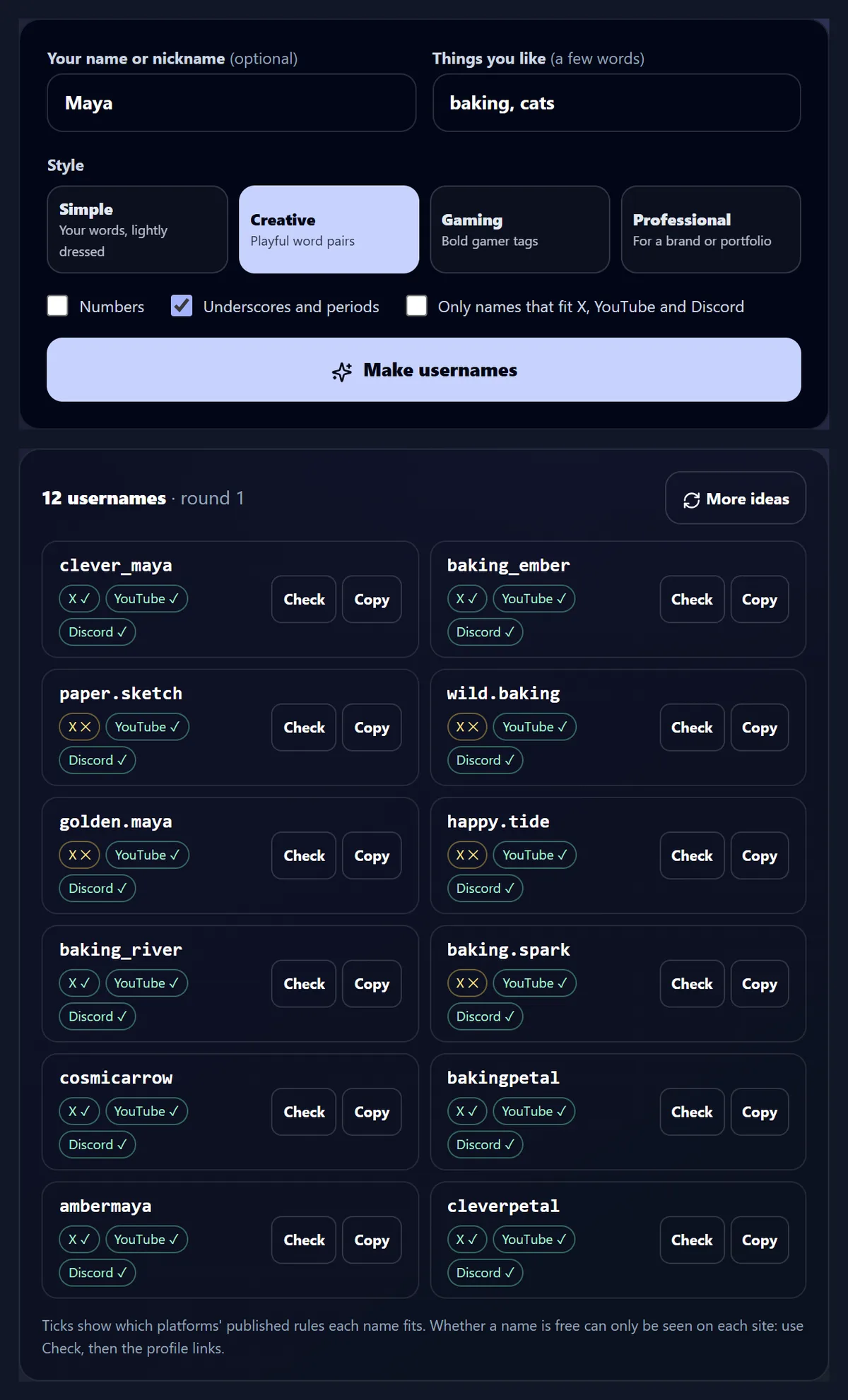
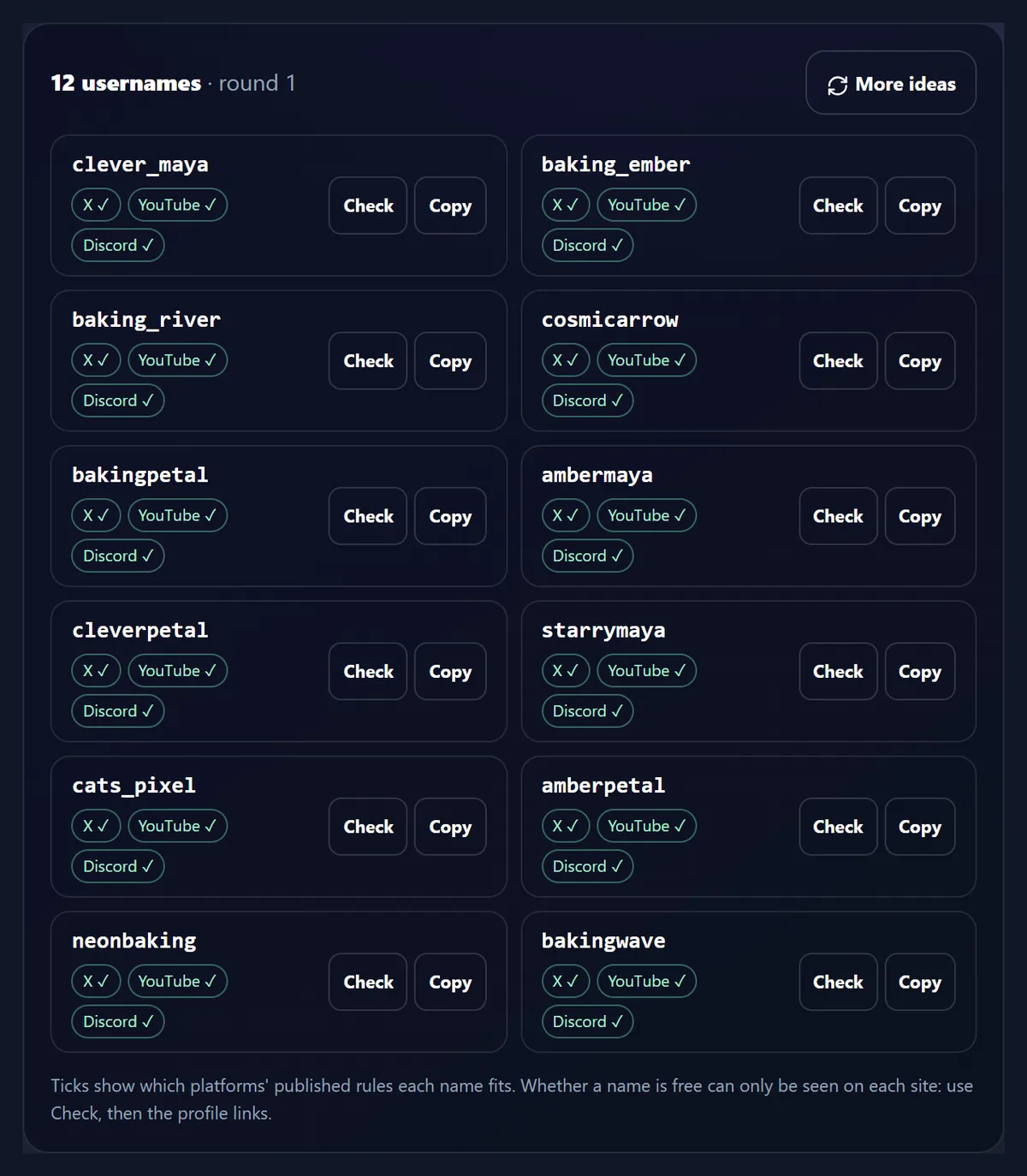
For "Maya" and "baking, cats", the first twelve creative ideas included clever_maya and baking_ember; all twelve fit YouTube and Discord, and seven fit X, whose usernames cannot contain a period.
How to find a username
- Type your words A name or nickname, and what you like.
- Pick a style Simple, creative, gaming or professional.
- Check and look it up Rules ticked, profile links ready.
Make and check username ideas
A real recording of this tool: the sample words typed, the Creative style chosen, twelve usernames made and then twelve more, and two names checked against the X, YouTube and Discord rules.
- Maya and baking, cats are typed in.
- The Creative style is chosen.
- Make usernames shows twelve ideas, each marked for X, YouTube and Discord.
- More ideas shows twelve more.
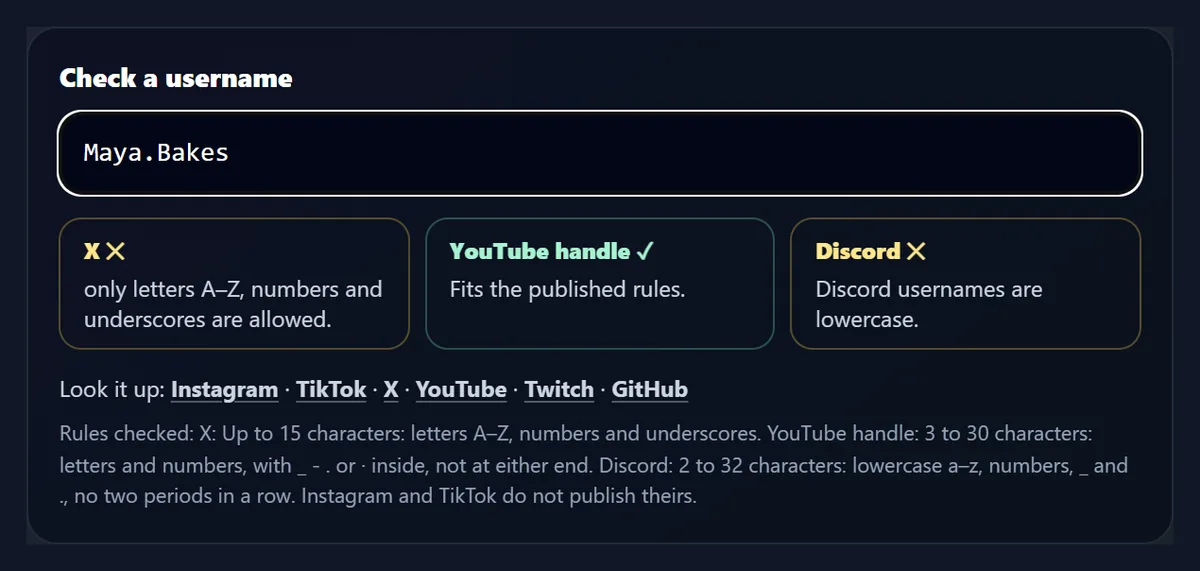
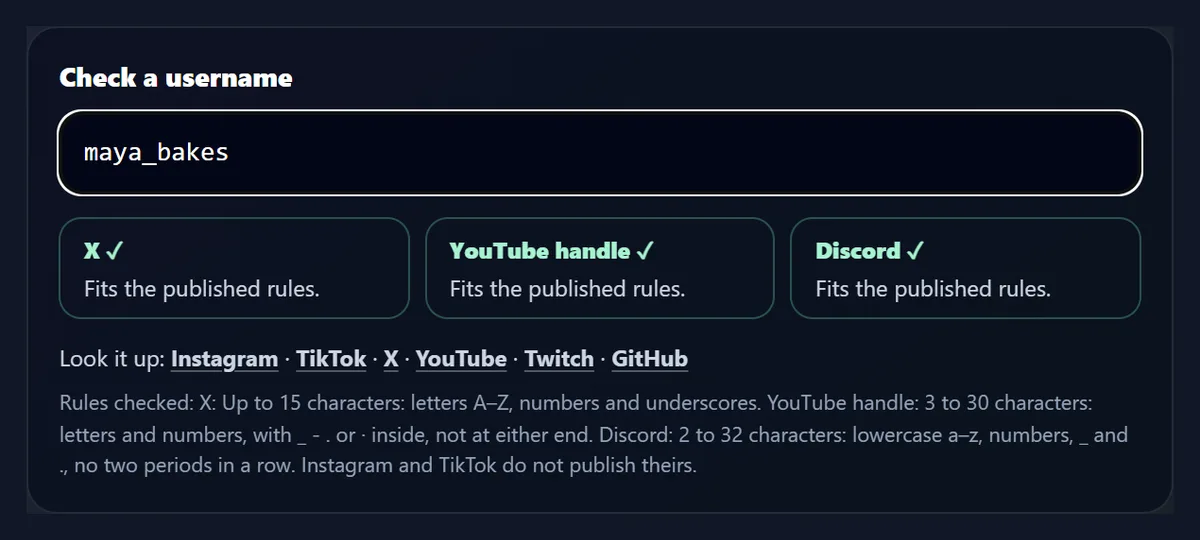
- The checker shows why Maya.Bakes fails on X and Discord, and that maya_bakes fits all three.
How do I make username ideas here?
Type your name or nickname in the first box (it is optional) and a few things you like in the second, separated by commas: hobbies, a pet, a place, a favourite food. Pick one of the four styles, choose whether names may have numbers and whether they may use underscores and periods, and press Make usernames. Twelve ideas appear, each with three marks: X, YouTube and Discord, ticked when the name fits that site's published rules and crossed when it does not. More ideas shows the next twelve. Copy puts a name on your clipboard, and Check opens it in the checker below.
The figure shows the first round for the sample words in the Creative style.
Which style should I choose?
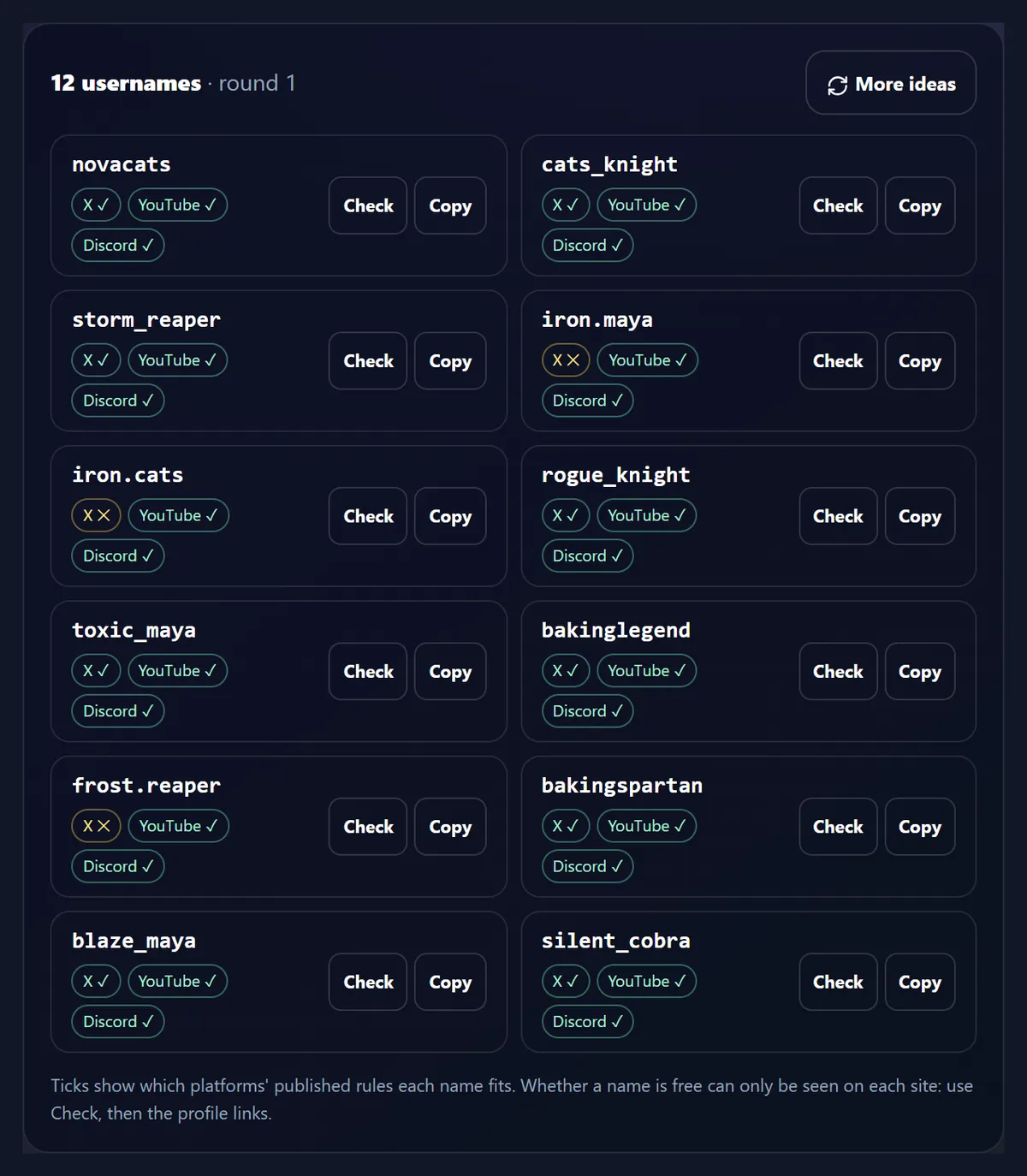
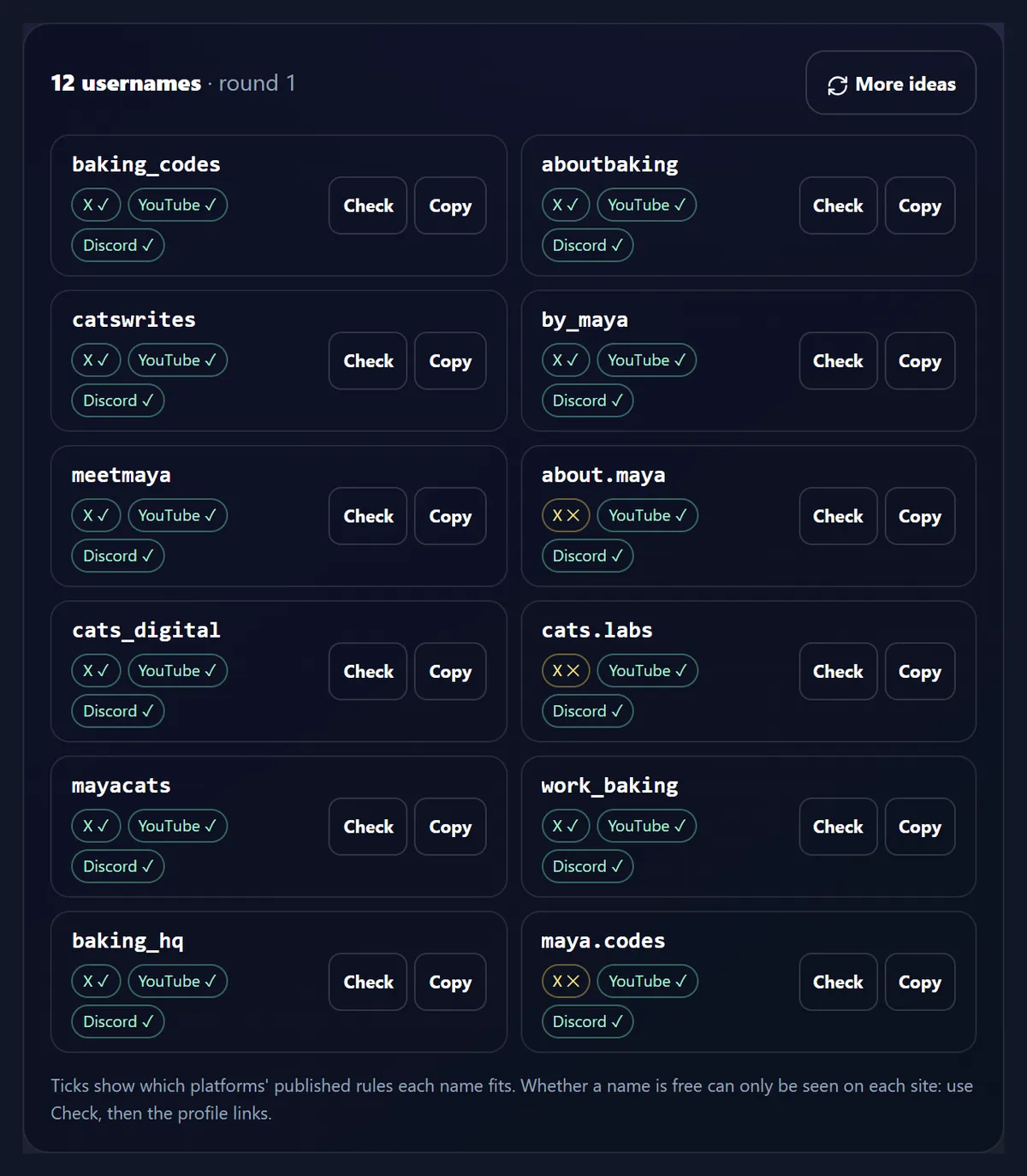
Simple keeps to your own words with a light touch: maya.life, the_maya, cats_corner. Creative pairs your words with gentle, playful ones (golden.maya, baking_ember) and sometimes offers a pair of its own. Gaming uses bold words for gamer tags: storm_reaper, cats_knight, rogue_knight. Professional suits a portfolio or a small business: baking_codes, by_maya, meetmaya. The table shows the first twelve ideas each style made for the sample words, and how many fit each site's rules.
X fits fewest because it allows only letters, numbers and underscores: every idea joined with a period fails there. Tick Only names that fit X, YouTube and Discord to see only names that work on all three.
| Style | Ideas shown | Fit X | Fit YouTube handles | Fit Discord |
|---|---|---|---|---|
| Simple | 12 | 9 | 12 | 12 |
| Creative | 12 | 7 | 12 | 12 |
| Gaming | 12 | 9 | 12 | 12 |
| Professional | 12 | 9 | 12 | 12 |
What are the username rules on X, YouTube and Discord?
These are the rules each site states in its own help pages, and the ones this tool checks. X: no longer than 15 characters, using only letters A to Z, numbers 0 to 9 and underscores, with no dashes, spaces or other symbols; X also says usernames containing "Admin" cannot be claimed. YouTube handles: 3 to 30 characters, letters or numbers from one of 75 supported languages, with underscores, hyphens, periods and Latin middle dots allowed anywhere except at the start and end; a handle cannot look like a web address or a phone number, and handles are not case-sensitive. Discord: 2 to 32 characters, lowercase Latin letters a to z, numbers, underscores and periods, and never two periods in a row.
The checker shows which rule a name breaks, in plain words, rather than a bare cross.
Can I check a username I already have in mind?
Yes. Type it in the checker, with or without an @ at the front, and it is checked as you type against all three sets of rules. Some names the checker caught for the sample: Maya.Bakes fails on X (a period) and on Discord (capital letters), but works as a YouTube handle; mb is too short for a YouTube handle, which needs three characters; maya..bakes fails on Discord (two periods in a row); www.mayabakes.com looks like a web address, which YouTube does not allow, and at 17 characters is too long for X, yet Discord accepts it.
A name that fits all three, such as maya_bakes, gets three ticks.
How do I know if a username is taken?
Only the site itself can tell you, so the tool does not pretend to. Under the checker, Look it up opens the profile address each name would have on Instagram, TikTok, X, YouTube, Twitch and GitHub in a new tab; if a profile opens, the name is taken there. Some sites show profiles only after you sign in, and a name can be held by a suspended or deleted account without a profile showing (X says such names are not released straight away), so the final word is the site's own sign-up or change-username form.
Nothing about the names you look up is sent to HueFold: the links go straight to the sites.
Why are Instagram and TikTok not checked?
Because we found no character rules for usernames published by them to check against, and the tool checks only rules a site states itself. Names made of letters, numbers and underscores, up to 15 characters, fit every rule the tool does check; if a name works on all three ticked sites, it is short and plain enough to be a good candidate elsewhere too, but only Instagram's and TikTok's own forms can say yes.
The profile links include both, so you can look a name up there in one click.
Why do I get the same names for the same words?
Because the tool is built to be repeatable: the same words, style and settings always give the same twelve ideas, so a name you liked yesterday is still there today. More ideas moves on to the next round, which for the sample words in the Creative style shared none of its twelve names with the first. Change one word, or the style, and you get a different set.
The styles have plenty to give: for the sample words, Creative and Gaming each have 526 word pairs to draw on, Professional 84 and Simple 72.
What makes a username work?
Short enough to type and say aloud: the twelve creative ideas for the sample averaged 11.1 characters, well inside X's 15. One spelling only, so nobody has to ask whether it has an underscore or a period; if you use one, use the same everywhere. Your own word in it, so people who know you can find you; the Simple and Professional styles always use one, Creative and Gaming in two of every three ideas. Numbers only when they mean something, which is why they are off unless you tick them.
And the same name on every site: tick Only names that fit X, YouTube and Discord to get names that can be identical on all three.
What about a username for a business or portfolio?
Choose Professional. It pairs your name or trade with words such as studio, design, works, by, hello and meet: by_maya, meetmaya, baking_codes. Keep the same handle across your website, email and social profiles where you can, and pick one people can spell after hearing it once, since many will hear it before they read it.
For a YouTube channel, the YouTube Name Generator makes channel names with matching handles.
Is a username the same as a display name?
No. The username (or handle) is the unique name in your profile's address, with the strict rules above; the display name is the name shown beside it, and is much freer. X says a name can be up to 50 characters, against 15 for a username; Discord's display names can have capitals, spaces, special characters, emojis and letters from other alphabets, up to 32 characters. So your display name can be "Maya Bakes 🍞" while the username stays maya_bakes.
This tool makes usernames, the part with the rules; use your real name or brand as the display name.
What if the username I want is taken?
Try a small change that keeps it recognisable. X's own advice is to add underscores before or after the name, as in @lindsay_ or @_lindsay. Swapping the word you paired your name with is often better still: if maya_bakes is taken, the tool's other ideas for the same words, such as maya_baking or baking_notes, keep the meaning. Avoid strings of random digits, which are hard to remember and look like spam accounts.
Then look the new name up on every site you want it on, before you change any.
Is anything I type sent anywhere?
No. The names are made in this browser tab from your words and the tool's word lists, without AI, and nothing you type is sent to HueFold or anyone else. There is no account and no limit. Only when you click a profile link does your browser open that site, as with any link.
The word lists are the tool's own and fixed, so it never suggests anything outside them.
What else helps set up a profile?
Link In Bio makes a page for all your links, URL Shortener makes short links to share, and Brand Kit keeps your colours and fonts together. For a channel, the YouTube Name Generator suggests names with handles, and the Facebook and TikTok hashtag generators help with posts.
Content Planner plans what you will post once the profile is set up.
Frequently asked questions
Is the username generator free?
Yes, with no account and no limit.
Does it use AI?
No. Names are combined in your browser from your words and word lists.
Can it tell me if a username is taken?
No; only each site can. It opens the profile addresses for you to look.
Which rules does it check?
The username rules X, YouTube (handles) and Discord publish.
Why do names with a period fail on X?
X usernames can only use letters, numbers and underscores.
How long can a username be?
X 15 characters, YouTube handles 30, Discord 32.
Can I get the same name on every site?
Tick Only names that fit X, YouTube and Discord, then look each up.
Why do the same words give the same names?
It is repeatable on purpose; More ideas gives the next twelve.
Does it check Instagram and TikTok rules?
No; we found no rules they publish to check against. The links still let you look names up.
Is what I type saved or sent?
No. Everything happens in your browser tab.
Related tools
- YouTube Name Generator — Channel names with handles.
- Link In Bio — One page for all your links.
- URL Shortener — Short links to share.
- Facebook Hashtag Generator — Hashtags for Facebook posts.
- TikTok Hashtag Generator — Hashtags for TikTok videos.
- Brand Kit — Your colours and fonts together.