TikTok Hashtag Generator
Write what your video shows, or paste its caption, and get hashtags for it: from your own words, free and in your browser, or suggested by AI in three groups, from broad topics to this one video. Each hashtag is cleaned to a single word, added under your caption, and the whole caption is counted the way TikTok counts it, against its 2,200 limit.
Updated
How do you find hashtags for a TikTok video?
Paste your caption or a line about the video, choose 5, 10 or 15 hashtags, and press Suggest hashtags with AI or From my words (no AI). The AI groups its ideas into broad topics, your niche and this video; the free option picks the words you used most. Tap any hashtag to leave it out, then copy the caption with the hashtags added.
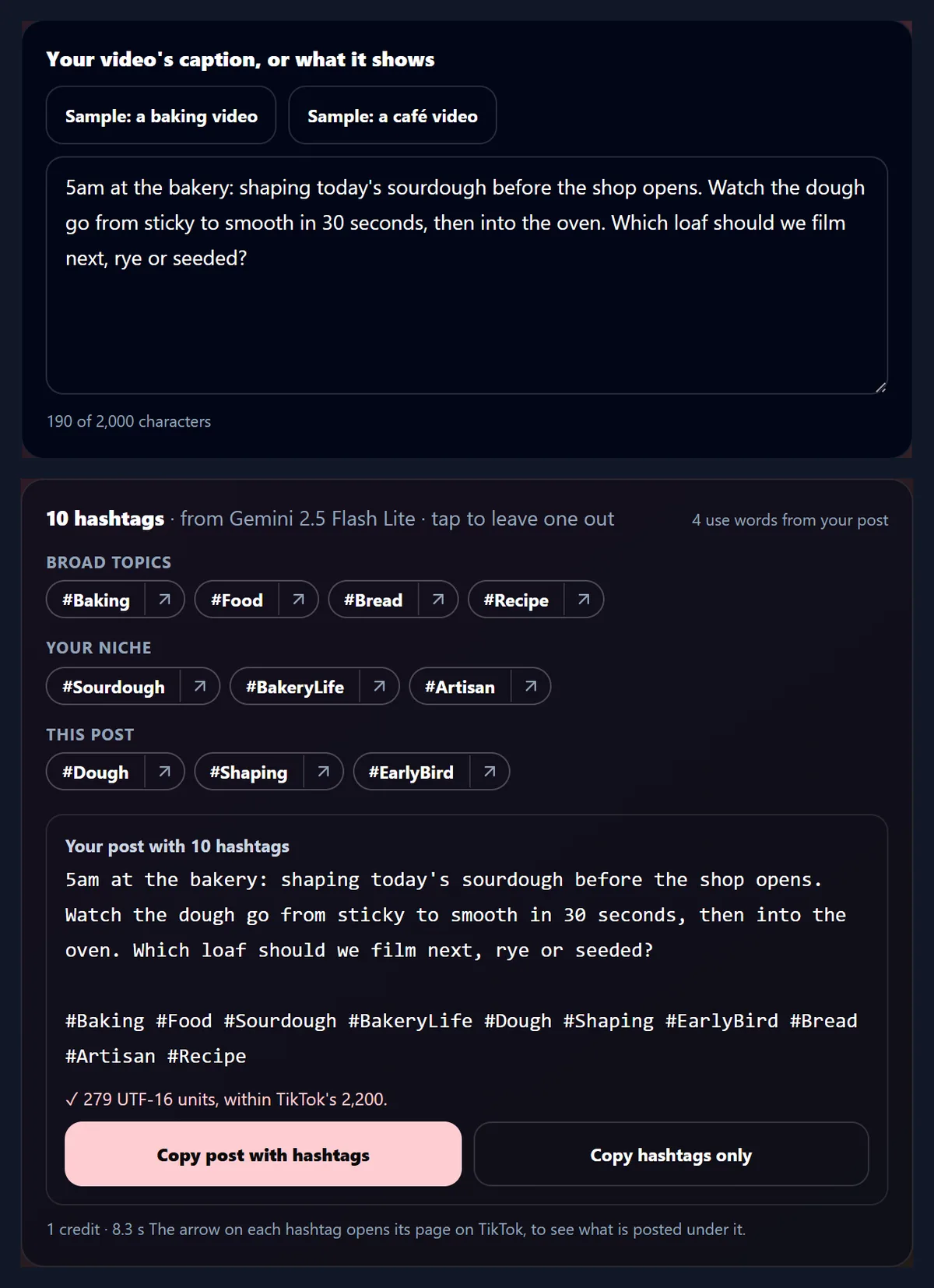
For the sample baking video, about shaping sourdough at 5am, the AI suggested ten hashtags in 8.3 seconds, from #Baking to #EarlyBird, and the caption with all ten came to 279 of TikTok's 2,200 units.
How to add hashtags to a caption
- Paste your caption Or try one of the samples.
- Get hashtags With AI, or from your words.
- Copy the caption Its length checked for TikTok.
Get hashtags for a TikTok video
A real recording of this tool: a sample caption given hashtags from its own words, then hashtags suggested by AI in three groups, and the caption copied with them, its length checked.
- The sample baking caption is put in the box.
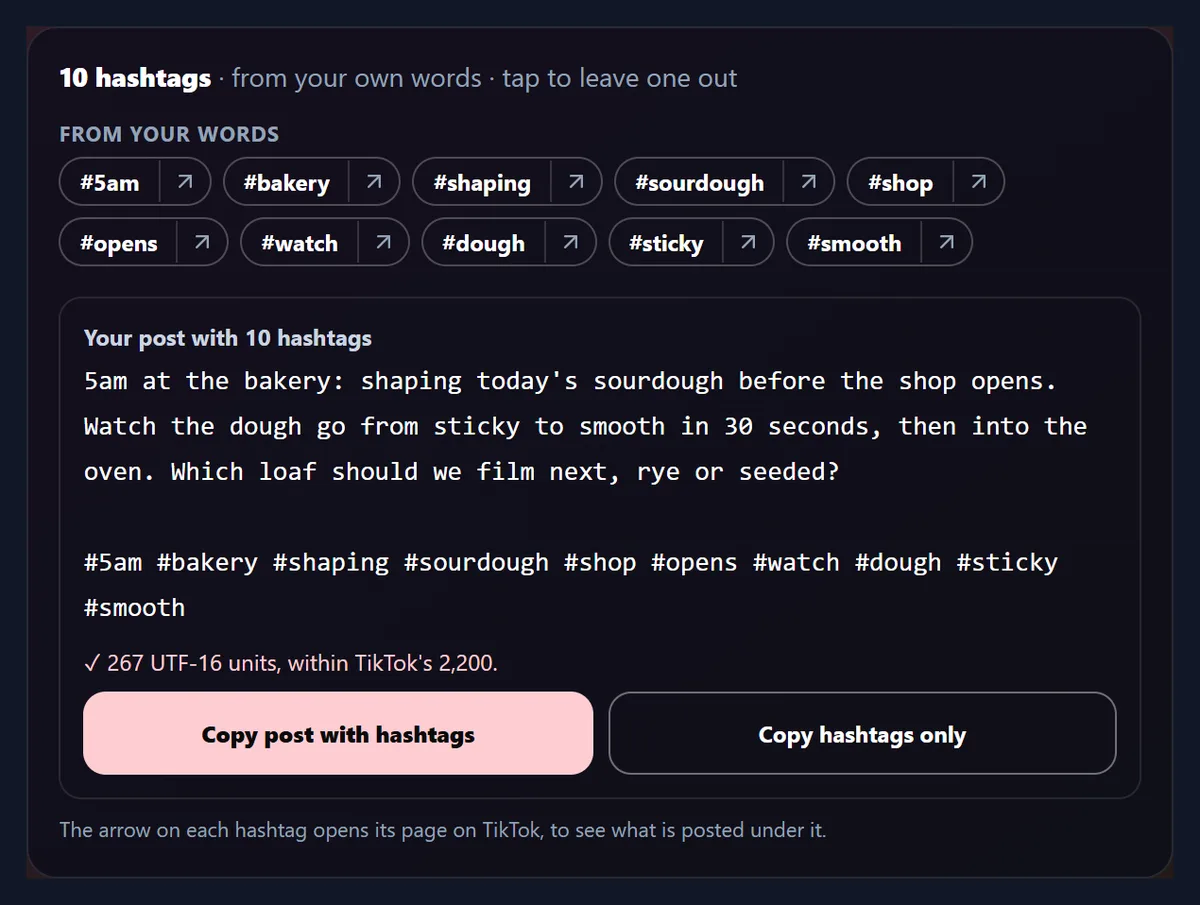
- From my words (no AI) picks ten hashtags from the words the caption uses most.
- Suggest hashtags with AI returns ten hashtags in three groups: broad topics, your niche and this video.
- The caption with its hashtags is copied, its length checked against TikTok's 2,200.
How do I get hashtags for my video?
Put your caption in the box, or a sentence or two about what the video shows, or press one of the two sample videos. Choose how many hashtags you want and press Suggest hashtags with AI. The hashtags arrive in three groups, each with a small arrow that opens the hashtag's page on TikTok, and below them is your caption with the hashtags added after a blank line, with its length. Every hashtag starts switched on; tap one to leave it out, and the caption and its length change with it.
The figure shows the sample baking video's caption with the ten hashtags the AI suggested for it.
What did it suggest for the sample videos?
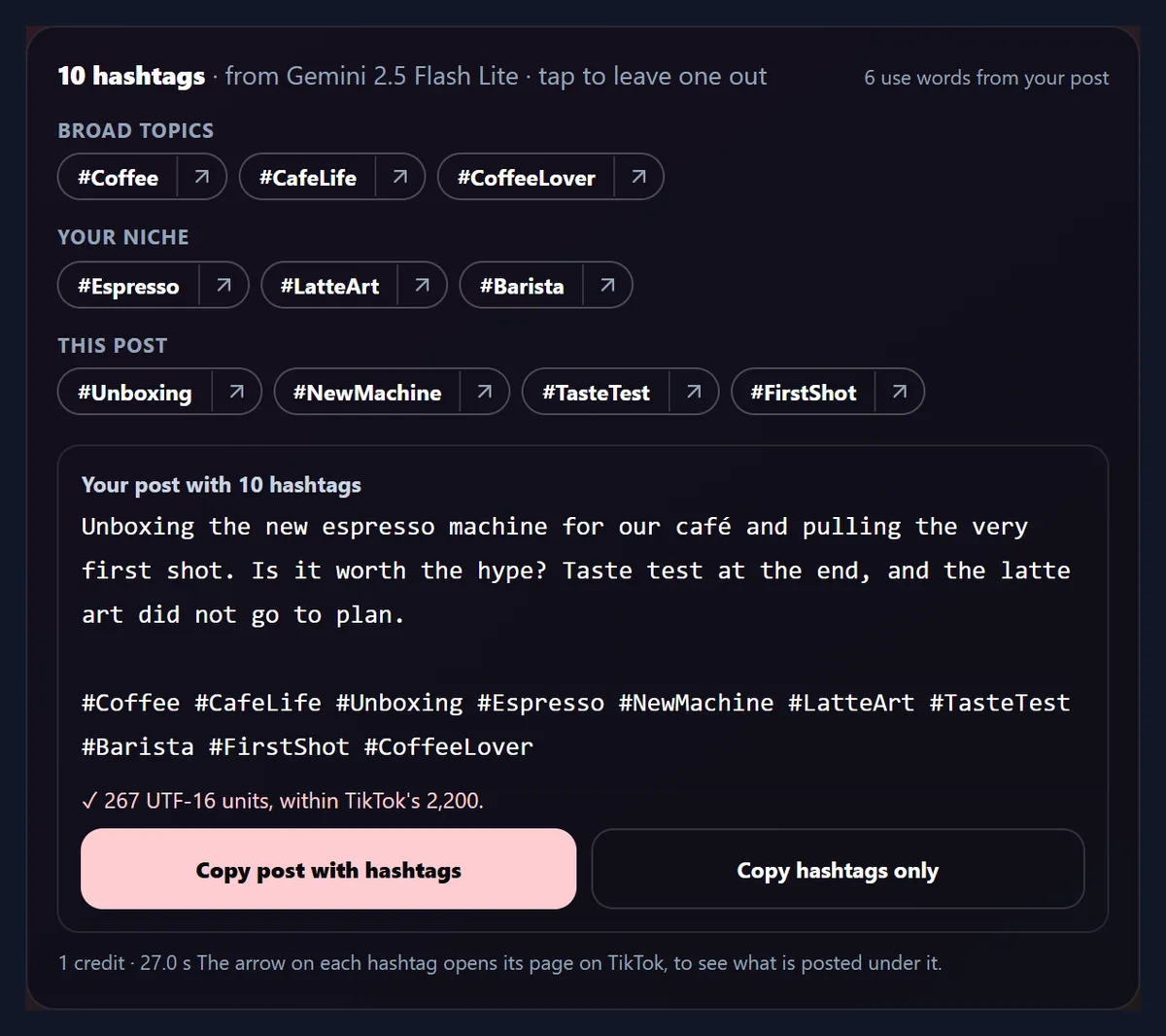
Each sample caption was given ten hashtags twice: once by Gemini 2.5 Flash Lite and once from its own words without AI. For the baking video the AI's ten mixed wide subjects such as #Food and #Recipe with #Sourdough, #BakeryLife and #EarlyBird; four of the ten used words from the caption. For the café video, about unboxing an espresso machine, six of ten did, among them #Unboxing, #Espresso, #LatteArt and #TasteTest. The table shows each set and the caption's length with all ten added, in UTF-16 units, the way TikTok counts.
Each AI set cost one AI credit and took 8.3 and 27.0 seconds. None of its hashtags needed cleaning, and none repeated another.
| Sample caption | Made by | Hashtags using the caption's words | Caption length with all ten (UTF-16 units) |
|---|---|---|---|
| Baking: shaping sourdough at 5am | Gemini 2.5 Flash Lite | 4 | 279 |
| Baking: shaping sourdough at 5am | Its own words, no AI | 10 | 267 |
| Café: unboxing an espresso machine | Gemini 2.5 Flash Lite | 6 | 267 |
| Café: unboxing an espresso machine | Its own words, no AI | 10 | 240 |
What are broad, niche and video hashtags?
They are the three groups the AI is asked for. Broad topics are big subjects many people follow, such as #Coffee and #CafeLife for the café video. Your niche is the community the video belongs to: #Espresso, #LatteArt and #Barista. This post covers what this one video shows: #Unboxing, #NewMachine, #TasteTest and #FirstShot. Mixing them lets the video be found both by people browsing a big subject and by people searching for something specific.
Keep the ones that fit and leave the rest out; the groups are a guide.
Can I get hashtags without AI?
Yes. From my words (no AI) works in your browser, costs nothing and needs no account. It reads the caption, leaves out common words such as "the", "and" and "from", and picks the words used most, with earlier words counting a little more; two words that stand together more than once become one hashtag. For the baking video it gave #5am, #bakery, #shaping, #sourdough, #shop, #opens, #watch, #dough, #sticky and #smooth; for the café video it kept the accent in #café.
Some picks say little on their own, such as #opens or #watch: tap those to leave them out, or use the AI, which joins words into hashtags such as #EarlyBird.
How long can a TikTok caption be?
TikTok's Content Posting API, which apps use to post videos to TikTok, takes a caption of up to 2,200 UTF-16 units, with hashtags and mentions in it separated by spaces or new lines. A UTF-16 unit is one ordinary letter, but an emoji usually counts as two, so the tool counts the caption the same way and shows the total under it, turning to a warning above 2,200. The box itself takes up to 2,000 characters, the most sent to the AI at once.
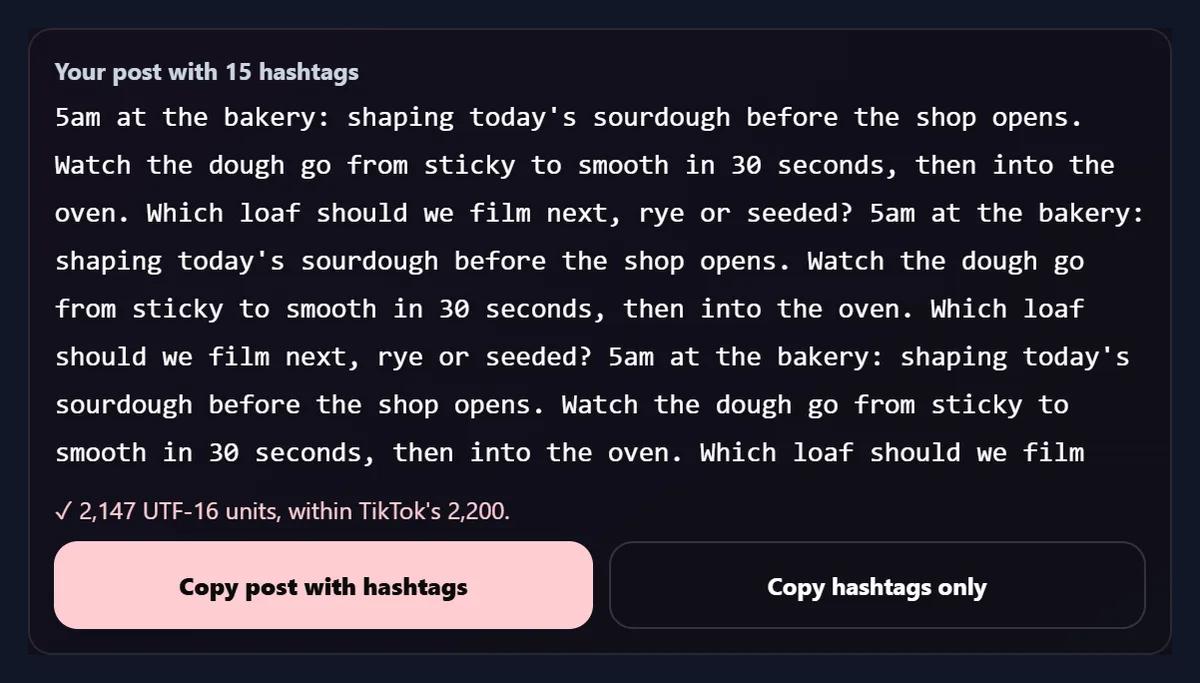
To see how close that comes, the baking caption was repeated to the box's full 2,000 characters and given the most hashtags, 15, from its words: the caption came to 2,147 units, still inside 2,200.
Why is every hashtag one word?
Because a space ends a hashtag: TikTok separates the hashtags in a caption by spaces or new lines, so #latte art would become #latte followed by the plain word art. Every hashtag here, from the AI or from your words, is cleaned to letters and numbers only. Spaces and symbols are taken out, and words that were apart are joined with each one starting with a capital letter, so a suggestion written as "latte art" becomes #LatteArt and stays readable. A cleaned hashtag is marked with a star.
Accented letters and other alphabets are kept, as #café shows.
How do I add the hashtags to my caption?
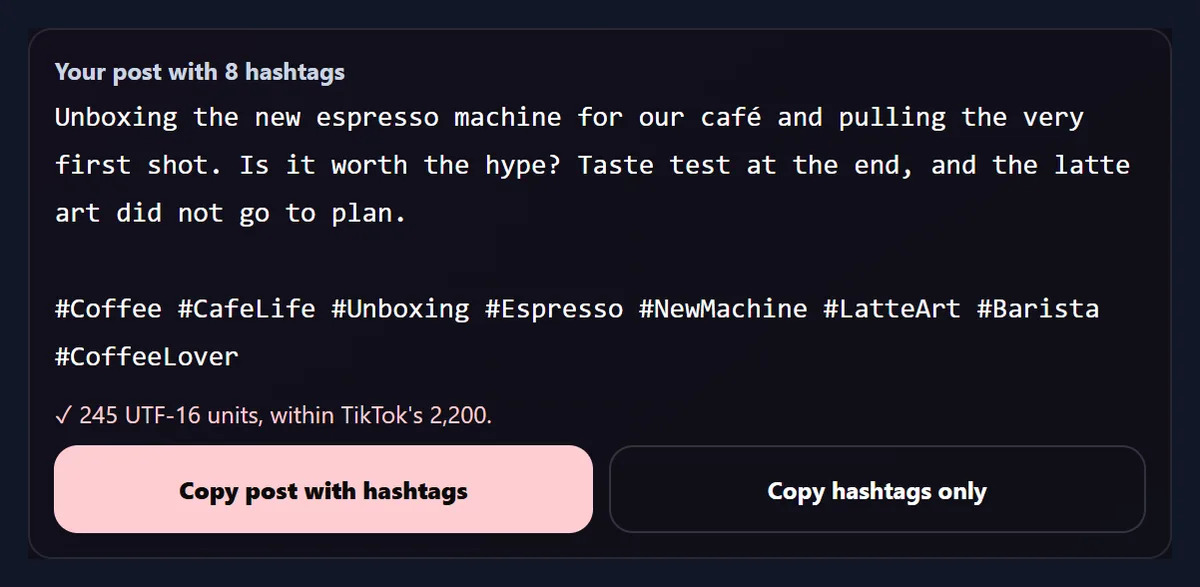
Under the hashtags is the caption as it will look, with the chosen hashtags after a blank line and its length beside it. Tap a hashtag above to take it out or put it back. Copy post with hashtags copies the lot to paste into TikTok; Copy hashtags only copies just the hashtags, for a caption you have already typed in the app. With all ten AI hashtags the café caption was 267 units; with #TasteTest and #FirstShot left out it was 245.
If a caption already has hashtags, they are named under the box and not suggested again.
What should I write in the box?
Whatever tells a reader what the video shows, because the words are all the tool has to go on. Name the subject, the place or kind of place, what happens and who it is for: "shaping sourdough at 5am in our bakery" gives more to work with than "morning vibes". A caption you have already written works well, and so does a plain description you will not post. Of the two samples, the café caption, which names the machine, the first shot, the taste test and the latte art, got six AI hashtags built from its own words, and the baking caption four.
Hashtags you have already typed into the caption are named under the box and not suggested twice, so you can keep the ones you always use.
Does it show how popular a hashtag is?
No. TikTok does not publish how many videos use a hashtag through anything this page could read, so the tool shows no view counts or trend scores, and the AI is told not to make any up. Each hashtag has an arrow that opens its page on TikTok, tiktok.com/tag/ and the hashtag, so you can see the videos under it before you use it.
A hashtag full of videos like yours is a good fit; one about something else is not, however big it is.
What is sent to the AI, and what does it cost?
Only when you press Suggest hashtags with AI, your caption (up to 2,000 characters) and the number you asked for are sent to HueFold, which has Gemini 2.5 Flash Lite suggest the hashtags. The AI is asked for broad, niche and video hashtags, each one word, in the language of the caption, with no repeats and no claims about popularity. Each suggestion uses one AI credit; the first time, you are asked to sign in and accept the AI policy.
From my words (no AI) sends nothing anywhere: it runs in your browser.
What can it not do?
It works from words only, so it cannot watch your video; say what the video shows if the caption does not. It does not know what is trending today, which sounds are popular, or how a hashtag performs, and it does not post anything for you. Like any AI, it can suggest a hashtag that is too general, such as #Food, or that misses the point of the video, which is why each one can be taken out.
Read the caption before you copy it, as you would anything you post.
What else helps with videos and posts here?
The Facebook Hashtag Generator does the same for Facebook posts. The YouTube Description Generator writes a description with chapters that follow YouTube's rules, and the YouTube Name Generator finds a channel name with a matching handle. The AI Caption Generator puts timed captions on the video itself, and Resize Video For Instagram fits a video to Reels, Stories or the feed.
Only the AI parts of these tools use credits.
Frequently asked questions
Is the TikTok hashtag generator free?
Hashtags from your caption's own words are free; AI suggestions use one AI credit each.
Do I need an account?
Not for hashtags from your words; AI suggestions need you to sign in.
How long can a TikTok caption be?
Up to 2,200 UTF-16 units through TikTok's Content Posting API; an emoji usually counts as two.
How many hashtags does it suggest?
5, 10 or 15, as you choose; tap any to leave it out.
Does it show trending hashtags?
No. TikTok does not publish counts it could read; each hashtag links to its page on TikTok.
Why are the hashtags joined into one word?
A space ends a hashtag, so words are joined with capitals, such as #LatteArt.
Which AI writes the hashtags?
Gemini 2.5 Flash Lite, through HueFold.
Does it work in other languages?
Yes. The AI writes in the caption's language, and accented letters are kept.
Can it see my video?
No. It works from your caption, so describe what the video shows.
Does it post to TikTok for me?
No. Copy the caption with its hashtags and paste it into TikTok.
Related tools
- Facebook Hashtag Generator — Hashtags for Facebook posts.
- YouTube Description Generator — Descriptions with chapters.
- YouTube Name Generator — A channel name and handle.
- AI Caption Generator — Timed captions on a video.
- Resize Video For Instagram — Reels, Stories and feed sizes.
- Link In Bio — One page for all your links.