Add Text to Video
Add titles and captions to a video in your browser: up to five texts, each with its own timing, font, style and entrance, dragged into place. MP4 out with the sound.
Updated

How do you add text to a video?
Open a video, type your text, set when it appears and disappears, pick a font, size, colours, style and entrance, and drag it into place. Add up to five texts. Press Add text to the video and download the MP4, with the original sound.
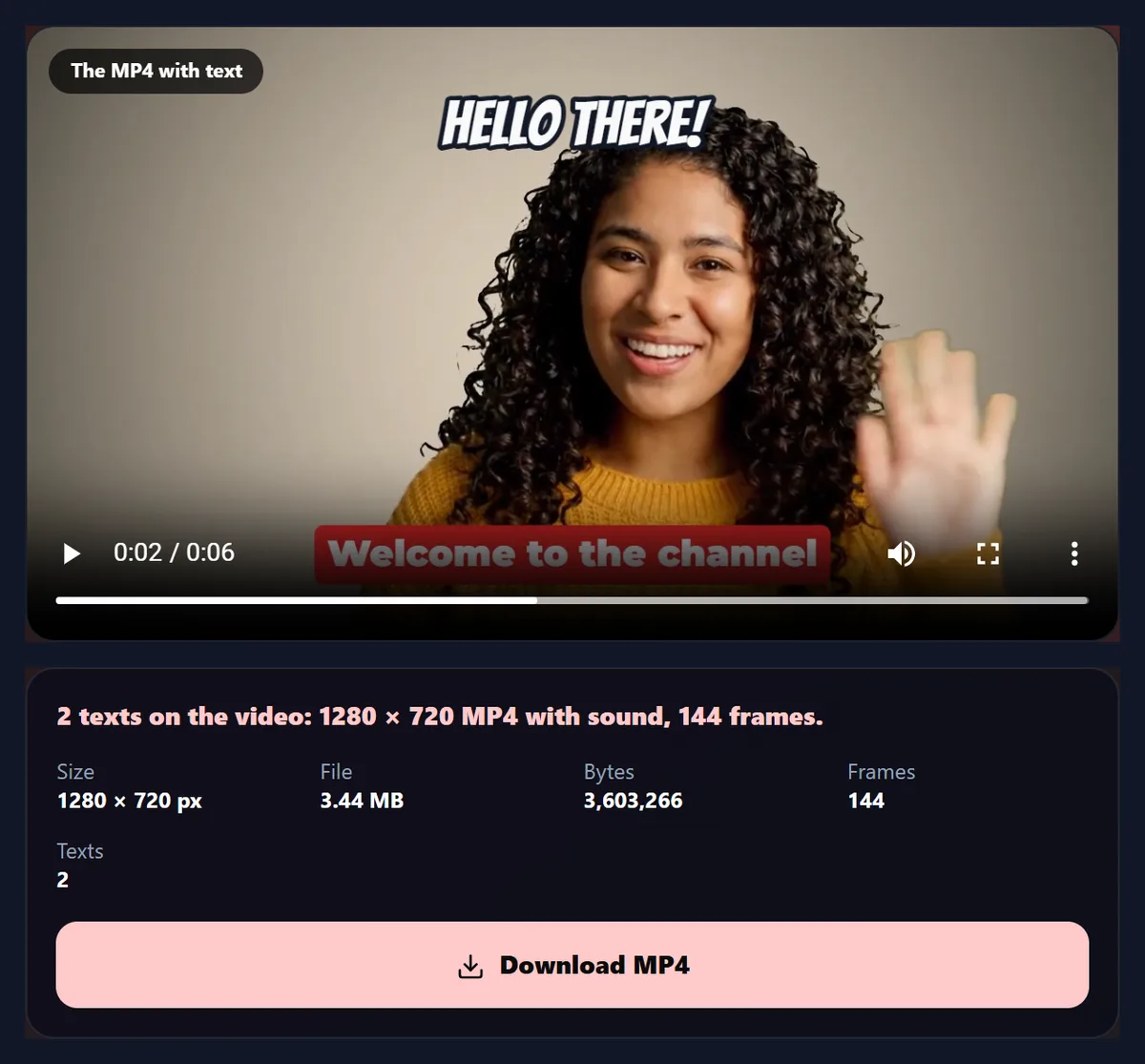
The sample's title and caption made a 1280 × 720 MP4 with all 144 frames. Nothing is uploaded and there is no watermark.
How to add text to a video
- Open a video Any video your browser plays.
- Type and time it Set when each text appears and disappears.
- Style it Font, size, colours, style and entrance.
- Make and download An MP4 with the text and the sound.
Add a title to a video
A real recording of this tool: the sample played with its texts, a title edited, its style and entrance changed, dragged into place, and the MP4 made.
- The sample plays with its two texts.
- The title is edited.
- Its style and entrance are changed.
- It is dragged into place on the picture.
- The MP4 is made with the text and the sound.
Does text make the video file bigger?
Hardly at all. The sample with no text was 3,512 KB; with the two texts it ships with, 3,519 KB; with five, 3,491 KB. The four versions differ by 1.3% at most. The encoder aims at a set amount of data each second for the picture size, so the text does not add data; it only changes what that data is spent on.
What text does cost is a little detail elsewhere when it moves or changes, because the encoder spends some of its data on the letters. At this tool's bitrate, at least 4 megabits a second, that is not visible. The table shows the four files.
| Version | MP4 size | Frames |
|---|---|---|
| No text | 3,512 KB | 144 |
| One caption | 3,474 KB | 144 |
| Two texts | 3,519 KB | 144 |
| Five texts | 3,491 KB | 144 |
How do you add text to a video?
Open the video and the first text box is ready on it. Type your words, set when the text appears and disappears with the two sliders, then choose a font, size, colours, a style and an entrance. Drag the text on the picture to move it, or press Top, Middle or Bottom. Add up to five texts, each with its own timing. Press Add text to the video and the MP4 is made with the text drawn on every frame and the original sound kept.
The sample comes with two texts, a title and a caption. Made into an MP4, it had all 144 frames at 1280 × 720, in 14 seconds.
How do I make text appear at the right moment?
Each text has an Appears at and a Disappears at slider, in tenths of a second. Scrub the video with the time slider above the texts, or press Play, to find the moment, then set the text's times. Texts can overlap in time: the sample's title shows from 0.3 to 3 seconds and its caption from 2.5 to 6, so both are on screen for half a second.
Each text fades in over 0.4 seconds with its entrance and fades out over the last 0.3 seconds, so it never pops off abruptly. Choose the entrance None for text that appears and disappears instantly.
Which entrances can a text have?
Fade, Slide up, Pop, Typewriter and None. Fade brings the text in from transparent; Slide up lifts it into place as it fades in; Pop grows it from 60% of its size with a small overshoot, the bouncy look of social video; Typewriter writes it letter by letter, over half its time on screen (between 0.3 and 1.5 seconds); None shows it at once.
The figure shows the sample's title popping in, frame by frame, from the MP4 the tool made.

Which text style is easiest to read?
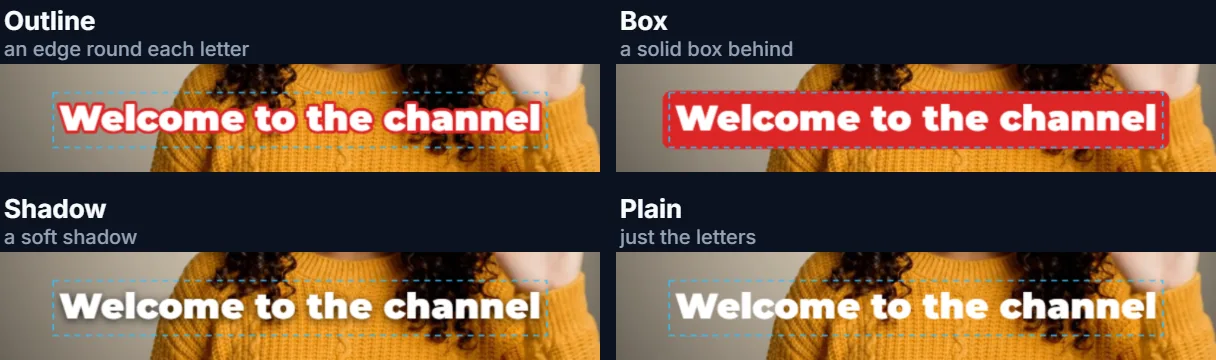
On a busy picture, Outline or Box. Outline draws a dark edge round every letter, which keeps white text readable on light and dark parts alike; Box puts the text on a solid rounded box in a colour you choose, the look of a lower third or a news caption. Shadow adds a soft shadow, gentler but less reliable on bright backgrounds; Plain is just the letters, for calm, even backgrounds.
Choose the text colour and the outline or box colour with the two colour pickers. The figure shows the sample's caption in each style.
Which fonts can I use?
Eleven free Google Fonts: Anton and Bebas Neue for tall headlines, Montserrat Black and Inter Bold for clean captions, Playfair Display for an elegant serif, Lobster, Pacifico and Permanent Marker for handwriting, Bangers and Comic Neue for a comic look, and Press Start 2P for pixel-game text. They load with the page, so the preview and the MP4 use exactly the same letters.
For captions people must read quickly, a bold sans-serif such as Montserrat or Inter at 6% to 8% of the height works best.
How big should the text be?
Size is set as a share of the video's height, from 3% to 20%, so it looks the same on a small or a large video. Titles read well at 8% to 12%; captions at 5% to 7%. Long texts wrap onto more lines automatically, never wider than 86% of the frame, and you can start a new line yourself with Enter.
Keep text away from the very top and bottom of a 9:16 video: apps put their own buttons and captions there.
How do I move a text?
Drag it on the preview: the text under your pointer or finger moves with it. Top, Middle and Bottom put the selected text in the centre of that band. The position is saved as a share of the frame, so it stays in the same place whatever the video's size.
Click a text's tab above the editor to select it, or click the text itself on the picture.
Can I add more than one text?
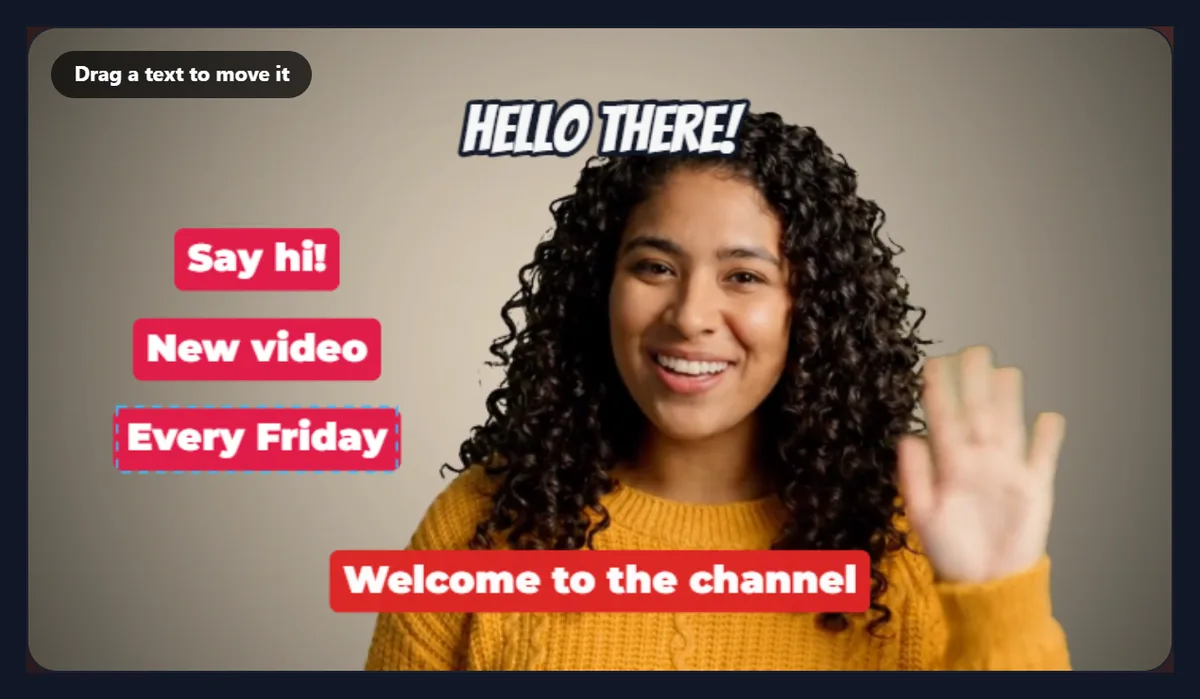
Yes, up to five, each with its own words, timing, font, size, colours, style, entrance and position: a title, a caption, a call to action, a price tag and a credit, for example. The figure shows five texts on the sample at once. Delete this text removes the selected one.
Five texts made the MP4 3,491 KB, against 3,512 KB with none.
Can I use it for subtitles?
For a few lines, yes: one text per sentence, each timed to its moment. The text becomes part of the picture (burned in), so it shows on every player and app, even those that ignore subtitle files, and cannot be turned off.
For a long video with many lines, a subtitle file and a captioning tool are faster; five texts suits titles, captions and calls to action.
Does the video keep its sound and quality?
Yes. The sound is copied into the new MP4 as AAC, in sync. The picture is re-encoded as H.264 at the video's own size and a generous bitrate, at least 4 megabits a second, so the video looks as it did, with your text on it.
Every frame keeps its moment in the video, so the text appears exactly when you set it.
How long does it take?
About twice the video's length: it plays through once at half speed (a quarter for 4K) so that no frame is missed while the text is drawn on each. The page says how long before you start.
Keep the tab in front while it works; browsers slow hidden tabs.
How do I make text readable on any background?
Use Outline or Box, keep the text large enough (6% of the height or more for captions), and choose colours that contrast: white with a dark outline works almost everywhere, and a coloured box makes a caption stand out even over a busy picture. Avoid thin script fonts for anything people must read quickly.
Give each text at least a second and a half on screen for every short line: people need time to read it.
Can I change the colours?
Yes: each text has two colour pickers, one for the letters and one for the outline or the box behind them. Shadow and Plain use only the letter colour. Brand colours work well for boxes; keep the letters white or black for contrast.
Colours, like every other setting, belong to the selected text, so each text can look different.
Which text is on top when they overlap?
Texts are drawn in the order of their tabs, so a later text appears over an earlier one where they overlap. While you edit, the selected text is also shown outside its time, with a dashed frame round it, so you can place it; the MP4 shows each text only between its own times.
To change which text is on top, delete the lower one and add it again.
How much text should be on screen?
Less than you think: one short line for a title, two for a caption. As a rule of thumb, leave a caption up long enough to read it twice. Split long sentences into two texts, one after the other, rather than one block.
The tool wraps long texts onto several lines automatically, but shorter lines are easier to read at a glance.
Can I add text to a video on my phone?
Yes, in a current browser on Android or an iPhone: type your text, drag it with a finger, and save the MP4 to your downloads.
Keep the screen on while the MP4 is made.
Is my video uploaded?
No. The video is opened, the text is drawn and the MP4 is made inside your browser tab. Nothing is sent to HueFold or anyone else, and there is no watermark or sign-up.
The fonts are the only thing the page downloads, from Google Fonts, once.
Why is my text cut off or in the wrong font?
If the text runs off the edge, it is wider than the frame at that size: make it smaller or add a line break. If the font looks plain in the preview, it is still loading; wait a moment, and the MP4 always waits for it.
If the page says it cannot write MP4 at this size, use a current Chrome, Edge or Safari.
Frequently asked questions
How do I add text to a video?
Open it, type your text, set its timing and style, and press Add text to the video.
Can I control when the text appears?
Yes. Each text has its own start and end time.
How many texts can I add?
Up to five.
Can I animate the text?
Yes: fade, slide up, pop or typewriter.
Can I add subtitles?
A few lines, burned into the picture.
Does the video keep its sound?
Yes.
Which fonts are there?
Eleven free Google Fonts.
Is my video uploaded?
No. Everything happens in your browser.
Related tools
- Add Text to GIF — Write on a GIF.
- Video to GIF — Turn the video into a GIF.
- Add Music to Video — Put a song under it.
- Crop Videos — Crop the frame.
- Images to Video — Make a video from photos.
- Text Effects — Styled text as PNG.