Crop Videos Online
Crop a video in your browser: drag a frame or pick 1:1, 9:16, 4:5, 16:9 or 4:3, see exactly how much of the picture is kept, and save an MP4 with its sound.
Updated
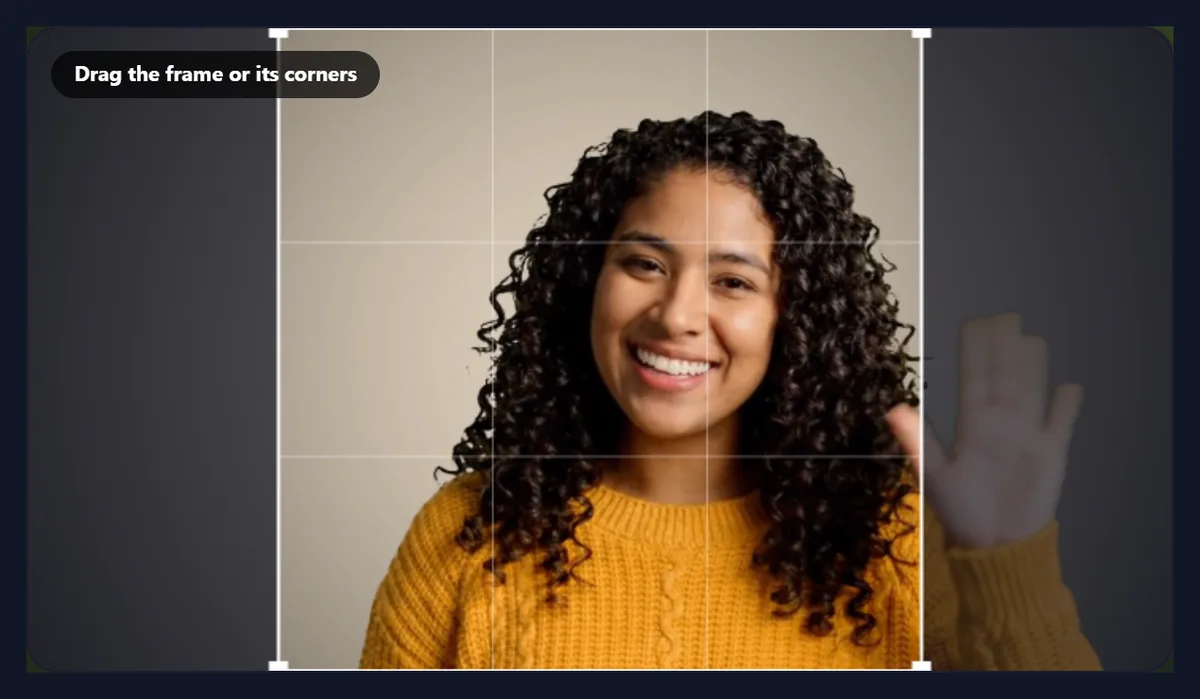
How do you crop a video?
Open the video, pick a shape or Free, and drag the frame and its corners over the part you want to keep. The tool shows the crop in pixels and the share of the picture kept. Press Crop video and download the MP4.
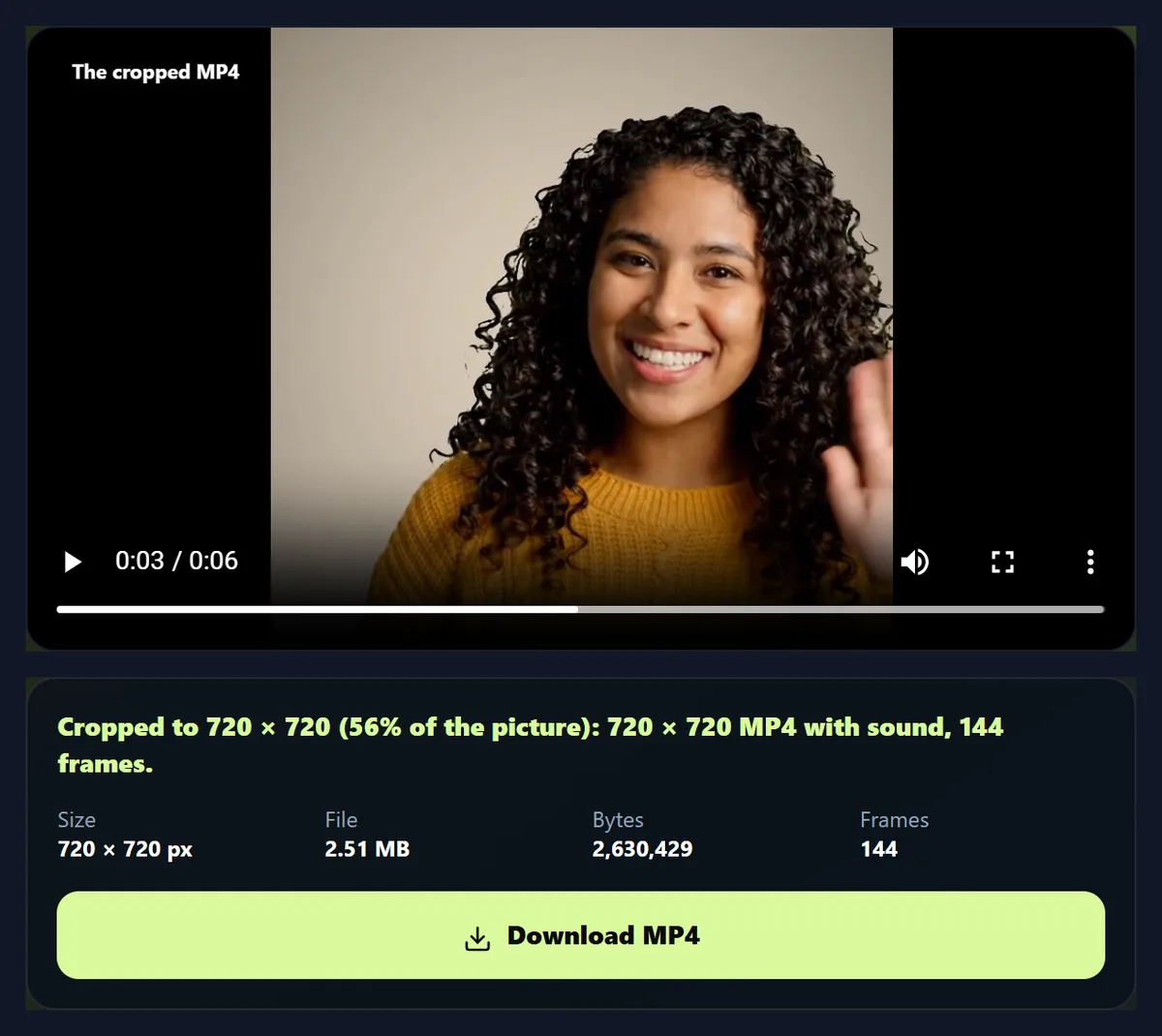
The sample, 1280 × 720, cropped to a square kept 56% of the picture and became a 720 × 720 MP4 with its sound. Nothing is uploaded.
How to crop a video
- Open a video Any video your browser plays.
- Pick a shape Free, 1:1, 9:16, 4:5, 16:9 or 4:3.
- Drag the frame Move it, or resize it by a corner.
- Crop and download An MP4 with the sound.
Crop a video to a square
A real recording of this tool: the sample opened, three shapes tried, the frame dragged, the result previewed and the cropped MP4 made.
- The sample video is opened with a crop frame over it.
- The 9:16, 4:5 and 1:1 shapes are tried.
- The frame is dragged onto the subject.
- The result is previewed at its final shape.
- The cropped MP4 is made.
How much of the picture does each shape keep?
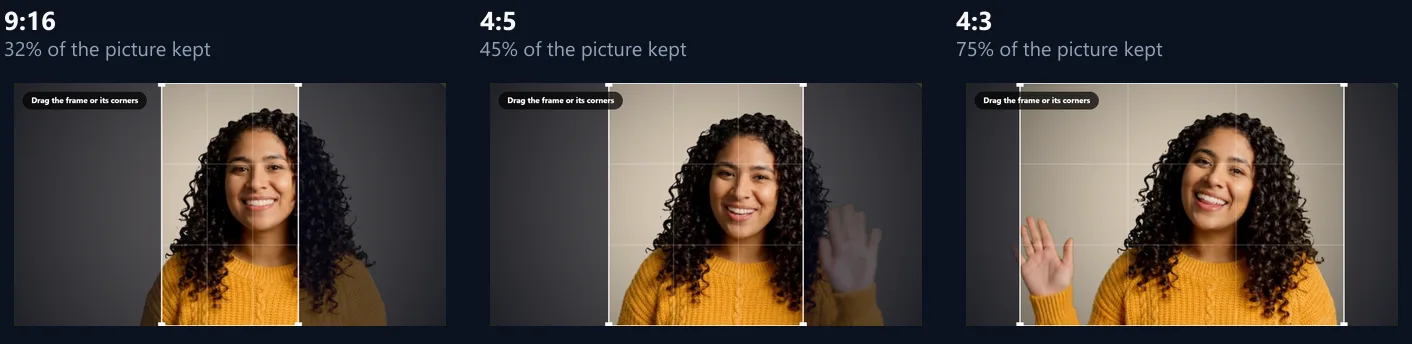
It depends on how far the shape is from the video's own. From the 1280 × 720 sample, the largest square the tool fits is 720 × 720, keeping 56% of the picture; a 4:5 portrait keeps 45%, and a 9:16 story only 32%, a strip down the middle. A 4:3 crop keeps 75%, and 16:9, the video's own shape, all of it.
The tool shows the crop size and the share kept as you go, so you can see what you are giving up. Cropping a wide video to 9:16 throws away more than two thirds of every frame: frame the subject carefully, or use the video resizer's fit on a blurred copy to keep the whole picture.
| Shape | Share kept | Crop |
|---|---|---|
| 1:1 square | 56% | 720 × 720 |
| 9:16 story | 32% | 405 × 720 |
| 4:5 portrait | 45% | 576 × 720 |
| 16:9 wide | 100% | 1280 × 720 |
| 4:3 classic | 75% | 960 × 720 |
How do you crop a video?
Open the video and a crop frame appears over it. Pick a shape, or Free for any shape, then drag the frame to move it and drag its corners to resize it. Show the result previews the cropped video at its final shape. Press Crop video and the video plays through once while each frame is cut to the frame and encoded into a new MP4, with the original sound.
The sample cropped to a square became a 720 × 720 MP4 with all 144 frames in 92 seconds.
Which shape should I crop to?
9:16 for Reels, Stories, TikTok and Shorts; 4:5 or 1:1 for feed posts; 16:9 for YouTube and presentations; 4:3 for a classic look or older screens. Free lets you cut out anything, such as a black border, a watermark at an edge or a person at the side of the frame.
The figure shows the frame for three shapes on the same video. The frame always starts in the middle at the largest size that fits; move it to keep the subject in.
What does the cropped video look like?
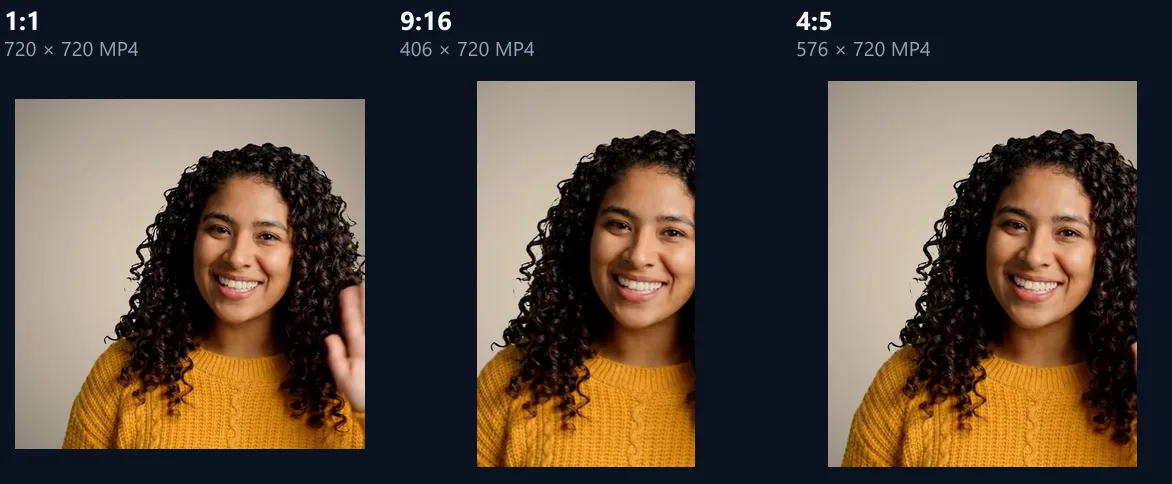
The MP4 has only what was inside the frame, at the crop's own size. The sample cropped to 1:1 became 720 × 720, to 9:16 406 × 720, and to 4:5 576 × 720. The figure shows a frame of each.
Cropping never enlarges: the MP4 has the crop's pixels, so a small crop of a small video makes a small video. Their sizes were 2.51 MB, 2.54 MB and 2.51 MB, with the sound kept.
How do I crop to any shape?
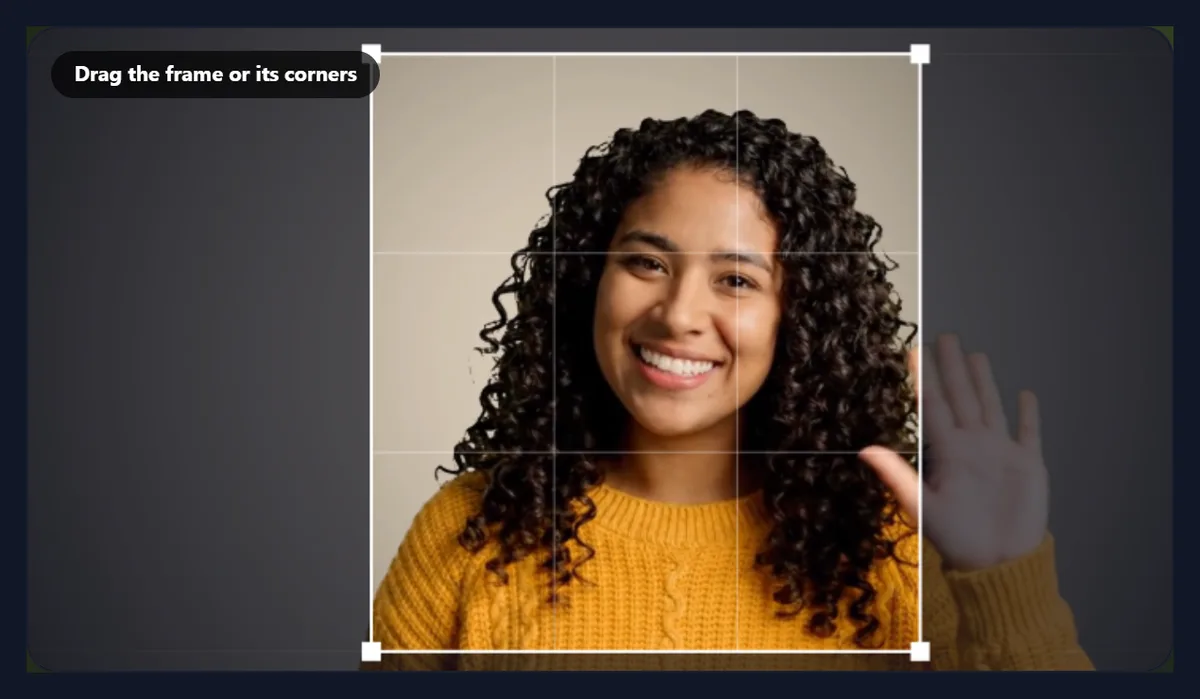
Choose Free and drag any corner: the frame takes whatever shape you draw. The tool reports the crop in pixels, where it starts from the left and top, and the share of the picture kept. Dragging two corners of the sample's frame inwards gave a 614 × 670 crop keeping 45%.
Choosing a shape again sets the frame to the largest of that shape, in the middle of the picture. Reset the frame does the same for a shape; for Free it sets a frame a tenth of the way in from every edge.
Why is the crop size always an even number?
Because H.264 video, which plays everywhere, stores colour at half the resolution of brightness, so its width and height must be even. The tool rounds the MP4's size to even pixels, which changes it by at most one pixel, too little to see.
The crop frame snaps to whole pixels of the video, not of the preview, so it is exact even on a small screen.
Can I make the cropped video smaller?
Yes: choose Up to 1080p or Up to 720p and the cropped picture is scaled down so its longer side is at most 1,920 or 1,280 pixels. As cropped keeps every pixel of the crop. Scaling down never makes a crop larger than it is.
A crop from a 4K video can still be large; 1080p is plenty for sharing.
Does cropping keep the sound?
Yes, the sound is copied into the new MP4 as AAC, in sync with the picture. Choose Remove sound for a silent video.
Cropping changes only the picture: the length, timing and frames stay as they were.
What is the difference between cropping and resizing?
Cropping cuts away parts of the picture and keeps the rest at full detail; resizing changes the size of the whole picture, and to change its shape it must either crop or add borders. To cut out a part, crop. To fit a whole video into a new shape, such as a landscape clip into a story, use the video resizer, which can show the whole frame over a blurred copy of itself.
To turn a sideways video upright, use the rotate video tool first.
How long does cropping take?
About twice the video's length: it plays through at half speed (a quarter for 4K) so no frame is missed, and the page shows how long before you start. If a busy page misses any frames, the video is read again more slowly.
Keep the tab in front while it works; browsers slow down hidden tabs.
How do I remove black bars from a video?
Choose Free and drag the frame's corners to the edges of the picture, inside the black bars. The readout shows the crop in pixels and where it starts, so you can make it exact: a 1280 × 720 video with bars of 60 pixels top and bottom has a 1280 × 600 picture starting 60 pixels from the top.
The cropped MP4 has only the picture, with no bars, at its own size.
Can I crop out a logo or watermark?
If it sits near an edge, yes: frame the crop so it leaves that edge out. A watermark in the middle of the picture cannot be cropped away without losing the middle too. Make sure you have the right to use the video without its watermark.
To cover something instead of cropping it, add a text box over it with the add text to video tool.
What do 9:16, 4:5 and 1:1 mean?
They are the width and height of the frame in proportion: 9:16 is 9 wide for every 16 high, the shape of a phone screen held upright; 4:5 is a slightly tall feed post; 1:1 is a square; 16:9 is a widescreen TV or laptop; 4:3 is an older TV or tablet.
The crop's pixels follow the shape: a 9:16 crop of a 720-pixel-high video is 405 × 720, rounded to 406 × 720 for H.264.
Can I crop a portrait video to landscape?
Yes: choose 16:9 on a portrait video and the frame becomes a wide band across it, which you can move up or down to the part that matters. It keeps less of the picture than the other way round, so it suits videos with the action in one band, such as a speaker's face.
To show a whole portrait video in a wide frame instead, use the video resizer's fit on a blurred copy.
Does cropping make the video blurry?
No: the part you keep is copied at its own pixels, not enlarged. But a crop has fewer pixels than the whole frame, so when a player shows it full screen it enlarges it, and a small crop of a small video can look soft there. Start from the largest original you have, such as the 4K or 1080p file from your phone.
The readout shows the crop's size in pixels before you start, so you know what you will get.
What if the subject moves around?
The crop frame stays in one place for the whole video, so a subject who walks out of it is lost. Check the result view while the video plays, and make the frame large enough for the movement, or cut the video into parts with the video splitter and crop each part on its own.
For a subject that moves a lot, a wider shape such as 4:5 or 1:1 keeps more of the picture than 9:16.
What can I do after cropping?
Add text, music or sound effects, join it with other clips, turn it into a GIF, or resize it to an exact size for a platform with the video resizer. Crop first, so everything after it works on the final frame.
For a still photo, use the crop image tool instead.
Can I crop a video on my phone?
Yes, in a current browser on Android or an iPhone. Drag the frame with a finger; the corners are large enough to grab. Save the MP4 to your downloads.
For long 4K videos, choose Up to 1080p to keep the phone's memory free.
Is my video uploaded?
No. The video is opened, cropped and encoded inside your browser tab. Nothing is sent to HueFold or anyone else, and there is no watermark or sign-up.
Large videos open as fast as your device can read them, without waiting for an upload.
Why can I not move the frame past the edge?
The frame always stays inside the video: there is nothing to keep beyond it. To get a shape that does not fit, such as a 9:16 crop taller than the video allows, crop to the largest frame and then use the video resizer to add a border or blurred background.
If the video will not open, your browser cannot play its codec; try Chrome or Edge, or convert it to MP4 first.
Frequently asked questions
How do I crop a video?
Open it, drag the crop frame, and press Crop video.
Can I crop a video to 9:16?
Yes. Choose 9:16 and move the frame onto the subject.
Can I crop to any size?
Yes. Choose Free and drag the corners.
Does it keep the sound?
Yes, unless you choose Remove sound.
Does cropping lower the quality?
The kept part stays at full detail; it is re-encoded at a high bitrate.
What is the difference from resizing?
Cropping cuts parts away; resizing scales the whole picture.
Is my video uploaded?
No. Everything happens in your browser.
Is there a watermark?
No.
Related tools
- Video Resizer — Fit a video to a new shape.
- Rotate Video — Turn a sideways video upright.
- Merge Videos — Join clips into one.
- Video to GIF — Turn the crop into a GIF.
- Add Text to Video — Titles and captions.
- Crop Image — Crop a photo.