AI Caption Generator
Generate captions automatically: speech recognition writes every word with its time, you check them, pick a word-by-word style, and burn them into the video or save SRT or VTT. Free with an account.
Updated
How do you add captions automatically?
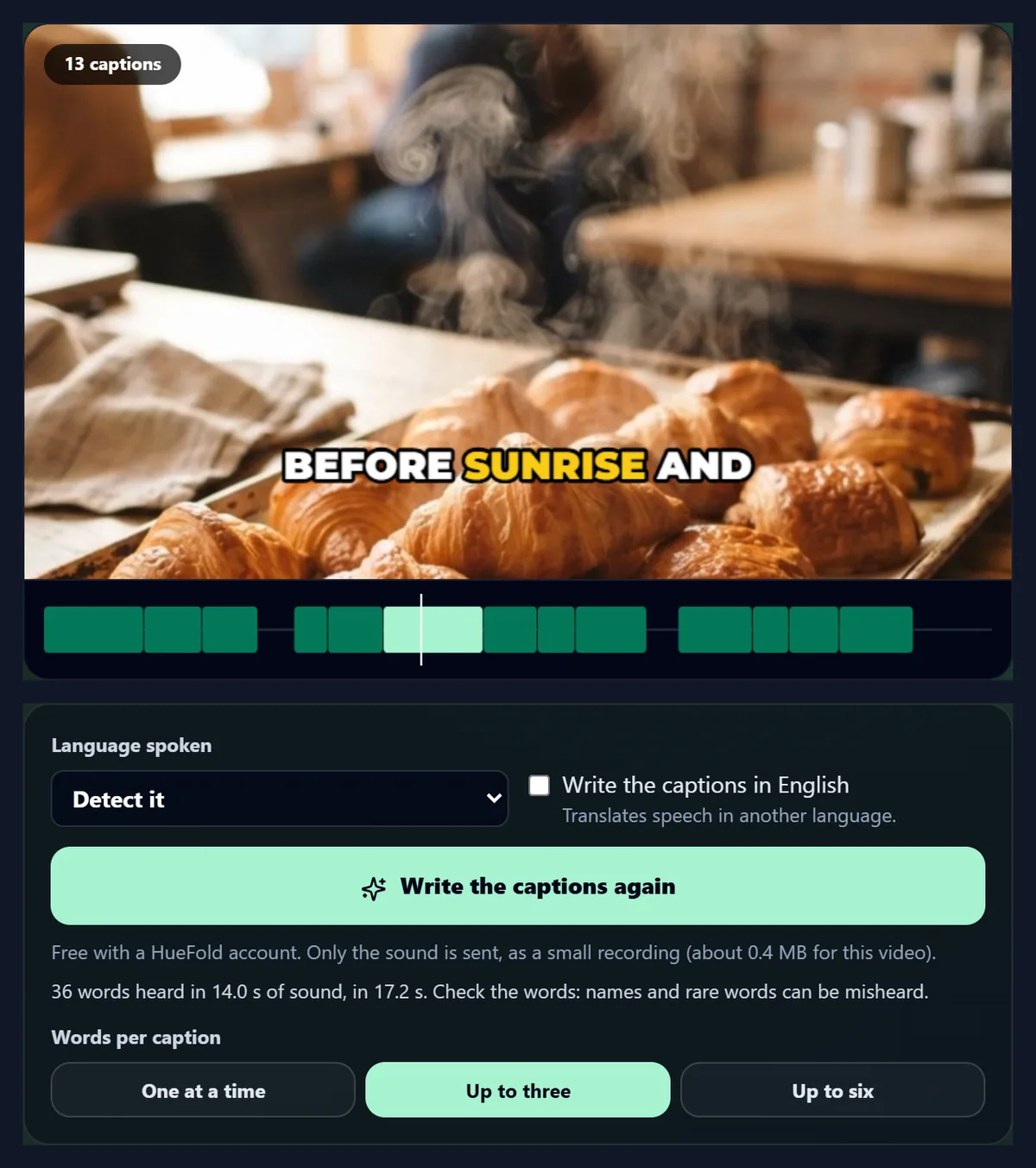
Open your video and press Write captions with AI: the sound is sent to HueFold's speech recognition, which returns every word and when it was said. Read them through, choose how many words each caption shows and a style, then burn them into the video or save a caption file.
On the sample's 14-second voiceover it got all 36 words right and answered in 17.2 seconds; the captioned MP4 kept all 420 frames and the sound.
How to generate captions with AI
- Open a video Any video your browser plays, up to 3 minutes of sound.
- Write with AI Every word is heard and timed.
- Check and style Fix any word; pick words per caption and a style.
- Save Burn them into an MP4, or save SRT or VTT.
Generate captions with AI
A real recording of this tool: the sample opened, captions written by AI from its voice, the words per caption changed, the Karaoke style chosen, and the captions burnt in.
- The sample video is opened.
- Write captions with AI is pressed and the words appear as captions.
- One word, six words and three words per caption are tried.
- The Karaoke style is chosen and the captions are burnt into the MP4.
How many words should each caption show?
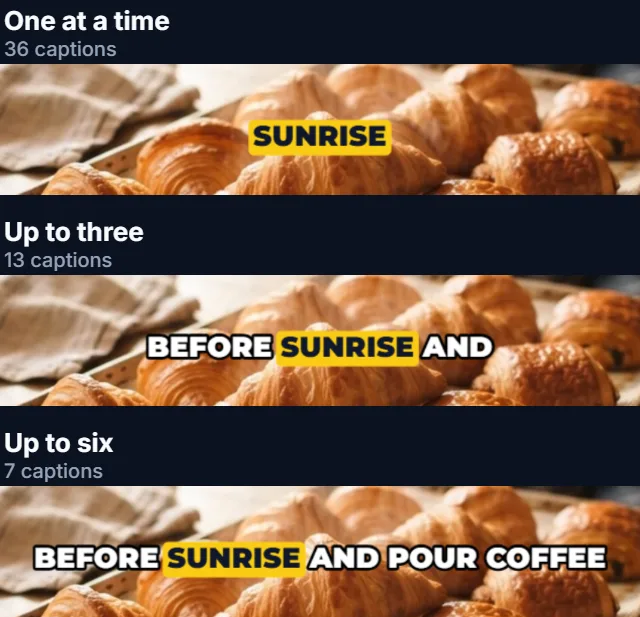
It depends on the look you want, and the tool can regroup the same words three ways after they are heard. One at a time shows each word alone, the punchy style of short social videos: the sample's 36 words became 36 captions of 0.32 seconds on average. Up to three gave 13 captions of 0.91 seconds; up to six, 7 captions of 1.70 seconds, closer to classic subtitles.
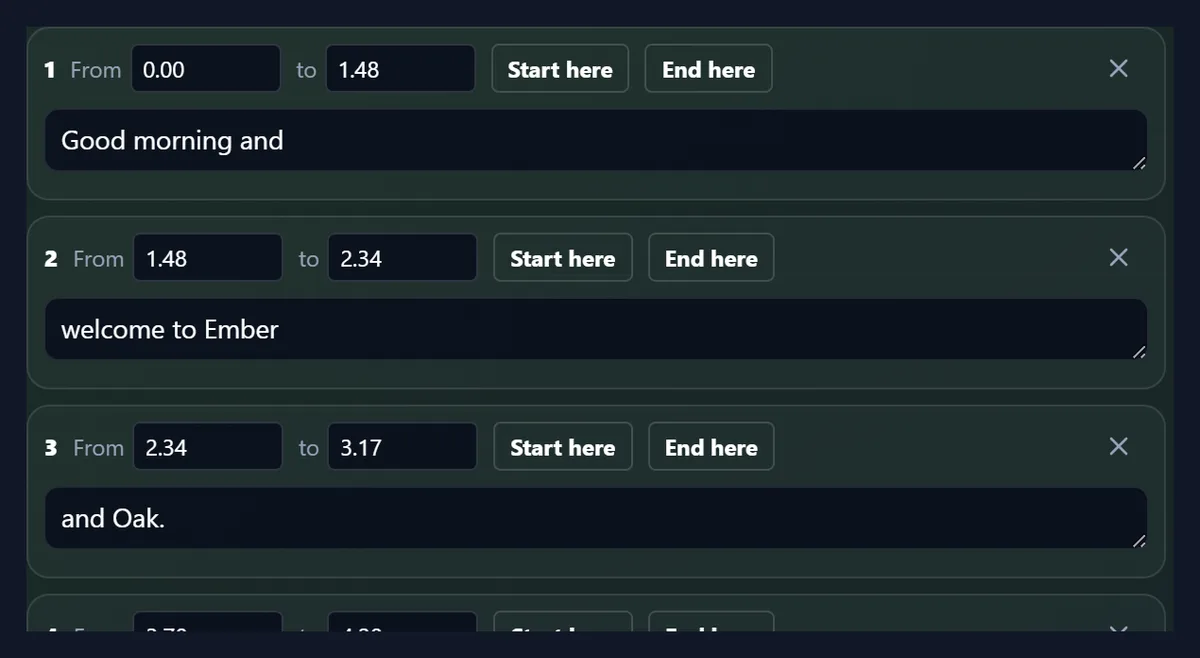
A sentence that needs more than one caption is split into even groups, so no word is left alone at the end: “Good morning and welcome to Ember and Oak” became “Good morning and welcome” and “to Ember and Oak”, not six words and two.
| Words per caption | Captions | Average time on screen |
|---|---|---|
| One at a time | 36 | 0.32 s |
| Up to three | 13 | 0.91 s |
| Up to six | 7 | 1.70 s |
How do I generate captions automatically?
Open your video and press Write captions with AI. The tool takes the sound from the video in your browser, sends just that to HueFold's speech recognition, and gets back every word with the moment it was said. The words appear as captions on the video, ready to read through, fix and style; then burn them into the video or save an SRT or VTT file.
On the sample, a 14-second café video with a voiceover, it heard 36 words in 14.0 seconds of sound and answered in 17.2 seconds, every word right.
How accurate are AI captions?
On the sample's clear voiceover, very: all 36 words were right, with only two commas left out. Speech recognition is less sure of names, rare words, accents it has heard little of, people talking over each other, and speech under loud music, so always read the captions through before publishing.
In Spanish it was good but not perfect: of the 37 words of the Spanish voiceover, 4 came out wrong (11%): “amanecer” (sunrise) was heard as two words, and “tómate” lost its accent. Every caption is a text box in the list, so a wrong word takes a second to fix.
Which AI writes the captions?
Whisper, the open speech recognition model from OpenAI, in its base size, running on HueFold's own server. It writes a time for every word, which is what the word-by-word styles need. Only the video's sound is sent, as a 16 kHz mono recording: about 0.4 MB for the 14-second sample, much less than the video itself.
Nothing is kept: the recording is deleted as soon as the words are written, and the captions exist only in your browser until you save them.
How do I correct the captions?
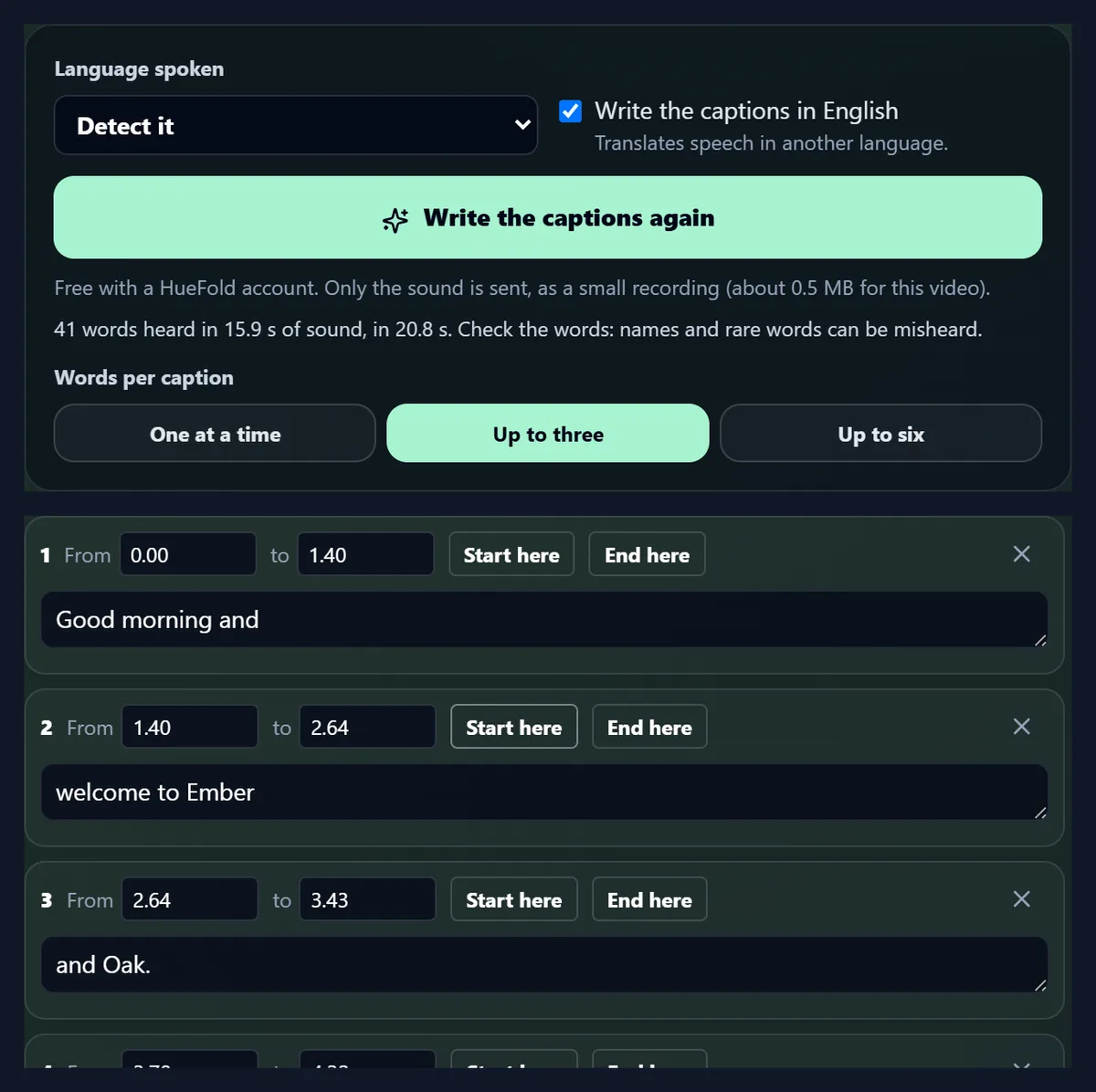
Every caption is a row in the list with its start and end times and its text. Click a number to jump to it, type to fix a word, and use Start here and End here to move it to the playhead. Changing a caption's words keeps it on screen at the same times; its words are then spread over it by length for the word styles.
To start again with different grouping, press another Words per caption button; to listen again, for example with the language set, press Write the captions again.
Which caption styles work best with AI captions?
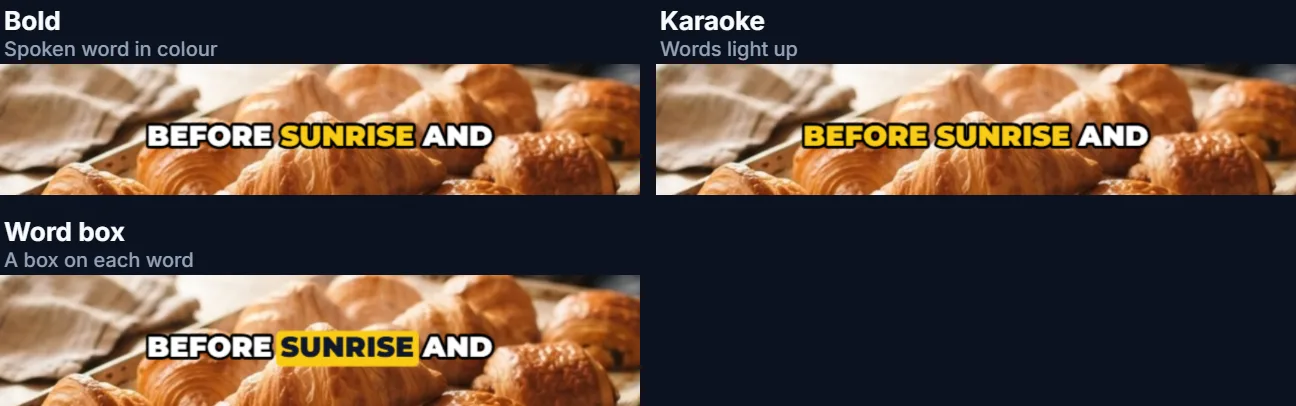
The word styles: Bold colours the word being spoken, Karaoke lights up each word as it is said and keeps the spoken ones lit, and Word box puts a coloured box behind the current word. They use the time of every word, so the highlight follows the voice. Classic and Boxed are there too, for plain subtitles.
Capitals and a heavy font such as Montserrat read best for word-by-word captions on a phone; the AI page starts with them.
Which languages does it understand?
The Language spoken list has fourteen languages, from English, Spanish, French and German to Hindi, Japanese, Korean, Chinese, Arabic, Russian and Turkish, and Detect it, which lets the model decide. Choosing the language helps with short clips, where there is little speech to recognise it from.
Detect it found the Spanish voiceover on its own and wrote 38 Spanish words.
Can it write English captions for speech in another language?
Yes: tick Write the captions in English and Whisper translates as it listens. On the Spanish voiceover it wrote 41 English words that kept the gist (“Good morning and welcome to Ember and Oak… take your time”) but changed details: “we bake fresh bread before sunrise” came out as “we wake up early in the morning before dawn”.
Treat translated captions as a draft and check them with someone who speaks the language; for captions in the original language, leave the box unticked.
What do I get?
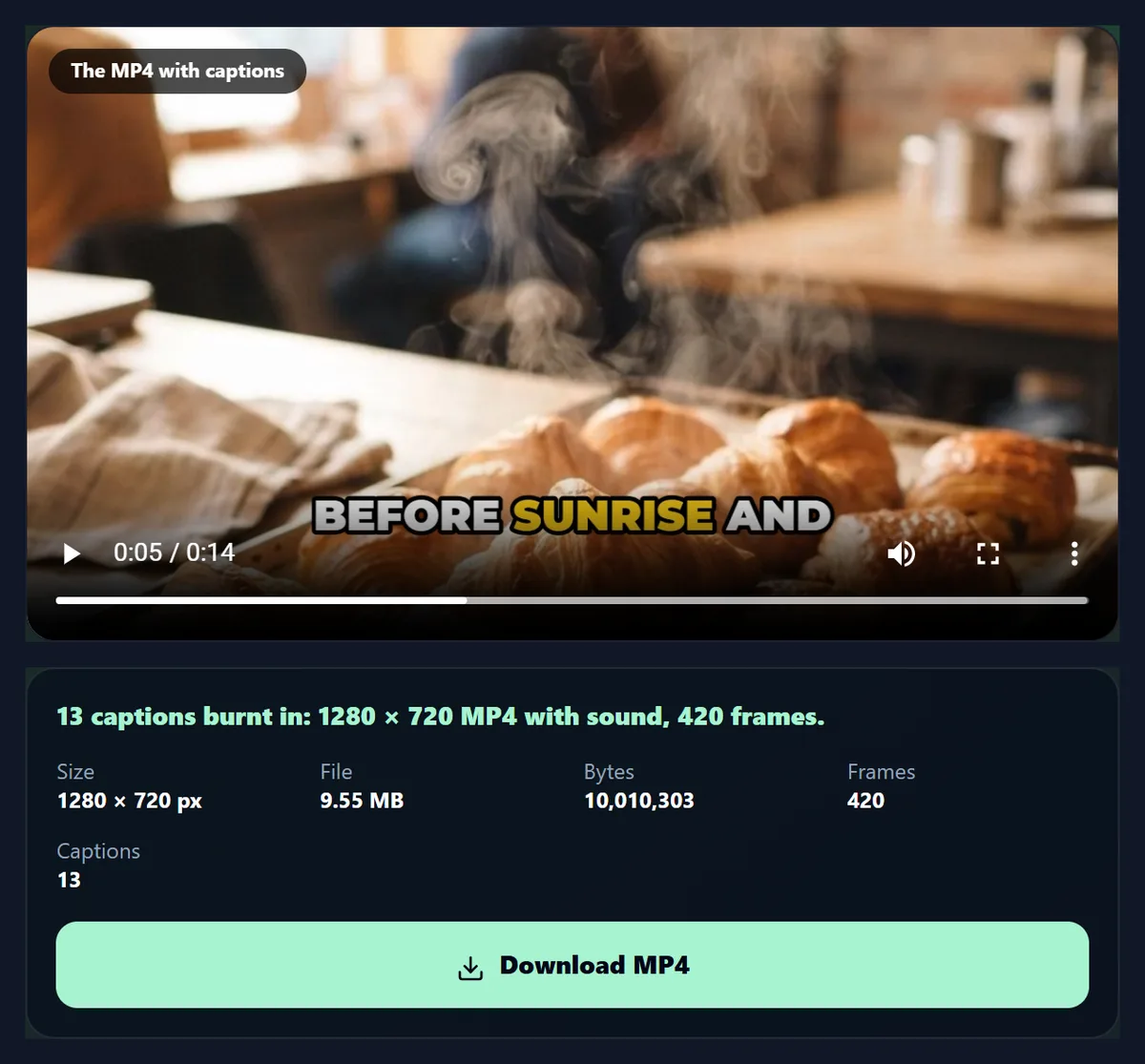
An MP4 with the captions drawn into every frame and the original sound kept, at the video's own size, and the captions themselves as SRT, VTT or plain text. The sample with 13 captions became a 1280 × 720 MP4 of 420 frames, 9.55 MB, made in 86 seconds.
The MP4 is made in your browser: the video plays through at half speed while each frame is drawn.
How long a video can I caption?
Up to 3 minutes of sound at a time. Recognition took about as long as the sound itself on the sample, so longer videos are best cut into parts with the video splitter and captioned in turn.
Typing captions on the caption page has no limit.
Do AI captions cost credits?
No. They are free with a HueFold account: you are asked to sign in the first time. The voice and video generators use credits; captions do not.
There is no watermark on the video.
How do I get the best captions?
Clear speech close to the microphone gives the best results; music under the voice is fine if the voice is louder (the sample's music is turned well down). Remove long silent parts first, set the language if you know it, and read the captions through while the video plays.
For a video with its script already written, the caption page can spread the script over the video without AI.
When should I show one word at a time?
For short, punchy videos where captions are part of the look: one word at a time keeps the eye on the centre of the screen and matches the rhythm of the voice. On the sample, each word was on screen for about a third of a second. For anything longer than a minute or two, three to six words are easier to follow.
Up to three is the starting choice on this page: short enough to feel lively, long enough to read whole phrases.
Does background music confuse the AI?
Quiet music under a clear voice does not: the sample's café music runs under the voiceover the whole time, and every word was heard. Loud music, singing, or several people talking at once make words harder to hear for the AI as for people.
If a video has loud music, lower it before captioning with add music to video, or caption a version with the music off.
Can I download the AI captions as a file?
Yes: SRT, VTT or plain text, at any time after the words are written. The file has the captions as grouped and edited on the page, with their times, so choose the words per caption first: one at a time makes a file with one caption per word.
Upload the SRT with your video where a platform accepts caption files, as YouTube does.
Which videos can I caption?
Any video your browser plays, from a phone recording to a screen recording, as long as it has a sound track with speech; the tool says so if a video has no sound. Only the sound is sent, so a large video uploads as a small recording.
Videos with long silences at the start are captioned correctly: the words are timed from the start of the video.
AI captions or typed captions?
AI captions save the typing and time every word, which the word-by-word styles need; typed captions on the caption page need no account and nothing leaves your device. For a video whose script you already have, pasting the script on the caption page is quick too, though its timing is spread by length rather than heard.
Many people use both: AI captions for the first draft, then a careful read-through.
Can I use it on my phone?
Yes, in a current browser on Android or an iPhone. The sound is read from the video on your phone, and only that is sent; the captioned MP4 is made on the phone, so keep the screen on.
On a phone, Up to three words per caption reads best.
Is my video uploaded?
No, only its sound, as a small recording, to HueFold's speech recognition, which returns the words and keeps nothing. The picture never leaves your device, and the captioned video is made in your browser.
If you prefer nothing to leave your device, type the captions on the caption page instead.
Frequently asked questions
How accurate are the captions?
On the sample's clear voiceover, all 36 words were right. Names, rare words and noisy speech can be misheard, so check them.
Is it free?
Yes, with a free HueFold account. No credits are used.
Which languages does it understand?
Fourteen are listed, and Detect it lets the model decide.
Can it translate to English?
Yes, as a draft: the meaning is kept but details can change.
Can I edit the captions?
Yes, every word and every time.
Can I download SRT?
Yes, SRT, VTT or plain text.
Is my video uploaded?
Only its sound, as a small recording, which is not kept.
How long a video can I caption?
Up to 3 minutes of sound at a time.
Related tools
- Caption — Type and time captions yourself.
- AI Voice Generator — Make the voiceover first.
- Add Text to Video — Titles at set times.
- Video Splitter — Cut a long video into parts.
- Resize Video for Instagram — The right shape for Reels.
- Add Music to Video — Music under the voice.