AI Voice Generator
Turn a script into a natural voiceover: listen to the voices free, pick one and a pace, and download the MP3. ElevenLabs voices that read many languages, in your browser.
Updated
How do you make an AI voiceover?
Type or paste your script, listen to a few voices with their free samples, choose one and a pace, and press Generate the voiceover. Play the MP3 with its waveform, try another voice or pace as a new take, and download the one you like.
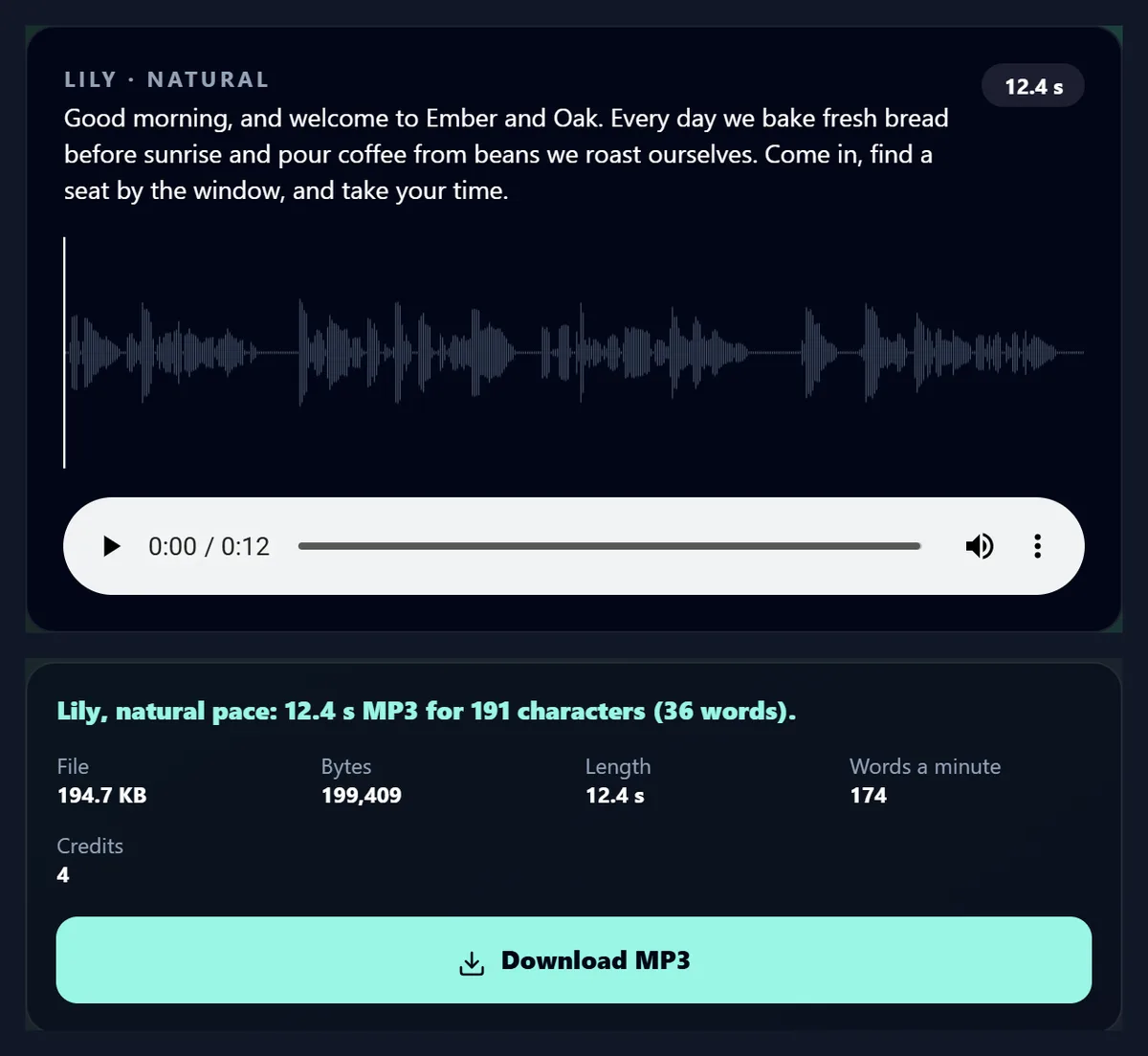
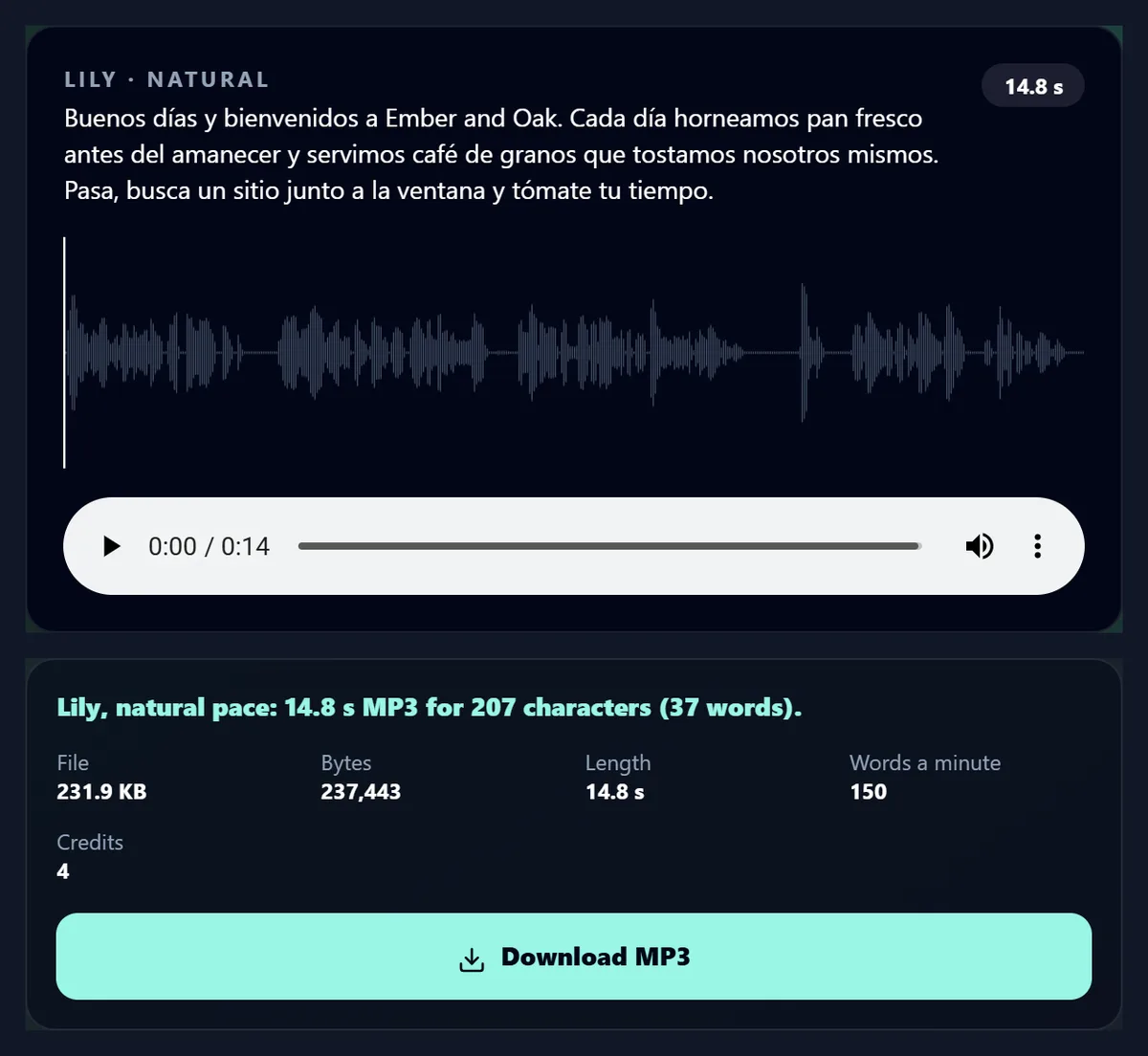
The 36-word café script read by Lily was a 12.4-second MP3 made in 10.7 seconds; the same voice read it in Spanish in 14.8 seconds.
How to generate an AI voiceover
- Write the script Up to 2,500 characters, in any language the voice reads.
- Choose a voice Filter by gender and accent; play the samples.
- Pick a pace Slower, Natural, Brisk or Fast.
- Generate and download Compare takes, then save the MP3.
Generate an AI voiceover
A real recording of this tool: a sample script chosen, the British voices filtered and one picked, the voiceover generated and played.
- The course intro sample script is chosen.
- The voices are filtered to British and Daniel is picked, at natural pace.
- The voiceover is generated.
- It plays with its waveform.
Can I change how fast the voice speaks?
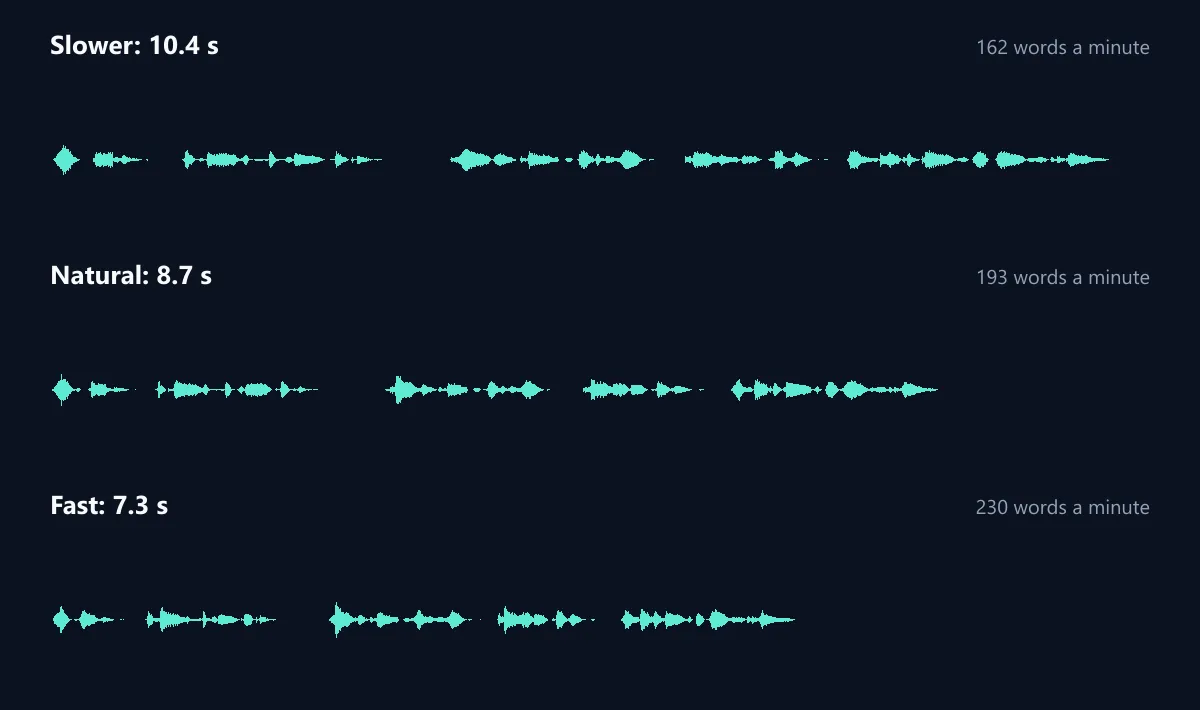
Yes: Slower, Natural, Brisk and Fast. The same 28-word script read by George took 10.36 seconds at Slower, 8.68 at Natural and 7.29 at Fast: 162, 193 and 230 words a minute. The voice stays the same; only the pace changes, and pauses at commas and full stops shrink or stretch with it.
Pace is a setting of the voice model, and not every model follows it: in our tests Eleven Multilingual v2, which this page runs on, read one line in 4.64 seconds at its slowest setting and 2.51 at its fastest, while the newer Eleven v4 read it in 3.92 and 3.76 whatever the setting. If the page ever runs on a model that reads at its own pace, the Pace buttons are hidden rather than left doing nothing.
| Pace | Length | Words a minute |
|---|---|---|
| Slower | 10.36 s | 162 |
| Natural | 8.68 s | 193 |
| Fast | 7.29 s | 230 |
How do I turn text into a voiceover?
Type or paste your script, up to 2,500 characters, or start from one of the samples. Listen to a few voices with their play buttons, pick one and a pace, and press Generate the voiceover. The MP3 appears with its waveform: play it, click the waveform to jump to a moment, try another voice or pace, and download the take you like.
The café script, 191 characters, read by Lily at her natural pace, took 10.7 seconds to make and is 12.4 seconds long: 174 words a minute.
Which voices can I choose from?
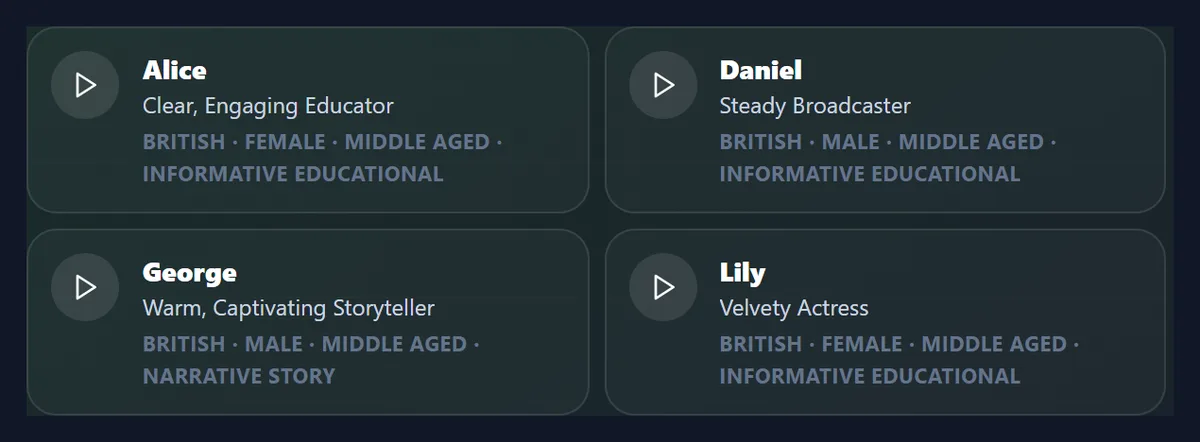
The 22 voices of HueFold's ElevenLabs account: 16 with an American accent, 4 British, 1 Australian and 1 Scottish, women's, men's and one neutral voice, from young to old. Each card shows the voice's name, its description from ElevenLabs (such as Steady Broadcaster or Warm, Captivating Storyteller), its accent, age and the use it suits best.
Filter by gender and by accent to narrow the list, and press the play button on any card to hear its sample. The samples are ElevenLabs' own recordings, so listening is free and needs no account.
Can it speak other languages?
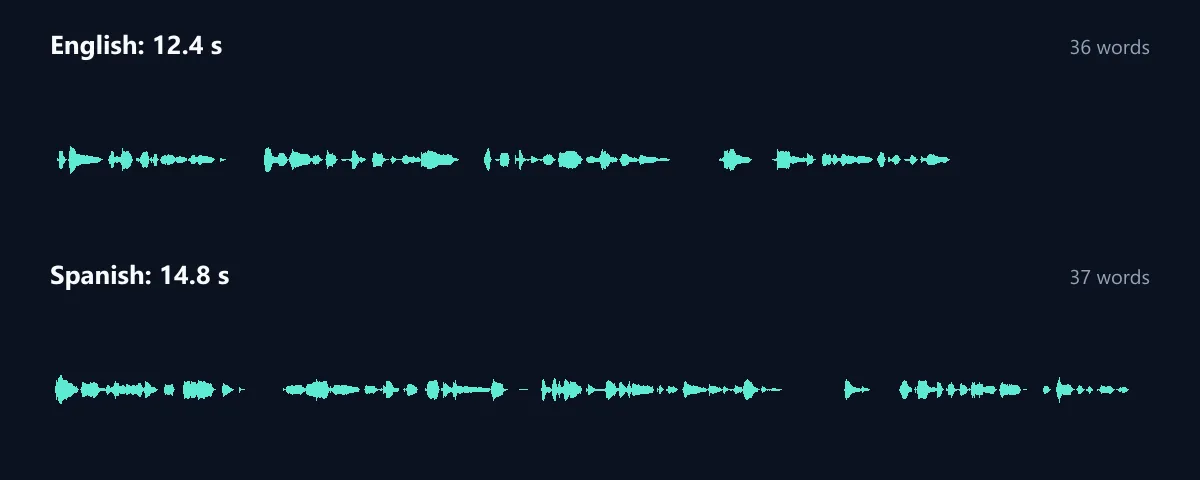
Yes: write the script in the language you want and the voice reads it in that language. Lily read the café script in Spanish in 14.8 seconds, against 12.4 in English; Spanish took more time for one more word, 150 words a minute against 174. The voice keeps its own character, and its accent may colour the new language.
Eleven Multilingual v2 is the model this page runs on; ElevenLabs lists the languages it supports. Spanish and a Hindi sample are among the samples to try.
How should I write a script for an AI voice?
Write it the way you would say it. Short sentences, commas where you would breathe, and full stops between ideas give the most natural reading. Spell out what should be said: numbers, units and abbreviations are read as the model guesses, so write “ten minutes”, “per cent” or “H-U-E” when it matters.
Punctuation is the main control: a comma makes a short pause, a full stop a longer one, and a question mark lifts the end of a line. Read the take back and adjust a word or a comma rather than the whole script.
Can I compare different voices?
Yes: every voiceover you make in a visit is kept as a take. Generate the same script with two or three voices or paces and switch between them with the take buttons; each keeps its own waveform, length and file. Making a take took 4.3 to 10.7 seconds in our tests.
Download the take you choose; every take is also saved in your HueFold account.
What file do I get?
An MP3 at 44.1 kHz and 128 kbit/s, which plays everywhere and drops into any video editor. At that rate a second of speech is 16 KB, so the 12.4-second café voiceover was 194.7 KB. The level is steady: the takes averaged about -24 dB, with peaks well below clipping.
To put the voiceover on a video, use add music to video, which mixes any sound file under a video at the volume you choose.
How much does a voiceover cost?
Listening to voices is free. Making a voiceover needs a free HueFold account and uses AI credits: each take in our tests, from 148 to 207 characters, used 4 credits. The tool shows the credits each take used under the Generate button.
A take that fails is not charged.
What are AI voiceovers good for?
Narration for product videos, tutorials and explainers; course introductions; podcast intros and outros; voice prompts for apps and phone menus; quick drafts of a script before recording it yourself; and versions of the same message in other languages. Add captions too, for people who watch with the sound off.
Pair it with the AI caption generator, which writes captions from the voice, and with add music to video for a music bed under it.
Can I get a British accent?
Yes: filter by British for Alice, Daniel, George and Lily, or Scottish for Lewis. The accent is the voice's own; it is how that voice speaks every script. For a page dedicated to British voices, see the British accent generator.
American voices are the largest group in the list, from deep and resonant to young and bright.
How long can the script be?
Up to 2,500 characters, about 400 words: roughly two minutes at a natural pace of around 193 words a minute. For a longer narration, split it into parts at paragraph breaks and generate each, so a mistake means redoing one part rather than the whole.
The character count under the script turns red when it is over the limit.
Does it sound natural?
Usually, yes, especially with well-punctuated sentences. Listen for names, rare words and numbers, which a voice can stress or read differently from how you would; respelling a word the way it sounds usually fixes it. Very long sentences can sound flat; split them.
Each take is a new reading, so generating the same text again can give slightly different timing and emphasis, which is useful when one reading is not quite right.
How do I choose the right voice?
Each voice is described by ElevenLabs with the use it suits best, shown on its card: informative and educational for lessons and explainers, narrative and story for documentaries and audiobooks, conversational for friendly product videos, social media for short energetic clips, advertisement for promotions, and characters and animation for games and cartoons.
Listen to two or three samples with your own script in mind; a voice that is right for one message can sound wrong for another.
How do I fix a word it says wrong?
Respell it the way it sounds, use hyphens for letters that should be said one by one, or rephrase the sentence. Names and brand words are the most common problem; reading the take back and changing a single word is quicker than changing the voice.
Each new take is a new reading, so a word that sounds odd once may come out right the next time.
How do I add the voiceover to my video?
Download the MP3 and open add music to video: choose your video and the voiceover as the sound to add, set where it starts and how loud it is against the video's own sound, and save the MP4. Then caption it with the AI caption generator, which writes the words from the voice.
The caption pages' sample is a café video with a voiceover made on this page.
Which AI reads the script?
Eleven Multilingual v2, from ElevenLabs, chosen for this page because it follows the pace setting and reads many languages. HueFold runs it for you, so you need no ElevenLabs account; the credits come from your HueFold account.
The voices on the page are the voices of HueFold's ElevenLabs account, each with ElevenLabs' own sample.
Can I use it to draft a narration before recording?
Yes: generate the script to hear how it flows, how long it runs and where it drags, before anyone records it. The length and words a minute under each take show whether the script fits the video; at a natural pace our two English takes read 174 and 193 words a minute.
A script that sounds stiff read by an AI voice usually sounds stiff read by a person too.
What about a long narration?
Split it at paragraph breaks and generate each part with the same voice and pace, then join the MP3s in your video editor. Shorter parts are quicker to redo when one word is wrong, and each part keeps under the 2,500-character limit.
Keep the same voice and pace for every part so the narration sounds like one reading.
Can I use it on my phone?
Yes, in a current browser on Android or an iPhone: type or paste the script, tap a voice's play button to hear it, and generate. The MP3 downloads to your phone, ready for any video app.
Turn the sound on to hear the samples.
What is sent, and where?
Your script is sent to HueFold, which asks ElevenLabs to read it with the voice you chose, and the MP3 is saved in your HueFold account. The voice samples come straight from ElevenLabs.
Do not put private information in a script you would not want stored with the voiceover.
Frequently asked questions
How do I turn text into speech?
Paste your script, choose a voice and a pace, and press Generate the voiceover.
How many voices are there?
22, with American, British, Australian and Scottish accents.
Can I hear the voices first?
Yes. Every voice has a free sample; no account is needed to listen.
Can it speak other languages?
Yes. Write the script in that language; the voice reads it.
Can I change the speed?
Yes. At Slower and Fast the same script took 10.4 and 7.3 seconds.
What file do I get?
An MP3 at 128 kbit/s.
Does it cost credits?
Yes, a few: each take in our tests used 4 credits. Listening is free.
How long can the script be?
Up to 2,500 characters, about 400 words.
Related tools
- British Accent Generator — British voices only.
- AI Caption Generator — Captions from the voice.
- Add Music to Video — Put the voiceover on a video.
- AI Sound Effect Generator — Sounds from a description.
- AI Reel Maker — A reel from your photos.
- Caption — Type and time captions.