AI Converter
One box for every file: drop a photo, a PDF, a Word or PowerPoint file, a spreadsheet, a recording or a text, and pick what it becomes. It is converted in your browser, so nothing is uploaded. And when the data you need is buried in an email or notes, paste it and AI lays it out as a table, every cell checked against your text.
Updated
What does the AI Converter do?
It works out what you dropped from the file itself, not just its name, and offers what that kind of file can become: a Word document can become a searchable PDF, page pictures or plain text; a spreadsheet can become Excel, CSV, JSON or a Markdown table. Pick one and press Convert. The conversion runs in your browser tab with the same engines as HueFold's single-format converters.
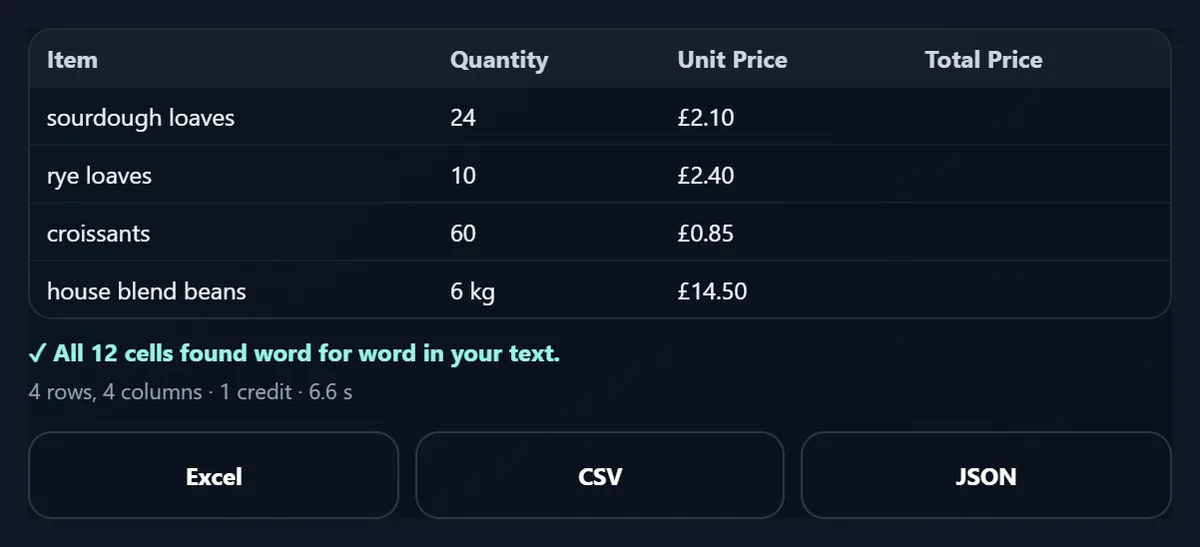
The AI part turns text into a table: a supplier's order email became four rows of items, quantities and prices, and every one of its 12 filled cells was found word for word in the email.
How to convert a file
- Drop the file Any picture, document, sheet, sound or text.
- Pick what it becomes Only the formats that make sense for it.
- Convert and download One file, or a ZIP for pages and slides.
Convert a Word file and turn an email into a table
A real recording of this tool: the sample Word newsletter dropped in and converted to a searchable PDF, then an order email turned into a table with AI, every cell checked.
- The sample Word newsletter is dropped in and recognised as a Word document.
- PDF is picked and the newsletter is converted.
- An order email is put in the table step and Make a table with AI pressed.
- The table comes back with every cell found in the email.
How do I convert a file?
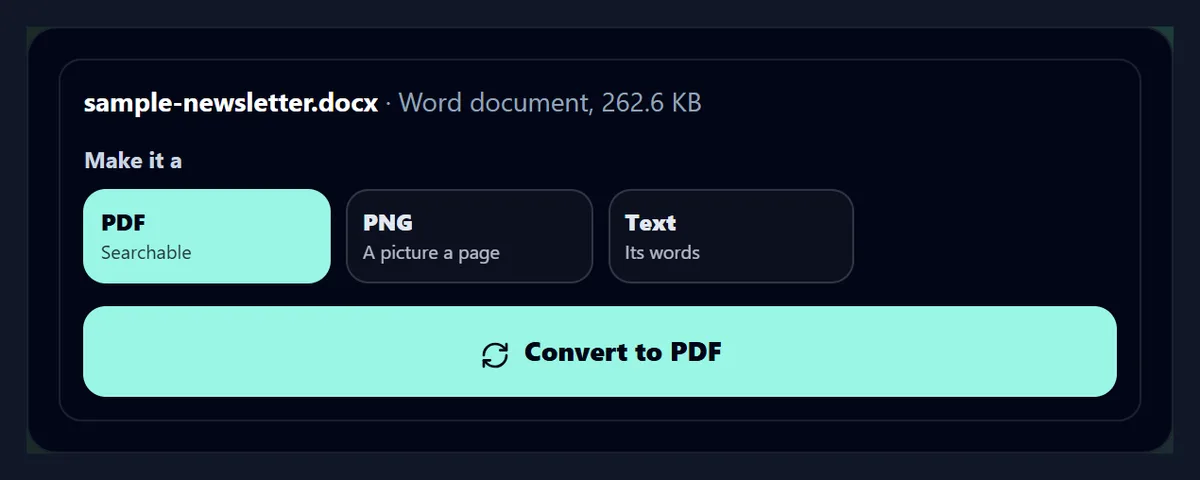
Drop it on the box or choose it. The tool reads the first bytes of the file to tell what it is, so a photo saved with the wrong extension, or a PDF called document.dat, is still recognised. It then shows what the file is, its size, and the formats it can become, with a line on each. Pick one and press Convert.
The figure shows the sample Word newsletter dropped in: a Word document of 262.6 KB, which can become a searchable PDF, a picture of each page or its text.
What can it convert, and how fast?
Pictures to PNG, JPG, WebP or PDF; PDFs to page pictures or text; Word documents to a searchable PDF, page pictures or text; PowerPoint decks to a searchable PDF or slide pictures; spreadsheets between Excel, CSV, JSON and Markdown; sound files to WAV; and text to Word or PDF. The table shows this page's samples, each converted in a browser tab, with what came out and how long it took.
What came out was checked each time: the 161.3 KB photo kept its 768 × 1376 pixels in every format; the 12-page handbook became 12 JPGs of 1239 × 1753 px, or 896 words of text; the newsletter a 3-page PDF; the deck a 6-page PDF or 6 slides of 2000 × 1125 px; the sales sheet kept its 1,464 rows and 5 columns each way; and the 247.6-second MP3 meeting, 2.9 MB, became a 48,000 Hz mono WAV. Pages and slides come out as one file each, downloaded together as a ZIP.
| From | To | Size (KB) | Time (s) |
|---|---|---|---|
| Photo (JPG) | PNG | 1,673.0 | 0.09 |
| Photo (JPG) | WebP | 121.4 | 0.14 |
| Photo (JPG) | 178.0 | 0.04 | |
| PDF handbook | JPG pages | 1,198.4 | 0.98 |
| PDF handbook | Text | 4.4 | 0.15 |
| Word newsletter | 600.8 | 0.57 | |
| Word newsletter | PNG pages | 1,981.1 | 0.35 |
| PowerPoint deck | 842.5 | 0.98 | |
| PowerPoint deck | PNG slides | 4,635.0 | 0.63 |
| Excel sales sheet | CSV | 60.9 | 0.04 |
| Excel sales sheet | JSON | 185.2 | 0.33 |
| CSV sales sheet | Excel | 37.7 | 0.11 |
| Meeting (MP3) | WAV | 23,208.3 | 5.32 |
Is a Word to PDF conversion faithful?
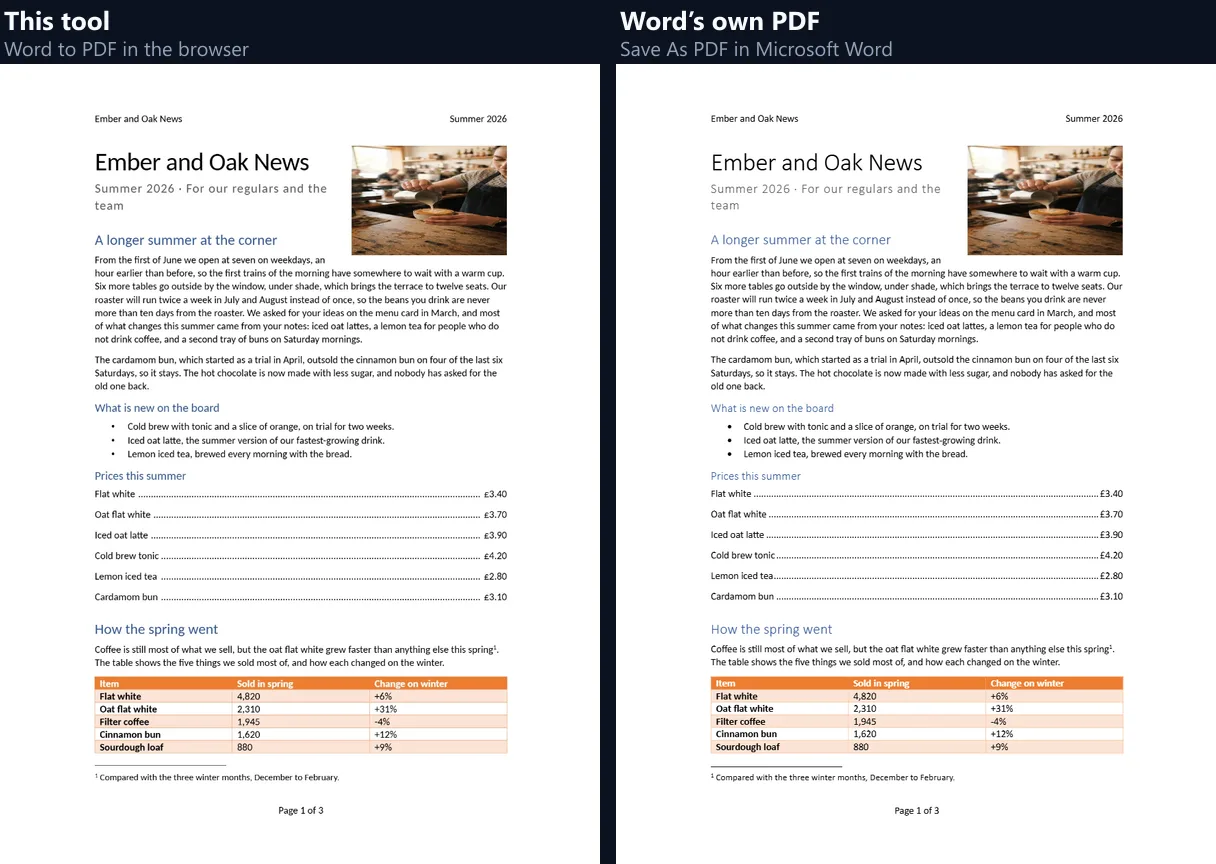
Very close to Word's own. The newsletter was converted here and saved as PDF by Microsoft Word itself, and the two compared: both have 3 pages, and all 225 different words in Word's PDF are in this tool's, which carries the text in invisible type over each page's picture so it can be searched and selected. The figure shows the first page of each.
Word's fonts are drawn with free fonts of the same widths where there are any, so lines break where Word breaks them; the layout engine is the one on HueFold's Word to PNG page.
What do I get?
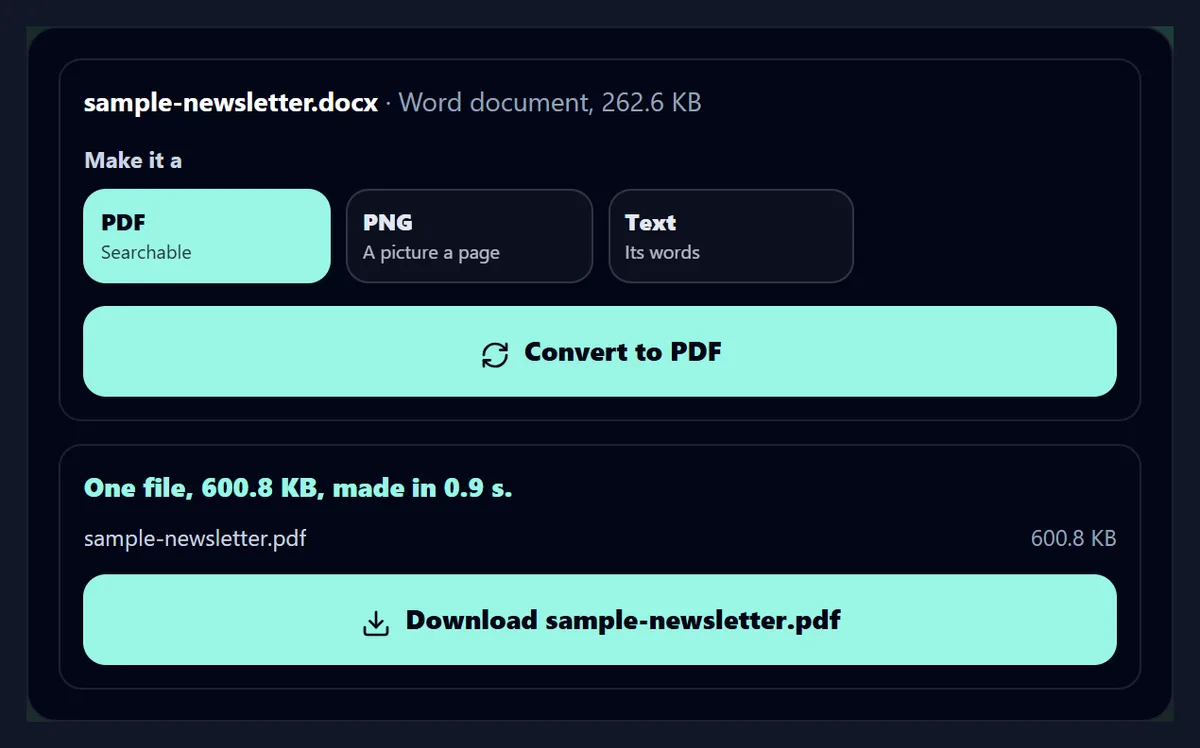
The file, named after yours with its new extension, and a line saying how many files were made, how big they are and how long it took. The newsletter's PDF was one file of 600.8 KB, made in 0.9 s. Pages and slides as pictures come as one file each, packed into one ZIP for a single download.
Nothing is kept: close the tab and the files are gone from HueFold's side, because they were never there.
How does it turn text into a table?
Paste the text into Text into a table and press Make a table with AI. The text goes to Gemini 2.5 Flash Lite, through HueFold, told to answer with a table in CSV, to copy every value as it is written and to leave a cell empty when the text does not give it. The answer is read back as a table you can download as Excel, CSV or JSON.
Name the columns you want, such as Item, Quantity, Price, and the table follows them; leave it blank and the AI chooses. The order email took 6.6 s and 1 credit.
How do I know the AI did not invent anything?
Every filled cell is looked for in the text you pasted, ignoring capital letters, spacing and thousands separators, and any cell that is not there word for word is shown in amber, with a count above the downloads. In the two samples on this page all 27 filled cells were found: 12 from the order email and 15 from the event notes.
It added a Total Price column to the order email, though, and left it empty rather than working out totals, as it was told; read the column names, which the check does not cover.
What kinds of text work?
Anything that lists things with details: order and booking emails, meeting notes, event lists, product descriptions, timetables, contact lists in a message. The event notes, three events written as running sentences, became a table of event, date, time, price and places, with times such as 10 to 11.30 am and prices such as £12 a child kept exactly as written.
Up to 4,000 characters go in one table; split longer texts into parts.

Can it change spreadsheet formats?
Yes: Excel workbooks (.xlsx), CSV and TSV files and JSON convert between each other and to a Markdown table. Dates stay dates, numbers stay numbers, and the Excel files it writes have a bold, frozen header row. The 1,464-row sales sample went from Excel to CSV in 0.04 s and back the other way in 0.11 s, every row and column there both times.
A workbook with several sheets converts its first sheet. To see what the numbers say, open the same file on AI Data Analysis.
What about PDFs and PowerPoint?
A PDF can become a picture of each page, at 150 dpi, or its text, one block per page in reading order; the 12-page handbook gave 896 words. A PowerPoint deck can become a searchable PDF, with hidden slides left out as PowerPoint leaves them, or a picture of each slide, drawn with the renderer of HueFold's PPT to PDF page.
For more control over each, with resolutions and page choices, use the PDF to JPG, PDF to PNG and PPT to PDF pages.
What does it do with sound files?
It decodes MP3, M4A, OGG, FLAC and other formats your browser plays and saves them as WAV, the uncompressed format that every editor and older device opens. WAV is large: the 4-minute MP3 meeting, 2.9 MB, became a 23.2 MB WAV. To turn a recording into words instead, use Transcribe Audio to Text.
Videos are not converted here: use the video converters, such as MOV to MP4.
Can it make a Word file from text?
Yes: a .txt or Markdown file becomes a Word document with each line as a paragraph, or a PDF on A4 pages with 2 cm margins. A short menu text converted here opened in Microsoft Word as a one-page document of 4 paragraphs and 23 words. Dropping a text file also fills the text box of the table step, in case it holds a list.
Headings and formatting are not guessed: Markdown marks come through as written.
How does it know what a file is?
From the file's first bytes, which every format starts with in its own way: a JPEG with FF D8 FF, a PNG with its signature, a PDF with %PDF, Word, PowerPoint and Excel files with the zip header of Office files and the names of the parts inside, such as word/ or ppt/. Only spreadsheets saved as text, sound and plain text are known by their names and types.
So a file whose extension was changed or lost is still converted as what it really is, and a file the tool cannot read is turned away before any work starts.
Are my files uploaded?
No. Every conversion runs inside this browser tab; nothing is sent to HueFold or kept. Only the text you paste into Text into a table is sent, and only when you press its button, to make the table with AI credits from your account, and it is kept in your account's AI history like other AI generations.
Fonts for Word and PowerPoint files may be fetched from Google Fonts; nothing about your file goes with them.
What does it not convert?
Older Office files (.doc, .ppt, .xls), which need saving in the newer format first; videos; and PDFs back into Word, which the Free PDF Converter does. Very large files are limited by your device's memory, since everything happens in the browser. A converted PDF of a Word or PowerPoint file is made of page pictures with searchable text over them, not editable text.
Animated GIFs convert their first frame.
Which single-format converters are there?
PPT to PDF, Word to PNG, PDF to PNG and PDF to JPG each give more choices for one kind of file; AI Data Analysis reads a spreadsheet and says what it shows; Transcribe Audio to Text turns recordings into words.
All of them, like this one, work in your browser.
Frequently asked questions
Is the AI Converter free?
Converting files is free; making a table from text uses AI credits from a HueFold account.
Are my files uploaded?
No. Files are converted in your browser; only text for the table step is sent.
Which files can I convert?
Pictures, PDFs, Word and PowerPoint files, Excel, CSV and JSON, sound files and text.
Is a converted PDF searchable?
Yes: Word and PowerPoint PDFs carry their text over each page's picture.
How does text become a table?
AI lays it out as rows and columns, and every cell is looked for in your text.
Can the AI make values up?
Any cell not found word for word in your text is shown in amber.
Can I convert old .doc or .ppt files?
Not yet: save them as .docx or .pptx first.
Does it convert videos?
No: use the video converters such as MOV to MP4.
How do I get many pages at once?
Pages and slides as pictures download together as a ZIP.
Related tools
- PPT to PDF — PowerPoint to a searchable PDF.
- Word to PNG — Word pages as pictures.
- PDF to PNG — PDF pages as PNGs.
- AI Data Analysis — What a spreadsheet says.
- Transcribe Audio to Text — A recording as text.
- Free PDF Converter — PDF to Word, text or PowerPoint.