AI Data Analysis
Drop a spreadsheet and see what it says: the trend, the busiest days, the days far from usual, the largest groups and the next month on the trend, worked out from every row and drawn as charts. Then have AI write it up in plain words, with every number in its answer checked against the figures.
Updated
How do you analyse data with AI?
Drop a CSV, Excel or JSON file on the tool, or paste a table. Every figure is worked out in your browser from every row, so it is exact and your file is not uploaded. Then press Write a summary with AI: only those figures, about 1,300 characters for the sample, are sent to the AI, which writes them up, and the tool checks that every number in its answer is one of them.
On a sample of a made-up café's six months of sales, with three events hidden in it, the tool found all three, and five AI summaries of it used 128 numbers, every one of them from the figures.
How to analyse a spreadsheet
- Open your data CSV, Excel, JSON, or a pasted table.
- Read the findings Trend, weekdays, unusual days, totals.
- Ask the AI A summary or an answer, numbers checked.
Analyse a sales spreadsheet with AI
A real recording of this tool: the sample café sales opened, its findings read, the data grouped by item, and an AI summary written and checked.
- The sample café sales open: 1,464 rows analysed in the browser.
- The findings list the trend, the busiest day, three unusual days and October on the trend.
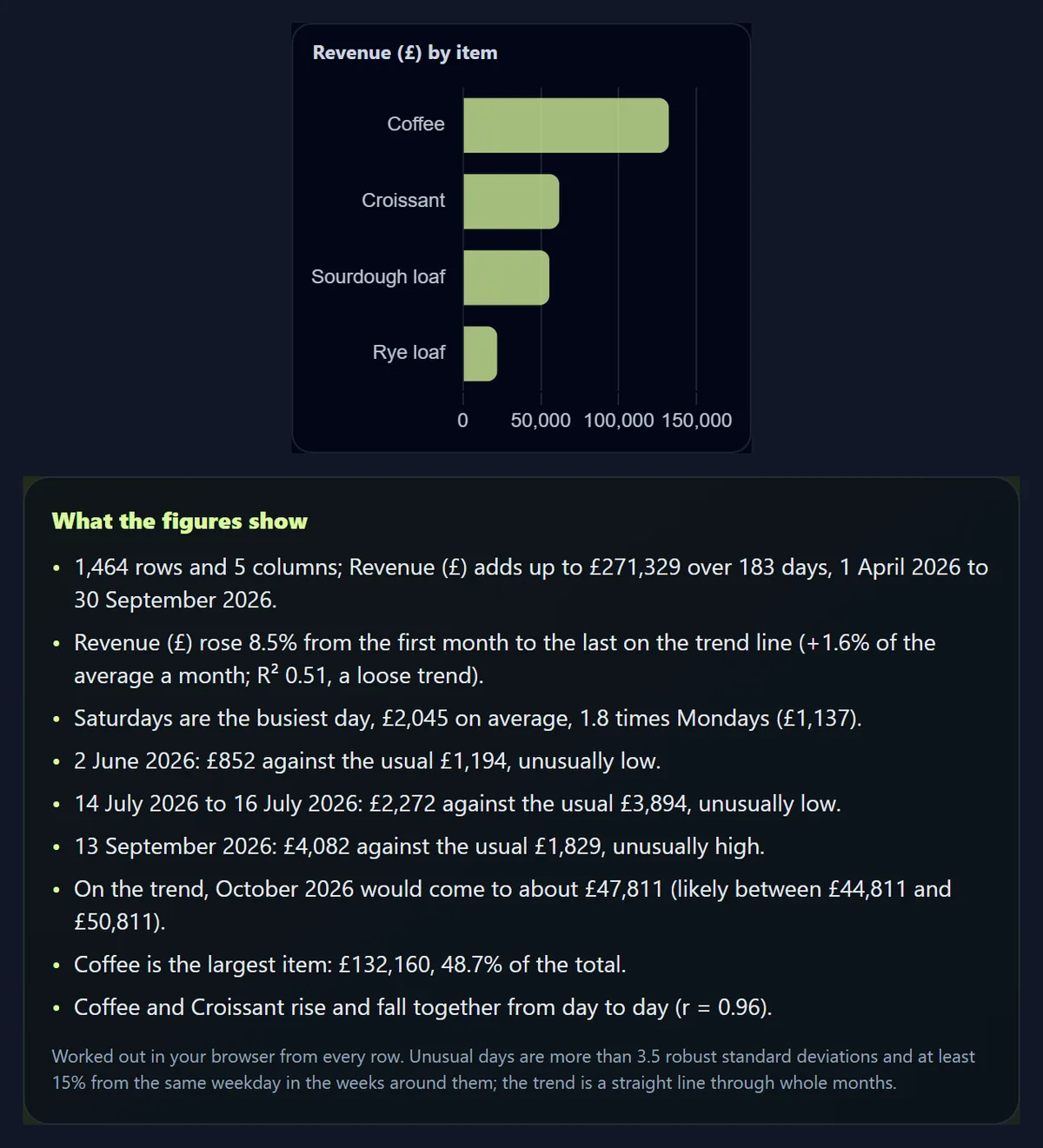
- Grouping by item shows coffee as the largest.
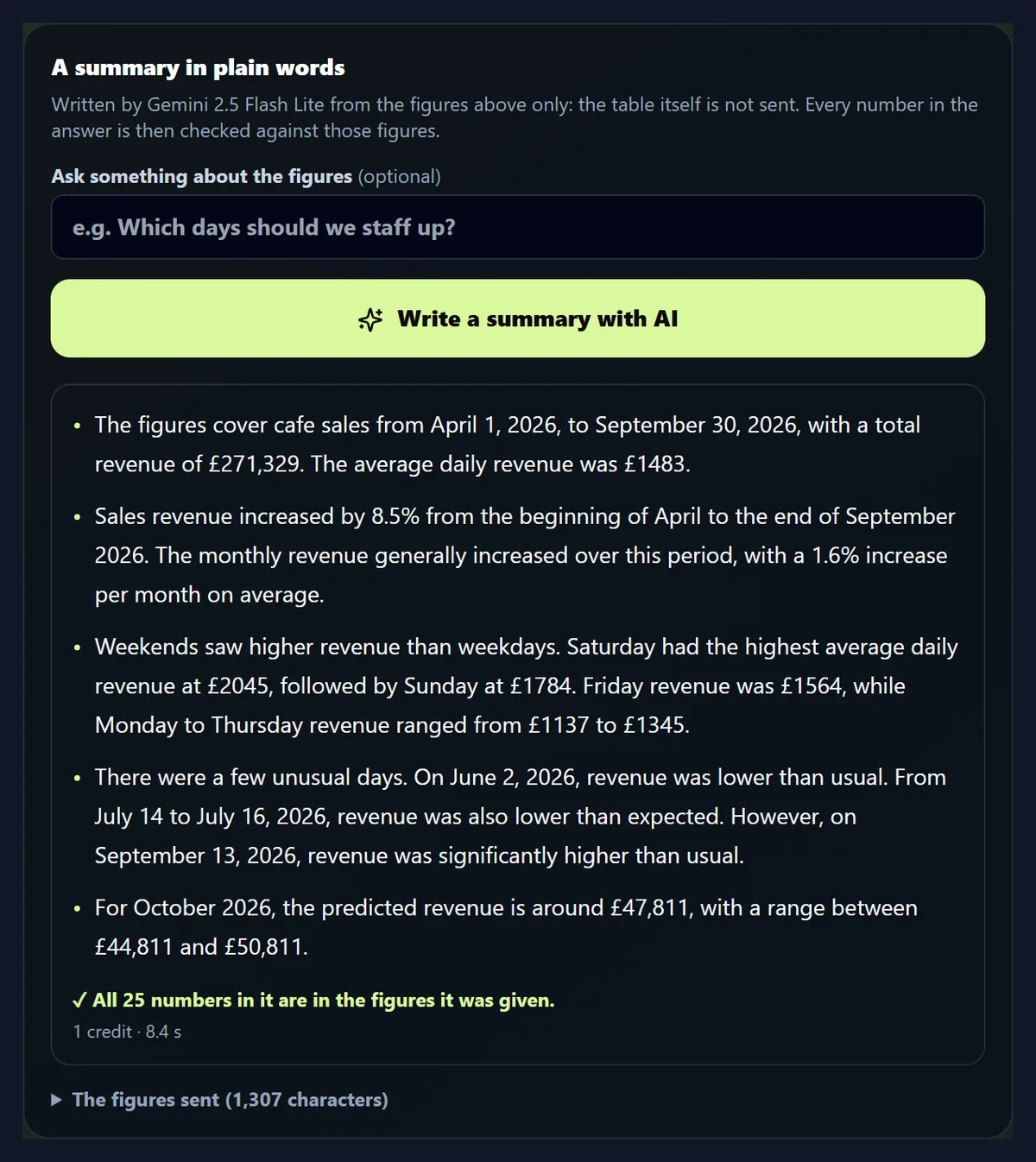
- Write a summary with AI sends the figures; the summary comes back with every number checked.
How do I analyse a spreadsheet here?
Drop the file or choose it. The tool reads every row, works out what each column holds (dates, numbers, categories or text) and picks what to analyse: the first date column, the measure most likely to matter, such as revenue or sales, and a small category to group by. Change any of them with the three menus. The charts and findings update at once.
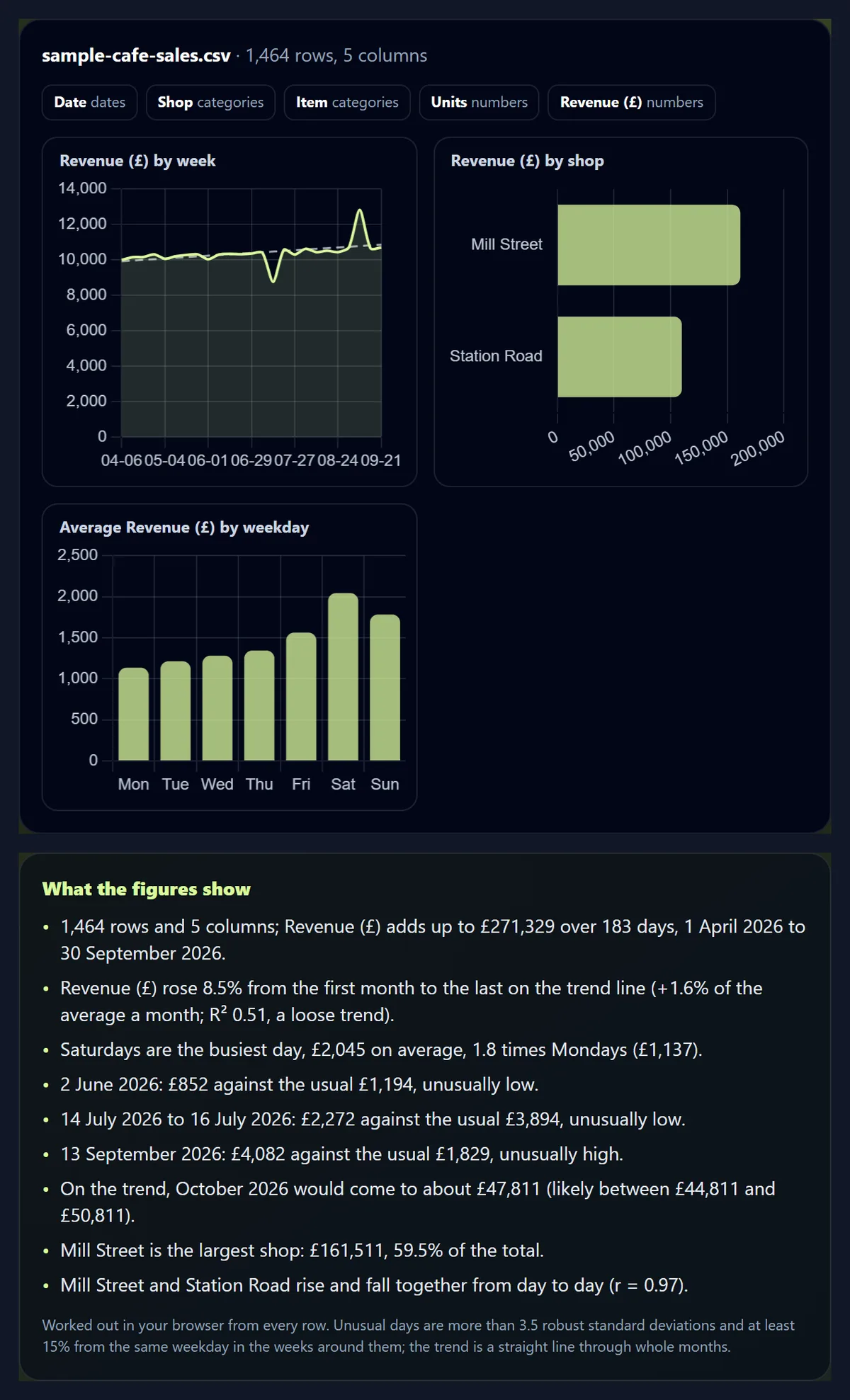
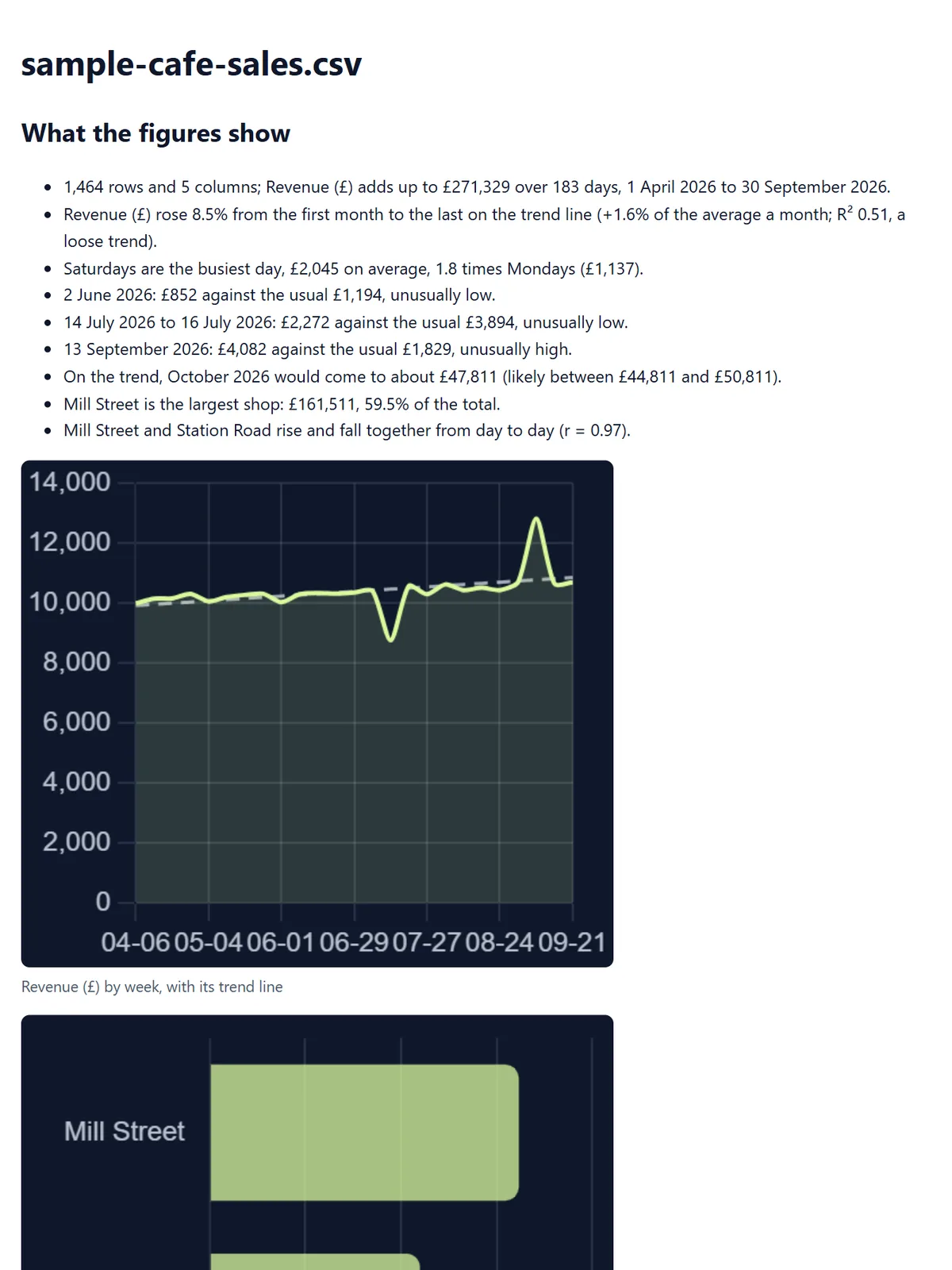
The figure shows the sample: 1,464 rows of daily sales by shop and item, from 1 April to 30 September 2026, analysed in your browser as soon as it opened.
Does it find what matters?
On the sample, yes. It was made with three events hidden among six months of normal days: a till fault on 2 June that recorded no coffee at one shop, the other shop shut for three days in July, and a street festival in September. The tool was not told; it found all three, each against what that day of the week usually brings in, and showed the July closure as one stretch of three days.
It also found the patterns built into the sample: weekends busiest and Saturday the best day, 1.8 times a Monday, and sales growing slowly over the six months.
| When | What was planted | Revenue (£) | Usual for those days (£) | Found by the tool |
|---|---|---|---|---|
| 2 June 2026 | A till fault: no coffee recorded at Mill Street | 852 | 1,194 | Yes, unusually low |
| 14 to 16 July 2026 | Station Road shut for three days | 2,272 | 3,894 | Yes, as one low stretch |
| 13 September 2026 | A street festival: Mill Street three times as busy | 4,082 | 1,829 | Yes, unusually high |
What does it work out?
For the measure you pick: its total and the span of dates; the trend, a straight line through every whole month (or week), with how much it rose or fell and how well the line fits; the average for each day of the week; the days far from usual; and the next month on the trend, with the range it is likely to fall in. For the category you group by: each group's total and share, and which groups rise and fall together from day to day.
Each finding is a sentence with its numbers, such as: Saturdays are the busiest day, £2,045 on average, 1.8 times Mondays (£1,137).
How are unusual days found?
Each day is compared with the same weekday in the four weeks before and after it, using their median, so a busy Saturday is compared with other Saturdays and not with Mondays. The gap is then measured against how far days usually stray, using the median of all the gaps (a robust standard deviation), so one big outlier cannot hide the others. A day more than 3.5 of those away from usual, and at least 15% above or below it, is unusual; the second rule stops ordinary wobbles in very steady data counting. Unusual days next to each other are shown as one stretch.
The till fault on the sample was the hardest to spot: one item missing at one shop took 29% off that day, £852 against the usual £1,194, and it was still found.
How is the trend worked out, and how far can I trust it?
It is a straight line through the totals of each whole month, so a month the data starts or ends part-way through does not drag it down. The tool says how much the line rose or fell from the first month to the last, and how well it fits: R², from 0 to 1, is the share of the ups and downs the line explains. On the sample it rose 8.5% with an R² of 0.51, a loose trend: months with five weekends sell more, and the July closure took a share out.
The next month on the trend comes with a range, from how far the months strayed from the line: £47,811 for October, likely between £44,811 and £50,811. It is the trend carried on, not a prediction of anything new.
Can I compare shops, products or regions?
Yes: choose the column to group by, and the tool totals the measure for each value, largest first, with its share, and draws them as bars. It also finds which groups rise and fall together from day to day. Grouped by item, the sample's coffee brought in £132,160, 48.7% of the total, and coffee and croissants moved most closely together (r = 0.96).
Grouped by shop, Mill Street made £161,511, 59.5%, and its days rose and fell with Station Road's (r = 0.97): both follow the same weekly rhythm.
What does the AI do?
It writes the figures up in plain words, or answers a question about them. The tool sends it the figures it worked out, the column names and the instruction to use only those numbers, and nothing else: not the table, not a single row. For the sample that is about 1,300 characters. The summary runs on Gemini 2.5 Flash Lite through HueFold, with AI credits from your account; each summary of the sample used 1 credit, and the five came back in 4.6 to 10.5 seconds.
You can read exactly what is sent under The figures sent, before you press the button.
How do I know the AI did not make numbers up?
The tool checks. Every number in the answer is looked for in the figures it was given, allowing for thousands separators and dates written out, and any number that is not there is named in amber under the answer. On the sample, five summaries used 29, 27, 19, 28 and 25 numbers and two answers to a question used 8 each: all 144 were in the figures.
The check confirms where the numbers came from, not what the words say about them: read the summary against the findings above it, which the tool worked out itself.
Can I ask a question about my data?
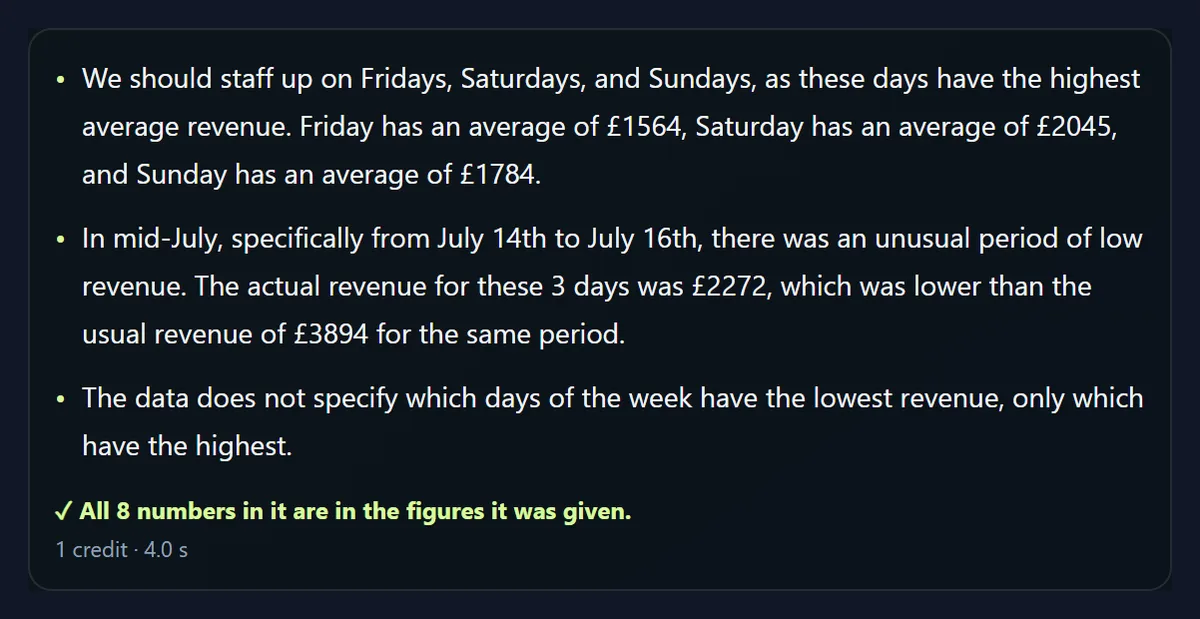
Yes: type it into Ask something about the figures and press Answer with AI. The answer comes from the same figures, so it can tell you which weekdays are busiest or what happened on an unusual day, but not things the figures do not hold, and it is told to say so. Asked which days to staff up and what happened in mid-July, it pointed to Fridays, Saturdays and Sundays and the low stretch from 14 to 16 July, with its 8 numbers all in the figures.
It cannot know why a day was unusual: the closure behind the July stretch is not in the data, so it called it low revenue. One answer also ended by saying the figures did not show which weekdays were lowest, though they did. The check covers the numbers, not every claim, so read answers against the findings.
Which files can I use?
CSV and TSV files (the separator, comma, semicolon, tab or bar, is worked out from the file), Excel workbooks (.xlsx, the first sheet, with dates read as dates), and JSON (a list of records, or columns of values). Or paste a table copied from a spreadsheet. The sample saved by Microsoft Excel as .xlsx gave exactly the same findings as the CSV.
Data with a row a week or a month is analysed in weeks or months: a pasted table of five monthly visitor counts gave its trend, 38.3% up, and June on the trend. Old .xls files need saving as .xlsx or .csv first.
Can I save the analysis?
Yes. Download the report saves one HTML file with the findings, the charts as pictures, the totals by group and the AI summary if you made one; it opens in any browser, offline, and prints cleanly. Download the figures saves them as JSON, the same figures the AI is sent, for a spreadsheet or another tool.
The sample's report, with its three charts, was 119 KB.
Is my data uploaded?
Not for the analysis: the file is opened and every figure worked out in this browser tab. Only if you ask for a summary or an answer are the figures sent, through HueFold, to the AI model, and kept in your account's AI history like other AI generations. The rows themselves never leave your device.
That makes it suitable for sales, budgets and other numbers you would not paste into a chatbot.
What can it not tell me?
Why something happened: the figures show that July 14 to 16 were low, not that a shop was shut. It analyses one measure at a time, needs a date column for trends and weekdays, and treats the trend as a straight line, so a seasonal business needs more than six months to see its seasons. It is not a statistics package: no significance tests, regressions on several columns or pivot tables.
For those, download the figures or the cleaned table and carry on in a spreadsheet.
What else works with data and documents here?
AI Converter turns tables between CSV, Excel and JSON and makes a table out of pasted text; PPT to PDF saves a deck you present these findings in; Content Planner plans the posts that share them.
Summarizer shortens long reports, and Translate puts findings into 41 languages.
Frequently asked questions
Is AI Data Analysis free?
The analysis and charts are free; an AI summary uses AI credits from a HueFold account.
Is my spreadsheet uploaded?
No. The figures are worked out in your browser; only they are sent if you ask for a summary.
Which files does it read?
CSV, TSV, Excel (.xlsx) and JSON, or a pasted table.
Can the AI make numbers up?
Every number in its answer is checked against the figures, and any that is not there is shown.
How are unusual days found?
Each day against the same weekday around it: more than 3.5 robust standard deviations and 15% away.
Does it forecast?
It carries the trend on one month, with a likely range; it does not predict new events.
Can I ask questions about my data?
Yes, and the answer is written from the same figures, its numbers checked.
Can I download the results?
Yes: an HTML report with the charts, and the figures as JSON.
Does it work with weekly or monthly data?
Yes: it sees how often the data has a row and analyses it in those steps.
Related tools
- AI Converter — Tables between CSV, Excel and JSON.
- PPT to PDF — Save the deck you present findings in.
- Summarizer — Shorten long reports.
- Translate — Findings in 41 languages.
- Content Planner — Plan the posts that share them.
- Transcribe Audio to Text — Meeting recordings as text.