AI Sound Effect Generator
Describe a sound and get it: doors, rain, crowds, whooshes and more, at the length you choose or one the model picks, looping if you like, as an MP3 for your videos.
Updated
How do you make a sound effect with AI?
Describe the sound in a sentence, choose a length or Auto, tick Loop seamlessly for a background, and press Generate the sound effect. Play the MP3 with its waveform, make another take if you like, and download the one you want.
Five sounds made on this page came back in 5.1 to 11.3 seconds; with a length set, each was exactly as long as asked.
How to generate a sound effect
- Describe it Source, action, material and space.
- Choose a length Auto, or 1 to 20 seconds; loop for backgrounds.
- Generate Play it with its waveform; make more takes.
- Download Save the MP3 you like.
Generate a sound effect with AI
A real recording of this tool: the footsteps idea chosen, a 5-second length set, the sound generated and played.
- The footsteps idea is chosen.
- A 5-second length is set.
- The sound effect is generated.
- It plays with its waveform.
How long is each sound effect?
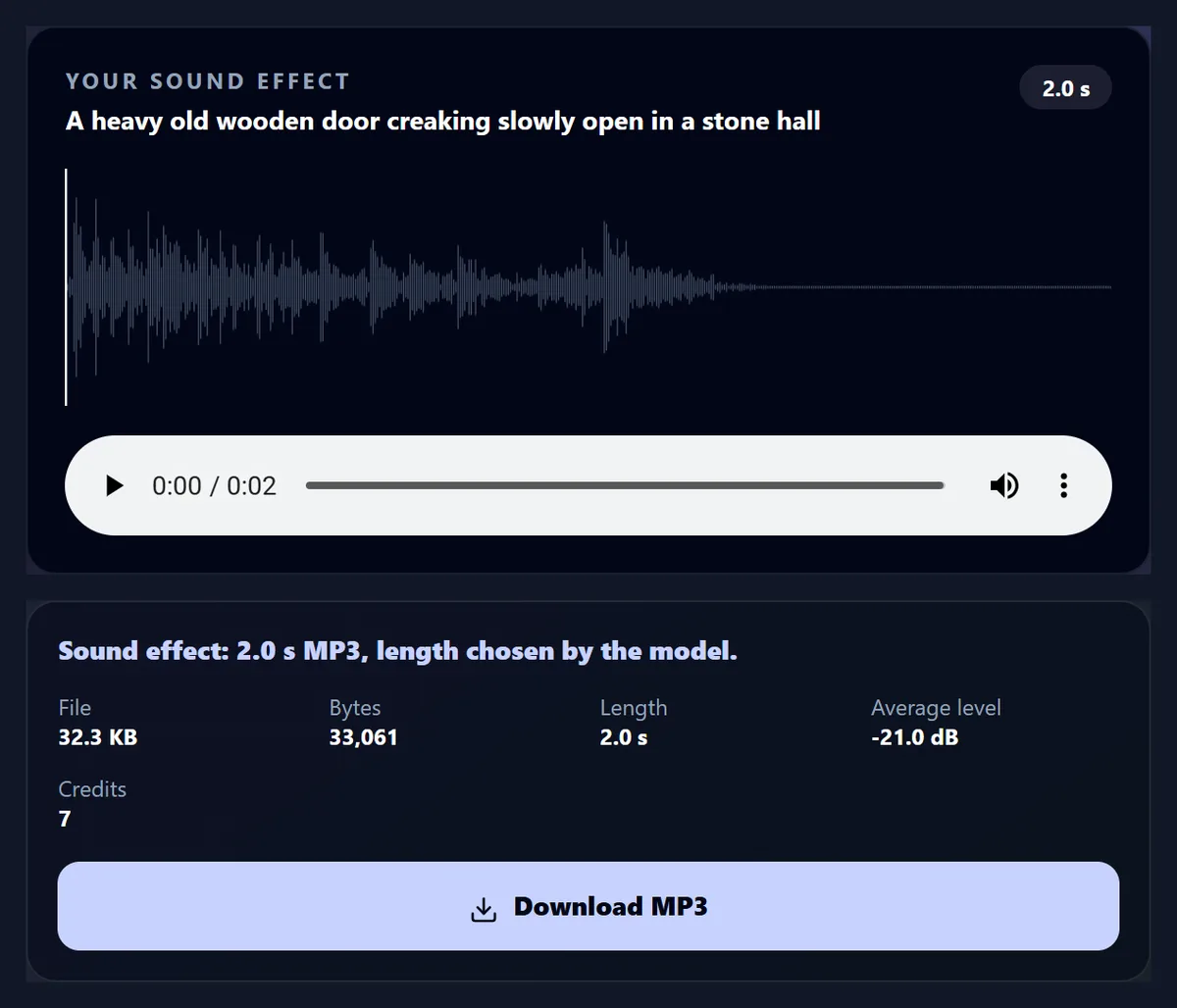
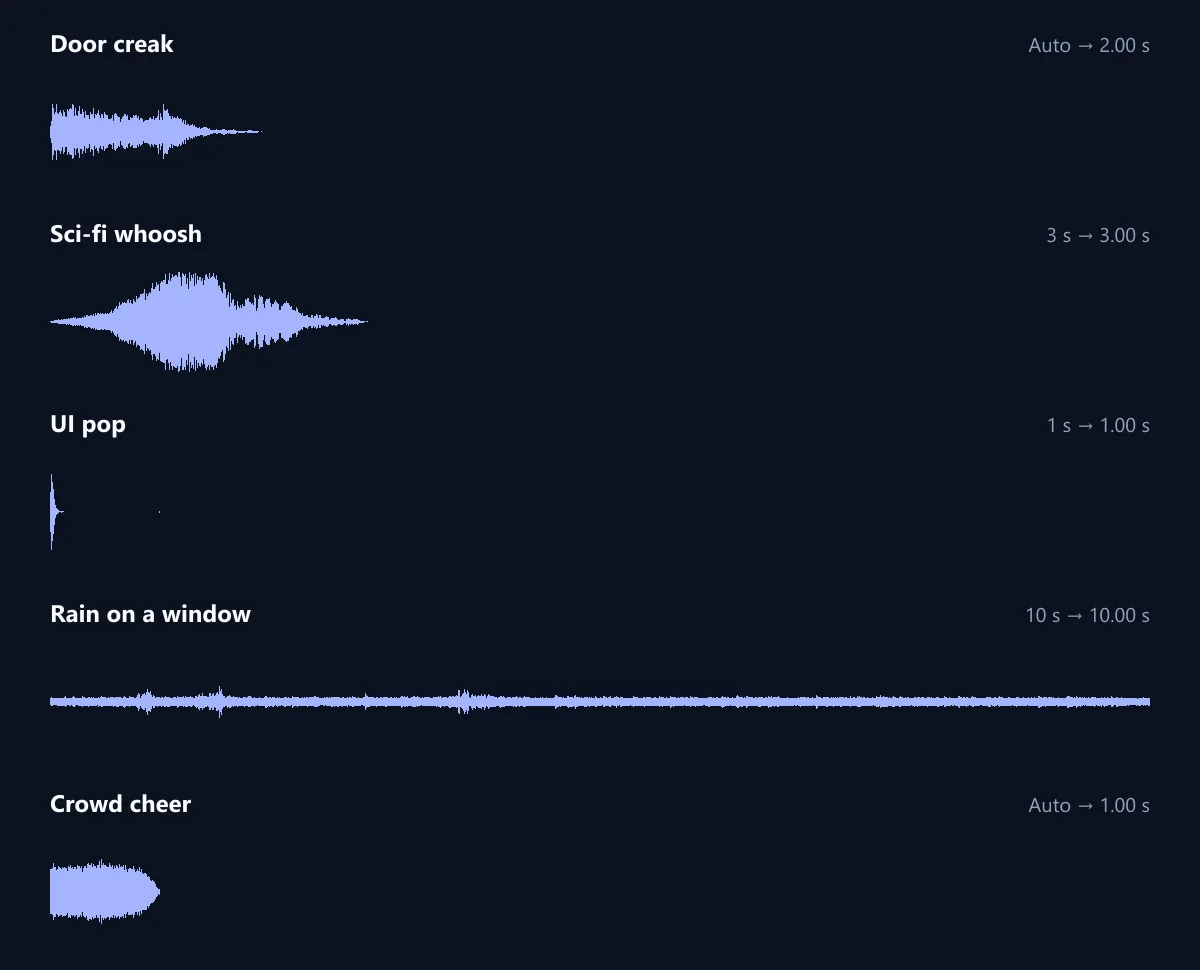
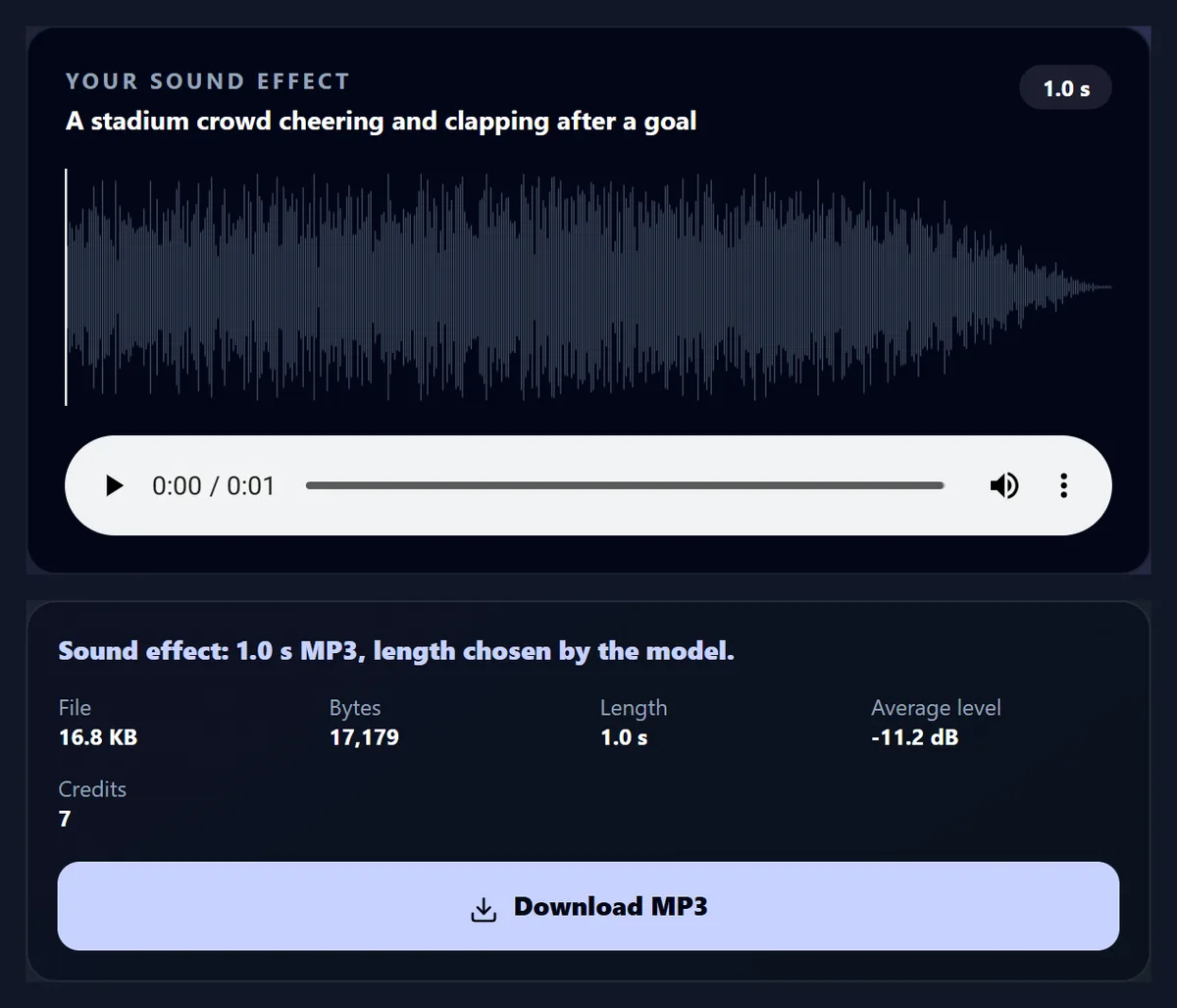
As long as you ask, or as long as suits the sound on Auto. With a length set, every sound came back exactly that long: the whoosh 3.00 seconds, the pop 1.00, the rain 10.00. On Auto the model chose 2 seconds for the door creak and just 1 for the crowd cheer, which is short for a cheer: set a length when you need one.
Loudness varies a lot from sound to sound: the sci-fi whoosh averaged -10.8 dB and the rain on a window -39.0 dB. Balance them in your video editor rather than expecting them to match.
| Sound | Asked for | Length | Average level |
|---|---|---|---|
| Door creak | Auto | 2.00 s | -21.0 dB |
| Sci-fi whoosh | 3 s | 3.00 s | -10.8 dB |
| UI pop | 1 s | 1.00 s | -24.6 dB |
| Rain on a window | 10 s | 10.00 s | -39.0 dB |
| Crowd cheer | Auto | 1.00 s | -11.2 dB |
How do I generate a sound effect?
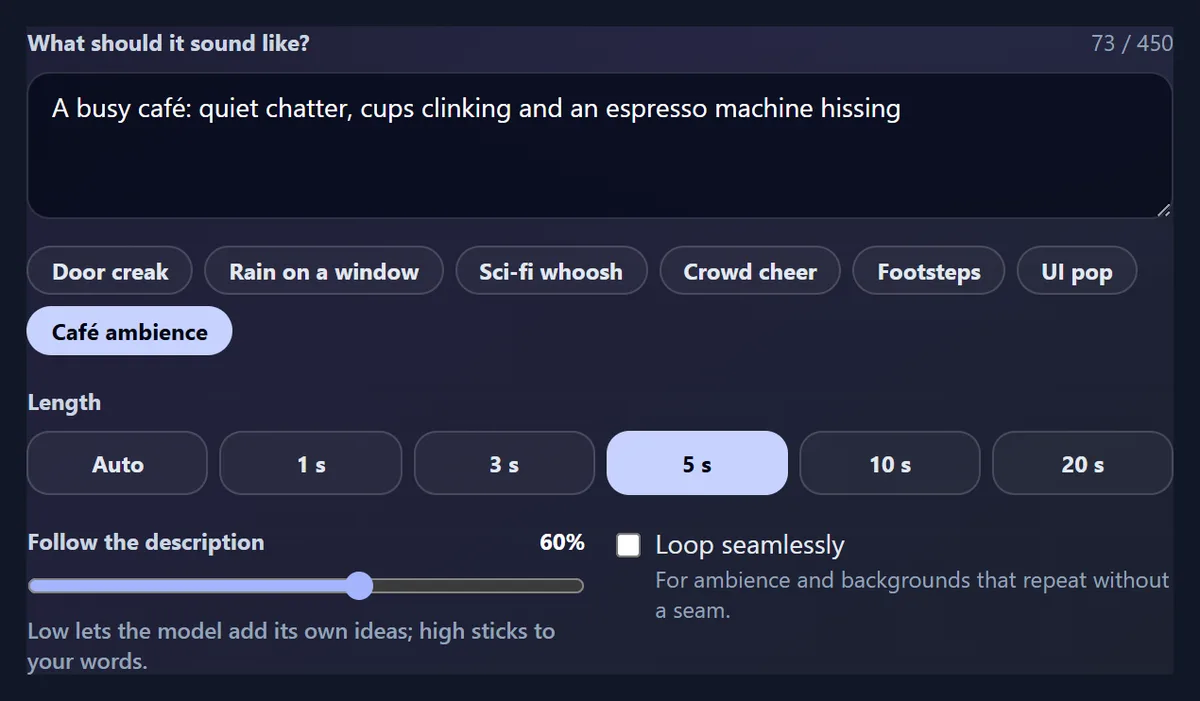
Describe the sound in a sentence, or start from one of the ideas. Choose a length, or Auto to let the model decide; set how closely it should follow your words; tick Loop seamlessly for a background that repeats. Press Generate the sound effect: the MP3 appears with its waveform to play, and you can make another version as a new take before downloading the one you like.
The door creak in the figure, “a heavy old wooden door creaking slowly open in a stone hall”, came back in 11.3 seconds as a 2-second MP3.
How should I describe the sound?
Name the source, the action and the space: “footsteps on crunchy gravel, walking at a steady pace” works better than “walking”. Add the material (wood, metal, glass), the size (a heavy door, a small bell), the distance (close, far away) and the mood (tense, cosy). For a sequence, say it in order: “a whoosh as a spaceship flies past, ending in a deep rumble”.
Leave out what you do not want rather than saying “no”: describe a clean sound instead of “without music”. Descriptions can be up to 450 characters.
What does Follow the description do?
It sets how literally the model takes your words, from 0% to 100%. Low lets it add its own ideas, which can give richer or more surprising sounds; high sticks to what you wrote. The tool starts at 30%. If a sound comes back with things you did not ask for, raise it; if it sounds thin or generic, lower it.
Try the same description at two settings and compare the takes.
Can I make a sound that loops?
Yes: tick Loop seamlessly and the sound is made to repeat without a jump, for rain, wind, a crowd, an engine or room tone under a scene. The 10-second rain loop started and ended at similar levels, -43.8 dB in its first 50 milliseconds and -47.6 dB in its last, so the join is soft.
That rain was also quiet, -39.0 dB on average, which suits a background but may need turning up in your editor.
Which length should I pick?
A second or less for clicks, pops and notifications; one to three seconds for whooshes, hits and doors; five to twenty seconds for ambience and backgrounds, ideally looped. Auto suits one-off sounds whose length you do not mind, but it can be short, as the one-second crowd cheer showed.
Lengths here go up to 20 seconds; for a longer background, make a loop and repeat it in your editor.
Does it cost credits?
Yes, a few: each sound in our tests used 7 credits, whatever its length. Generating needs a free HueFold account; the tool shows the credits each sound used. A sound that fails is not charged.
Sounds took 5.1 to 11.3 seconds to come back.
Can I keep several versions?
Yes: every sound you make in a visit is kept as a take, with its own waveform, length and file. Generate the same description a few times, or with different settings, and switch between the takes to pick the best; each is also saved in your HueFold account.
The same description gives a different sound each time, which is useful for variety, such as several footsteps that do not repeat exactly.
What file do I get?
An MP3 at 44.1 kHz and 128 kbit/s: 16 KB a second, so the 10-second rain was 157.2 KB and the one-second pop 16.8 KB. MP3 plays in every video editor and browser.
To put a sound on a video at its moment, use sound effects for video, which places sounds on a timeline; or add music to video for a background under a whole clip.
Should I generate a sound or use a ready-made one?
For common sounds such as a whoosh, a pop or a click, the sound effects for video page has twelve ready-made effects that are free and instant. Generate a sound when you need something specific: a particular door, a crowd in a particular place, a spaceship, an ambience for a scene.
Generated sounds are made for you each time, so no one else has the exact same file.
What are AI sound effects good for?
Foley for short films and animations, transitions and hits for social videos, ambience under podcasts and presentations, notification and button sounds for apps and prototypes, sound for games, and quick placeholders while you find or record the final sound.
Pair them with the AI voice generator for narration and the AI caption generator for captions.
What is Foley, and can AI do it?
Foley is the everyday sound of a film added after shooting, such as footsteps, cloth, doors, cups and keys, named after Jack Foley, who pioneered it. Generated sounds work well for it: describe the action and the surface, “footsteps on crunchy gravel” or “a ceramic cup set down on a wooden table”, at the length of the moment.
Make one sound per action, so each can be placed exactly on its frame in your editor.
How do I make a background ambience?
Describe the place rather than a single sound, such as “a busy café: quiet chatter, cups clinking and an espresso machine hissing”, choose 10 or 20 seconds, and tick Loop seamlessly. Keep Follow the description low to medium so the scene has some variety.
Ambience should sit well under speech: the rain loop came back quiet already, and others may need turning down in your editor.
How do I make hits, whooshes and risers?
Name the material and the weight, “a heavy metal door slamming” or “a deep cinematic boom”, and keep the length short: one to three seconds for a hit or a whoosh. For a riser, say how it should build and where it ends, “a rising tension sweep ending in a sudden stop”, and give it three to five seconds.
The sci-fi whoosh here was asked for 3 seconds and came back exactly 3.00, peaking just under full scale.
Can I combine several sounds?
Yes, in a video editor: download each sound and place them on the timeline, overlapping where they should. For one sound under a whole video, use add music to video on this site; for quick ready-made effects at set moments, sound effects for video places twelve built-in effects on a timeline.
Keep each generated sound short and specific; combining several simple sounds gives more control than one long description.
What if the sound is not what I wanted?
Generate it again: each run is a new sound. If it keeps missing, change the description rather than repeating it: add the material, the size or the distance, or take out details the model is getting wrong, and move Follow the description up to stick closer to your words.
Set a length if Auto keeps coming back too short.
Can it make sounds for apps and websites?
Yes: short interface sounds such as a pop, a click, a chime or a soft notification are a good fit. Ask for one second or less and describe the feel, “a soft, friendly bubble pop”, rather than a musical note. The UI pop here came back as a single short sound at the start of a one-second file, with silence after it.
Trim the silence in an audio editor if your app needs the sound to end exactly when it does.
Why are some sounds louder than others?
Each sound is made at the level that suits it: a crowd cheer is dense and loud, rain is soft and spread out. The five sounds here averaged from -11 dB to -39 dB, and the crowd cheer reached the top of the scale. Match them to your video in your editor, by ear, with the voice as the reference.
For a steady background, quieter is usually better than louder.
Does the description change the length on Auto?
It can: on Auto the model picks a length that suits what you describe, two seconds for the door creak and one for the crowd cheer here. A description that implies a long event, such as a storm passing or a train arriving and leaving, tends to suit a longer length, but setting it yourself is the only way to be sure.
With a length set, every sound we made came back exactly that long.
Can I use it on my phone?
Yes, in a current browser on Android or an iPhone. Turn the sound on to hear the takes; the MP3 downloads to your phone, ready for any video app.
Headphones help to judge quiet sounds such as rain.
What is sent, and where?
Your description is sent to HueFold, which asks ElevenLabs to make the sound, and the MP3 is saved in your HueFold account. Nothing else from your device is sent.
Do not put private information in a description.
Frequently asked questions
How do I make a sound effect with AI?
Describe the sound, choose a length, and press Generate the sound effect.
How long can a sound be?
Up to 20 seconds here, or Auto.
Is it exactly the length I ask for?
In our tests, yes: 1, 3 and 10 seconds came back as 1.00, 3.00 and 10.00.
Can it loop?
Yes, tick Loop seamlessly.
Does it cost credits?
Yes, 7 credits a sound in our tests.
What file do I get?
An MP3 at 128 kbit/s.
Can I put it on a video?
Yes, with sound effects for video or add music to video.
Does each run sound the same?
No. Each take is a new sound.
Related tools
- Sound Effects for Video — Twelve free effects on a timeline.
- AI Voice Generator — A voiceover from a script.
- Add Music to Video — A sound under a whole clip.
- AI Caption Generator — Captions from the voice.
- Remove Audio From Video — Silence a clip first.
- Beat Sync — Cut clips to music.