AI To SVG Converter
Turn an Adobe Illustrator .ai file into an SVG for the web, without Illustrator and without uploading it. Shapes stay vectors, letters become exact outlines, gradients and clipping are kept, and the SVG is checked against the original drawing pixel by pixel before you download it.
Updated
How do you convert an AI file to SVG?
Drop the .ai file on the tool and press Convert to SVG. The tool draws the artwork from the PDF part Illustrator saves inside the .ai, writes down every shape, line, gradient and clip as it draws, and turns them into SVG: real vectors, not a traced picture. It then draws the SVG back and compares it with the original drawing, and tells you how closely they match.
The sample logo, a 78.3 KB Illustrator file, became a 7.8 KB SVG of 11 vector shapes that matched the original drawing on 99.85% of pixels, the rest on edges. It took under a second, in the browser.
How to convert an Illustrator file to SVG
- Open the .ai file Drop it, choose it, or try a sample.
- Convert to SVG The whole artboard or the artwork.
- Check and download See the match, read the code.
Convert an Illustrator .ai file to SVG
A real recording of this tool: the sample logo converted to an SVG and checked, its code opened, then a test file with gradients and text converted.
- The sample logo opens: a 78.3 KB Illustrator CC file.
- Convert to SVG writes it as 11 vector shapes, 7.8 KB, matching the original on 99.85% of pixels.
- The SVG code opens below the result: plain paths of Bézier curves.
- A test file with gradients, text and a picture converts the same way, its fading sun kept as a picture.
How do I convert an Illustrator file to SVG here?
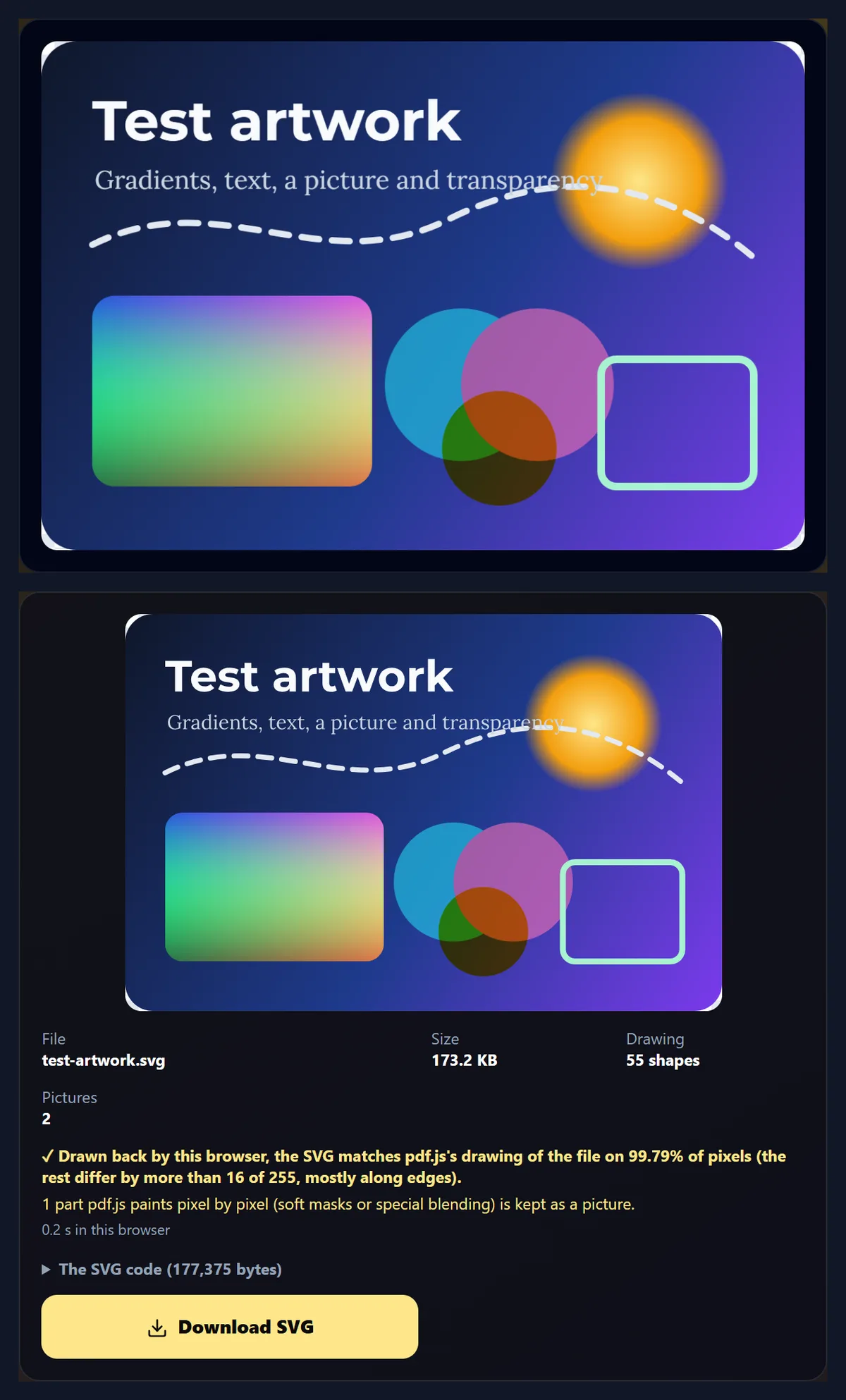
Drop the .ai file on the tool or choose it. The tool shows the artboard as other programs see it and what the file holds: the program that made it, the artboard size, its colours, its layers and how much of it is Illustrator's own editing data. Choose Whole artboard or Artwork only, which ends the SVG at the artwork's own bounds, and press Convert to SVG. The result shows the SVG on a checkerboard, its size, how many shapes and pictures it holds, the check, and the code itself; Download SVG saves it.
The figure shows the third sample, a test PDF made with Inkscape that has what the two logos lack: gradients, real text in two fonts, a picture, a dashed line and transparency. It converted in 0.2 seconds.
How big is the SVG?
Usually far smaller than the .ai, because an SVG holds only the drawing: none of Illustrator's editing data, colour profiles or previews. The table shows the three samples converted by this tool, against Inkscape 1.4's own plain SVG export of the same files, in KB of 1,024 bytes.
Inkscape's banner SVG is large because it embeds the file's CMYK colour profile, U.S. Web Coated (SWOP) v2, which a browser does not need. The test artwork is the other way round: this tool keeps its fading sun as an embedded picture (see below), Inkscape writes it as a gradient.
| File | Original (KB) | SVG (KB) | Inkscape's SVG (KB) |
|---|---|---|---|
| Logo (.ai) | 78.3 | 7.8 | 11.5 |
| Banner (.ai, CMYK) | 1,599.3 | 13.5 | 938.0 |
| Test artwork (PDF) | 89.5 | 173.2 | 7.1 |
How close is the SVG to the original?
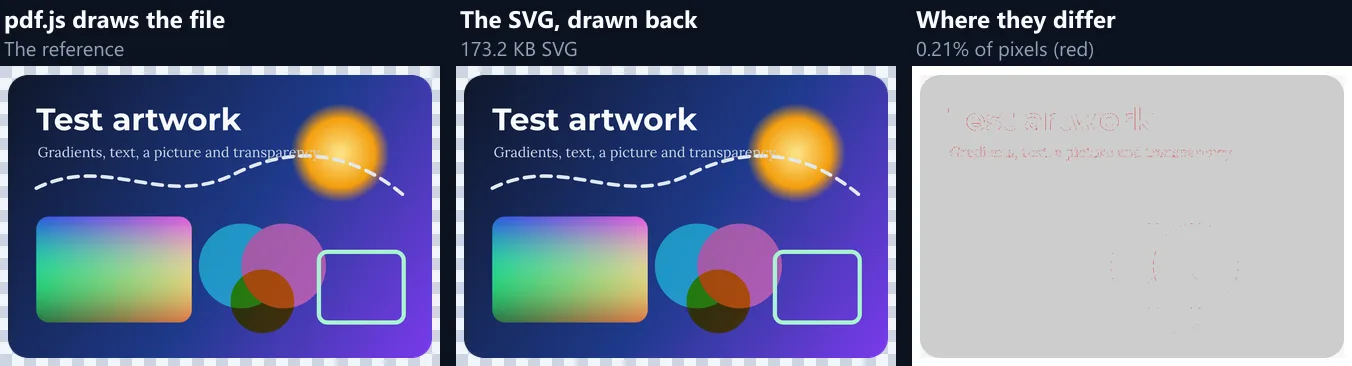
Very close, and the tool measures it on every conversion. It draws the original with pdf.js, the PDF reader built into Firefox, draws the SVG back with the browser at the same size, and counts the pixels whose colour differs by more than 16 of 255. The table shows the three samples, and Inkscape 1.4's own SVG of each, measured the same way.
Inkscape kept the test artwork's words as live text in Montserrat and Lora, which only look right where those fonts are installed (drawn in Chrome on the test laptop, without them, they fell back to other fonts), and it dropped the yellow circle's multiply blend. This tool writes letters as outlines and keeps the blend.
| File | This tool's SVG (%) | Inkscape's SVG (%) |
|---|---|---|
| Logo (.ai) | 0.15 | 0.14 |
| Banner (.ai, CMYK) | 0.04 | 0.04 |
| Test artwork (PDF) | 0.21 | 5.41 |
How does it turn the artwork into vectors?
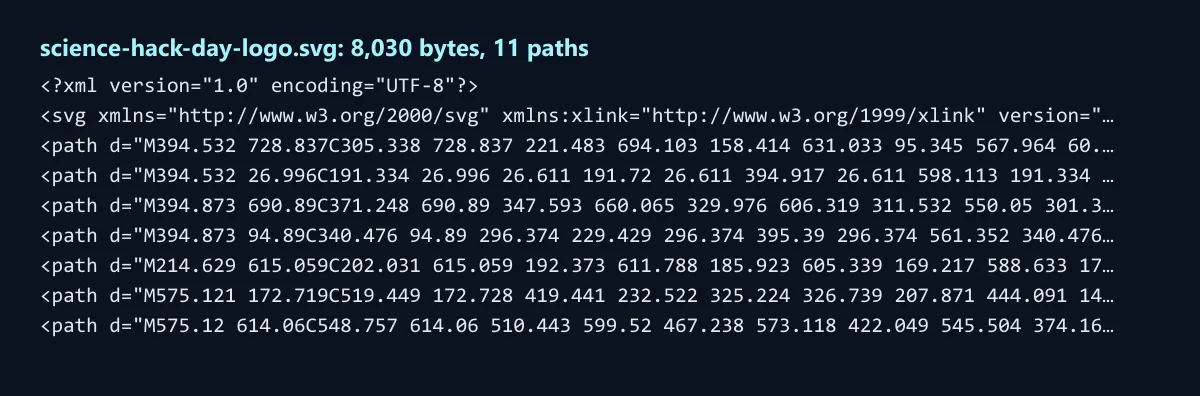
By watching it being drawn. pdf.js draws the .ai file's PDF part onto a canvas as usual, but through a recorder that writes down each step with everything in force at that moment: the shape's path, its colour or gradient, its line width, caps, joins and dashes, its transparency and blend mode, and the clipping around it. Text is drawn from the font's own letter shapes, so every letter is recorded as its exact outline. The recording becomes SVG: one path per shape, with neighbouring shapes in the same colour joined into one path when they do not overlap.
Nothing is traced from pixels, so curves stay curves: the logo's circle is the same few Bézier curves Illustrator saved.
Why SVG instead of PNG?
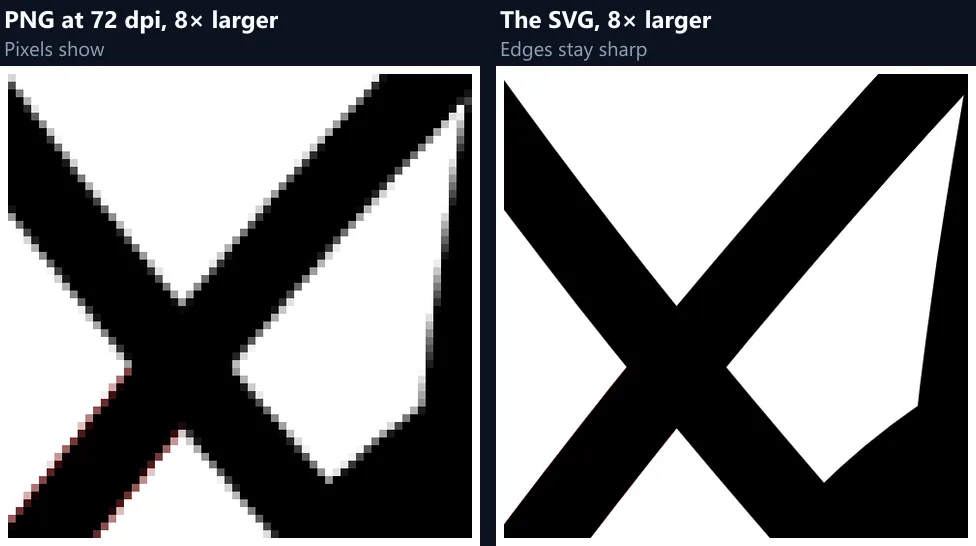
Because an SVG stays sharp at any size and is usually smaller. A PNG has a fixed number of pixels, so enlarging it shows them; an SVG is redrawn from its curves at whatever size it is shown, on any screen. The figure shows where the logo's thin orbits cross, enlarged 8 times: from a PNG at 72 dpi, and from the SVG.
SVG suits logos, icons and simple illustrations on websites and in apps. For photos, or artwork mostly made of pictures, a PNG or JPG is the better format: AI to PNG makes one from the same file.
What happens to text?
Letters become outlines: exact vector shapes of each letter, drawn from the font embedded in the .ai file. The SVG then looks the same everywhere without the font installed, which matters for logos and headings in brand fonts. The price is that the words are no longer editable text, and screen readers cannot read them; for text people need to read on a web page, use real HTML text next to the graphic.
In the test artwork the two lines of text, in Montserrat Bold and Lora, came out as outlines matching the original drawing.
Does anything stay a picture?
Pictures placed in the artwork stay pictures, embedded in the SVG as PNG (or JPEG for large photos without transparency). So does anything pdf.js has to paint pixel by pixel: soft masks, as in the test artwork's sun that fades to clear at its edge, and some blend and knockout groups. Those parts are embedded as pictures of themselves, so they still look right, and the tool says how many there are.
Neither logo has any: both came out as pure vectors, with no picture in the file.
What happens to CMYK colours?
They become RGB, because SVG colours on the web are RGB. pdf.js uses the colour profile embedded in the file, so the sample banner's CMYK black is written as #040708, the colour that ink makes on that press, and its unprinted white as #fdfeff. If the colours must stay CMYK, for a printer, convert to PDF instead.
The SVG also keeps everything the file draws, hidden or not: both samples have a red shape tucked under one black orbit, which shows only as a faint red edge in pdf.js and in Inkscape alike, and it is in the SVG too.
Will the SVG open in other programs?
Yes: it is standard SVG, paths, gradients, clipping paths and embedded pictures, with one unit per point. Opened in Inkscape 1.4 and drawn at 96 dpi, the three sample SVGs differed from Inkscape's drawing of the original files on 0.49%, 0.50% and 3.84% of pixels, mostly single pixels along edges. Most of the test artwork's 3.84% is its multiply-blended circle: Inkscape draws the blend from the SVG, but leaves it out when it opens the original PDF.
Browsers show it directly, in an img element or inline in the page.
How long does it take?
Under half a second for each sample, in Chrome on the test laptop, check included: the middle of three runs was 0.2 seconds for the logo and the test artwork and 0.4 seconds for the banner. The conversion happens while the file is drawn once, so it takes about as long as drawing it; then the SVG is drawn back once more for the check.
The first file you open takes a moment longer while the PDF reader loads.
How do I use the SVG on a website?
Like any picture: upload it and use it in an img element, as a CSS background, or paste its code into the page. Because the SVG has a viewBox, it scales to whatever width you give it and stays sharp, so one file serves phones and large screens alike. The sample logo is 7.8 KB as SVG, against 539.4 KB for the same artwork as a 300 dpi PNG.
Give the img element alt text describing the logo or graphic, since the letters in the SVG are shapes a screen reader cannot read.
Is my file uploaded?
No. The file is read, drawn and converted inside this browser tab; nothing is sent to HueFold or anyone else. There is no account and no watermark. One artboard is converted at a time; choose it from the page buttons under the preview.
Files saved without Illustrator's PDF part, older PostScript .ai files and EPS files cannot be drawn here, and the tool says which you have.
What else works with SVG and Illustrator files here?
SVG Editor recolours an SVG's shapes, edits its text and code and cleans it up, SVG to PNG saves an SVG as a picture, and AI to PDF and AI to PNG convert the same .ai files to other formats.
Remove Background from Logo cleans up a logo that only exists as a picture.
Frequently asked questions
Is the AI to SVG converter free?
Yes. It runs in your browser, with no account and no watermark.
Do I need Adobe Illustrator?
No. The tool reads the PDF part Illustrator saves inside a PDF-compatible .ai file.
Is my .ai file uploaded?
No. It is converted in this browser tab.
Is the SVG real vectors or a traced picture?
Real vectors: the shapes are recorded as the file draws them, not traced from pixels.
How accurate is the SVG?
The tool measures it; the sample logo matched the original on 99.85% of pixels.
Is text kept as text?
No, as exact letter outlines, so it looks the same without the font.
Are gradients kept?
Yes, as SVG gradients; parts with soft masks are embedded as pictures.
What happens to CMYK colours?
They become RGB using the file's colour profile; use AI to PDF to keep CMYK.
Can I convert only the artwork, not the whole artboard?
Yes: Artwork only uses the artwork bounds Illustrator records.
Does it work with EPS or old .ai files?
No. Those are PostScript inside; save them again as .ai or PDF first.
Related tools
- AI To PDF Converter — Illustrator artwork as a PDF.
- AI To PNG — Illustrator artwork as a PNG.
- SVG Editor — Recolour and clean up an SVG.
- SVG To PNG — An SVG as a picture.
- Remove Background from Logo — Clear a logo's background.
- Delete Pages from PDF — Remove pages from any PDF.