British Accent Generator
Type your script, pick a British voice and hear its sample first. The voice reads your words exactly as written, and you download an MP3 or keep editing in HueFold Studio.
Updated

How do you make a British accent voiceover?
To make a British accent voiceover, you need a voice that is British, not a voice that is putting one on. That is how the generator on this page works. Every voice in its list is an ElevenLabs voice labelled with a British accent, so the accent belongs to the voice and stays the same from the first word to the last. You type the script, choose a voice, choose a pace, and the voice reads your words exactly as you wrote them.
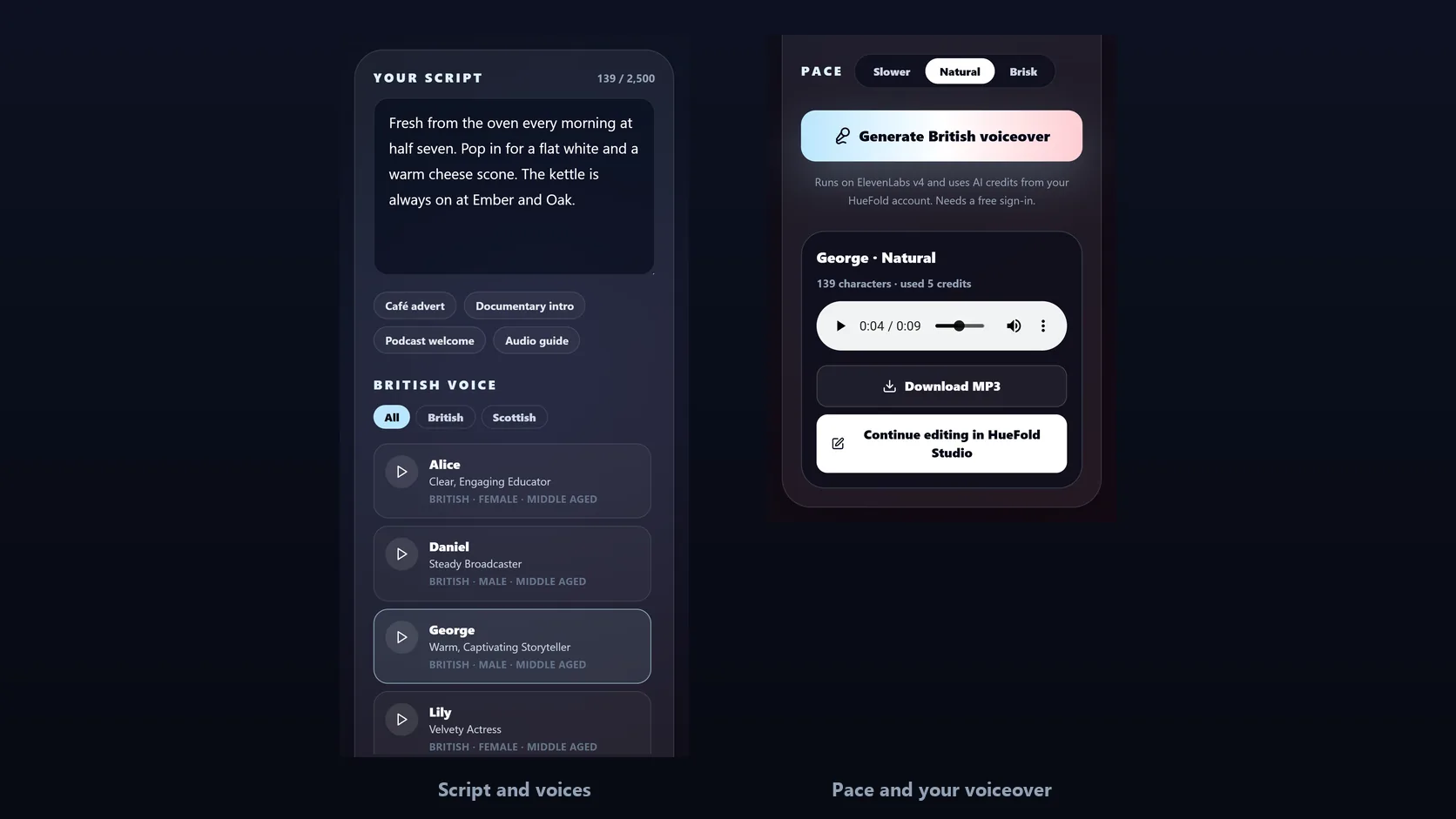
Before you spend anything, play each voice's own sample and pick the one that suits the job: a warm storyteller for a documentary, a steady broadcaster for an explainer, a clear educator for a lesson. Then click Generate British voiceover. In the demo on this page, George read a 139-character café advert in 9 seconds of audio.
The result plays on the page as an MP3 you can download. Or open it in HueFold Studio, where it arrives on the timeline of a vertical video page with your script on screen, ready for pictures, captions and music.
How to make a British accent voiceover
- Write your script Type or paste up to 2,500 characters, or start from one of the four sample scripts.
- Pick a British voice Press play on any voice to hear its own sample, then select the one you want. Filter by accent if the list is long.
- Set the pace Slower, Natural or Brisk. The voice keeps its accent and reads every word as written.
- Generate and use it Sign in and click Generate British voiceover. Play it, download the MP3, or continue editing in HueFold Studio.
Make a British accent voiceover from text
A real run of the tool on this page: the café sample script, George’s voice sample, a voiceover generated on ElevenLabs v4 and played in full, then opened in HueFold Studio.
- Choose the Café advert sample script.
- Press play on George, a warm British storyteller, to hear his sample, then select him and keep the Natural pace.
- Click Generate British voiceover. The voiceover is ready 29 seconds later; the wait is shown 8× faster.
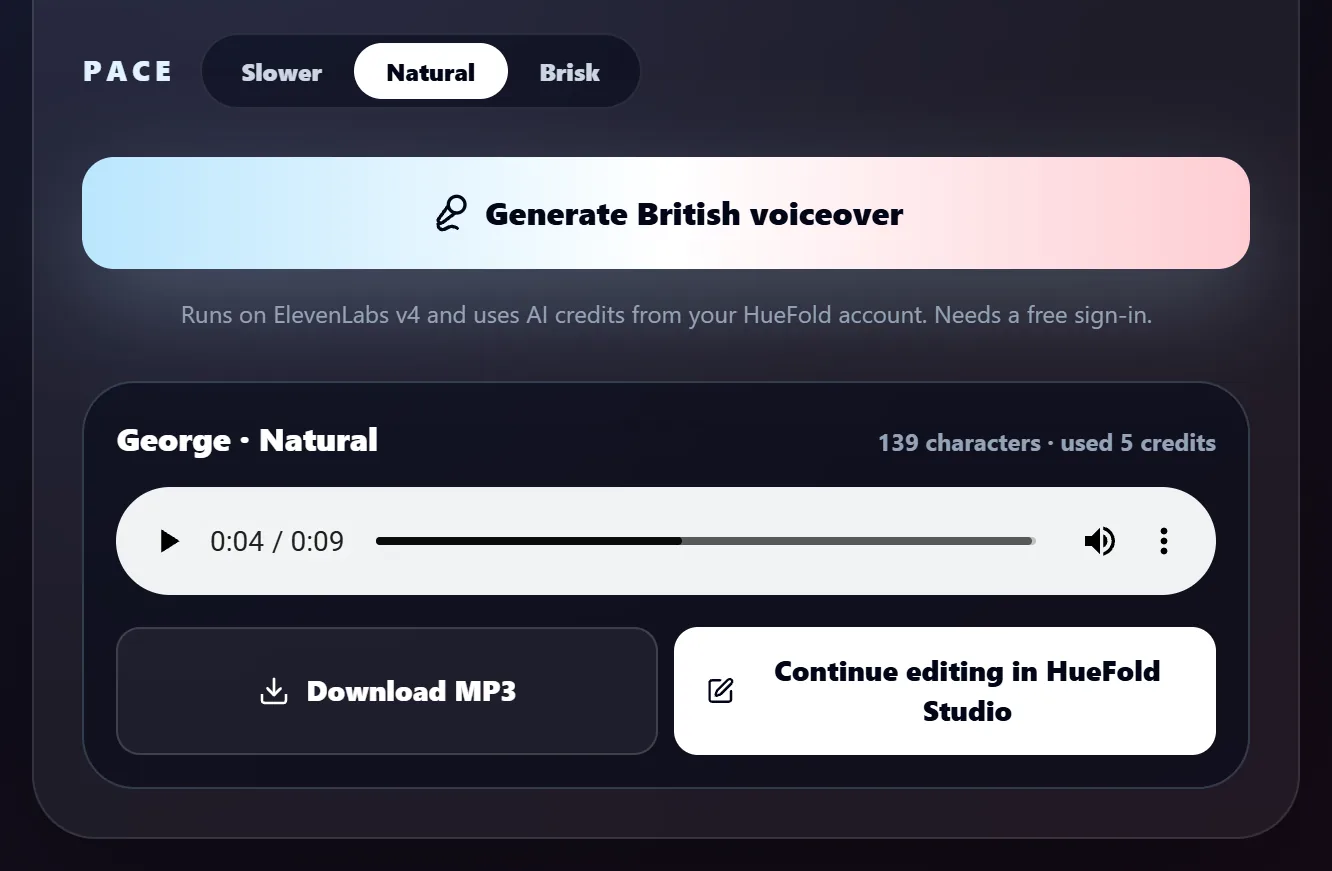
- George reads: "Fresh from the oven every morning at half seven. Pop in for a flat white and a warm cheese scone. The kettle is always on at Ember and Oak." It is 9 seconds long and used 5 credits.
- Click Continue editing in HueFold Studio to open it on a video page.
Where the British accent comes from
There are two ways a computer can give you a British accent. One is to take a voice and ask it to put an accent on, the way an actor might. The other is to use a voice that is British to begin with. The second is more reliable, because nothing has to hold the accent in place: it is simply how the voice speaks. This generator uses the second way.
The voices come from ElevenLabs, a speech company whose voices carry labels for accent, gender, age and the kind of work they suit. The tool shows only the voices whose accent label is British, or a part of Britain: Scottish, Welsh, Cockney, Yorkshire and the like. Today the list includes George, a warm storyteller; Alice, a clear educator; Daniel, a steady broadcaster; and Lily, a velvety actress. Voices from ElevenLabs' Voice Library with British regional accents can be added to the same list, and they appear with their own accent label and filter.
Each voice card shows the name, a short description, the accent, gender and age. The play button plays a sample recorded by ElevenLabs for that voice. Listening is free and needs no account, so you can compare every voice before you generate anything.
How British do the voices sound? We measured
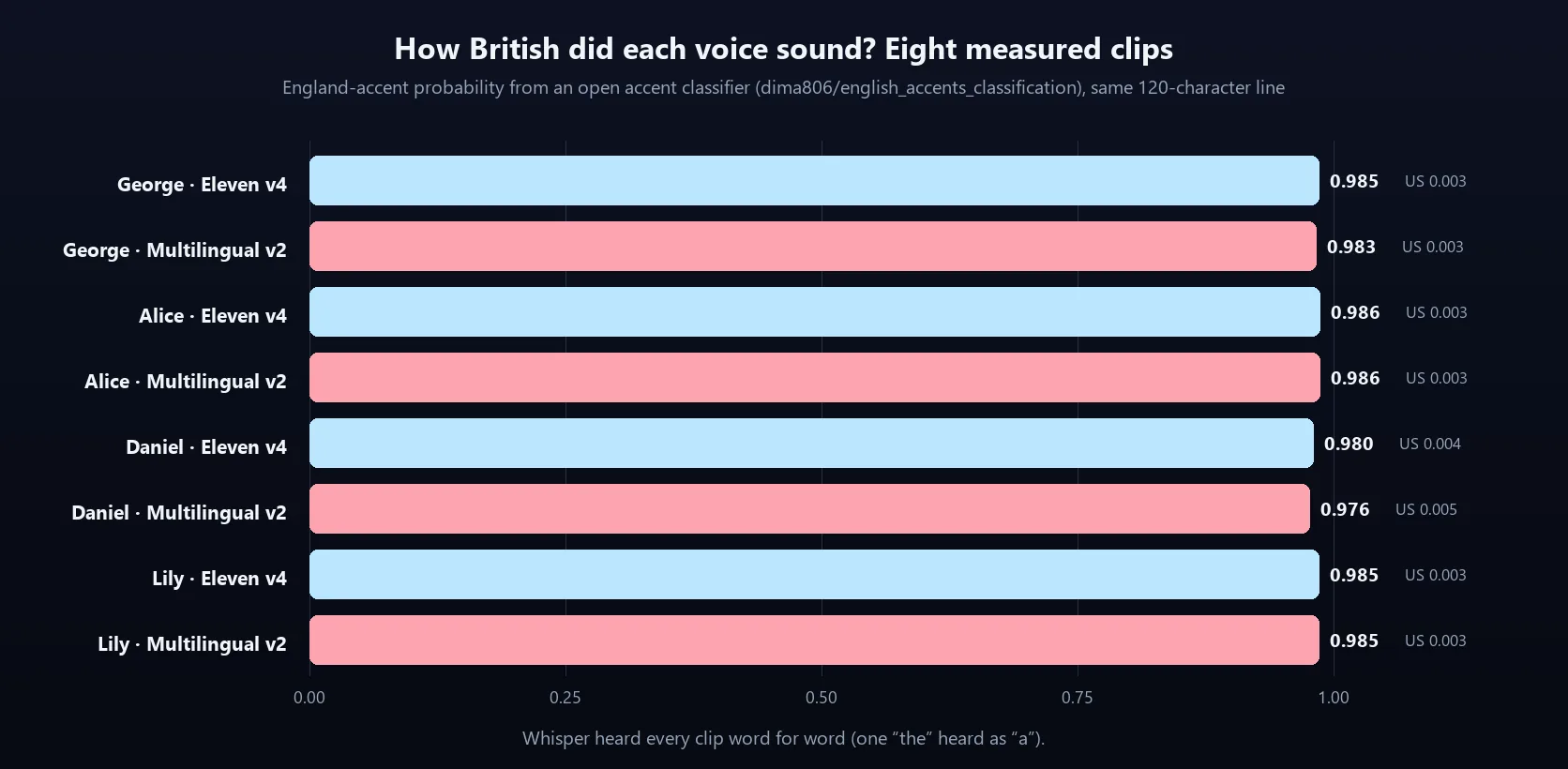
Sounding British is the whole point of this page, so we checked it rather than just claiming it. Each of the four British voices read the same 120-character line twice: once on Eleven Multilingual v2, the model the tool uses, and once on Eleven v4, which it used before. That made eight clips. We ran each clip through an open accent classifier, a speech model trained to tell English accents apart (dima806/english_accents_classification). It scores every clip for England, the United States, India, Australia and Canada.
All eight clips scored between 0.976 and 0.986 for England, and between 0.003 and 0.005 for the United States. The two models sounded equally British. We also transcribed every clip with Whisper, an open speech recogniser, to check that the voices read the script and nothing else. Whisper heard every clip as written, apart from one "the" that it heard as "a".
A classifier is not a person, and accents are more than a label. But the numbers agree with what you hear in the samples: these voices speak with a British accent, and they keep it.
| Voice | Eleven v4 | Multilingual v2 |
|---|---|---|
| George | 0.985 | 0.983 |
| Alice | 0.986 | 0.986 |
| Daniel | 0.980 | 0.976 |
| Lily | 0.985 | 0.985 |
Your words, read as written
The voice reads your script exactly as you typed it. It does not rewrite your sentences, add words or translate anything. That makes the script your main control over how the voiceover sounds.
Write it the way a British speaker would say it. Spellings such as colour and favourite, and phrases such as half seven or a flat white, come out naturally, because that is how the voice speaks anyway. Full stops give the voice a pause and a falling tone. Commas give a shorter pause. A question mark lifts the end of a sentence. If a name or brand is said wrongly, spell it the way it sounds. Numbers are read as numbers, so write 1840 if you want eighteen forty, or eighteen-forty if you want to be sure.
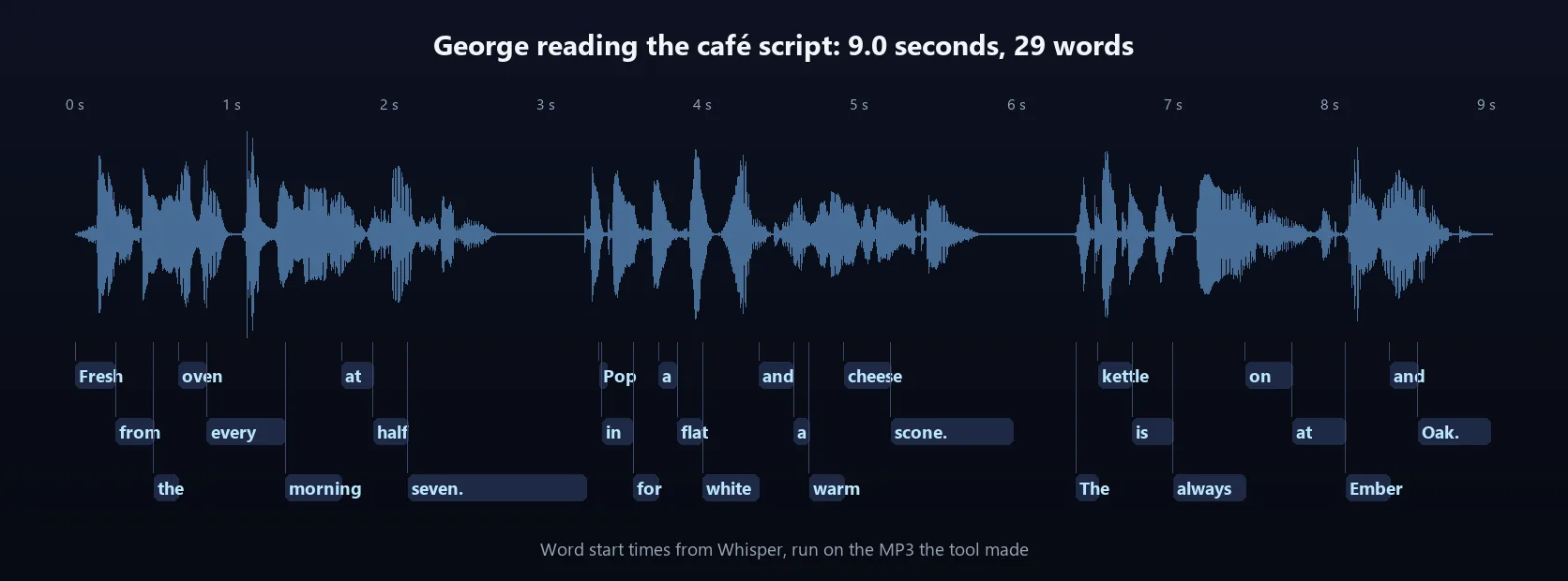
In the demo, George read the café advert "Fresh from the oven every morning at half seven. Pop in for a flat white and a warm cheese scone. The kettle is always on at Ember and Oak." Its waveform below goes quiet twice, after "seven" and after "scone": the two full stops in the middle of the script.
Choosing a pace
The pace setting changes how fast the voice speaks, not how it sounds. Natural is the voice's own speed; Slower and Brisk set ElevenLabs' speed to 0.9 and 1.1 of it. We timed George reading the 29-word demo script on Eleven Multilingual v2, the model the tool uses: 9.57 seconds at Slower, 8.13 and 8.73 seconds in two Natural takes, and 8.08 and 7.76 seconds at Brisk. Slower is a clear change, which helps with lessons, instructions and anything the listener needs to follow carefully. Brisk is a small one, about the same as the difference between two takes, so for a noticeably quicker read, cut words rather than relying on Brisk.
A rough guide for planning: the demo script of 29 words took 8 to 9 seconds at a natural pace, about three words a second including the pauses between sentences. A 30-second advert is therefore around 90 words, and a one-minute explainer around 180. The script box allows 2,500 characters, which is roughly 400 words or two to three minutes of speech.
If a take is close but not quite right, generate it again with a different pace or a different voice. The tool keeps your last six takes on the page, so you can switch between them and keep the best one.
| What | Detail |
|---|---|
| Script | Up to 2,500 characters, read exactly as written |
| Voices | ElevenLabs voices with a British accent label, each with its own free sample |
| Pace | Slower (speed 0.9), Natural (1.0) or Brisk (1.1); the demo script took 9.57, 8.13–8.73 and 7.76–8.08 s |
| File | MP3, 44.1 kHz, 128 kbps |
| Account | Free sign-in to generate; listening to samples needs none |
| Credits | Each voiceover uses AI credits; the demo’s 139 characters used 5 |
| Studio | A 1080 × 1920 video page as long as the voiceover, script on screen |
Credits and what a voiceover costs
Listening to the voice samples is free. Generating a voiceover uses AI credits from your HueFold account, because each one is made by ElevenLabs' speech model. Before the voiceover is made, HueFold prices the request; after it is made, the result shows how many credits it used. In the demo, the 139-character café advert used 5 credits.
If a voiceover cannot be made, for example because the speech service is busy, the credits held for it are released and you are not charged. Your script stays in the box, so you can simply try again.
Finishing the voiceover in HueFold Studio
A voiceover is usually one part of something bigger: an advert, a reel, a lesson, a product video. Continue editing in HueFold Studio takes it there. You sign in if you have not already, and the voiceover opens in a new design. It is a vertical 1080 × 1920 video page exactly as long as the voiceover, with your script on screen as editable text and the MP3 on the page's audio track.
From there you can add photos, video clips, stickers and your logo, turn the script into captions, add music under the voice and export the finished video with HueFold's renderer. The voiceover itself is also saved with your AI generations, so you can use it again in other designs.
What people use a British voiceover for
A British accent suits many kinds of work. These are the jobs the sample scripts and the voices were chosen for.
- Adverts for British businesses: a café, a shop, an event, a local service.
- Documentary and travel narration, where a calm storyteller carries the pictures.
- Explainer and product videos that need a clear, trustworthy voice.
- Lessons, training and e-learning, read slower so learners can follow.
- Podcast intros, outros and adverts between segments.
- Museum, gallery and tour audio guides.
- Social clips and reels, with a short script to fit the length.
What is sent and what is stored
The script box, the voice list and the samples live on the page. When you click Generate British voiceover, your script, the voice you chose and the pace are sent to HueFold, checked against HueFold's content policy, and passed to ElevenLabs, which returns the audio. HueFold stores the MP3 with your account's AI generations, which is how you can play it, download it and open it in Studio. Continue editing in HueFold Studio also saves a new design to your account.
| Step | Where it happens | Account |
|---|---|---|
| Write the script, filter voices | Your browser | No |
| Play a voice sample | The sample is streamed from ElevenLabs | No |
| Generate British voiceover | Script, voice and pace go to HueFold and ElevenLabs; the MP3 is stored with your AI generations | Free account, AI credits |
| Download MP3 | Your browser saves the stored file | Free account |
| Continue editing in HueFold Studio | A new design is saved to your account | Free account |
Troubleshooting
The problems people run into most, and what fixes them.
- Generate asks you to sign in: making a voiceover needs a free account. Sign in and it starts by itself, with your script still in the box.
- You are asked to accept the AI policy: HueFold asks once before your first AI generation. Accept it and the voiceover continues.
- A word is pronounced wrongly: spell it the way it sounds, or add a hyphen between its parts.
- The pauses feel wrong: add or remove full stops and commas, which is where the voice pauses.
- It is too fast: generate again with Slower. Too slow or too long: shorten the script, since Brisk only speeds it up a little.
- A voice is not available: pick another voice; you are not charged for a voiceover that is not made.
- The Generate button is greyed out: the script is empty, over 2,500 characters, or no voice is selected.
Frequently asked questions
How do I make a British accent voiceover?
Type your script into the tool on this page, pick one of the British voices, choose a pace and click Generate British voiceover. Then download the MP3 or continue editing in HueFold Studio.
Is the British accent real or added on?
Real. Every voice in the list is an ElevenLabs voice labelled with a British accent, so the accent is how the voice speaks. An open accent classifier scored all eight of our test clips between 0.976 and 0.986 for England.
Can I hear the voices before I generate?
Yes. Every voice has a play button with its own sample. Listening is free and needs no account.
Is the British accent generator free?
Listening to the samples is free. Generating a voiceover needs a free HueFold account and uses AI credits; the demo’s 139-character advert used 5.
How long can my script be?
Up to 2,500 characters, roughly 400 words or two to three minutes of speech.
Does it change my words?
No. The voice reads your script exactly as written. Punctuation sets the pauses and tone.
Which British accents are there?
The voices labelled British today are George, Alice, Daniel and Lily. Voices with regional accents such as Scottish or Welsh appear with their own label and filter when they are added.
What file do I get?
An MP3 at 44.1 kHz and 128 kbps, which plays everywhere and drops into any video editor.
Can I change the speed?
Yes, a little. Slower is clearly slower: the demo script took 9.57 seconds against 8.13 to 8.73 at Natural. Brisk is a small change (7.76 to 8.08 seconds), so for a quicker read, shorten the script.
What is a British Accent Generator?
A tool that turns written text into speech in a British accent. This one uses ElevenLabs voices with a British accent, reads your script as written and gives you an MP3.
Can I control how strong the accent sounds?
Not with a slider. The accent comes from the voice, so choose the voice whose sample sounds the way you want. The pace and your punctuation shape the delivery.
Can I use the voiceover in videos?
Yes. Download the MP3 for any editor, or continue editing in HueFold Studio, where it opens on the timeline of a video page.
Can I keep editing after generating the voice?
Yes. Continue editing in HueFold Studio opens a design with the voiceover on its timeline and your script as text, ready for pictures, captions and music.
Related tools
- AI Voice Generator — Voiceovers in many voices and languages.
- Auto Caption — Captions for narrated videos.
- AI Music Generator — Music to go under the voice.
- Add Music To Video — Give any video a soundtrack.
- Transcribe Audio To Text — Turn recordings into text.
- AI Sound Effect Generator — Sound effects for your edit.