Auto Caption
Auto caption a vertical video: speech recognition writes and times every word, shows them a few at a time in word-by-word styles, and burns them in or saves them as SRT.
Updated
How do you auto caption a video?
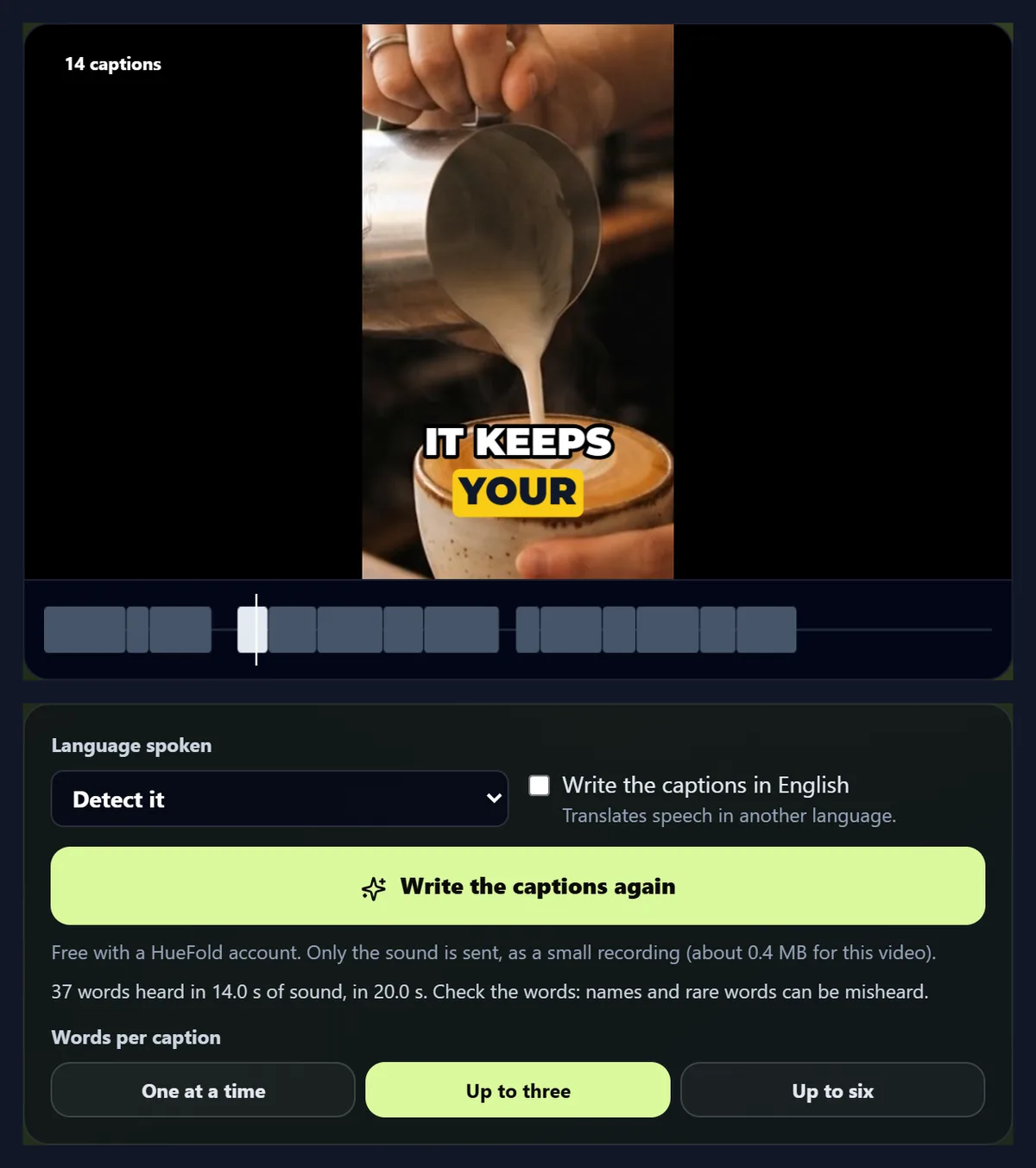
Press Write captions with AI: speech recognition writes every word with its time, the words are grouped into short captions, and you pick a style and burn them into the video or save them as SRT.
On the 14-second vertical sample it heard 37 of 37 words right; burnt in, the captions made a 720 × 1280 MP4.
How to auto caption a video
- Open the video Vertical or wide, up to three minutes.
- Write captions with AI Every word heard and timed.
- Choose words and style One, three or six words; word-by-word styles.
- Burn in or save An MP4, or SRT and VTT files.
Auto caption a vertical video
A real recording of this tool: the vertical sample opened, the captions written by AI, the words per caption and the style changed, the captions played over the video and saved as SRT.
- The vertical sample video is opened.
- Write captions with AI: every word is heard and timed.
- One word at a time, then up to three.
- The Word box and Karaoke styles are tried.
- The captions play over the video, and are saved as an SRT file.
How do I add captions to a vertical video automatically?
Open the video and press Write captions with AI. Speech recognition listens to its sound and writes every word with its time; the words are grouped into captions a few at a time, ready to read on a narrow screen. Pick a style, check the words, then burn the captions into the video or save them as SRT or VTT.
The sample is a 14-second vertical clip with a product voiceover. The AI heard all 37 of its words right.
How many words should each caption show?
For vertical video, few. The frame is narrow, so a long line wraps or shrinks; short captions keep the words big and in step with the voice. The tool groups the words it heard one at a time, up to three, or up to six, breaking at the ends of sentences and at pauses. On the sample that made 37, 14 and 8 captions.
One at a time is the punchiest, for short ads and hooks; up to three suits most Reels and Shorts; up to six reads more like subtitles, for longer talks.
| Words per caption | Captions | Most words on screen | Average time on screen |
|---|---|---|---|
| One at a time | 37 | 1 | 0.28 s |
| Up to three | 14 | 3 | 0.75 s |
| Up to six | 8 | 6 | 1.32 s |
Which styles suit vertical video?
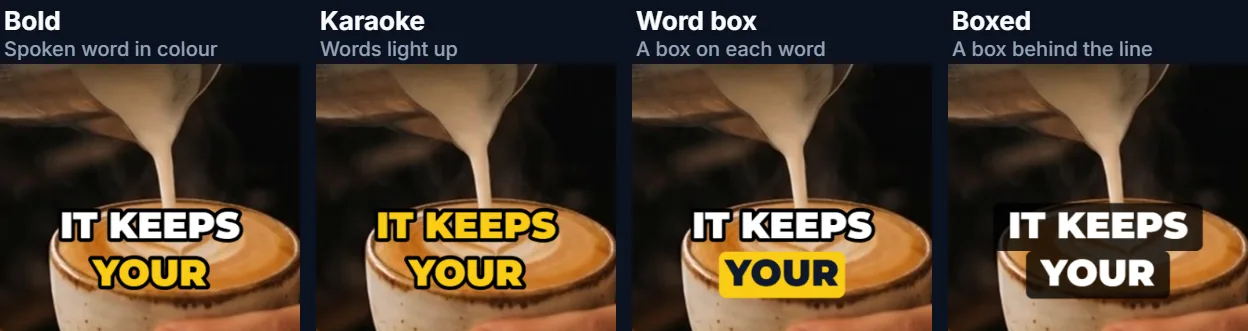
The word-by-word ones: Bold colours the word being spoken, Karaoke lights the words up as they are said, and Word box puts a coloured box behind the spoken word, with the text colour chosen to stay readable on it. Every word has its own time from the voice, so the highlight moves with the speech. Classic and Boxed are steadier, for subtitles.
AI captions open in Bold, in capitals, at 7% of the video's height and 80% of the way down, clear of the buttons apps draw along the bottom; the size and height sliders move them.
How accurate are the captions?
On the sample's clear voiceover, 37 of 37 words were right (0.0% word error rate). Clear speech close to the microphone does best; music over the voice, several people talking at once, names and rare words do worst. Every caption is a text box: fix a word by typing over it.
The recognition is Whisper, run on HueFold's own server; the words are not sent to anyone else.
How does it hear the words?
The browser takes the sound out of the video and sends it to HueFold as a small mono recording (the picture stays on your device). Whisper writes the words and the moment each one starts and ends; the tool groups them into captions. The same editor then lets you move, merge, split and restyle them.
Fourteen languages can be chosen, or the language detected; speech in another language can also be written straight into English captions.
What does the captioned video look like?
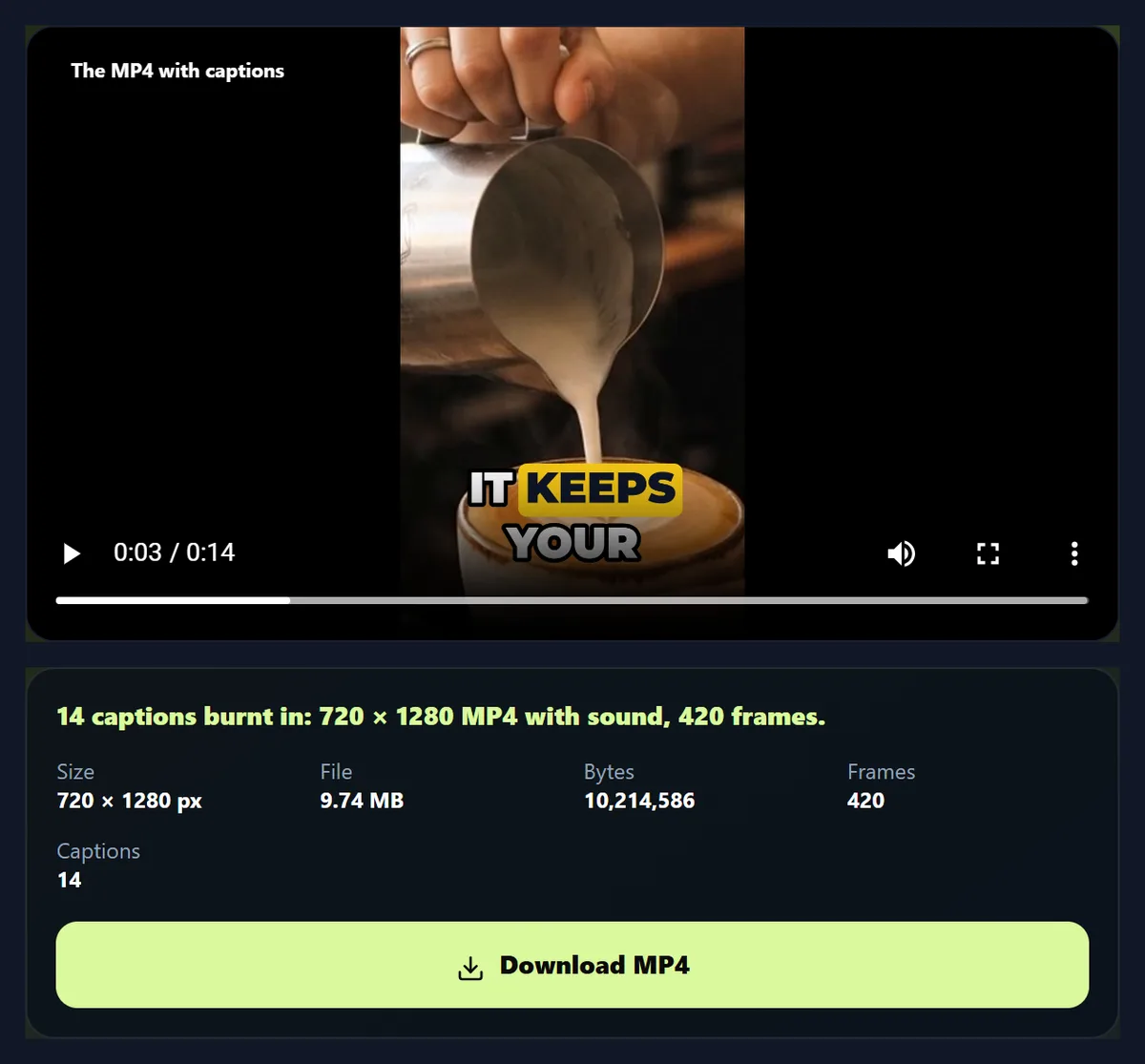
The same video at its own size, re-encoded with the captions drawn into every frame and its sound kept. The sample became a 720 × 1280 MP4, 420 frames, 9.74 MB.
Making it plays the video through once at half speed, so every frame gets its captions.
Can I get an SRT file instead?
Yes: SRT, VTT or plain text, from the same captions. Upload the SRT with the video where a platform takes caption files, as YouTube does; burn them in for apps that do not, which is most short-video apps.
Both from the same captions take seconds: make the MP4 and save the SRT.
Why caption short videos at all?
Because much of short video is watched with the sound off: on a train, in an office, late at night. Captions carry the message without sound, help viewers who are deaf or hard of hearing, and help people watching in a second language follow along.
Word-by-word captions also hold attention: the eye follows the highlight.
How long a video can it caption?
Up to three minutes of sound per video, which covers Reels, Shorts and TikToks. For longer videos, cut them into parts with the video splitter.
Recognition runs on the processor of HueFold's own server, so how long it takes depends on how busy that is: the sample's 14 seconds of sound took 24 seconds from pressing the button to captions on screen, measured while the same machine was also recording these pages' videos. Longer sound takes proportionally longer.
Which languages can it caption?
Fourteen are listed: English, Spanish, French, German, Italian, Portuguese, Dutch, Hindi, Japanese, Korean, Chinese, Arabic, Russian and Turkish. Detect it, the default, lets the model work out the language from the first seconds of speech; choosing it yourself helps when the video opens with music or a name.
Write the captions in English translates speech in any of them into English captions, timed to the speech, so a Spanish video can carry English captions without a separate translation step.
How do I fix a caption?
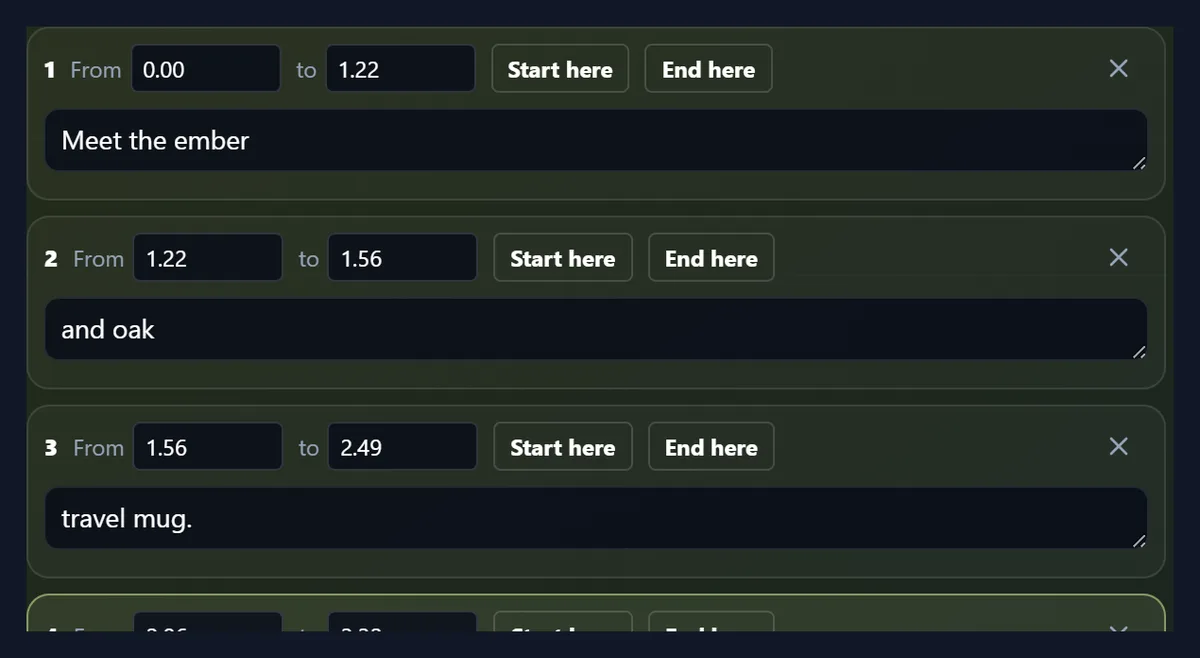
Every caption is listed with its start and end times and its words. Type over a misheard word; pause the video where a caption should start or end and press Start here or End here; delete a caption with its cross, or add one at the playhead. Changing the words per caption regroups the words the AI heard, so make that choice before fixing individual words.
The timeline under the video shows every caption as a block, with the one on screen now highlighted, so gaps and overlaps are easy to spot.
Where should captions sit on a vertical video?
Clear of the parts of the screen the apps cover. Short-video apps put the account name, the description and their buttons along the bottom and right edge, so captions sitting in the lower middle, roughly two thirds to four fifths of the way down, stay visible. The height slider moves them; the size slider keeps longer words inside the frame.
Captions in capitals with a box or an outline stay readable over any footage, bright or dark.
Can I change the font and colours?
Yes: eleven fonts, from Inter and Montserrat Black to Bebas Neue, Anton and Permanent Marker, with colours for the text, the outline or box, and the spoken word. Sizes are shares of the video's height, so the captions look the same whatever its resolution.
A brand colour on the spoken word is an easy way to make captions look like yours.
How was the accuracy measured?
Against the script the voice read. The sample's voiceover was made from a known text, so the words the AI heard could be compared with it word by word: every word inserted, left out or changed counts as an error, divided by the number of words in the script (the word error rate). On the sample that was 0 of 37.
A clear synthetic voice is an easy test; real recordings with background noise or several speakers will have more to fix.
Captions or subtitles: what is the difference?
Subtitles usually translate the speech for viewers who can hear it; captions write down what is said, and often other sounds, for viewers who cannot. On social video the word captions is used for both. This tool writes what is said, in the language it is said in, or in English when you ask it to translate.
For people who are deaf or hard of hearing, add important sounds in brackets, such as [music] or [laughs], by editing the captions.
What exactly is sent to the server?
Only the sound, and only as much as recognition needs: the browser takes the video's sound, mixes it to one channel and resamples it to 16 kHz, the rate speech recognition works at, and sends that as a WAV file. For the 14-second sample that was about 0.4 MB, against 4.8 MB for the video. The picture never leaves your device, and the sound is not kept after the words come back.
Burning the captions in happens in your browser too, from your own copy of the video.
What can I do with the captioned video?
Post it as it is: the captions are part of every frame, so they show in any app, on any phone, with or without sound. Or keep editing: open it in the HueFold editor to add a logo or an end card, trim it with the video splitter, or add music under the voice. Keep the SRT too, so the captions can be fixed and burnt in again without listening a second time.
If you change the words later, burn them into the original video, not the captioned one, so captions are never drawn over captions.
How do I get the most accurate captions?
Give the recognition clear speech: one speaker at a time, close to the microphone, with music turned down under the voice. Choose the language instead of Detect it when the video opens with music or a name, and check names and brand words, which are the words most often misheard.
Fixing a word is quicker than re-recording: type over it in the list.
Is it free?
Yes, with a free HueFold account: AI captions use no credits. Typing captions yourself needs no account at all, on the Caption page.
The video stays on your device; only its sound is sent, and it is not kept.

Frequently asked questions
How do I auto caption a video?
Press Write captions with AI, check the words, pick a style, and burn them in or save SRT.
Is it accurate?
On the clear sample voiceover it heard 37 of 37 words right. Fix any word by typing.
Does it work for Reels, Shorts and TikTok?
Yes: short captions in word-by-word styles, sized for vertical video.
How many words show at once?
One, up to three, or up to six: your choice.
Can I download an SRT file?
Yes, SRT, VTT or plain text.
Which languages?
Fourteen are listed, or the language is detected.
Is it free?
Yes, with a free account. No credits are used.
Is my video uploaded?
Only its sound is sent for recognition, and it is not kept.
Related tools
- AI Caption Generator — The same captions for any video.
- Caption — Type and time captions yourself.
- Resize Video for Instagram — Make it vertical first.
- Add Text to Video — Titles at set times.
- AI Voice Generator — A voiceover from a script.
- Transcribe Audio to Text — The words as text only.