YouTube Description Generator
Give the title, a few lines about your video and its timestamps or transcript, and get a description ready to paste into YouTube: an opening that says why to watch, a short summary, chapters, your links and hashtags. Every description is checked against the limits and chapter rules YouTube publishes, whether AI wrote it or the tool put it together from your details.
Updated
How do you write a YouTube description with chapters?
Fill in the title, what the video is about, your chapter timestamps, links and hashtags, or load the video's transcript instead of timestamps. Press Write it with AI, or Put it together without AI. The description appears in a box you can edit, with its size and every chapter checked against YouTube's rules, ready to copy.
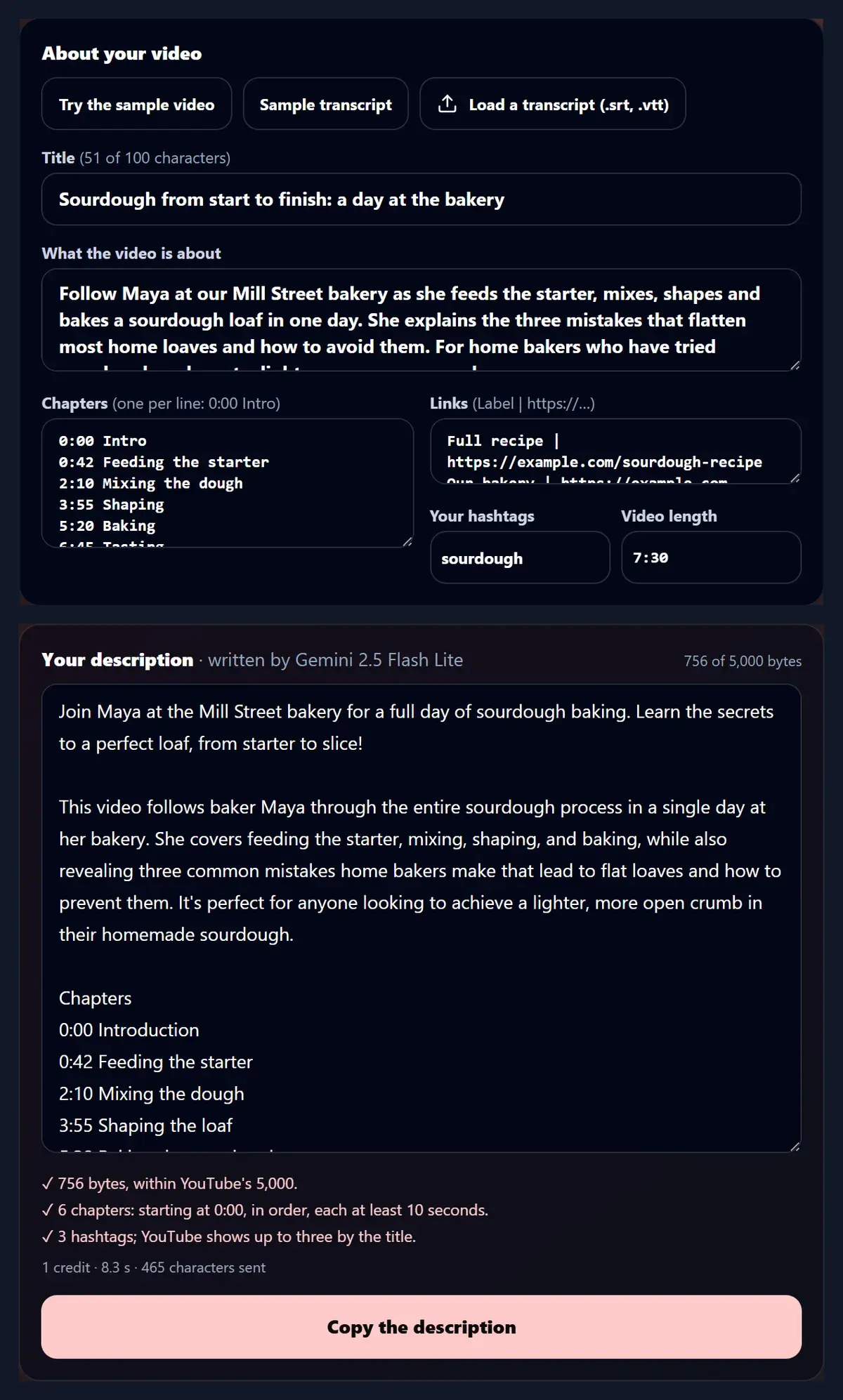
For the sample video, a day of sourdough baking, the AI wrote a 756-byte description with six chapters in 8.3 seconds, and every check passed: within YouTube's 5,000 bytes, chapters from 0:00, in order, each at least 10 seconds long.
How to write a description
- Add the details Title, summary, timestamps, links.
- Write or put together With AI, or without it.
- Check and copy YouTube's rules checked.
Write a YouTube description with chapters
A real recording of this tool: the sample video's details filled in, a description written by AI with six chapters, checked against YouTube's rules and copied.
- The sample video's title, summary, timestamps, links and length are filled in.
- Write it with AI returns a description with an opening, a summary, chapters, links and hashtags.
- The checks under it confirm the size and the chapters meet YouTube's rules.
- Copy the description puts it on the clipboard, ready for YouTube Studio.
How do I write a description here?
Type the video's title, a few sentences on what happens in it and who it is for, its chapter timestamps one per line (such as 0:42 Feeding the starter), any links as a label and an address, your own hashtags and the video's length, or press Try the sample video. Then press Write it with AI. The description arrives in an editable box: an opening of one or two sentences, a short summary, the chapters, your links and the hashtags, with its size and the checks under it and a Copy button.
The figure shows the sample video's details and the description the AI wrote from them.
What came out for the sample video?
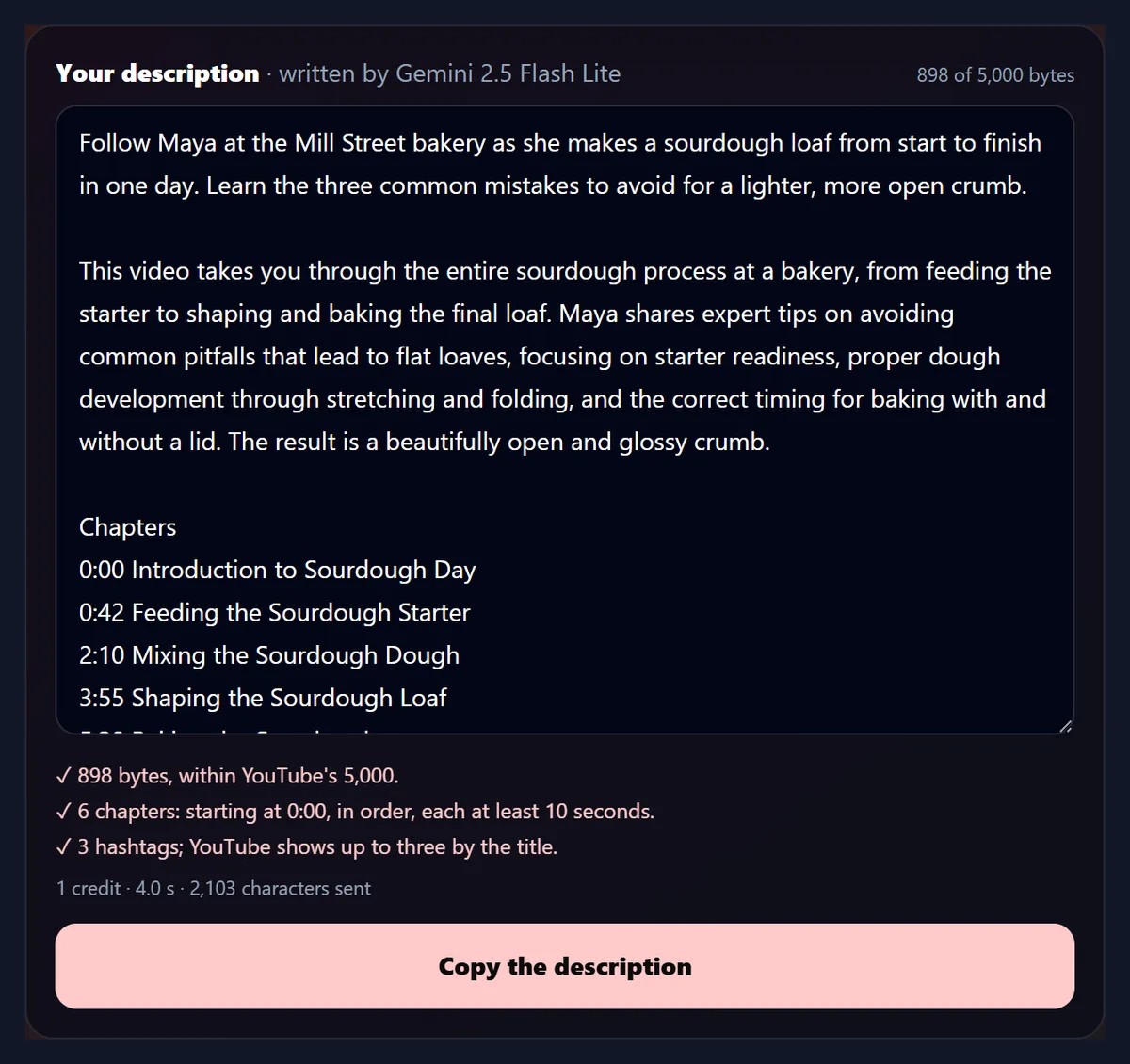
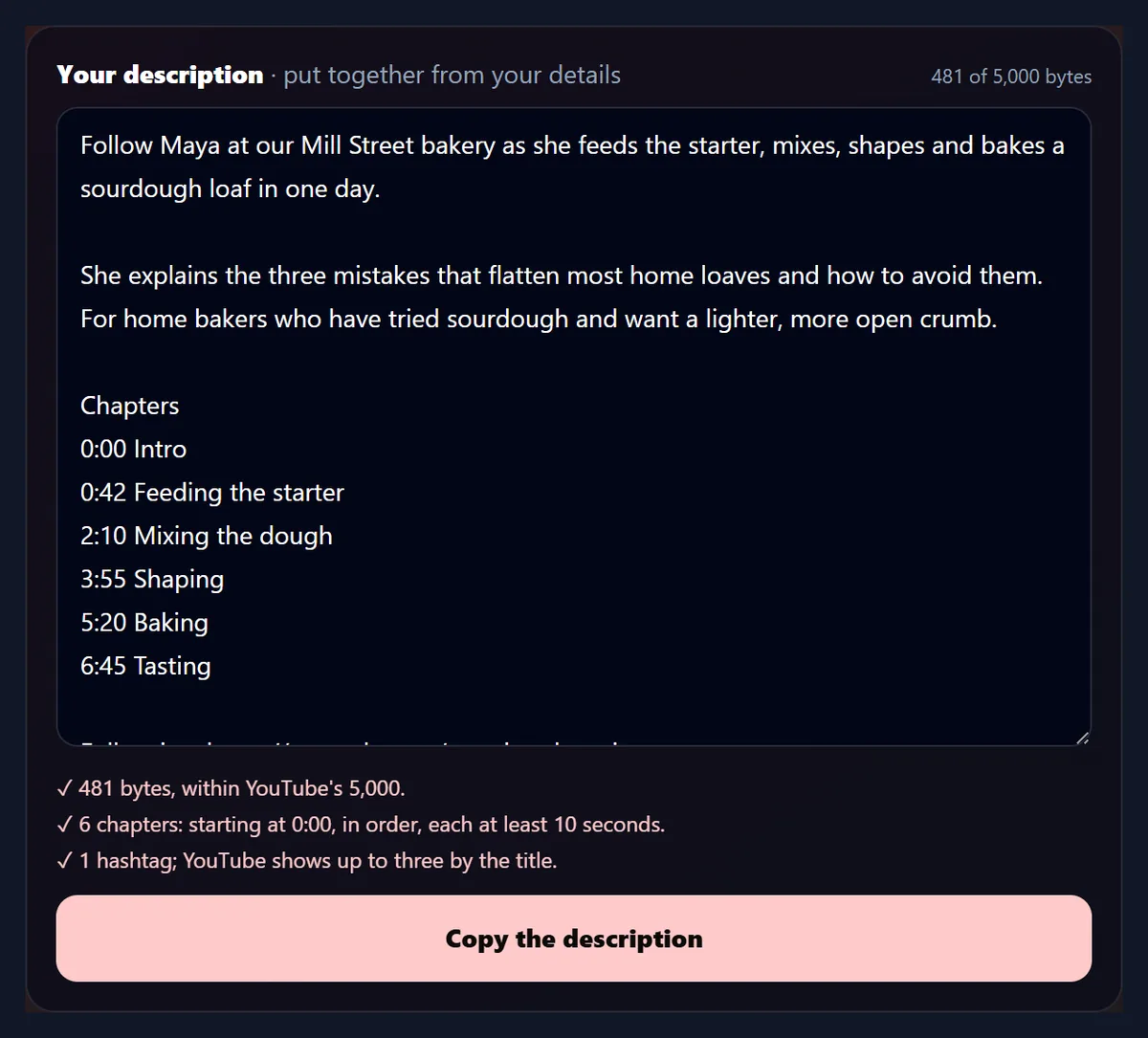
Three descriptions were made from the same sample details. Put together without AI, the description was 481 bytes: the first sentence of the summary as the opening, the rest as the second paragraph, then the chapters, links and the one hashtag. Written by Gemini 2.5 Flash Lite from the typed timestamps, it was 756 bytes, with a fuller summary, the same six chapter times and clearer titles, such as Shaping the loaf for Shaping. Written from the sample transcript instead of timestamps, it was 898 bytes, with six chapters the AI chose from the transcript's 19 caption times.
All three passed every check. Each AI description cost one AI credit and took 8.3 and 4.0 seconds.
| Made from | Bytes | Chapters | Characters sent to the AI |
|---|---|---|---|
| The details, without AI | 481 | 6 | 0 |
| The details and typed timestamps, with AI | 756 | 6 | 465 |
| The details and a transcript, with AI | 898 | 6 | 2,103 |
What are YouTube's rules for chapters?
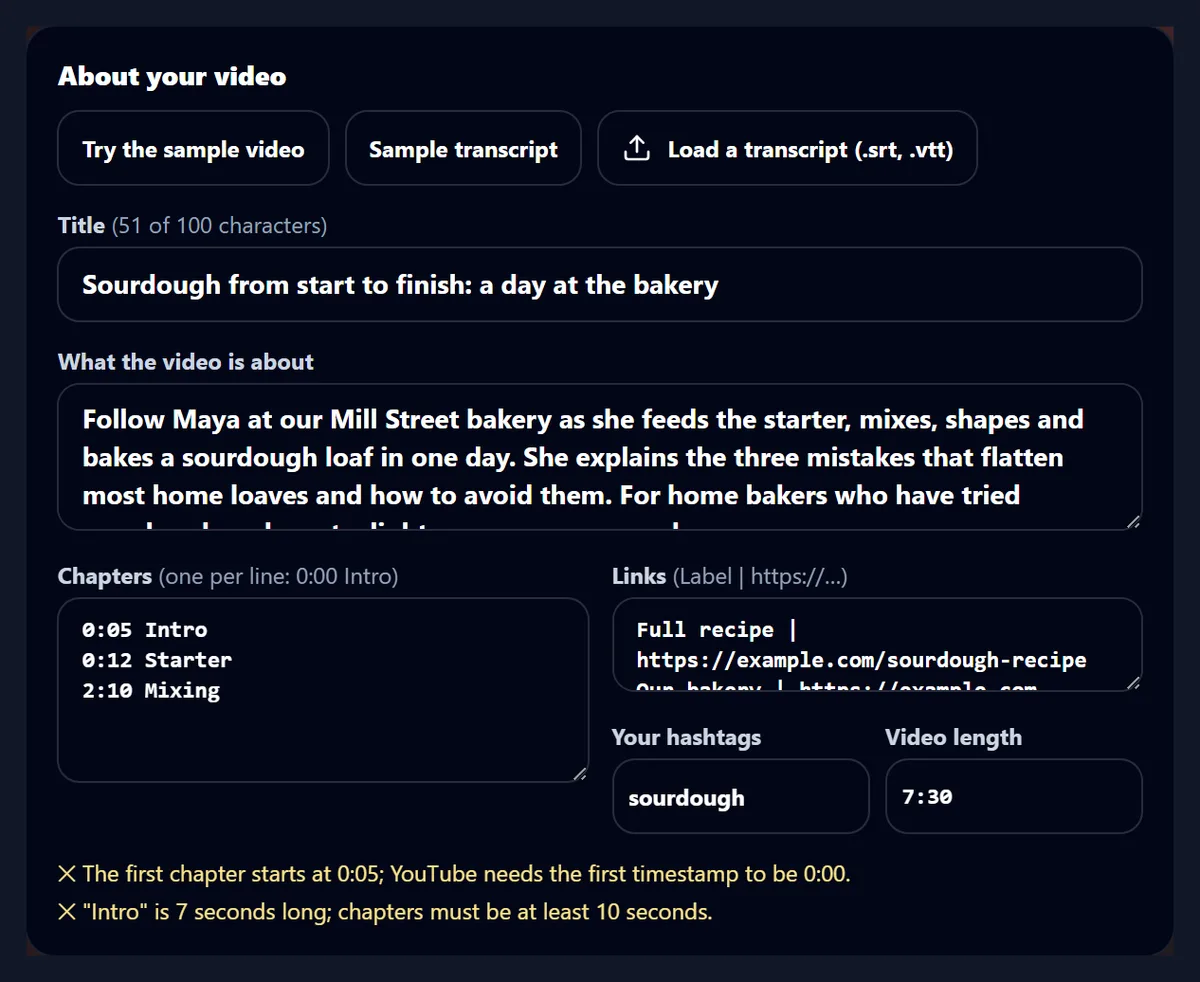
YouTube's help page on video chapters sets three rules for them: the first timestamp must be 0:00, there must be at least three timestamps in ascending order, and each chapter must be at least 10 seconds long. The tool checks your typed timestamps as you type, and checks the finished description again, with the video's length used to check the last chapter. Typing 0:05 Intro, 0:12 Starter and 2:10 Mixing, for example, gives two warnings: the first chapter must start at 0:00, and Intro would be 7 seconds long.
Times are written as YouTube shows them, such as 0:42, 6:45 or 1:02:03.
What should I write about the video?
A few plain sentences: who is in it, where it happens, what happens and who it is for. The AI works only from what you give it and is told not to add facts, so a detail missing from your summary will not be in the description. The sample summary names the baker, Maya, the place, the Mill Street bakery, the steps, from feeding the starter to baking, and the viewers it is for, home bakers after a lighter, more open crumb; the description the AI wrote from it kept all four. Write the summary in the language of the video, because the AI writes in the language of the details.
If you would rather keep your own wording, put the description together without AI instead.
Can I change the description after it is written?
Yes. The description is in an ordinary text box: change a word, add a line, or move a link, and the byte count and every check update as you type. The chapters are read again from the text itself, so a timestamp you add or change in the box is checked against YouTube's rules like the ones you typed at the start, using the video's length for the last one. Copy the description takes whatever is in the box at that moment.
Changing the details above does not overwrite your edits; press a button again to make a new description from them.
Can the AI change my chapter times?
No. The AI is told to use exactly the timestamps you list, in the same order, and to give each a clear title of at most six words. The tool then keeps only chapter times that are among yours: any other time in the answer is left out, and the checks say which. In the sample run, all six times came back as they were typed and only the titles changed, from Intro to Introduction and from Baking to Baking the sourdough.
The titles are suggestions: edit them in the box, and the checks run again as you type.
Can it make chapters from a transcript?
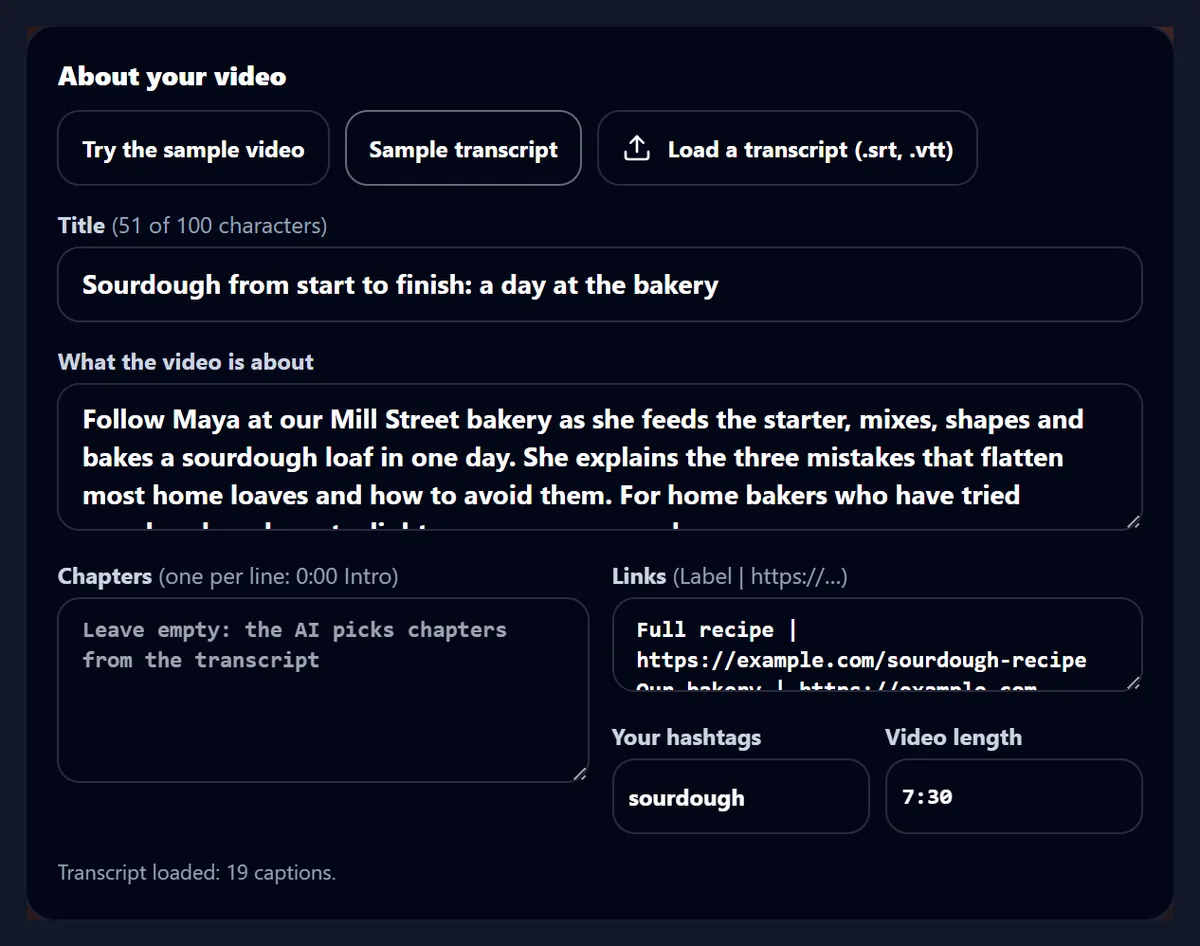
Yes. Load the video's subtitles as an .srt or .vtt file, or press Sample transcript, and leave the chapters box empty. Each caption is sent with its start time, and the AI picks four to eight chapter starts from those times only, starting at 0:00 and at least 10 seconds apart; a time that is not a caption start is left out, as with typed timestamps. Up to 4,000 characters of transcript go in one request, and the tool says how many captions fitted when a transcript is longer.
From the sample transcript of 19 captions, the AI chose 6 chapter starts, all of them caption times, and wrote a 898-byte description.
How long can a YouTube description be?
YouTube's Data API, which tools use to upload videos, takes a description of up to 5,000 bytes, and no < or > characters in it; a title can be up to 100 characters. Bytes are not the same as characters: an ordinary letter is one byte, but an accented letter is two and most emoji four, so a description in another language reaches the limit sooner. The tool counts bytes as YouTube does, shows the count beside the description, and warns about anything over the limit or any < or >.
The title box counts its characters against the 100 too.
Can I make a description without AI?
Yes. Put it together without AI builds the description in your browser from what you typed, with no account and no credits: the first sentence of your summary becomes the opening, the rest the second paragraph, followed by your chapters under a Chapters heading, your links one per line and your hashtags. For the sample video that came to 481 bytes. All the same checks run on it.
It is a quick way to lay out a description you have mostly written yourself.
What is sent to the AI, and what does it cost?
Only when you press Write it with AI: the title, what the video is about, and your timestamps, or the transcript's captions with their start times, up to 4,000 characters of transcript. For the sample that was 465 characters with timestamps and 2,103 with the transcript; the count is shown under each description. Your links and hashtags are added by the tool, not sent. The AI is told to use only facts in the details, with no invented links, prices, dates or claims. Each description uses one AI credit; the first time, you are asked to sign in and accept the AI policy.
Putting a description together without AI sends nothing.
What can it not do?
It cannot watch your video: it works from what you type and from a transcript, so a chapter can only start where you say or where a caption starts. It does not upload anything to YouTube or change a video's settings; copy the description into YouTube Studio yourself. It does not suggest tags for the separate tags field, and it cannot tell how a description will rank. Like any AI, it can phrase something in a way you would not; the box is there to edit it.
Read the description before you publish it, as you would anything with your name on it.
What else helps with YouTube here?
The YouTube Name Generator finds a channel name with a handle that fits YouTube's rules. Transcribe Audio to Text and the AI Caption Generator turn a video's speech into text and captions, which can then become chapters here. The TikTok and Facebook Hashtag Generators find hashtags for the same video elsewhere, and Resize Image For YouTube Banner fits channel art to YouTube's size.
Only the AI parts of these tools use credits.
Frequently asked questions
Is the YouTube description generator free?
Putting a description together without AI is free; writing one with AI uses one AI credit.
How long can a YouTube description be?
5,000 bytes, with no < or >; an accented letter is two bytes and most emoji four.
What are the rules for chapters?
Start at 0:00, at least three timestamps in order, each chapter at least 10 seconds long.
Can it make chapters from a transcript?
Yes. Load an .srt or .vtt file and the AI picks chapter starts from its caption times.
Will the AI change my timestamps?
No. Only times you gave are kept; the AI may suggest clearer titles.
How many hashtags should a description have?
YouTube shows up to three by the title and ignores all of them above 60.
Do I need an account?
Not to put a description together without AI; writing with AI needs you to sign in.
Which AI writes the description?
Gemini 2.5 Flash Lite, through HueFold.
Does it upload the description to YouTube?
No. Copy it and paste it into YouTube Studio.
Can I edit the description?
Yes, in the box; the checks run again as you type.
Related tools
- YouTube Name Generator — A channel name and handle.
- Transcribe Audio to Text — Speech as timed text.
- AI Caption Generator — Timed captions on a video.
- TikTok Hashtag Generator — Hashtags for video captions.
- Facebook Hashtag Generator — Hashtags for Facebook posts.
- Resize Image For YouTube Banner — Channel art at YouTube's size.