Free GIFs
Make free GIFs from free stock videos: search Pexels, pick a clip, choose the moment, size and speed, add a caption, and save the GIF in your browser.
Updated
Where can I get free GIFs?
Make them here from free stock video: search for a subject, pick a clip from Pexels, choose the part, size and speed, add a caption if you like, and download the GIF. The clips are free to use under the Pexels licence, so the GIF is too.
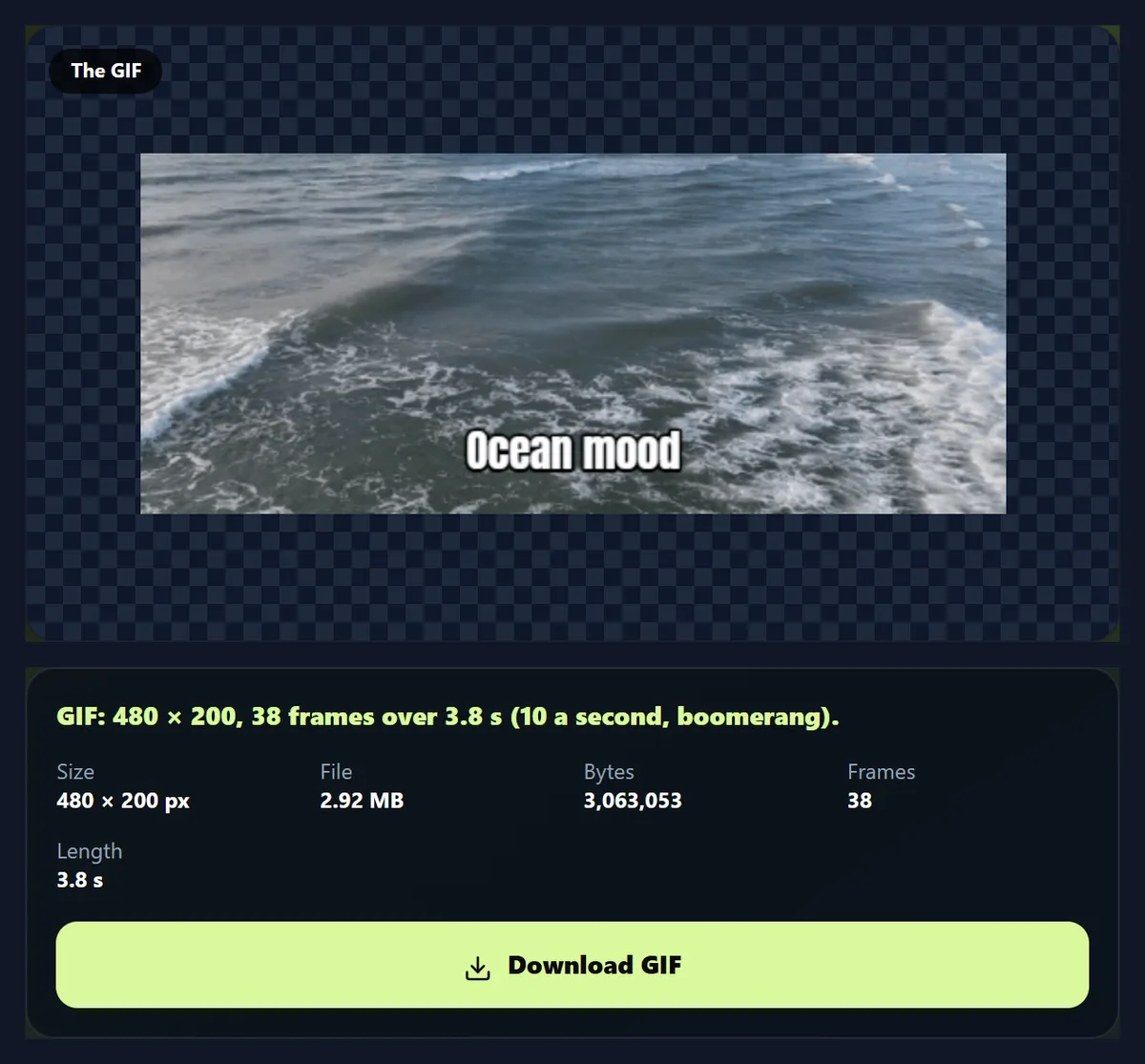
An ocean clip by Samed Gojak became a 480 × 200 boomerang GIF of 38 frames with the caption Ocean mood, 2.92 MB, made in the browser in 1.8 seconds.
How to make a free GIF
- Search Type a subject, such as ocean waves or a cat.
- Pick a clip Play it, then press Make a GIF from this clip.
- Choose the part Start, end, width, frame rate and speed.
- Make the GIF Add a caption if you like, then download.
Make a free GIF from a stock clip
A real recording of this tool: a search for wide ocean wave clips, a clip picked and opened in the GIF maker, the part, width and caption set, and the GIF made.
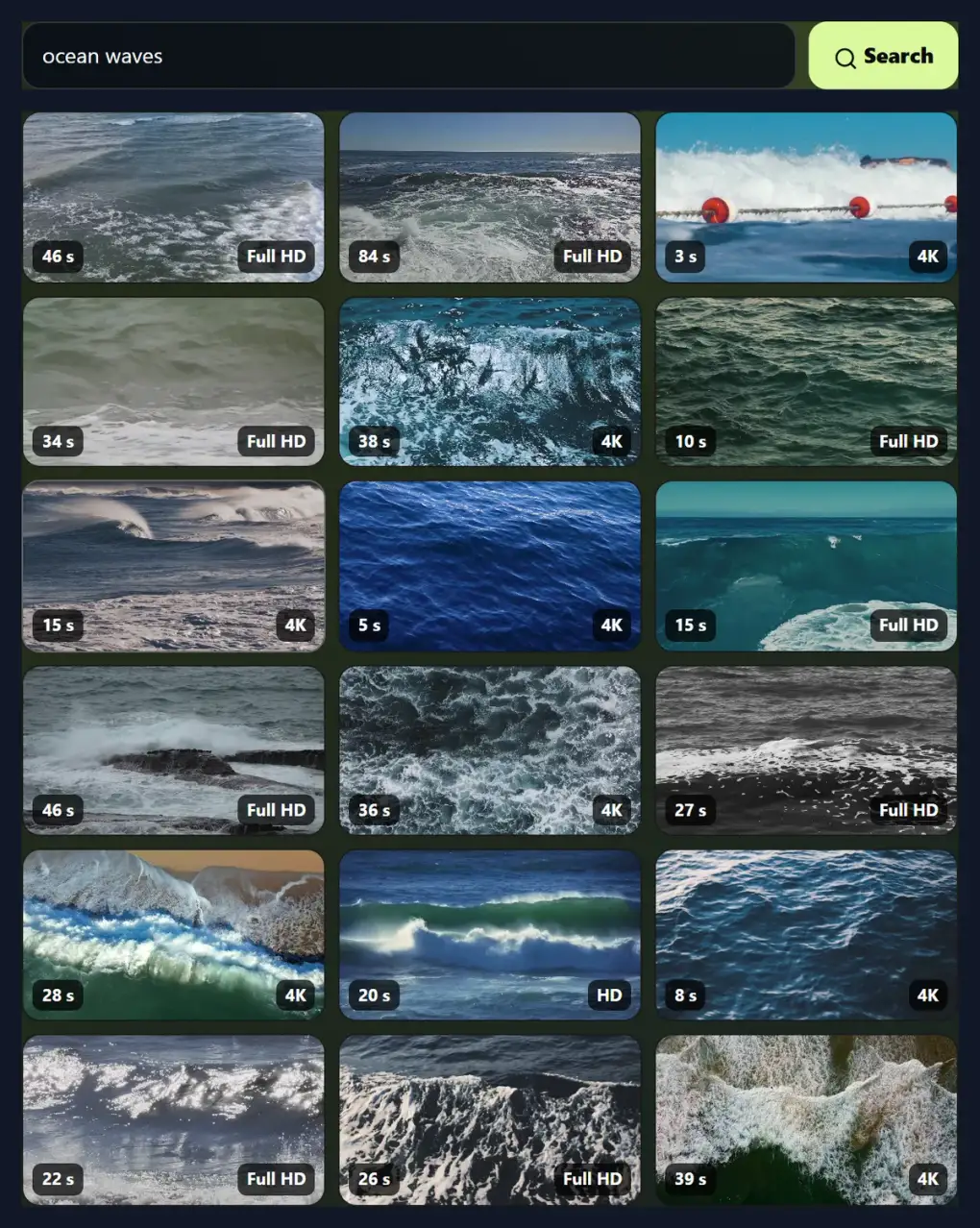
- Ocean waves is searched in the free stock videos and narrowed to wide clips.
- The first clip is picked and opened in the GIF maker.
- The part, the width and a caption are set.
- The GIF is made and shown.
How big is a GIF made from a stock clip?
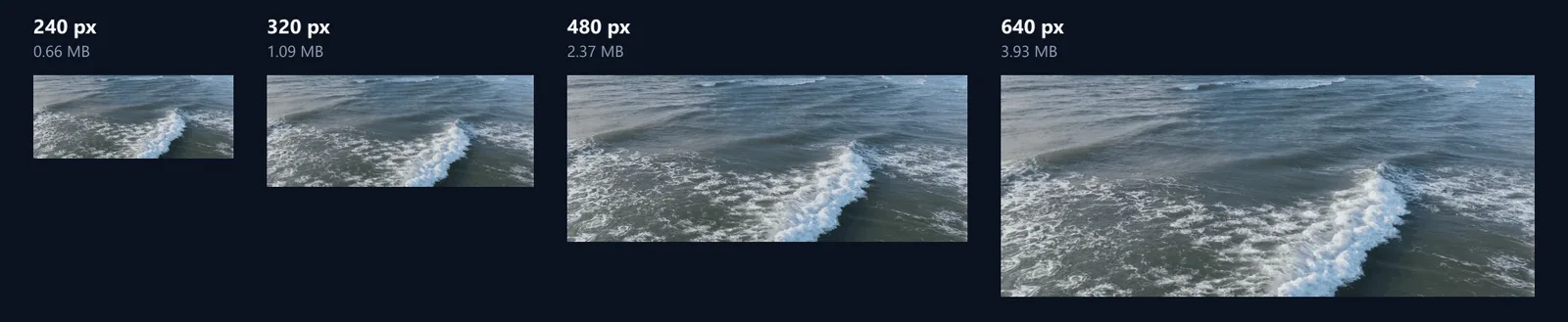
Bigger than most people expect. The same 3-second part of an ocean clip, at 10 frames a second, came out at 0.66 MB at 240 pixels wide, 1.09 MB at 320, 2.37 MB at 480 and 3.93 MB at 640. Going from 240 to 640 pixels wide multiplied the file by 6.0, close to the 7.1 times as many pixels.
A GIF stores every frame as a picture of at most 256 colours, so detail that changes every frame, like breaking waves, costs the most. Calm scenes, flat colours and fewer frames make much smaller GIFs.
| Width | Size | Frames | GIF size |
|---|---|---|---|
| 240 px | 240 × 100 | 30 | 0.66 MB |
| 320 px | 320 × 134 | 30 | 1.09 MB |
| 480 px | 480 × 200 | 30 | 2.37 MB |
| 640 px | 640 × 266 | 30 | 3.93 MB |
How do I make a free GIF?
Search for what you want, such as ocean waves, a dog, rain or a city at night, and press a result to play it. Press Make a GIF from this clip: the clip opens in the GIF maker, where you choose the part (start and end), the width, the frame rate and the speed, and can add a caption or make it a boomerang. Press Make the GIF and download it.
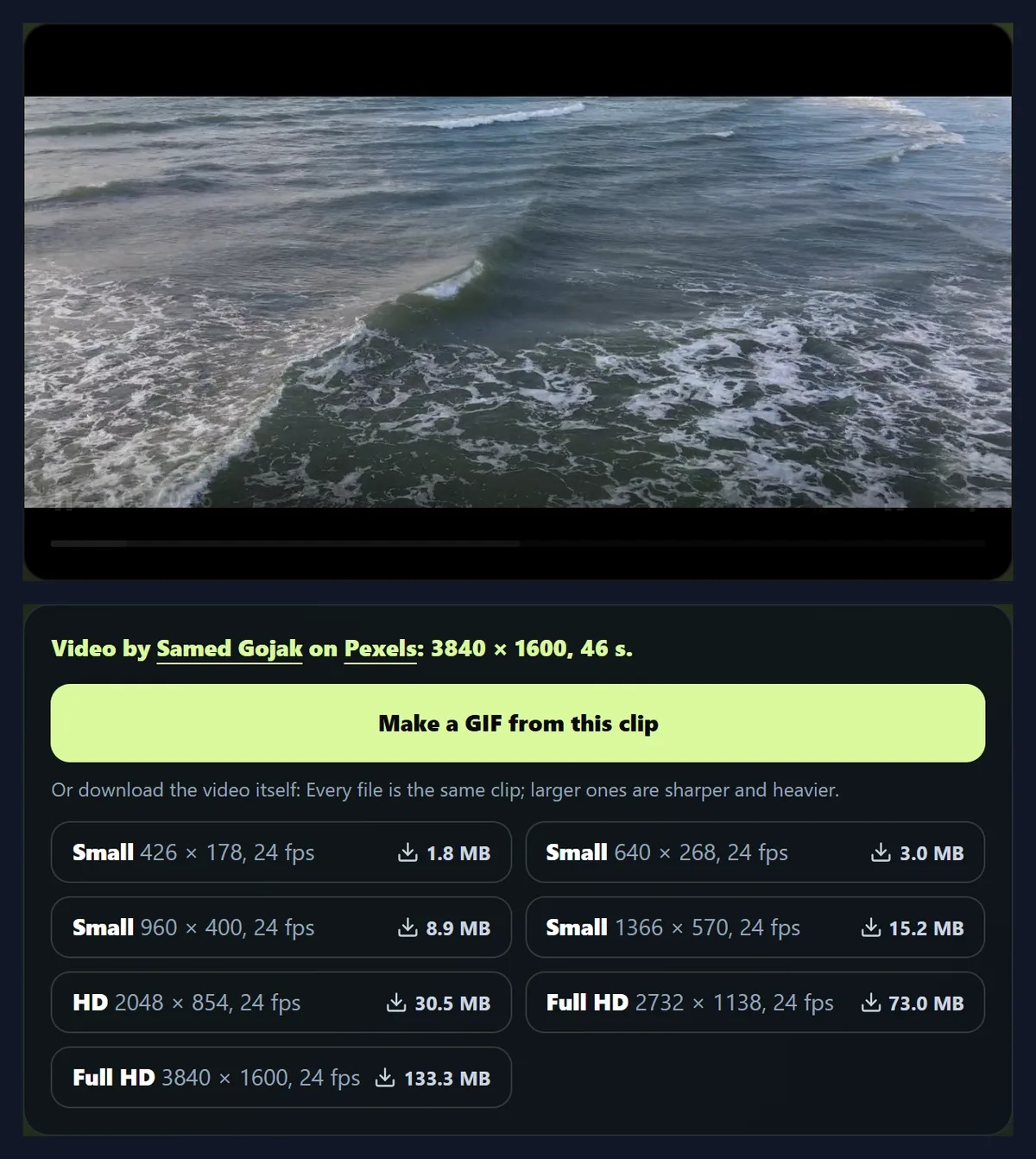
The page searched Pexels for ocean waves, filtered to wide clips, and opened a 46-second clip by Samed Gojak. The GIF in the figure is 2 seconds of it played forwards and back with the caption Ocean mood: 480 × 200, 38 frames, 2.92 MB.
Where do the clips come from?
From Pexels, a library of free stock videos shared by photographers and filmmakers. HueFold searches it for you with its own key, so you need no account, and shows a still of each result; hover over one, or tap it, to see it move. The Shape buttons keep only wide, tall or square clips, and At least keeps only clips of HD, Full HD or 4K.
A search shows 18 clips at a time; Load more videos adds the next page. Each clip shows its length and its sharpest size.
Which part of the clip becomes the GIF?
The part you choose with Start and End, from a fifth of a second up to the whole clip. The GIF maker opens the clip at 960 × 400, a size Pexels already offers that is sharp enough for any GIF width but quick to load: 8.93 MB for this 46-second clip, instead of the full 3840 × 1600 original.
Keep GIFs short: two to four seconds is what most people watch, and each extra second adds as much again to the file.
Can I use these GIFs anywhere?
Under the Pexels licence, all photos and videos on Pexels are free to use and you can modify them, which covers a GIF made from a clip, in chats, posts, websites, presentations and client work. Attribution is not required, though a credit is welcome: the GIF maker shows the creator's name and keeps it in the GIF's file name.
The licence lists what is not allowed: identifiable people may not appear in a bad light or in a way that is offensive; unaltered copies may not be sold; and you may not imply that people or brands shown endorse your product. Read the licence on Pexels before a sensitive use; HueFold does not grant any rights beyond it.
Which settings make a good GIF?
For chats and social posts, 320 to 480 pixels wide at 8 to 12 frames a second looks smooth and stays small. 240 pixels is enough for a reaction GIF on a phone; 640 is for a GIF that is the main picture on a page. 15 frames a second is smoother but stores half as many frames again as 10, and the file grows with the frames.
Speed changes how fast it plays without adding frames: 2× makes a long moment snappy, 0.5× makes a short one dreamy.
What does boomerang do?
It plays the part forwards and then backwards, so the GIF loops without a jump. The 2-second ocean part became a 38-frame boomerang of 3.8 seconds; the turning frames are not repeated, which is why it is a little under twice the length.
Boomerangs suit motion that looks natural both ways, like waves, a swing or someone waving; they look odd for things that cannot run backwards, like pouring.
Can I add text to the GIF?
Yes: type a caption and it is drawn on every frame, near the bottom, in a bold white typeface with a dark outline so it reads on any picture. Keep it short: three or four words fit a 480-pixel GIF comfortably.
For several captions at different moments, make an MP4 first with add text to video, then turn it into a GIF with the video to GIF converter.
Is this like a GIF library?
Not quite. GIF libraries collect ready-made GIFs, often clips from films and TV that the uploader may not own. This page makes the GIF for you from a free stock clip you choose, so you control the moment, size and caption, and the clip's licence is clear.
That also means you will not find famous film scenes or reaction memes here: Pexels holds footage shared by its creators.
Can I make a GIF from my own video?
Yes: use the video to GIF page, which has the same GIF maker for a video from your device, or press Back to the search and then Try sample video in the GIF maker to see it with a sample.
Your own video never leaves your device; only Pexels clips are fetched from the internet.
Should I send a GIF or a short video?
Where an MP4 plays automatically, such as most social networks and messaging apps, a short video keeps full colour and is often smaller: on the motion path page, a 480-pixel GIF of an animation was larger than a 1280-pixel MP4 of the same animation. Use a GIF where only images are allowed: email, some chat apps, documents and README files.
The free video to GIF converter makes GIF, animated WebP or MP4 from the same clip, so you can compare.
How many frames a second should a GIF have?
Ten is a good default: smooth enough for most motion and each frame lasts exactly a tenth of a second. GIFs time frames in hundredths of a second, so the maker gives each frame the delay that keeps the real speed: at 12 frames a second the delays alternate 8 and 9 hundredths, at 15 they alternate 6 and 7.
Fewer frames make a smaller file but jerkier motion; 5 frames a second suits slow scenes and slideshows, 15 suits fast action.
Can I speed the GIF up or slow it down?
Yes: 0.5×, 1×, 1.5× or 2×. Speed changes which moments of the clip become frames, not how many frames a second the GIF shows, so a 2× GIF of a 4-second part lasts 2 seconds and has half the frames, and a 0.5× GIF lasts 8 and has twice as many.
Slow motion suits water, smoke and hair; double speed suits people walking, traffic and clouds.
Why is my GIF so wide (or so tall)?
The GIF keeps the clip's own shape. Pexels clips come in many shapes: the ocean clip was 3,840 × 1,600, so wider than 16:9, and its 480-pixel GIF was 480 × 200. Use the Shape buttons in the search to keep only wide, tall or square clips, so the GIF comes out the shape you need.
To change a clip's shape before making the GIF, download it and use the video resizer or crop videos, then make the GIF on the video to GIF page.
How do I find the right clip?
Search with plain words for what should be in the picture: a cat, rain on a window, a crowd cheering, a city at night. Hover over a result to see it move, or tap it on a phone; the label on each shows its length and its sharpest size. Load more videos fetches the next page of results.
If nothing fits, try a related word, as clips are tagged by the people who shared them.
Can I make GIFs on my phone?
Yes, in a current browser on Android or an iPhone: search, tap a clip, and make the GIF. Long or wide GIFs take more memory to make; on a phone, 320 or 480 pixels wide and under five seconds work best.
Downloaded GIFs go to your phone's downloads, from where you can share them.
Is anything uploaded?
No. Your search goes to HueFold, which asks Pexels and keeps no copies; the clip comes straight from Pexels to your browser, and the GIF is made inside your browser tab. There is no watermark or sign-up.
HueFold does not see which clip you chose or the GIF you made.
Frequently asked questions
Are these GIFs free?
Yes. They are made from Pexels clips, which are free to use and modify under the Pexels licence.
Do I need to credit anyone?
Not under the licence, though a credit to the creator is welcome.
How big will the GIF be?
It depends on the width and the picture: a 3-second ocean GIF was 0.66 MB at 240 px wide and 3.93 MB at 640.
Can I add text?
Yes, one caption drawn on every frame.
Can I make a boomerang?
Yes. It plays forwards then backwards.
Can I use my own video?
Yes, on the video to GIF page.
Do I need an account?
No.
Is there a watermark?
No.
Related tools
- Video to GIF — Make a GIF from your own video.
- Free Stock Videos — Download the clips themselves.
- Free Video to GIF Converter — GIF, WebP or MP4 under a size limit.
- Add Text to GIF — Captions on an existing GIF.
- Add Music to GIF — Turn a GIF into a video with sound.
- Stock Photos — Free photos to use.