Free Video to GIF Converter
Convert a video to GIF, animated WebP or MP4 in your browser. Set a size limit and the converter shrinks the file until it fits, showing every try.
Updated
How do you convert a video to a GIF that fits a size limit?
Open a video, choose GIF, animated WebP or MP4, the width and the frame rate, and if the file must stay under a size, choose 10, 5, 2 or 1 MB. Press Make, and the converter makes the file, checks it, and makes it again smaller if it is over, until it fits.
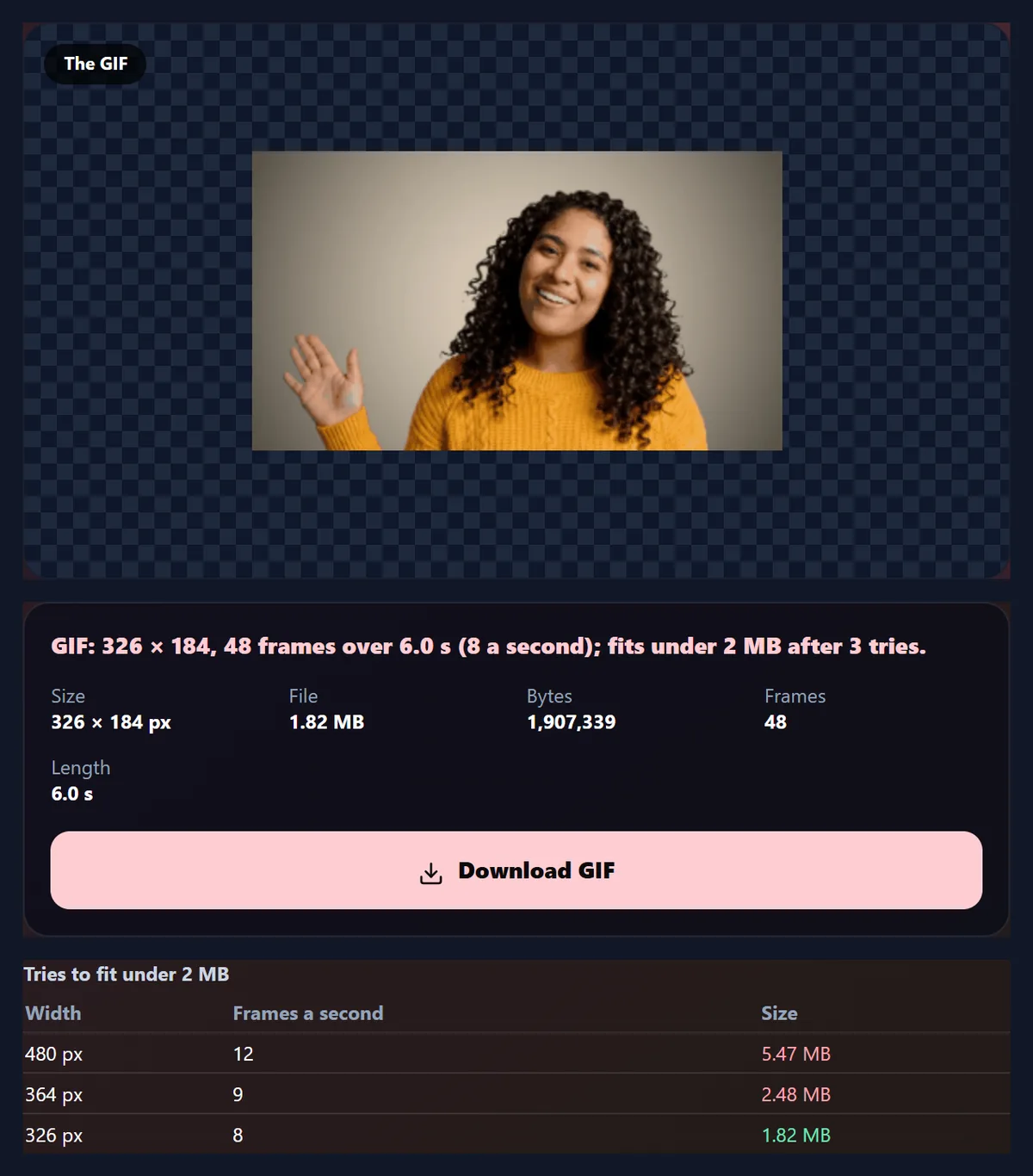
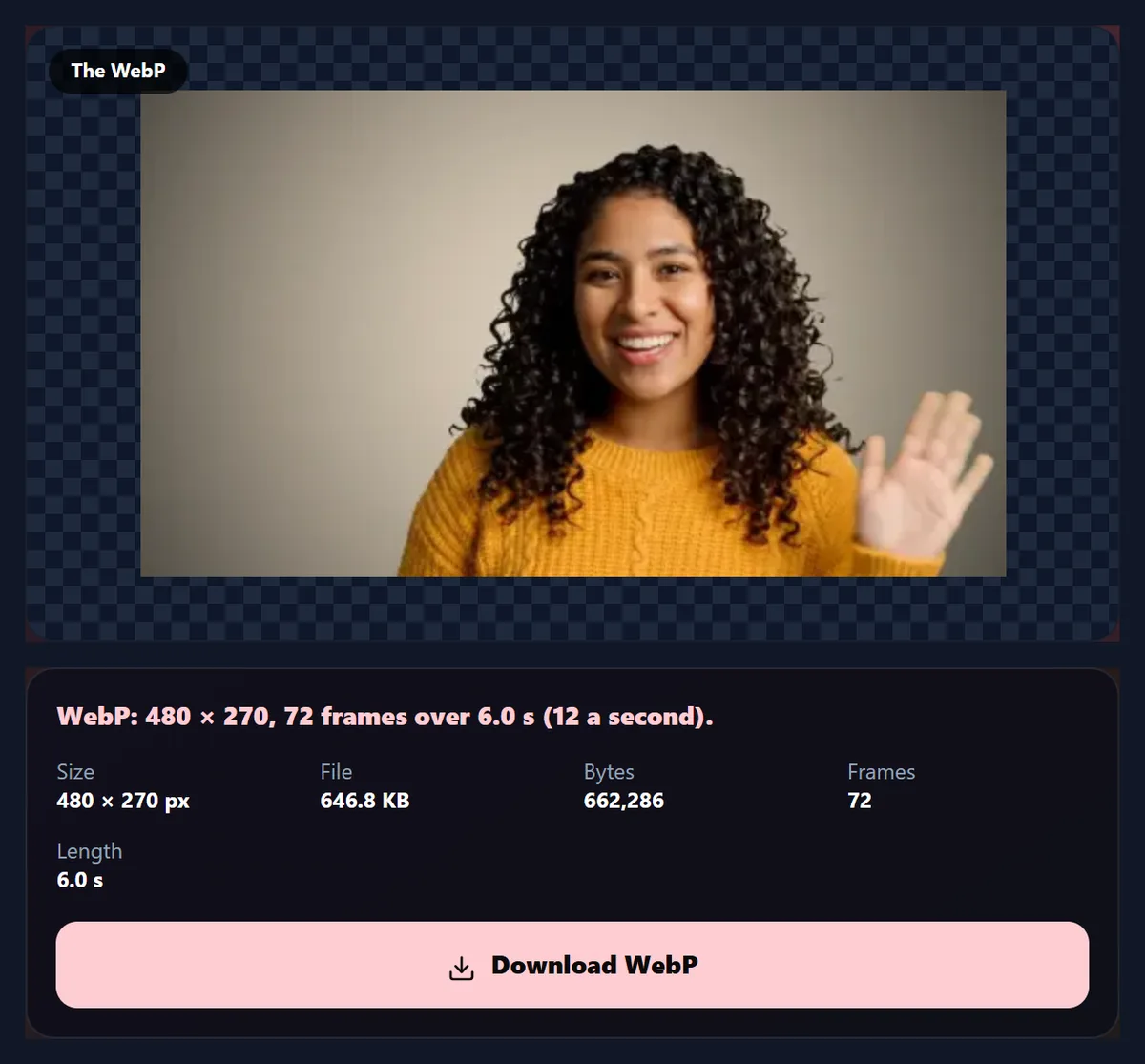
The sample's 6 seconds became a 5.47 MB GIF with no limit, and a 1.82 MB GIF under a 2 MB limit after 3 tries. As an animated WebP, with no limit, it was 646.8 KB. All in your browser, free and without a watermark.
How to convert a video to GIF
- Open a video Any video your browser plays.
- Choose a format GIF, animated WebP or MP4.
- Set a size limit Or None to keep your settings.
- Convert and download The tries are listed under the result.
Convert a video to a GIF under 2 MB
A real recording of this tool: the sample video opened, the formats compared, a 2 MB limit set, the GIF made in several tries and downloaded.
- The sample video is opened.
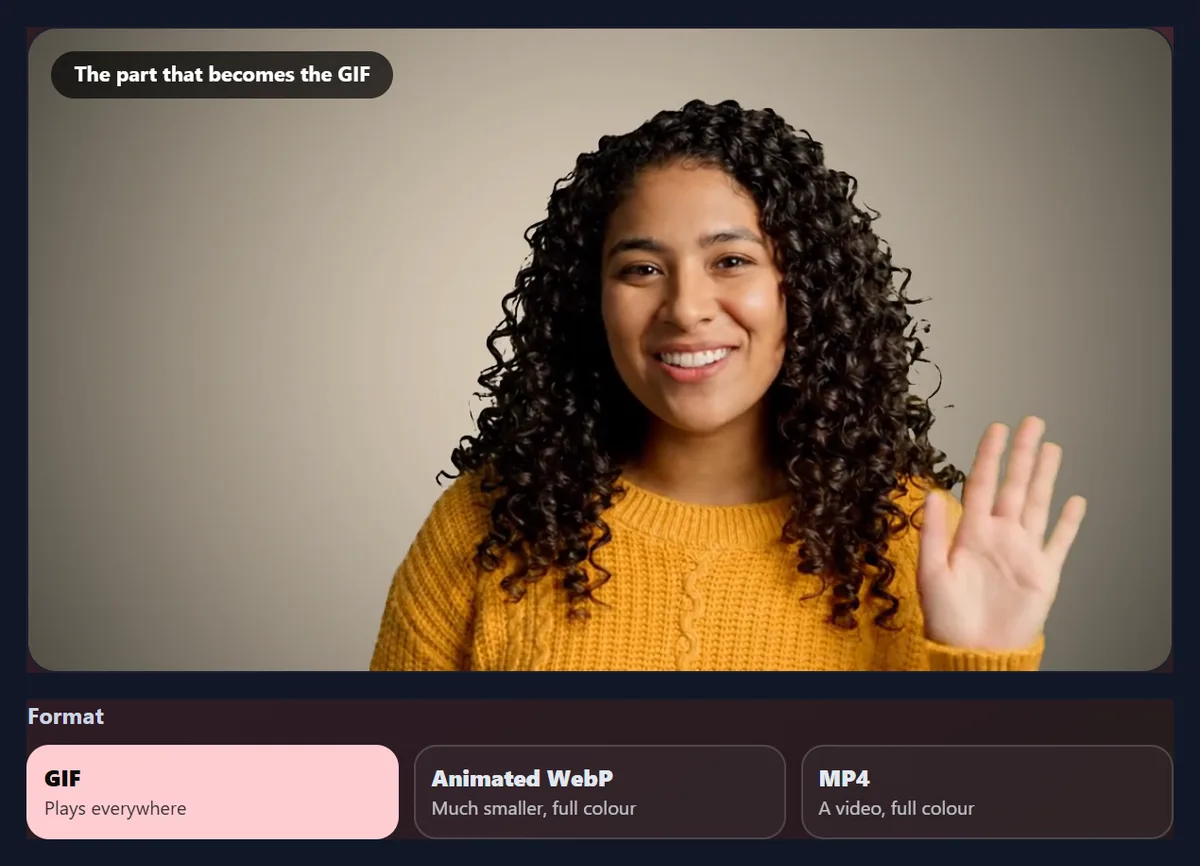
- The formats are shown: GIF, animated WebP and MP4.
- A 2 MB size limit is chosen.
- The converter makes the GIF, smaller each try, until it fits.
- The tries are shown, and the GIF is downloaded.
GIF, WebP or MP4: which makes the smallest file?
For a short clip at GIF sizes, the animated WebP, by far. The whole 6-second sample at 480 pixels wide and 12 frames a second came to 5.47 MB as a GIF and 646.8 KB as an animated WebP, less than an eighth of the size for the same frames. The MP4 was 2.34 MB, less than half the GIF, with every one of the video's 144 frames rather than 72.
The MP4 is larger than the WebP here because the converter writes MP4 at a generous bitrate, at least 4 megabits a second, so that fast movement stays sharp; at small sizes that is more than a GIF replacement needs. GIF is the largest because it has no real compression between frames: each one is a separate 256-colour picture.
| Format | File size | Frames | Converting took |
|---|---|---|---|
| GIF | 5,598 KB | 72 at 12 a second | 9 s |
| Animated WebP | 647 KB | 72 at 12 a second | 8 s |
| MP4 (H.264) | 2,396 KB | 144 at 24 a second | 39 s |
How does the size limit work?
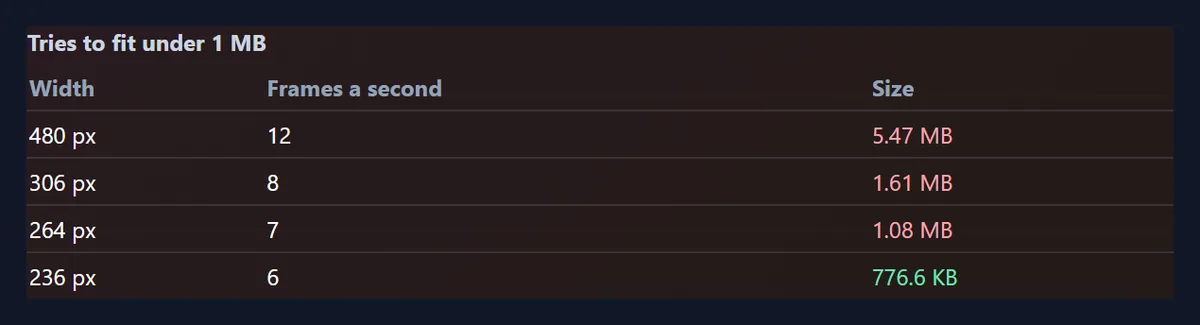
Choose 10, 5, 2 or 1 MB and the converter makes the file as you set it, checks its size, and if it is over the limit makes it again, narrower and with fewer frames a second, until it fits. The sample's 6 seconds as a GIF fitted under 5 MB in 2 tries, under 2 MB in 3 and under 1 MB in 4, ending at 236 pixels wide and 6 frames a second. The table under the result lists every try, so you can see what was given up.
Each try aims at the limit: the further over the last file was, the more the converter shrinks both the width and the frame rate, by at least 10% and at most 40% a step, so it does not overshoot far below the limit. For an MP4, or a GIF already at 5 frames a second, only the width shrinks. It stops at 160 pixels wide and 5 frames a second; if the file is still too large there, it says so, and the answer is a shorter part.
| Limit | Try | Width | Frames a second | Size |
|---|---|---|---|---|
| 5 MB | Try 1 | 480 px | 12 | 5.47 MB |
| Try 2 | 432 px | 11 | 4.17 MB | |
| 2 MB | Try 1 | 480 px | 12 | 5.47 MB |
| Try 2 | 364 px | 9 | 2.48 MB | |
| Try 3 | 326 px | 8 | 1.82 MB | |
| 1 MB | Try 1 | 480 px | 12 | 5.47 MB |
| Try 2 | 306 px | 8 | 1.61 MB | |
| Try 3 | 264 px | 7 | 1.08 MB | |
| Try 4 | 236 px | 6 | 776.6 KB |
How does the converter work?
For a GIF or a WebP, it works out the moment of every frame at the frame rate you chose, asks the browser to show the video at each moment in turn, and copies each picture at the width you chose. The GIF is written by gif.js, an open-source encoder that picks the best 256 colours for each frame. For a WebP, each frame is saved as a WebP picture by the browser itself and the frames are put together into one animated WebP file, with each frame's delay to the millisecond.
For an MP4, the video plays through once at half speed while each frame it shows is encoded as H.264 at its own moment, so the MP4 keeps the video's own frame rate. The MP4 has no sound, as a GIF would not. Nothing leaves your browser at any step.
Which format looks best?
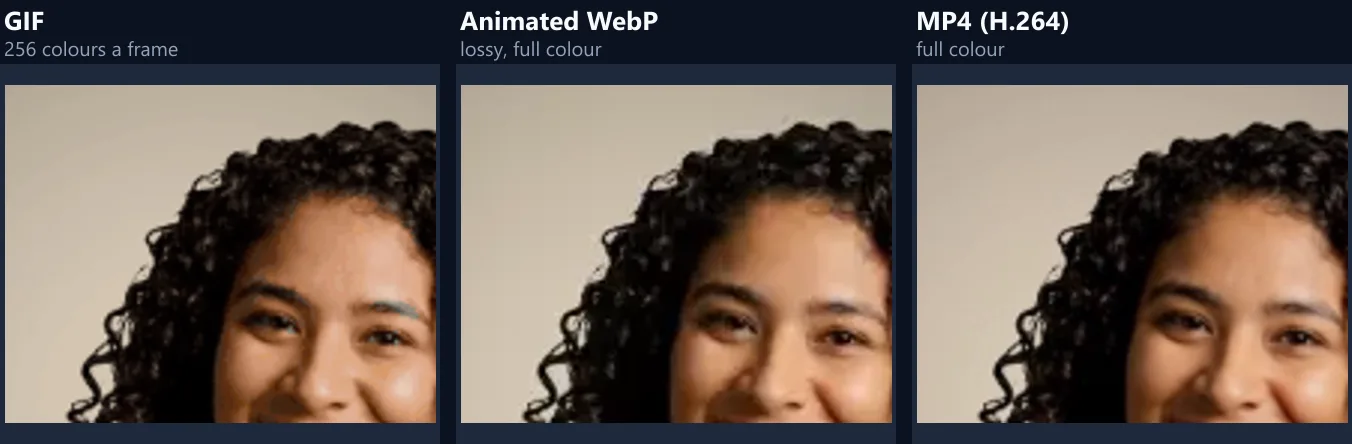
The WebP and the MP4 keep full colour, so faces, skies and shadows look like the video. A GIF has 256 colours a frame, so smooth shading turns into visible steps and speckles. The figure shows the same moment of the sample, enlarged, from each file the converter made.
WebP compresses each frame on its own, like a JPEG, so at a lower quality setting it can blur fine detail; the converter uses a quality of 75 out of 100, which keeps the sample looking clean.
What is an animated WebP, and where does it work?
WebP is an image format from Google that can hold animation, like a GIF, with full colour and transparency and much better compression. Every current browser shows animated WebP files: Chrome, Edge, Firefox and Safari, on computers and phones, so for a web page it is usually the best replacement for a GIF.
Outside the browser, support is patchier: some chat apps, email programs and older image viewers show only the first frame or refuse the file. Where a GIF is expected, such as an email newsletter, send a GIF.
When should I convert to MP4 instead?
When the clip is long, when full frame rate matters, or when the place you are posting turns GIFs into videos anyway, as many social sites do. An MP4 keeps every frame of the video, here all 144 of the sample's 6 seconds at 24 frames a second, where the GIF and WebP kept 72 at 12.
To keep the sound, convert with the video to MP4 converter instead: this one makes a silent MP4, the way a GIF is silent. To loop it on a web page, play it muted with the loop and autoplay settings.
Do the GIF and WebP play at the right speed?
Yes. A GIF can only store each frame's delay in hundredths of a second, so at 12 frames a second (83.3 milliseconds a frame) the converter alternates delays of 80 and 90 milliseconds so that the 72 frames add up to exactly 6 seconds. A WebP stores milliseconds, so its delays alternate 83 and 84. Both play in exactly the video's time.
When the converter lowers the frame rate to meet a limit, the delays change to match, so a GIF at 8 frames a second still lasts as long as the video.
How long a video can I convert?
The converter takes the first 20 seconds of the video, or all of it if it is shorter; drag Start and End to choose another part. A GIF or WebP can have up to 300 frames, which is 25 seconds at 12 frames a second; if the part has more, lower the frame rate or shorten it.
For anything longer, an MP4 is the better format anyway: a 25-second GIF at a useful size is tens of megabytes.
Which width and frame rate should I choose?
Start with 480 pixels and 12 frames a second, the converter's defaults, and let the size limit shrink them if needed. For a chat reaction, 320 pixels is plenty; for a web page shown large, 640 or 800. Frame rates from 8 to 12 look smooth for most movement; 5 is choppy but small.
The width can never be more than the video's, and the picture keeps the video's shape.
Which size limit should I choose?
The one just under the limit of wherever the file is going: a website, a chat app, a forum or an email. Each service sets its own limit and they change, so check the upload page or its help. With no limit, you get the file exactly as you set it.
A smaller limit costs width and smoothness. The tries table shows what each limit cost the sample: under 1 MB, the GIF ended up less than half as wide and at half the frame rate.
Is the converter really free?
Yes: no sign-up, no watermark, no limit on how many files you convert and no upload. It runs entirely in your browser, using its own video decoder, canvas and encoders, so there is no server to pay for each conversion.
The GIF encoder, gif.js, is open-source software under the MIT licence.
Can I convert on my phone?
Yes, in a current browser on Android or an iPhone. Phones have less memory, so for long clips choose a smaller width or a size limit, and keep the screen on while it converts. Animated WebP needs a browser that can save WebP pictures; where it cannot, the WebP button is greyed out.
The finished file is saved to your downloads or files, ready to share.
Is my video uploaded?
No. The video is opened, its frames are read and the file is made inside your browser tab. Nothing is sent to HueFold or anyone else.
That also means a large video is not slowed down by your internet connection.
Why did the conversion fail?
If the video will not open, your browser cannot play its codec: try Chrome or Edge, or convert it to MP4 first. If Make is greyed out, the part has more than 300 frames. If the result says it is still over the limit at the smallest size, shorten the part: at 160 pixels and 5 frames a second, length is all that is left to cut.
If converting a long part runs out of memory, choose a smaller width, a lower frame rate or a shorter part.
Frequently asked questions
Is this video to GIF converter free?
Yes, with no sign-up and no watermark.
Can I make a GIF under 2 MB?
Yes. Choose 2 MB and the converter shrinks it until it fits.
Which is smaller, GIF or WebP?
WebP, by far: 646.8 KB against 5.47 MB for the sample.
Does the MP4 have sound?
No. Use the video to MP4 converter to keep the sound.
How long can the video be?
Up to 300 frames for GIF or WebP: 25 seconds at 12 frames a second.
Will the GIF loop?
Yes, forever.
Does animated WebP work everywhere?
In every current browser; some apps and email programs show only its first frame.
Is my video uploaded?
No. Everything happens in your browser.
Related tools
- Video to GIF — Speed, boomerang and captions.
- Video to MP4 — Convert with the sound.
- Crop Videos — Crop before converting.
- Video Resizer — Resize for Reels and Stories.
- Add Text to GIF — Write on a GIF.
- Remove Audio From Video — Silence a video.