Generate realistic images and art using AI
Describe a picture in your own words and AI makes it: a realistic photo, an illustration, a watercolour, an oil painting, a 3D render, anime, a pencil sketch or pixel art, square, wide or tall. You see the price first, and every image is saved to your HueFold account.
Updated

How do you make an image with AI?
Write what the picture should show (the subject, the setting, the light), choose a style and a shape, and press Make. The image arrives in about a minute and can be downloaded as a PNG or opened in another HueFold tool. It uses AI credits from your HueFold account, and the price is shown before anything is made.
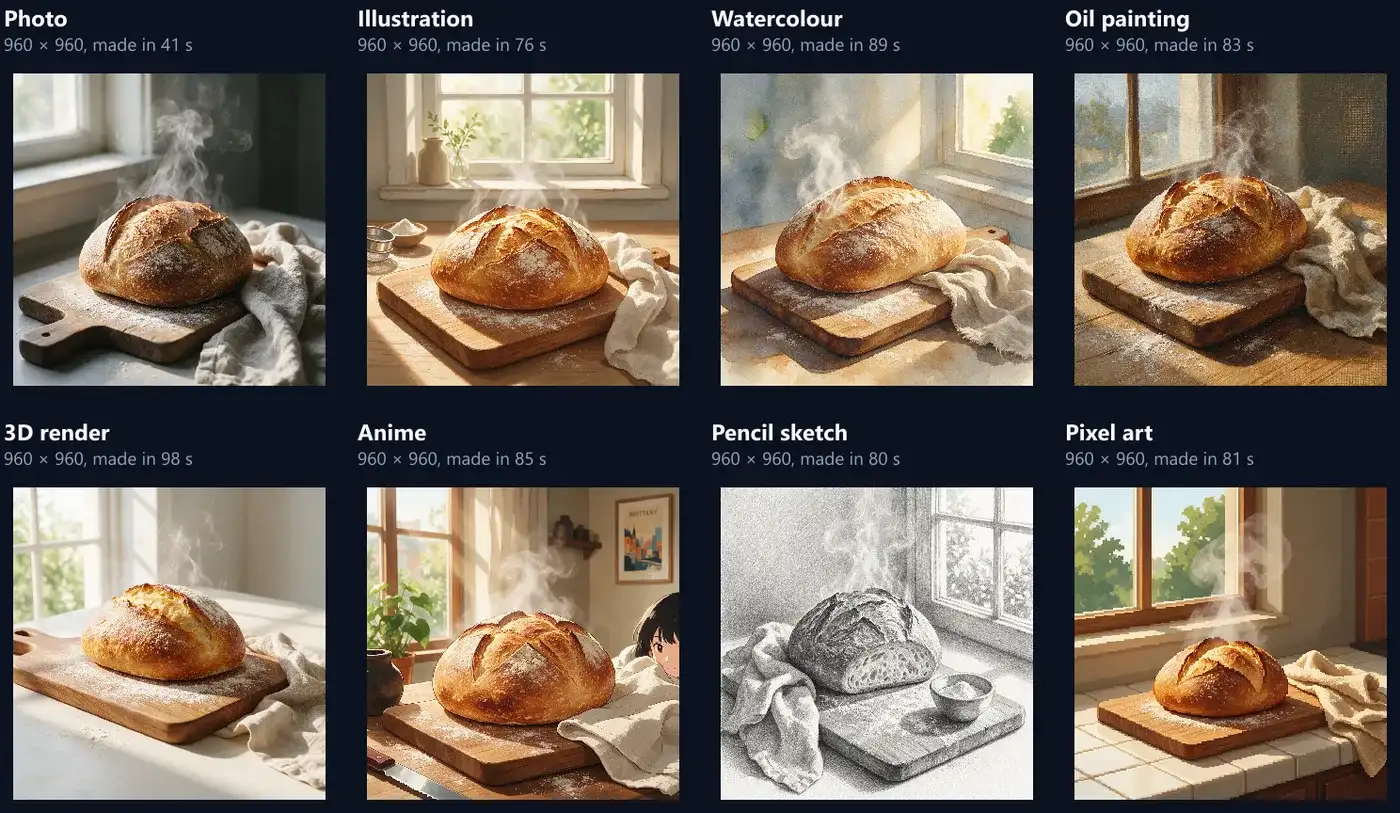
Every picture on this page was made by this tool on Seedream 5.0, ByteDance's image model, from the words shown: one description in eight styles, another in four shapes, and two takes of a third. Each was charged 2 credits and took between 41 and 98 seconds.
How to make an AI image
- Describe the picture Subject, setting and light.
- Pick a style and shape Photo to pixel art; square to tall.
- See the price Before anything is made.
- Make and download A PNG, saved to your account.
Make an image from a description
A real recording of this tool on Seedream 5.0: the café idea chosen, the Photo style and the 16:9 shape picked, the price checked, the image made (97 seconds, shown eight times faster) and downloaded.
- The description of a café on a rainy street is chosen from the ideas.
- The Photo style and the wide 16:9 shape are picked.
- See the price shows what the image can cost.
- Make sends it to Seedream 5.0, and the seconds are counted until it arrives, 97 seconds later (the wait is shown eight times faster).
- The finished picture is downloaded as a PNG.
How do I make a picture from a description?
Type the description, or start from one of the four ideas, then choose the style, the shape and how many takes you want. See the price shows what one image costs before anything happens; Make sends it to the model. While it is made, the tool counts the seconds; when the image arrives it shows its size, file, credits and how long it took, with Download and Open in… to take it into another HueFold tool.
Sign in first (the tool asks), and accept HueFold's AI policy once. Each image is saved to your HueFold account as well as shown here, so it is not lost if you close the tab.
Which styles can I choose?
Ten: From the words (no style added, the description decides), Photo, Illustration, Watercolour, Oil painting, 3D render, Anime, Pencil sketch, Pixel art and Pop art. Each sends one of HueFold's own style directions with your words, so the same description comes back as a very different picture. The table and the figure are one description, "a loaf of sourdough on a floury wooden board by a window, soft morning light, a linen cloth beside it, steam rising from the crust", in eight styles, square.
The style follows the description, and sometimes adds to it: the Anime take put a girl at the edge of the picture that the words never asked for, and the Pencil sketch cut the loaf open. Pixel art drew a blocky window and trees but left the loaf itself smooth. If a style adds something you do not want, say so in the words, or try another take.
| Style | Size (px) | Made in (s) | PNG (KB) |
|---|---|---|---|
| Photo | 960 × 960 | 41 | 1,712 |
| Pixel art | 960 × 960 | 81 | 1,472 |
| Illustration | 960 × 960 | 76 | 1,839 |
| Pencil sketch | 960 × 960 | 80 | 2,452 |
| Oil painting | 960 × 960 | 83 | 2,290 |
| Anime | 960 × 960 | 85 | 1,856 |
| Watercolour | 960 × 960 | 89 | 2,068 |
| 3D render | 960 × 960 | 98 | 1,723 |
How should I describe the picture?
Say what is in it, where, and in what light, in plain words: "a red and white lighthouse on a rocky headland at dusk, waves breaking below, the lamp just lit". Name the important details (the steam, the linen cloth) and leave out the ones you do not care about; the model fills the rest. Up to 1,000 characters.
HueFold adds a short direction to your words before they reach the model: the style's own description (for Photo, "make it look like a polished real photograph with natural light, realistic texture, and convincing depth"), the shape, and readings from your words such as the light. Words like "golden hour" or "close-up" are picked up and passed on as well. Avoid real people's names, brands and other artists' work.
Which shapes and sizes do I get?
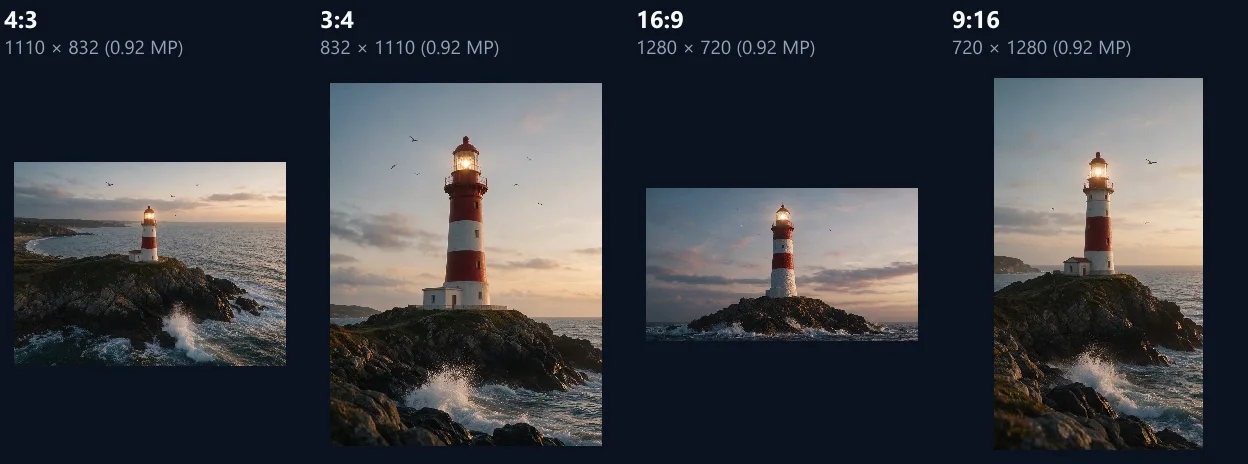
Five shapes: square (1:1) for feeds, 4:3 and 3:4 for photos, 16:9 for slides and headers, and 9:16 for stories. On Seedream 5.0 each came out at about 0.92 megapixels, the model's smallest size, whatever the shape: 960 × 960 square, 1280 × 720 wide and 720 × 1280 tall. Every image was a PNG.
Pick the shape for where the picture is going before you make it: cropping a square to 16:9 afterwards throws away 44% of it, and the model composes the scene for the shape it is given. That is enough for a post, a slide or a web page. For print or a large screen, enlarge it with the AI Image Upscaler, which adds detail as it doubles or quadruples the size.
| Shape | Size (px) | Made in (s) | PNG (KB) |
|---|---|---|---|
| 1:1 square | 960 × 960 | 41 | 1,712 |
| 4:3 | 1110 × 832 | 44 | 1,717 |
| 3:4 | 832 × 1110 | 60 | 1,556 |
| 16:9 wide | 1280 × 720 | 64 | 1,576 |
| 9:16 tall | 720 × 1280 | 53 | 1,338 |
Why does the same description give a different picture?
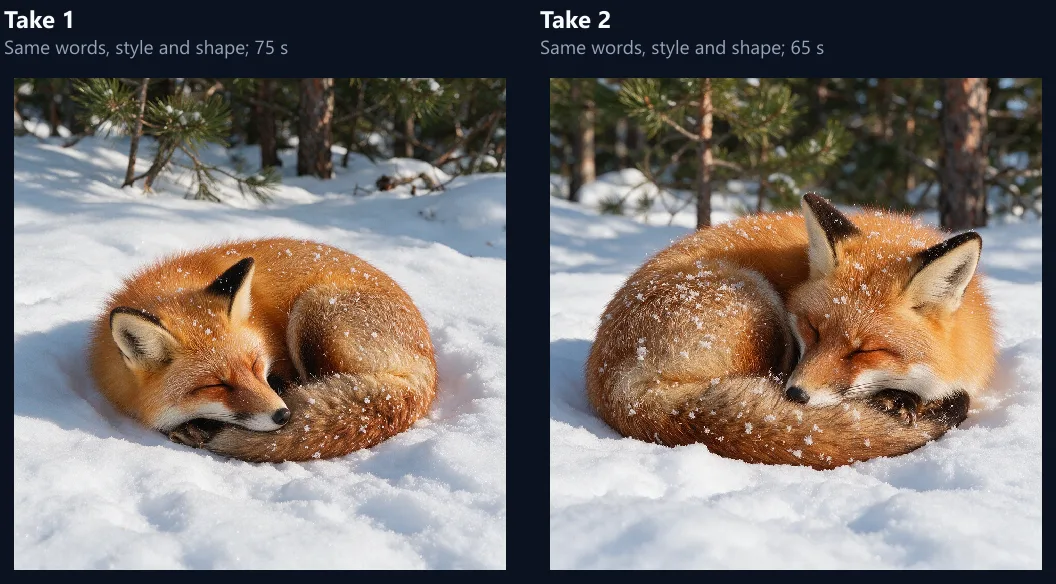
Because the model starts each image from fresh noise, so two takes of the same words, style and shape differ in pose, framing and detail. The fox below was asked for twice in one press of Make (Takes: 2): in one it curls to the left with its tail across its nose, in the other it faces right with snow on its back. Each take is a separate image and a separate charge.
Ask for up to four takes at once and keep the one you like; the strip under the picture holds the last twelve, and each can be downloaded or opened in another tool.
How much does an AI image cost?
It is paid in AI credits from your HueFold account. See the price shows the most one image can cost; that much is held while it is made, and you are charged what the image actually used, with the rest given back. Nothing is charged if it fails. On Seedream 5.0 the price shown was up to 6 credits, and each of the images on this page was charged 2.
Takes multiply: three takes cost three images. Nano Banana 2 Lite, the other model on the page, is priced the same way, shown before you make anything.
How long does an image take?
About a minute, measured from pressing Make to the picture arriving. On Seedream 5.0 the 15 images measured took 41 to 98 seconds: the photos of this page's figures 41 to 75 seconds, the art styles 76 to 98, and the photo in the video 97, so the moment matters as much as the style. The image is made as a queued job: the tool asks every 3 seconds whether it is ready, so a time can be up to 3 seconds longer than the model took.
You can keep the tab open and do something else; the seconds are counted on the button, and the picture appears when it is ready.

Which AI model makes the images?
You choose between two: Seedream 5.0 from ByteDance, which made every picture on this page, and Nano Banana 2 Lite, Google's lighter image model. The badge on the tool says which one is running, and the result says which one made the picture; if the chosen model fails, the tool says so instead of quietly using the other.
Nano Banana 2 Lite was not measured for this page, so its times, sizes and price are not given here; See the price shows its price before you make anything.
What can I do with the image?
Download it as a PNG, or open it in another HueFold tool without downloading: Mockups to put it on a phone or a poster, the AI Photo Enhancer, Photo Effects, Crop Image, Photo Frames or the batch Enhancer. The picture is handed over inside your browser.
Each image is also saved to your HueFold account, with the words and settings that made it.
What is sent, and where is the image kept?
Your words and settings go to HueFold, which sends them, with the style direction, to the model's maker (ByteDance through BytePlus for Seedream, Google for Nano Banana) to make the image. Nothing else from your device is sent. The finished image is kept in your HueFold account.
Before your first image, HueFold asks you to accept its AI policy, which sets out how its AI features may be used.
What does the AI image generator not do?
It makes new pictures from words; it does not change a photo you already have (for that, the AI Photo Editor and Generative Fill take a picture as well as words). It cannot follow a reference image here, guarantee exact text inside a picture, or keep the same character across takes. Images come at about 0.92 megapixels.
A style can add things the words did not ask for, as the anime girl showed. Read the result before you use it, and make another take if it is not right.
Frequently asked questions
Is the AI image generator free?
It uses AI credits from your HueFold account; the price is shown before anything is made.
How much does one image cost?
On Seedream 5.0 the price shown was up to 6 credits, and each image here was charged 2.
How long does it take?
About a minute: 41 to 98 seconds for the images on this page.
What size are the images?
About 0.92 megapixels: 960 × 960 square, 1280 × 720 wide, 720 × 1280 tall, as PNG.
Which styles are there?
Photo, illustration, watercolour, oil painting, 3D render, anime, pencil sketch, pixel art, pop art, or none.
Why is each take different?
The model starts every image afresh, so the same words give a new picture each time.
Which AI model does it use?
Seedream 5.0 from ByteDance or Nano Banana 2 Lite from Google; you choose.
Where are my images kept?
In your HueFold account, with the words and settings that made them.
Can I edit one of my own photos?
Not here. Use the AI Photo Editor or Generative Fill, which take a picture too.
Can I make the image bigger?
Yes: open it in the AI Image Upscaler to double or quadruple its size.
Related tools
- AI Image Upscaler — Make an image bigger and sharper.
- Mockups — Put the picture on a device.
- AI Generative Fill — Change part of a photo with words.
- AI Image Expander — Widen a picture beyond its edges.
- AI Cartoon Generator — Turn a photo into a cartoon.
- AI Generated Video — A short video from words.