JPEG to JPG
Change .jpeg files to .jpg without re-saving them: a real JPEG keeps every byte, so nothing is lost and its EXIF data stays. Files that only claim to be JPEGs are found by their contents and converted properly.
Updated

How do you convert JPEG to JPG?
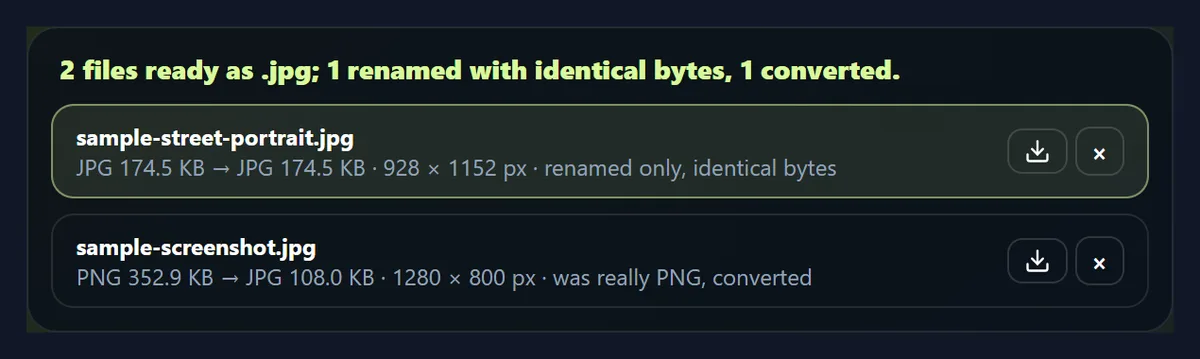
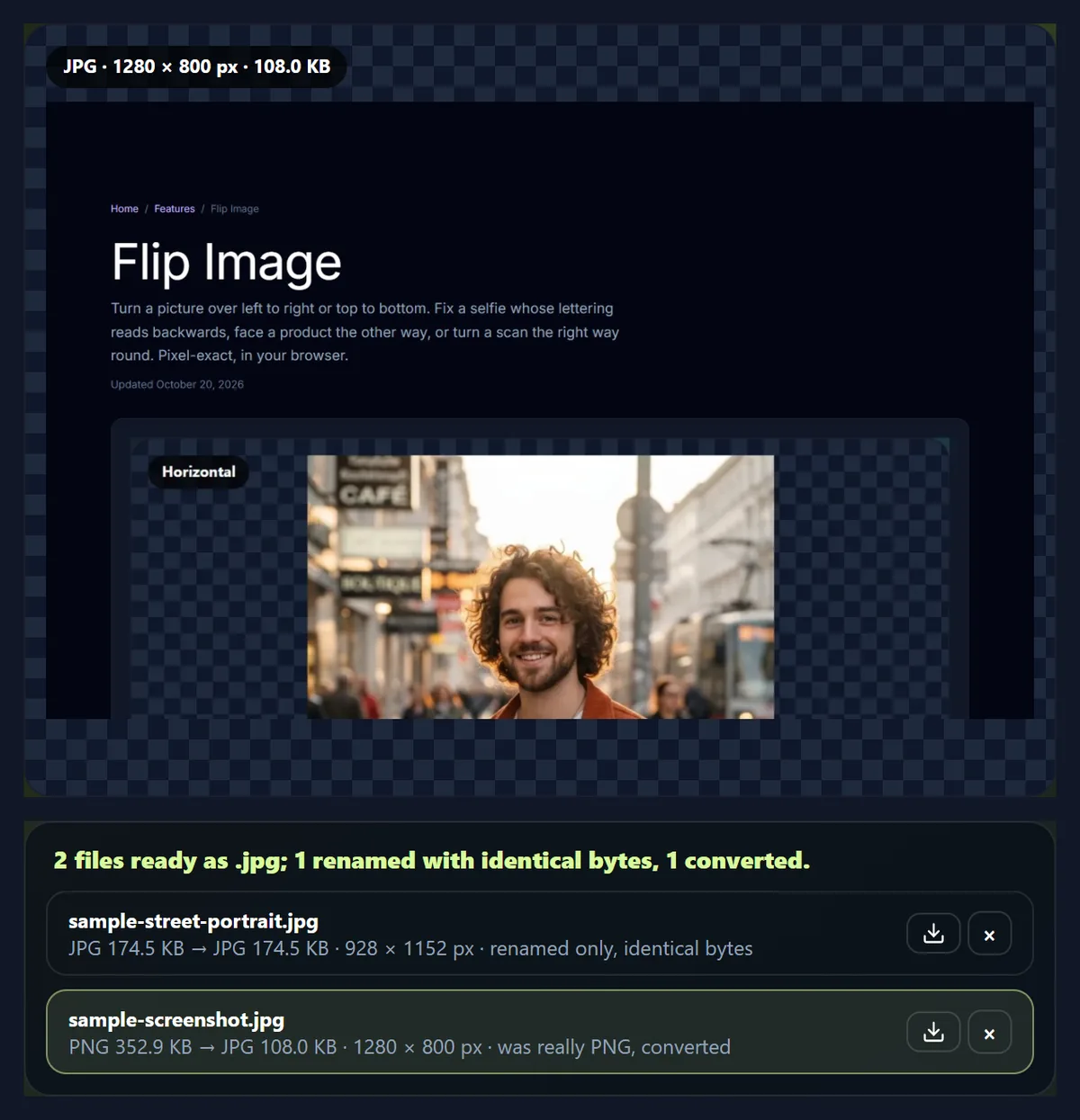
Add your .jpeg files, or try the two samples. Each file's contents are checked: a real JPEG is saved again under a .jpg name with exactly the same bytes, and a file that is really another format, such as PNG or WebP, is converted into a real JPG. Download the files one by one or all as a ZIP.
JPEG and JPG are the same format with two spellings of the file ending, so no conversion is needed, only a new name. Re-saving a JPEG to change its name, as many converters do, compresses the picture again and changes it.
The samples are a street portrait saved as .jpeg, and a screenshot named .jpeg although it is really a PNG, to show the check. Your files never leave your device.
How to change JPEG to JPG online
- Add .jpeg files Choose or drop up to 50 .jpeg, .jpe or .jfif files, or try the samples.
- Let the tool check them Real JPEGs are renamed with identical bytes; anything else is converted.
- Read the list Each file says whether it was renamed or converted.
- Download Save each .jpg, or all of them as one ZIP.
Change .jpeg files to .jpg
A real recording of this tool: a real JPEG renamed with identical bytes, a mislabelled PNG converted, and a ZIP download.
- Two .jpeg samples open and are checked.
- The real JPEG is renamed to .jpg with identical bytes.
- The file that is really a PNG is converted to a real JPG.
- Both files are downloaded as one ZIP.
Why rename instead of re-saving?
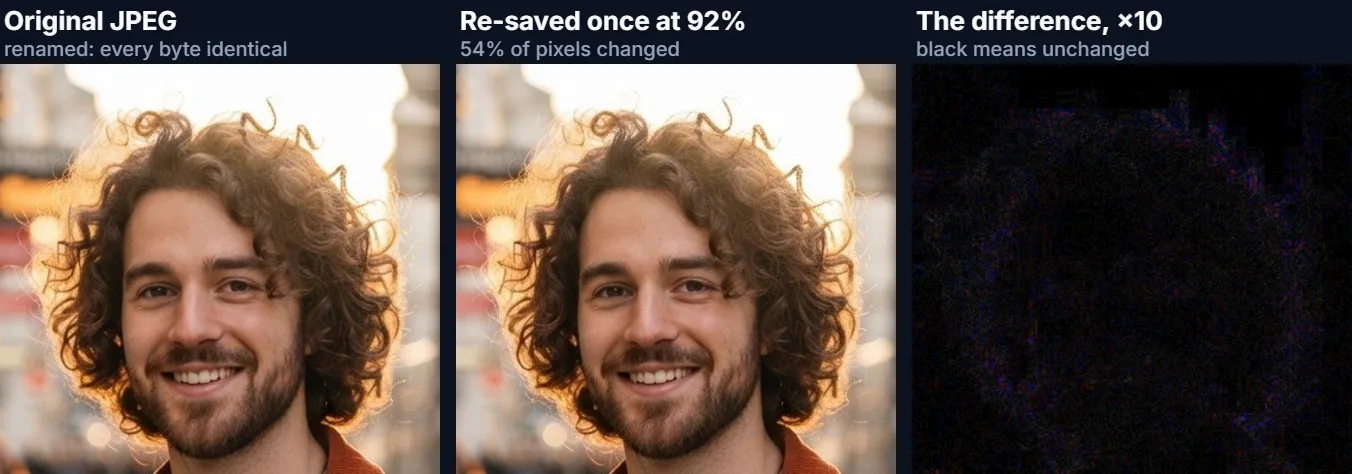
Because re-saving a JPEG changes it and renaming does not. JPEG compression rounds the picture's detail every time it saves, so opening a JPEG and saving it again, even at a high quality, gives a different file. In our test the street portrait re-saved once at 92% had 53.7% of its pixels changed (a match with the original of 47.9 dB PSNR, where higher means closer) and the file grew from 178,736 to 207,028 bytes. Renaming changes nothing: the .jpg file has exactly the same bytes as the .jpeg.
Re-saving the same picture again and again at the same quality settles quickly: after 50 re-saves 54.4% of pixels differed, barely more than after one. Losses pile up when a photo is edited between saves, or saved at different qualities or by different apps, which is what happens to a photo in real life.
| Version | Pixels changed | Match with the original (PSNR) | File size, bytes |
|---|---|---|---|
| Renamed (0 re-saves) | 0% | identical | 178,736 |
| Re-saved 1 time | 53.7% | 47.9 dB | 207,028 |
| Re-saved 2 times | 54.1% | 47.7 dB | 207,052 |
| Re-saved 5 times | 54.4% | 47.1 dB | 207,013 |
| Re-saved 10 times | 54.4% | 46.9 dB | 207,003 |
| Re-saved 20 times | 54.4% | 46.8 dB | 207,006 |
| Re-saved 50 times | 54.4% | 46.8 dB | 207,006 |
Are JPEG and JPG the same?
Yes. JPEG is the format, named after the Joint Photographic Experts Group that defined it, and .jpg, .jpeg, .jpe and .jfif are just different endings for the same kind of file. The three-letter .jpg comes from older versions of Windows and DOS, whose file names allowed only three letters after the dot; .jpeg is the full name, used more on Macs and Linux.
So converting a .jpeg to .jpg needs no conversion at all, only a new name, and any app that opens one opens the other.
How do I know the bytes are identical?
The tool checks the file's first bytes to confirm it really is a JPEG, then saves the same bytes under the new name. In our test the renamed street portrait was 178,736 bytes, and its contents matched the original .jpeg byte for byte. Because nothing is re-encoded, everything inside the file stays: the picture, its quality, and its EXIF data such as the camera, date and orientation.
That also means a photo's location data stays in a renamed file. To remove it, convert the photo with the Image Converter instead, which saves a new file without EXIF data.
What if my .jpeg file is not really a JPEG?
Then a new name would not help: an app expecting a JPEG would still fail to open it. Files saved from websites are often a different format under a .jpeg or .jpg name, usually WebP or PNG. The tool reads the first bytes of every file, so it notices, converts those files into real JPEGs, and says so in the list. The sample screenshot.jpeg is really a PNG; it was converted to a real JPG (352.9 KB as PNG, 108.0 KB as JPG).
Converted files are saved at the quality you set (92% by default), with any transparent areas filled with white.
Why would I need .jpg instead of .jpeg?
Mostly because of upload forms and older software that only accept a list of extensions and test the name rather than the contents: a job portal, an exam or visa form, a printer kiosk or an old photo frame may accept .jpg but reject .jpeg. Some people just want all their files named the same way.
Renaming is safe for all of these, because the contents are already a JPEG.
Can I rename many files at once?
Yes, up to 50. Each file is listed with what happened to it: renamed with identical bytes, or converted because it was really another format. You can download each one, or all of them as one ZIP. Names keep their stem, and files that would end up with the same name are numbered.
The ZIP stores the files without recompressing them, so renamed files inside it are still byte-for-byte identical.
Can I rename the file myself?
Yes. On a computer, rename the file and change the ending from .jpeg to .jpg; if the ending is hidden, turn on file name extensions in File Explorer's View menu on Windows, or in Finder's settings on a Mac. The result is exactly what this tool produces for a real JPEG.
The tool is handy for many files at once, on a phone where renaming endings is awkward, and for catching files that are not really JPEGs.
What are JFIF, EXIF and the .jfif ending?
A JPEG file holds the compressed picture plus a few labelled blocks of information. JFIF (JPEG File Interchange Format) is the classic block that describes the basics, such as the pixel density; EXIF is the block cameras and phones add, with the camera model, date, exposure, orientation and often GPS location. Both are part of ordinary JPEG files.
The .jfif ending appears when some Windows setups save downloaded JPEGs under that name. The file inside is an ordinary JPEG, so renaming it to .jpg is all it needs, and this tool does exactly that.
How does the tool tell what a file really is?
Every image format starts with its own signature bytes. A JPEG starts with FF D8 FF; a PNG with 89 followed by the letters PNG; a WebP with RIFF, then WEBP a few bytes later; a GIF with GIF8. The tool reads the first bytes of every file and trusts them, not the file name, so it knows when a .jpeg is really a JPEG and when it is a PNG or WebP in disguise.
This matters because apps that check the contents will refuse a mislabelled file even after a rename.
Does .JPG in capitals make a difference?
Usually not on Windows or macOS, whose file systems ignore case by default, but sometimes on websites: web servers on Linux treat photo.JPG and photo.jpg as different files, and some upload checks only accept lower-case endings. This tool always writes the ending as lower-case .jpg.
Older cameras often name photos in capitals, such as IMG_0001.JPG; renaming them here gives a consistent lower-case set.
Will a renamed photo still show the right way up?
Yes. A renamed JPEG keeps all its information, including the orientation tag phones use to say which way up the photo goes, so it shows exactly as before in any app that reads that tag, which is almost all of them. Files the tool converts, because they were not really JPEGs, are drawn upright and need no tag.
If a renamed photo shows sideways somewhere, that app ignores the tag; use Rotate Image to turn the pixels themselves.
Does it work on a phone?
Yes. The tool runs in any current mobile browser, so you can rename photos straight from your phone's photos or files. On an iPhone, downloads go to the Downloads folder in the Files app; on Android, to the Downloads folder. Phones have less memory than computers, so convert very large images, or long lists of them, a few at a time.
Nothing is installed and nothing is uploaded, so it works the same on a phone, a tablet or a computer.
Will my file names change?
Only the ending: IMG 2041.jpeg becomes IMG-2041.jpg. Spaces and unusual characters become hyphens so the name works on every system and website, and very long names are shortened to 80 characters. If two files in a batch would end up with the same name, the second gets -2 and the third -3, so nothing in a ZIP is overwritten.
Is anything uploaded?
No. The files are read and renamed or converted inside your browser tab, and no account is needed. Renamed files are never decoded, so even very large photos are renamed instantly.
Converted files carry no EXIF data, and their colours are saved in sRGB.
Why does my .jpg still not upload?
Usually because of a limit other than the name: a maximum file size in KB, or exact pixel dimensions. Check the form's rules, then use Reduce Image Size in KB or Resize Image in Pixels. If the site says the file is corrupt, it may not have been an image at all; the list here shows each file's real format.
If a site needs a JPG but your file is HEIC, from an iPhone, use HEIC to JPG.
Frequently asked questions
Are JPEG and JPG the same?
Yes. They are the same format with two spellings of the file ending.
Does JPEG to JPG lose quality?
No. Real JPEGs are renamed with identical bytes.
How do I change .jpeg to .jpg?
Add the file here and download it, or rename the ending yourself.
What if my file is not really a JPEG?
It is converted into a real JPG, and the list says so.
Is EXIF data kept?
Yes, for renamed files; converted files have none.
Can I rename many files at once?
Yes, up to 50, downloaded as one ZIP.
Why do some sites reject .jpeg?
They check the name against a list of allowed endings.
Are my files uploaded?
No. Everything happens in your browser.
Does it work with .jfif files?
Yes, and .jpe too.
Is it free?
Yes, with no account, watermark or limit.
Related tools
- JPG to PNG — A lossless copy as PNG.
- Image Converter — Any format to JPG, PNG or WebP.
- WebP to JPG — WebP files to real JPGs.
- HEIC to JPG — iPhone photos to JPG.
- Reduce Image Size in KB — Meet an upload size limit.
- Resize Image in Pixels — Meet exact dimensions.