Magic Eraser
Paint over something you do not want in a photo and press Erase: the area is rebuilt from the texture around it, sky from sky, water from water, grass from grass. Erase as many things as you like, undo any of them, and download the photo at full size.
Updated

How do you remove an object from a photo?
Open the photo, paint over the object with the brush, a little wider than the object itself, and press Erase. The painted area is filled with patches copied from elsewhere in the photo and blended into its surroundings, so the object disappears and the background continues through where it was. Paint and erase again for the next object, press Undo to take back the last erase, and download.
The eraser works like the content-aware fill in desktop photo editors: it does not invent anything, it copies. That makes it very good at removing things that sit on a repeating background, such as a boat on the sea, a bird in the sky, litter on grass, a power line, a stain on a wall or a stray hair on skin, and less good at rebuilding something unique that was hidden behind the object, such as half a face or a line of text. For that kind of fill, AI Generative Fill draws new content instead.
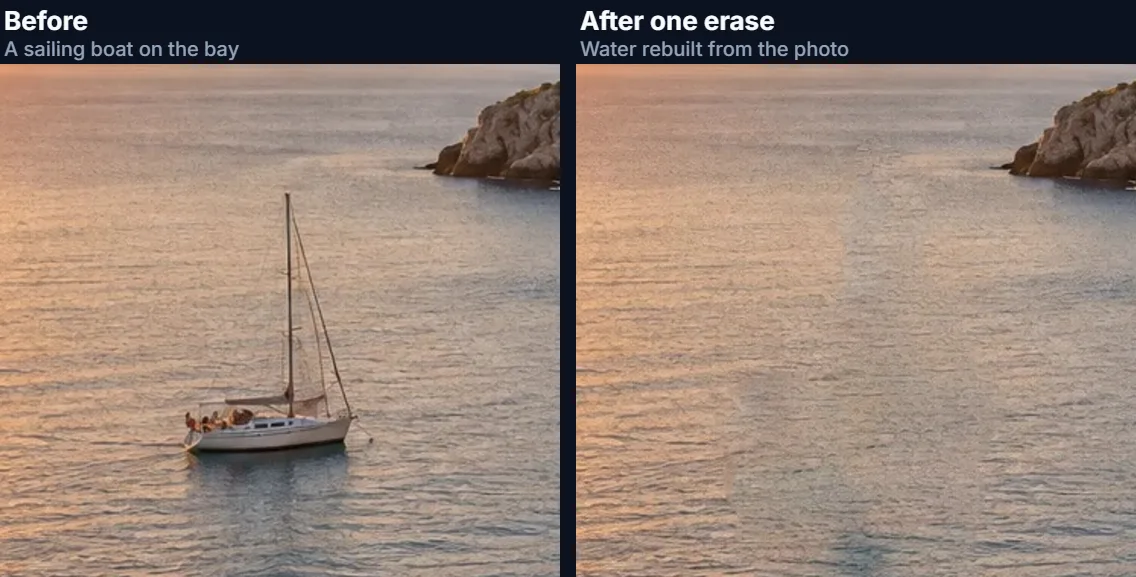
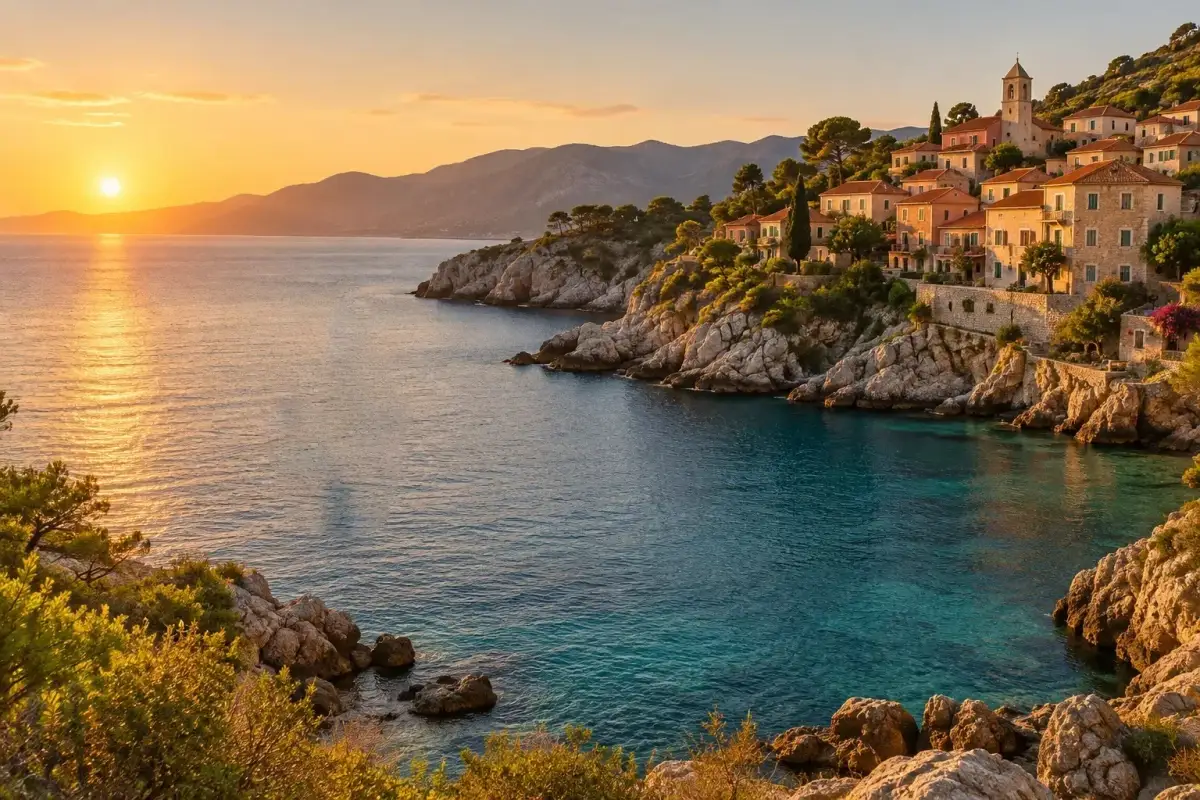
On the coastal sample, painting over the sailing boat and pressing Erase rebuilt 39,789 pixels in 1.2 seconds. Nothing is uploaded: the eraser runs in your browser tab, with no account.
How to remove objects from a photo online
- Open the photo Choose a JPG, PNG or WebP, drop it on the preview, or use the coastal sample with its sailing boat.
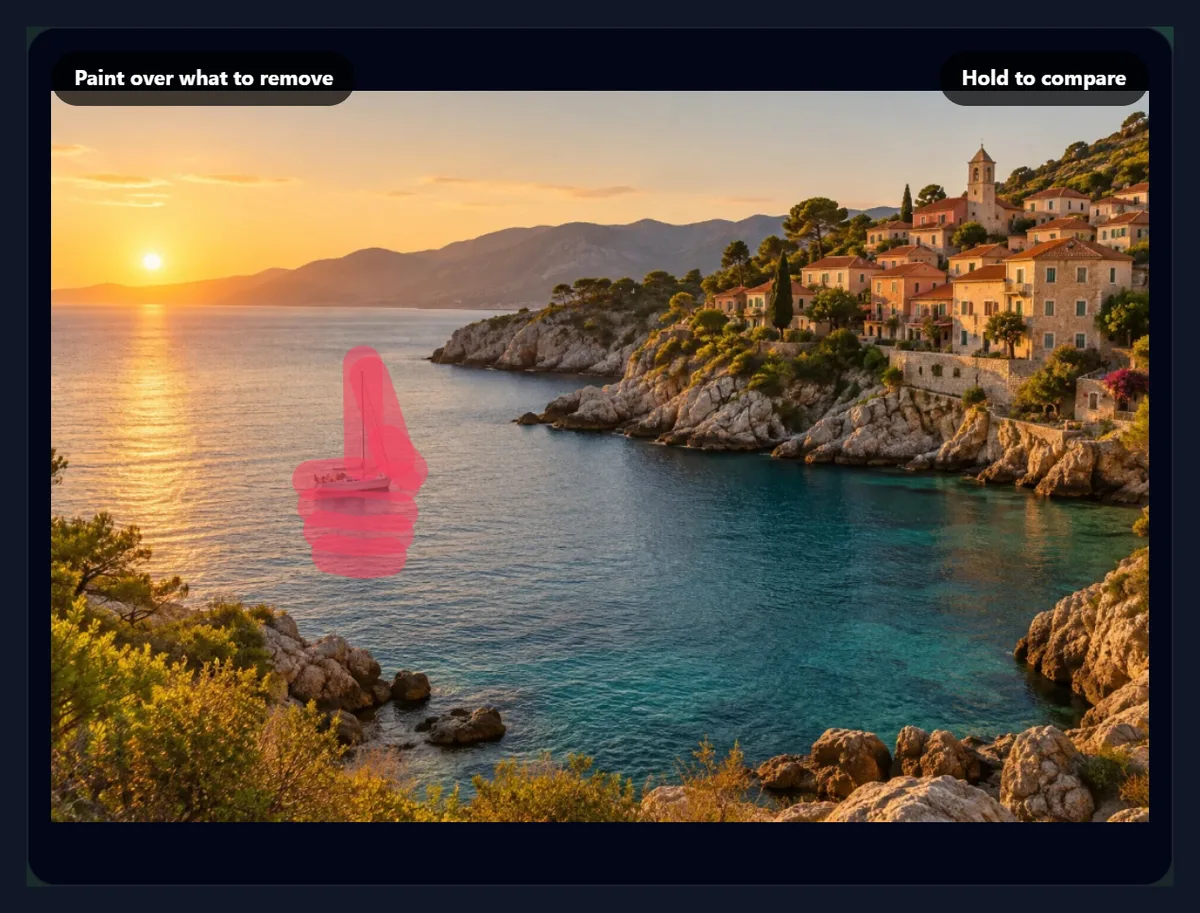
- Paint over the object Set the brush size and cover the object and its shadow or reflection, with a little margin.
- Press Erase The area is rebuilt from the photo’s own texture. Hold Compare to check; Undo takes it back.
- Download Erase more if you like, then save as JPG, PNG or WebP at full size.
Remove a boat from a photo with the magic eraser
A real recording of this tool: the sailing boat on the coastal sample is painted over and erased, the result compared with the original, undone and erased again, and downloaded.
- The coastal sample opens with a sailing boat on the bay.
- The boat, its mast and its reflection are painted over with the brush.
- Erase rebuilds the area from the water around it.
- Holding Compare shows the original; Undo brings the boat back, it is painted and erased again, and the photo is downloaded.
How does the magic eraser fill the gap?
It looks for the patches of the photo that fit best. For every small square of 7 × 7 pixels that touches the painted area, the eraser searches the rest of the photo for the square that matches it most closely, then fills each painted pixel with what the matching squares put there. The search is PatchMatch, a fast randomised method published by Barnes, Shechtman, Finkelstein and Goldman in 2009: each square starts with a random guess, borrows its neighbour's match if that fits better (neighbouring squares usually match neighbouring places), and then tries random places nearer and nearer to its best match so far. The filling follows Wexler, Shechtman and Irani's completion method: match, fill, and match again, so the filled texture keeps improving.
The work is done over the area around each separate painted shape, with a margin as wide as the shape (at least 48 pixels), because nearby texture is usually the best match: two objects painted far apart are erased one after the other, each from its own surroundings. Every result is reproducible: the random guesses come from a fixed seed, so the same photo and the same brush give the same fill.
Why does it work from small to large?
Big holes are hard to fill one pixel at a time: the middle of the hole is far from any real texture, and a fill that starts there drifts. So the eraser first shrinks the area to a small picture, halving it again and again until its shorter side is 64 pixels or less, where even a large hole is only a few dozen pixels across. It fills that tiny version, which settles the overall colours and shapes, then doubles the size, carries its matches up to the larger picture, and refines them, level after level, until it is back at the photo's own detail. The coarsest level gets 8 rounds of matching and filling, the middle levels 3, and the full-size level 2.
At full size, each pixel is copied from the single best match covering it rather than averaged from all of them, which keeps grain, ripples and leaves crisp instead of smearing them. The table shows the levels of the boat erase.
| Level | Picture size | Width (px) | Pixels filled at this level |
|---|---|---|---|
| 1 (coarsest) | 54 × 63 | 54 | 187 |
| 2 | 108 × 125 | 108 | 683 |
| 3 | 215 × 249 | 215 | 2,591 |
| 4 | 430 × 498 | 430 | 10,087 |
| 5 (full size) | 859 × 996 | 859 | 39,789 |
How does the fill match the colour around it?
Patches copied from further away can carry a slightly different tint: cooler water from further out, a wall in less light. After filling, the eraser measures the colour step between the surroundings and the fill all along the edge of the painted area, spreads that difference smoothly across the fill (each inner pixel takes the average of its neighbours, a membrane), and adds it. The texture stays as copied while the colour meets the edge without a seam. The painted area is also widened by 2 pixels on each side, so the soft edge of the object, its anti-aliased outline, goes with it rather than leaving a faint ghost.
Only the painted pixels change in the photo; everything outside them keeps its original values exactly.
What can you remove from a photo?
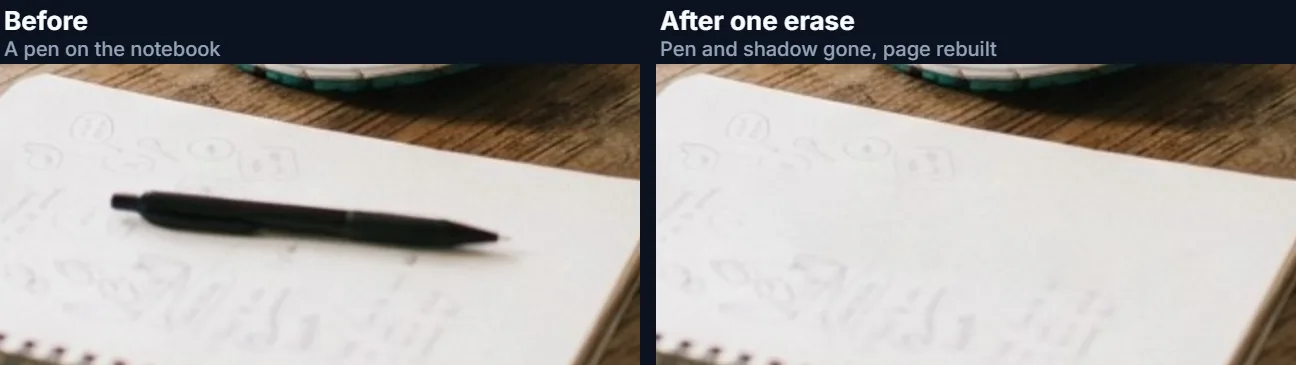
Anything that sits on a background with texture to spare. Typical jobs: people or cars in the distance of a travel photo, a boat or a buoy on water, birds, aircraft and contrails in the sky, power lines and poles, litter, signs, rubbish bins and traffic cones, a stain or crack on a wall, dust and scratches on a scanned photo, a blemish or a stray hair in a portrait, a date stamp in a corner. On the desk sample, painting over a pen lying on a notebook, and its shadow, rebuilt 10,191 pixels of paper in 0.3 seconds.
The harder cases are objects that hide something unique or highly structured, or that touch the subject you want to keep: a person standing in front of a building's windows, an object across a straight railing, a hand over text, a bench right behind a dog's ear. The eraser can only repeat what it finds nearby, so lines may not continue perfectly, windows may not line up, and texture from the touching subject (fur, hair, skin) can be copied into the gap. Erasing in smaller pieces, one part at a time, and keeping the brush off the subject, often helps.
How much should you paint over?
All of the object, plus a little margin, plus anything that belongs to it: its shadow on the ground, its reflection in water, the wake behind a boat. Anything left unpainted stays in the photo and can be copied into the fill as part of the texture, which is the usual reason for a ghostly half-object afterwards. A margin of a few pixels costs nothing, because the fill blends in from the true surroundings.
Set the brush size from 6 to 120 pixels of the preview; the brush is scaled to the full-size photo when you press Erase. Paint several strokes before erasing if the object is irregular, or use Clear brush to start again. Big objects are best erased in two or three parts, each with plenty of real background around it.
Magic eraser or AI generative fill?
Use the magic eraser when the background behind the object is texture the photo already has: sky, water, sand, grass, foliage, plaster, floor tiles. It is instant, free, works offline once the page has loaded, never uploads the photo, and never invents anything that was not there. Use AI Generative Fill when the gap needs new content that the photo does not contain, such as the rest of a building behind a person, or when you want to replace the object with something else described in words. AI Text Remover is tuned for signs, captions and date stamps.
The two work well together: erase the simple things here, and send only the hard part to the AI tool.
How big a photo can it handle, and how fast is it?
The tool opens JPG, PNG and WebP photos up to 40 megapixels and edits them at full size up to about 16 megapixels (larger ones are scaled to fit, the biggest canvas iPhone browsers allow). Each erase works on the painted area and its margin, at most 1.2 megapixels at a time; a bigger area is worked on at a reduced scale and fitted back, which the readout reports as a percentage. Time grows with the size of the painted area: the boat on the 1536 × 1024 sample took 1.2 seconds and the pen on the 1264 × 848 desk sample 0.3 seconds, on the test laptop in Chrome; a phone will usually be slower.
Erases stack: each one is applied to the photo as it stands, so you can remove several objects one after another. Undo restores the area exactly as it was before the last erase.
Is the photo uploaded, and is it free?
No upload, no account, no watermark. The photo is opened, edited and saved inside your browser tab; the eraser's code runs on your device and nothing about the photo is sent anywhere. The downloaded file carries no EXIF data from the original, so camera details and any location are not copied. Download as JPG, PNG or WebP; the sample came out at 1536 × 1024 pixels and 627,492 bytes as a 92% JPG.
If you share an edited photo, be honest about the edit where it matters: news, evidence, real estate and product listings often have rules against removing things from photos.
Why is there a smudge or a repeated pattern where the object was?
A smudge usually means part of the object was left unpainted, so its colour was blended into the fill: undo, paint a little wider, and erase again. A visible repeat means the fill found one good patch and used it often, which happens when there is little matching texture nearby: crop the photo less tightly, or erase a smaller area. Broken lines (a horizon, a railing, a kerb) happen when the object crosses them; erase in pieces so each part has real line on both sides.
If the fill brings in something that should not be there, such as part of another object, that object was the best match nearby. Paint over the stray part and erase again; each erase uses the photo as it now is.
Two limits are worth knowing. On a smooth gradient, such as a sunset sky or calm water, the edge of the filled area can show as a faint change of tone; a slightly wider brush or a second pass usually hides it. And very fine, sharp texture, such as in-focus grass or gravel, tends to come out a little softer than around it, because the best-matching patches are the calmer ones; in the tool's own tests on a lawn, the fill kept roughly 55 to 65% of the fine detail of the grass around it. Erase small areas there, and zoom in to check.

Frequently asked questions
How do I remove an object from a photo for free?
Paint over it here and press Erase. The area is rebuilt from the photo’s own texture; download the result.
Does the magic eraser use AI?
No model is involved: it copies and blends patches from the photo itself (PatchMatch inpainting).
Is my photo uploaded?
No. The eraser runs in your browser tab.
Can I remove people from a photo?
Yes, if the background behind them is texture the photo has elsewhere. Unique backgrounds need AI Generative Fill.
How do I undo an erase?
Press Undo. Each erase can be undone in turn.
Can I remove several objects?
Yes. Paint and erase each one; erases stack.
Why is there a smudge left?
Part of the object was not painted. Undo, paint a little wider, and erase again.
Does it change the rest of the photo?
No. Only the painted pixels change.
Which formats can I use?
Open JPG, PNG or WebP; save as JPG, PNG or WebP at full size.
Is it free?
Yes, with no account, watermark or limit.
Related tools
- AI Generative Fill — Fill a gap with new content the photo does not have.
- AI Text Remover — Remove signs, captions and date stamps.
- Background Remover — Remove the whole background instead.
- Photo Blur — Blur a face or a plate instead of removing it.
- Crop Image — Cut an unwanted edge away.
- AI Image Expander — Add more background around a photo.