MOV To MP4 Converter
Convert MOV to MP4 in your browser by copying the video: iPhone H.264 and HEVC kept frame for frame, camera PCM sound made AAC, nothing uploaded, done in seconds.
Updated
How do you convert MOV to MP4 without losing quality?
Copy the video instead of re-encoding it: open the MOV and press Make the MP4. The frames move into an MP4 unchanged, so the quality is the MOV's and it takes about as long as reading the file.
The 14-second sample took 98 ms, with every frame identical afterwards; a camera MOV with PCM sound took 573 ms and shrank from 4.61 MB to 2.36 MB.
How to convert MOV to MP4
- Open the MOV From an iPhone, a Mac or a camera.
- Check the tracks The tool lists what is copied or converted.
- Make the MP4 Frames are copied, not re-encoded.
- Download The MP4 plays almost everywhere.
Convert MOV to MP4 by copying
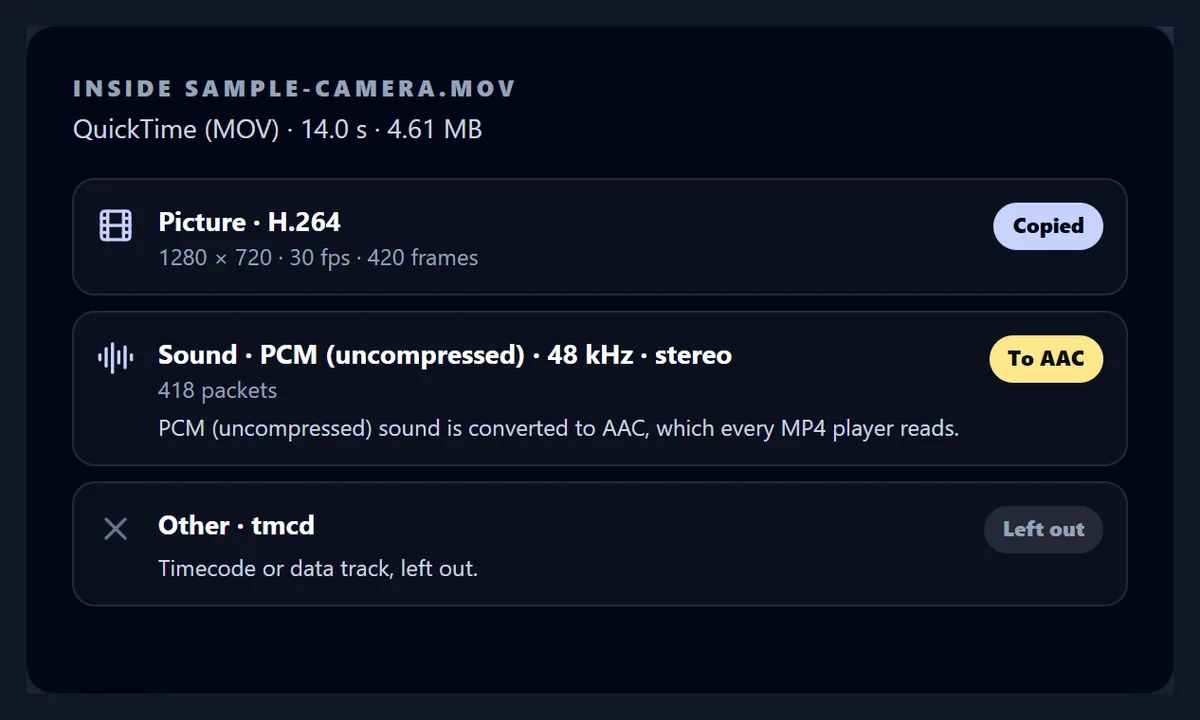
A real recording of this tool: a camera MOV opened and its tracks listed, the MP4 made with the PCM sound converted to AAC, and the MP4 played.
- A camera MOV is opened: H.264 picture, PCM sound and a timecode track.
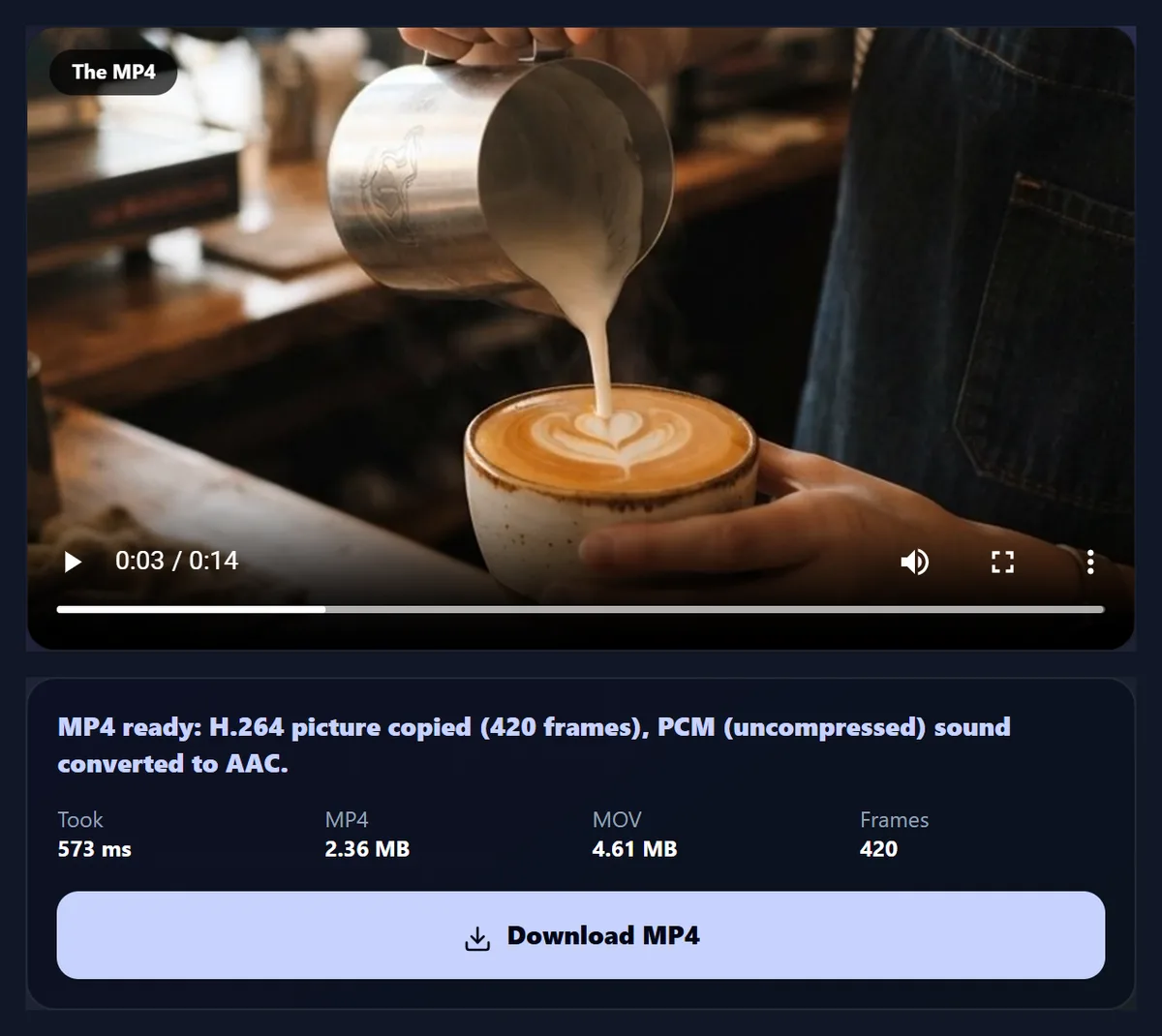
- The MP4 is made, the picture copied and the sound converted.
- The MP4 plays in the page.
What is a MOV file?
MOV is Apple's QuickTime container, the format iPhones, Macs and many cameras record in. MP4 was built from it, and most MOVs hold exactly what an MP4 holds: H.264 or H.265 (HEVC) video and AAC sound. So turning a MOV into an MP4 usually needs no re-encoding at all; the frames just move into the other container.
That is what this tool does: it reads the MOV, lists what is inside, and copies the encoded frames into an MP4 unchanged. Cameras that record uncompressed PCM sound get it converted to AAC, which MP4 players expect.
How long does it take?
About as long as reading the file. The 14-second iPhone-style sample became an MP4 in 98 ms; the camera sample, whose sound is converted, in 573 ms. Nothing is decoded except that sound, so a long recording takes seconds, not its own length.
Re-encoding the same clip with the Video to MP4 converter took 29.5 s, because every frame is drawn and compressed again.
| Way | Time | MP4 size | Picture |
|---|---|---|---|
| Copied, H.264 and AAC (iPhone style) | 0.10 s | 2.30 MB | Identical: all 420 frames bit for bit |
| Copied, H.265 and AAC (iPhone HEVC) | 0.05 s | 1.21 MB | Identical: all 420 frames |
| Copied, PCM sound made AAC (camera) | 0.57 s | 2.36 MB | Identical: all 420 frames |
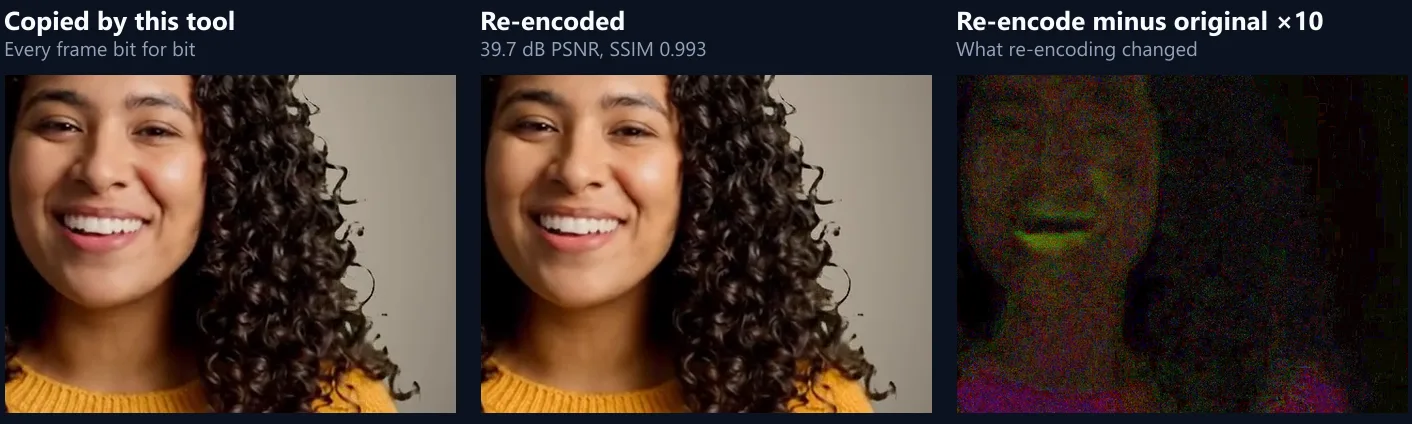
| Re-encoded (Video to MP4) | 29.5 s | 9.03 MB | 39.7 dB PSNR, SSIM 0.993 |
Will the MP4 look worse than the MOV?
No: it is the same picture. After copying, the sample's 420 frames and 658 sound packets were compared with ffmpeg, one by one, and all were identical.
A re-encode is never identical: the same clip re-encoded measured 39.7 dB PSNR, SSIM 0.993. That is a small change, but it is a change, and it adds up each time a video is re-encoded.
Does it work with iPhone videos?
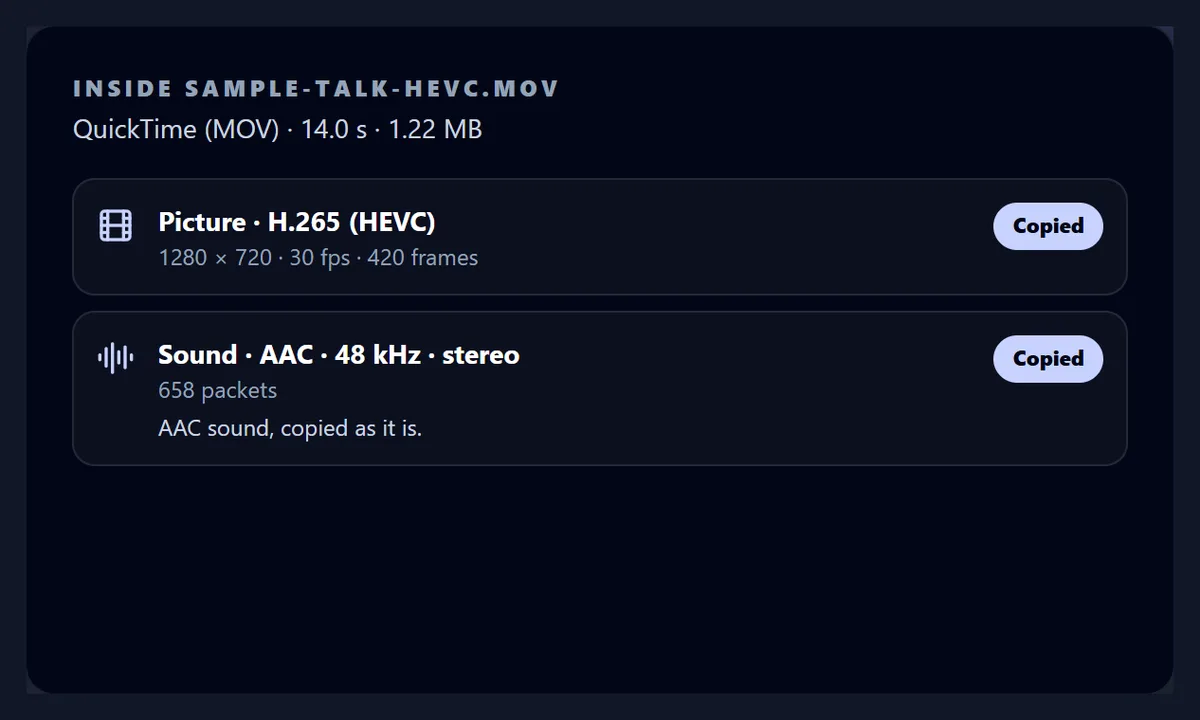
Yes. iPhones record H.265 (HEVC) in MOV files when the camera format is High Efficiency, and H.264 when it is Most Compatible. Both are copied. A HEVC version of the sample, made for this page with x265, became an MP4 in 46 ms with all 420 frames identical.
An MP4 with HEVC plays where the device decodes HEVC: iPhones, Macs, and recent Windows and Android devices. Where it will not play, convert it to H.264 with Video to MP4.
What about MOVs from cameras?
Many cameras and recorders store uncompressed 16- or 24-bit PCM sound in their MOVs, which many MP4 players will not read. The tool converts it to AAC and copies the picture. The camera sample's 4.61 MB MOV became a 2.36 MB MP4: the picture's 420 frames identical, the sound -27.2 dB on average against -27.2 dB in the MOV.
Timecode and data tracks, which cameras add for editing, are left out of the MP4.

Which MOV files can be copied?
Those whose picture is H.264, H.265, VP9 or AV1. ProRes, DNxHD, Motion JPEG and DV, which editing cameras and older devices use, cannot go into a standard MP4 that players will open; the tool says so and points to Video to MP4, which re-encodes what the browser can play.
Sound: AAC and Opus are copied; PCM, MP3 and FLAC become AAC; anything else is left out with a note.
| Track | In the MP4 |
|---|---|
| H.264 or H.265 picture | Copied |
| ProRes, DNxHD, Motion JPEG, DV | Not copied: convert with Video to MP4 |
| AAC sound | Copied |
| PCM (16, 24 or 32-bit) | Converted to AAC |
| Timecode, metadata | Left out |
What do I get?
An MP4 with the MOV's picture and sound, its index at the start so it plays while it downloads. The camera sample's MP4 was 1280 × 720, 420 frames at 30 a second, 2.36 MB.
It plays in the page as soon as it is made, when this browser can play it.
Will the MP4 be smaller?
The picture stays the same size, because it is the same data. The file is smaller when the MOV had uncompressed sound, which AAC stores in a fraction of the space: the camera sample went from 4.61 MB to 2.36 MB. An iPhone MOV becomes an MP4 of almost exactly its own size.
To make a video smaller than that, it has to be re-encoded: Share Video fits it under a size limit.
Will the sound stay in sync?
Yes. Every frame keeps its time from the MOV, and the MOV's edit list, which skips what an encoder adds before the start (a short stretch of AAC sound, and the delay B-frames need), is carried into the MP4, so it starts on the same frame and the same sound as the MOV.
Converted PCM sound is timed from the MOV's own clock.
Can it handle long recordings?
Yes. Files up to 1 GB are copied in memory and offered as a download; larger ones are written straight to a file you choose, in Chrome or Edge on a computer. The MOV is read a piece at a time, never all at once.
If a MOV is incomplete (a recording that stopped when a battery died), its index may be missing; the tool says so, because the frames cannot be found without it.
Why convert MOV to MP4 at all?
MOV opens on Apple devices and in most editors, but MP4 is the format many Windows apps, Android phones, websites and upload forms ask for.
Because copying keeps the quality, there is no reason not to keep the MP4 as your everyday copy.
Can I just rename .mov to .mp4?
Sometimes it plays, because the two formats are related, but the file still says it is QuickTime inside, and sound MP4 players do not read, such as a camera's PCM, stays as it was. Copying writes a real MP4, with the sound in a form MP4 players expect.
It takes the same few seconds as renaming, near enough.
How does copying work?
A MOV keeps an index (the moov box) that lists, for every frame and every packet of sound, where it sits in the file, how big it is, when it is decoded and when it is shown, and which frames are key frames. The tool reads that index, then reads each frame from its place and writes it into an MP4 with a new index of the same kind. Because MP4 grew out of QuickTime, the two indexes say the same things; only the file around them changes.
The MP4 is written with its index at the front, so it starts playing before it has finished downloading.
Is the recording date and location kept?
No. The MP4 holds the picture and the sound only: the MOV's metadata (the date and time it was recorded, the place, the camera or phone model) is not copied. That is often what you want when sharing a video publicly, since a phone's MOV can carry where it was filmed.
Keep the original MOV if you need that information later; the MP4 is a copy, not a replacement.
How do MOV and MP4 differ?
Mostly in what each container allows around the video. Both hold H.264 and H.265 with AAC sound, which is why copying works. MOV also takes the formats editing and cameras use, such as ProRes and uncompressed PCM sound, and timecode tracks; MP4 is the stricter, more widely read one.
The table shows what the tool does with each part of a MOV.
| MOV (QuickTime) | MP4 | |
|---|---|---|
| Made by | Apple; iPhones, Macs, cameras | ISO standard, built from QuickTime |
| Usual picture | H.264, H.265, ProRes | H.264, H.265, AV1 |
| Usual sound | AAC, PCM | AAC |
| Opens on | Apple devices, most editors | Almost everything |
What about screen recordings from a Mac?
They are MOV files too, usually H.264 or H.265 with AAC sound, and copy the same way: the MP4 has exactly the frames that were recorded, so small text stays as sharp as it was. Re-encoding a screen recording is where quality loss shows most, on text and thin lines.
Long screen recordings are where copying saves the most time: an hour-long recording copies in about the time it takes to read the file.
Can I edit the MP4 afterwards?
Yes, like any MP4: trim it with the video splitter, resize it for a platform, add music or captions, or open it in the HueFold editor. Because the copy did not re-encode, the first edit you make is the first time the picture is compressed again.
If you only need to send it, Share Video fits it under a size limit in one step.
Will the MP4 play on Windows and Android?
An H.264 MP4 plays in the Windows Photos and Media Player apps, on every Android phone and in every browser. An H.265 MP4 from an iPhone's High Efficiency setting plays where the device decodes HEVC: recent Android phones, and Windows with HEVC support installed; elsewhere, convert it to H.264 with Video to MP4.
If you are sending a video to someone whose device you do not know, set the iPhone camera to Most Compatible before recording, or convert to H.264.
Is my video uploaded?
No. The MOV is read and the MP4 written inside your browser tab; nothing is sent to HueFold or anyone else, and there is no sign-up or watermark.
Your iPhone videos never leave your device.
Frequently asked questions
How do I convert MOV to MP4 without losing quality?
Copy the frames, as this tool does: the MP4 has the MOV's own picture.
Does it work with iPhone videos?
Yes, H.264 (Most Compatible) and H.265 (High Efficiency).
How long does it take?
Seconds: the sample took 98 ms.
What happens to camera PCM sound?
It is converted to AAC; the picture is still copied.
Will the file be smaller?
Only if the MOV had uncompressed sound; the picture is the same data.
Can I just rename .mov to .mp4?
Sometimes, but stricter players reject it. Copying writes a real MP4.
What about ProRes?
ProRes cannot be copied into an MP4; convert it with Video to MP4.
Is my video uploaded?
No. It is read and written in your browser.
Related tools
- MKV to MP4 — Copy MKV and WebM files.
- Video to MP4 — Re-encode anything the browser plays.
- Share Video — Make it small enough to send.
- Video Resizer — Change the size or shape.
- Rotate Video — Fix a sideways recording.
- Remove Audio from Video — Keep the picture only.