PNG Maker
Make PNGs from any image in your browser: JPG, WebP, HEIC, GIF, BMP, AVIF or SVG, up to 50 at once, with every colour kept or as a smaller palette PNG of 256, 64 or 16 colours, transparency included.
Updated
How do you make a PNG from an image?
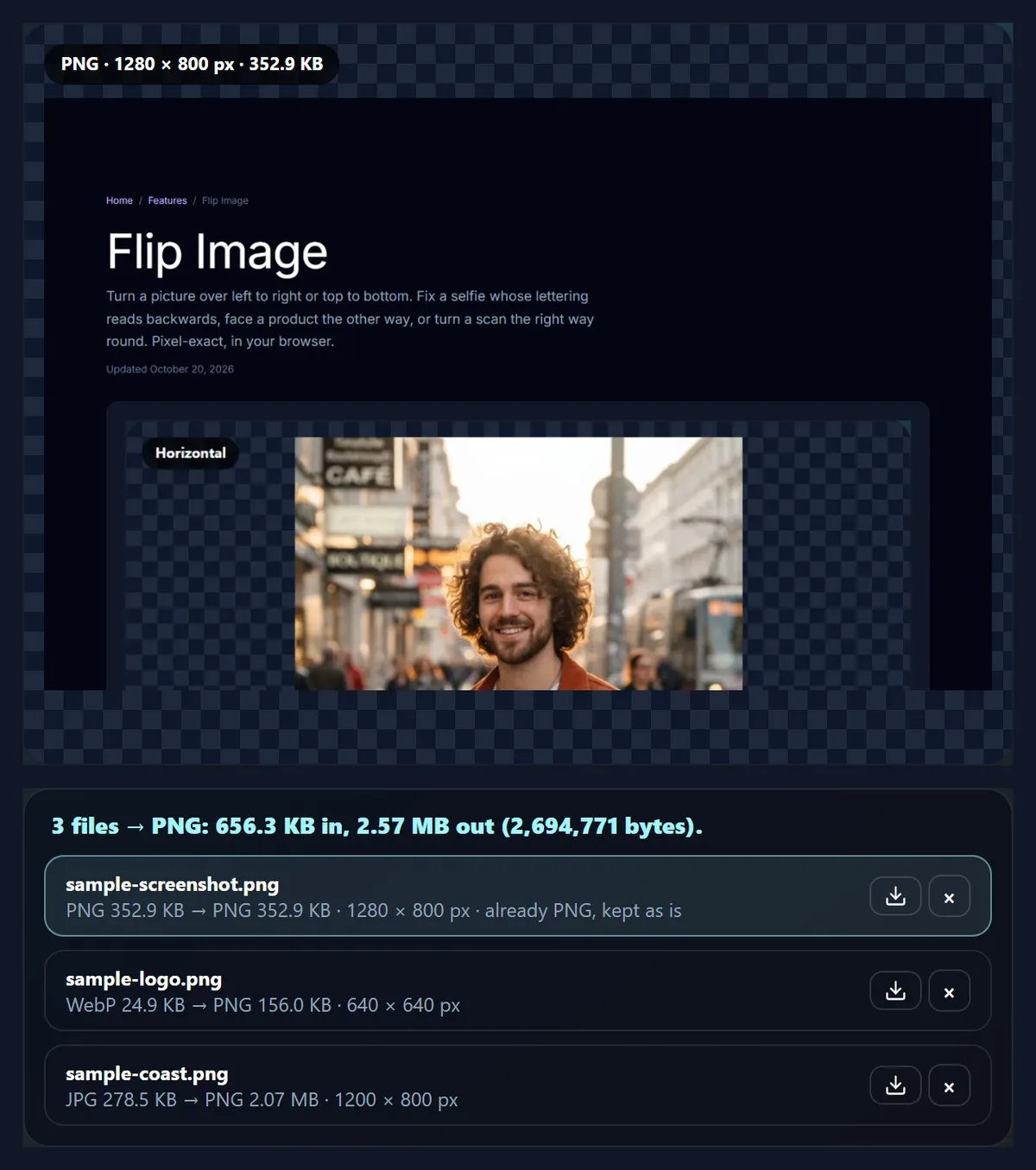
Drop images on the tool, or try the three samples. Each one is converted to PNG at once, with its size before and after; download them one by one or all together as a ZIP. Under Colours, keep every colour, or choose 256, 64 or 16 for a palette PNG that is often several times smaller, with dithering for smooth gradients.
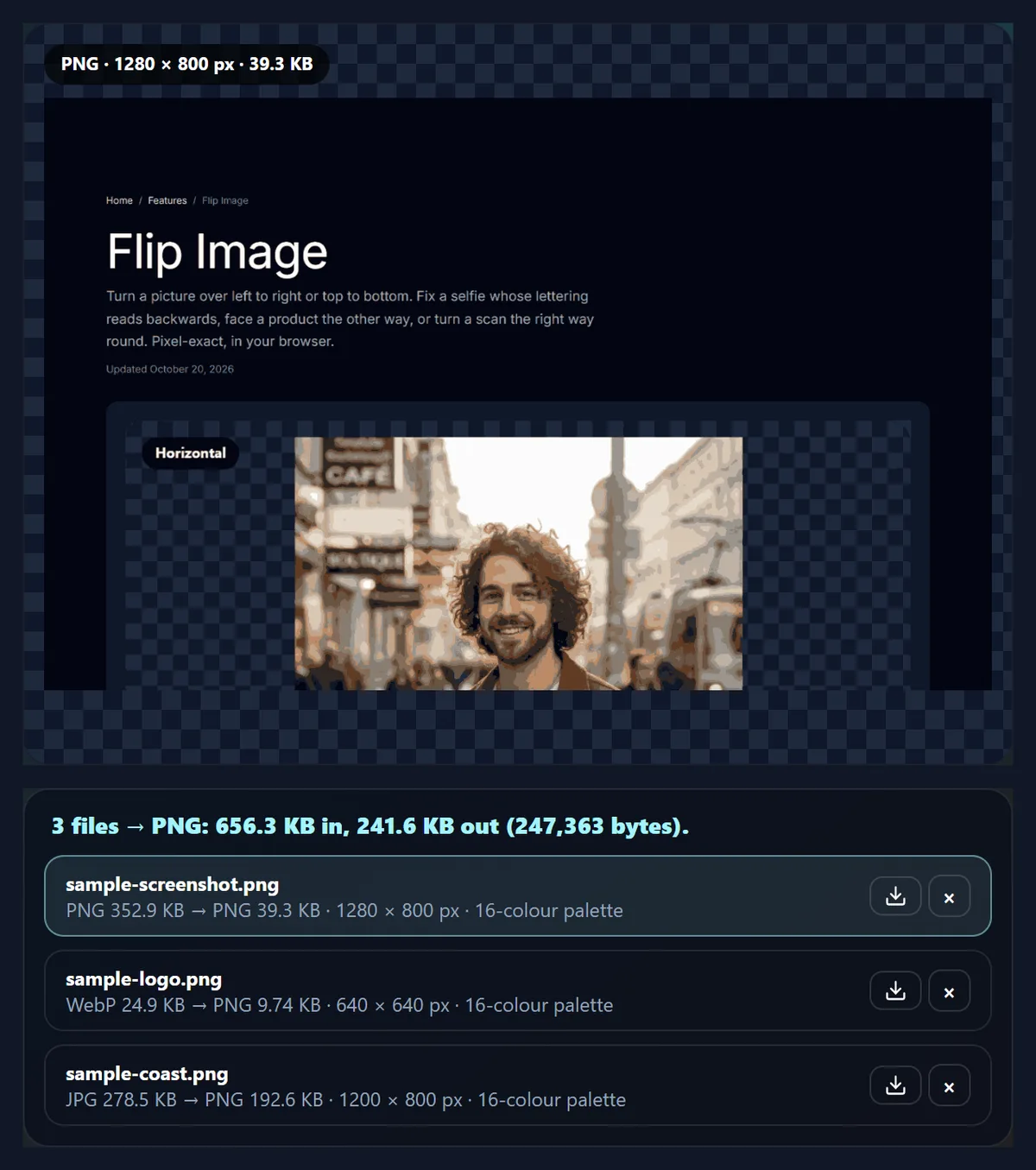
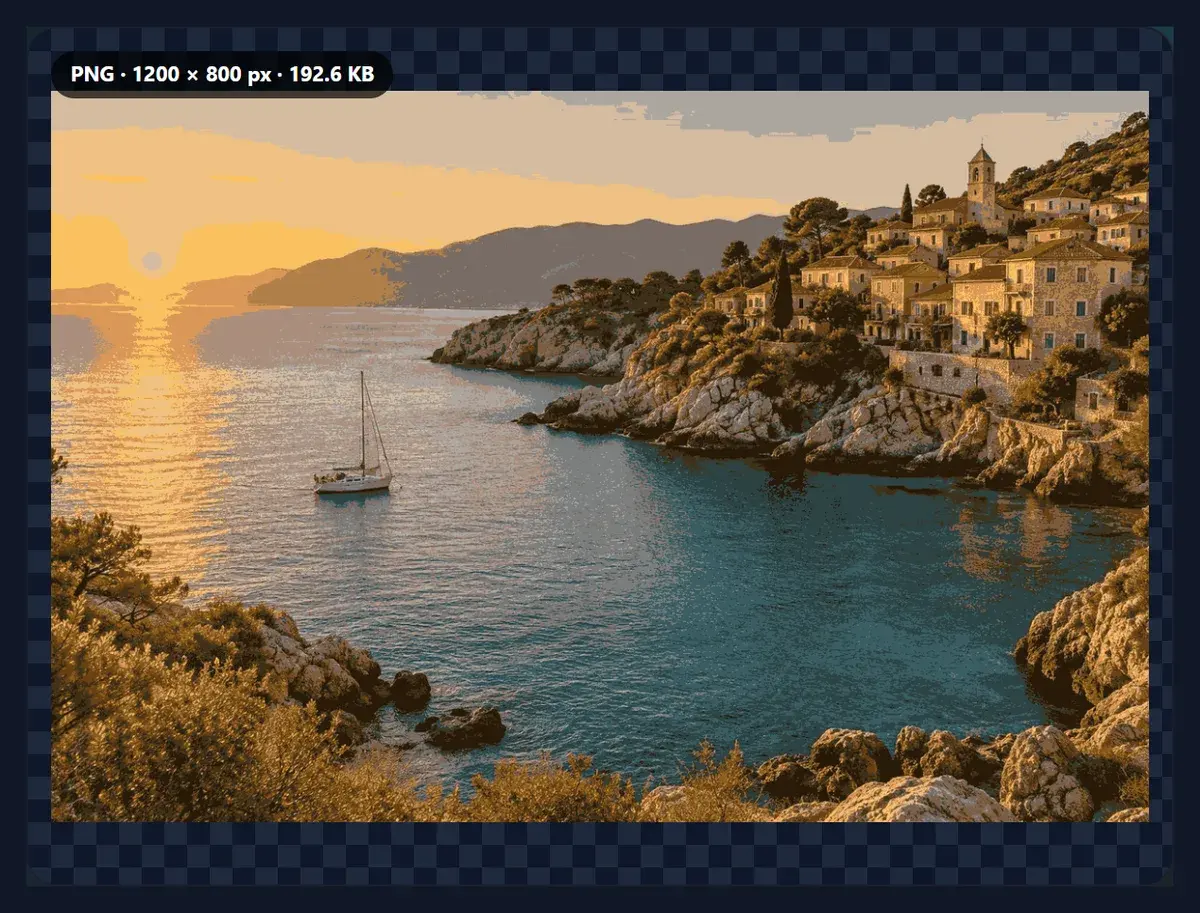
The samples show the range: the screenshot went from 352.9 KB to 39.3 KB with 16 colours, the logo from 156 KB to 9.7 KB, and the photo, which has 184,869 colours, is better kept as a JPG.
Everything happens in your browser: nothing is uploaded and no account is needed.
How to make a PNG
- Add images Drop up to 50 files, or try the samples.
- Choose the colours Keep every colour, or 256, 64 or 16 for a smaller file.
- Check each file See its size and preview; turn on dither for gradients.
- Download One file at a time, or all of them as a ZIP.
Make PNGs, then smaller PNGs
A real recording of this tool: three sample files made into PNG, the colours reduced to 64 and then 16, the photo dithered, and all three downloaded as a ZIP.
- Three sample files are added and made into PNG, with their sizes before and after.
- The colours are reduced to 64 and then to 16, and every file is made again.
- The photo is selected and dithering is turned on to hide the bands in its sky.
- All three PNGs are downloaded in one ZIP.
How much smaller is a palette PNG?
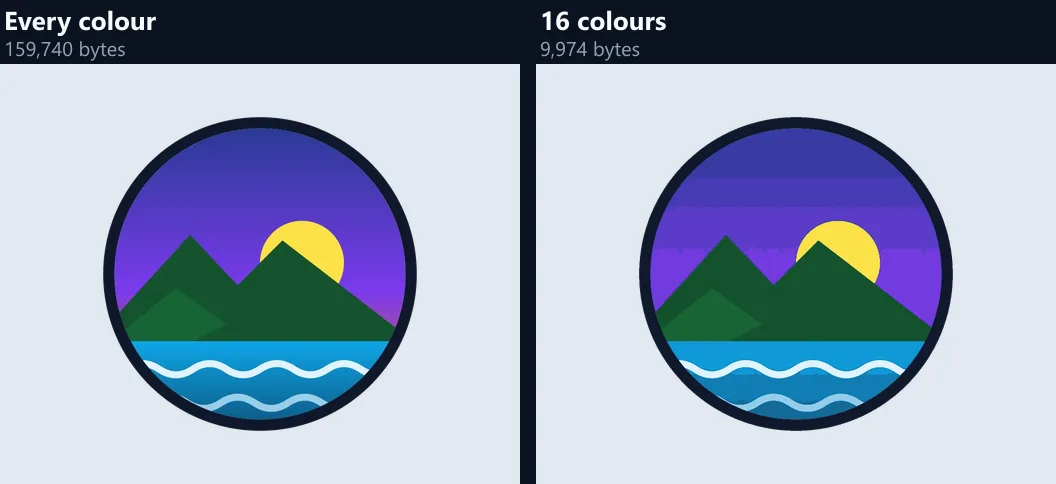
Several times smaller. An ordinary PNG stores every pixel as a full colour; a palette PNG stores a list of up to 256 colours once and then each pixel as one small number pointing into that list. The 1280 × 800 screenshot sample was 352.9 KB as it came; with 256 colours the tool saved it at 116.9 KB, and with 16 colours at 39.3 KB, 89% smaller. The logo went from 156 KB as a full-colour PNG to 9.7 KB with 16 colours.
A photo is the exception: it has a great many colours (the coastal sample had 184,869 different ones), so even a 256-colour palette leaves it at 551.9 KB, about twice the 278.5 KB JPG it came from. For photos, keep JPG or WebP unless you need a PNG for a reason.
| Setting | Screenshot | Logo | Photo |
|---|---|---|---|
| Every colour | 352.9 KB | 156 KB | 2.07 MB |
| 256 colours | 116.9 KB | 34.5 KB | 551.9 KB |
| 64 colours | 77.2 KB | 21.6 KB | 377.7 KB |
| 64 colours, dithered | 144.9 KB | 55.2 KB | 472.1 KB |
| 16 colours | 39.3 KB | 9.7 KB | 192.6 KB |
| 16 colours, dithered | 82.1 KB | 22.6 KB | 245.3 KB |
What is a PNG, and when should I use one?
PNG is a lossless image format: what you save is exactly what you get back, pixel for pixel, and it can hold transparency, from fully clear to partly see-through. That makes it the right file for logos, icons, screenshots, diagrams, text, line art and anything with a transparent background, where JPG's compression would smudge sharp edges and cannot keep the clear areas at all.
It is the wrong file for most photos. A photo saved as PNG keeps every grain of noise exactly, so it is large: the coastal sample was a 278.5 KB JPG and became a 2.07 MB PNG with every colour, with no visible gain. Use PNG for a photo only when an app asks for it, when you will edit it again, or when it needs transparency.
How do I convert an image to PNG?
Drop your files on the tool or choose them, up to 50 at a time. Each is read in your browser and saved again as PNG; the list shows every file's size before and after. Download one file with its own button, or all of them in one ZIP. A file that is already an upright PNG is kept exactly as it is, byte for byte, because saving it again could only change it for the worse.
The tool takes JPG, PNG, WebP, GIF, BMP, AVIF, SVG and HEIC (iPhone photos). A GIF gives its first frame; an SVG is drawn at its own size, or at 2, 3 or 4 times that size for a sharper PNG, since a vector can be drawn at any size without losing detail.
What do 256, 64 and 16 colours mean?
How many colours the PNG may use. With All, every colour of the image is kept. With 256, 64 or 16, the tool picks that many colours that best cover the image and redraws each pixel with the nearest one. If the image already has no more colours than that, as a simple logo or a diagram often does, every colour is kept exactly and the note says so.
To choose the colours, the tool groups the image's colours and keeps splitting the group with the most error, so that a small patch of a distinct colour, like a yellow sun on a purple sky, gets its own colour instead of being averaged into a muddy one. On the logo at 16 colours, the average difference from the original was 2.62 levels out of 255 per channel.
What does dither do?
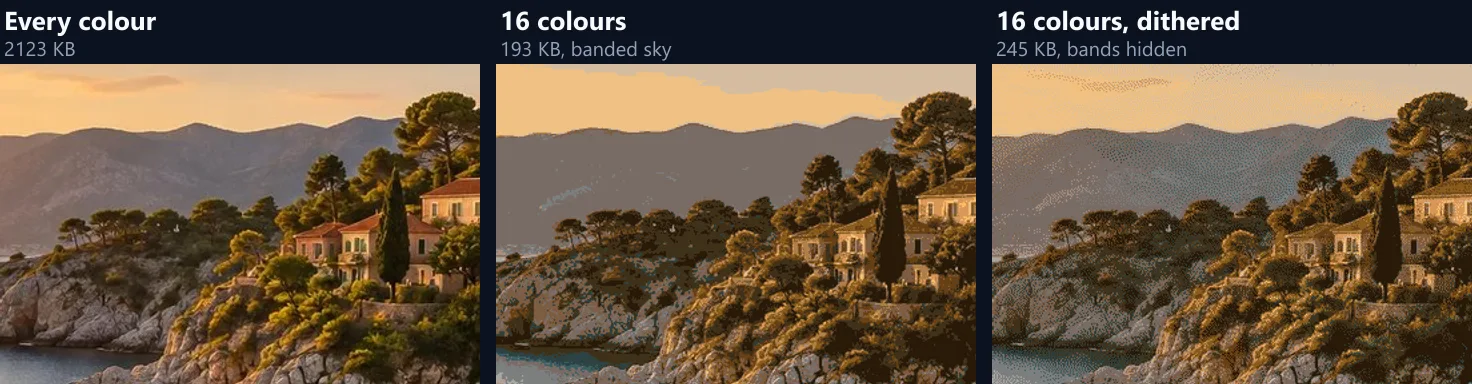
It hides bands. With few colours, a smooth gradient such as a sky has to jump from one colour to the next, which shows as stripes. Dithering mixes neighbouring colours in a fine pattern of dots, so from a normal distance the eye sees the in-between shades. The tool uses Floyd–Steinberg dithering, which passes each pixel's rounding error on to the pixels next to it.
It has two costs. The dots make the file larger, because a pattern compresses less well than flat areas: the photo at 16 colours was 192.6 KB without dithering and 245.3 KB with it. And measured pixel by pixel the dithered picture differs more from the original (9.54 against 7.87 levels on average), even though it looks closer. Use it for gradients and photos; leave it off for logos, text and flat colour.
How close is a palette PNG to the original?
Close, for images with few colours, and further for photos. The table gives the average difference between each saved file and the original, in levels out of 255 for each of red, green, blue and transparency. Below about two levels the difference is hard to see side by side; photos with 16 colours are clearly different, which is why they need dithering or more colours.
Every colour kept means an identical picture: zero difference for the screenshot and the photo. The logo's tiny difference with every colour comes from WebP decoders, which round a few edge pixels differently in different programs, not from the PNG.
| Setting | Screenshot | Logo | Photo |
|---|---|---|---|
| 256 colours | 0.71 | 1.10 | 2.83 |
| 64 colours | 0.98 | 1.19 | 4.37 |
| 64 colours, dithered | 1.32 | 1.46 | 5.83 |
| 16 colours | 1.78 | 2.62 | 7.87 |
| 16 colours, dithered | 2.52 | 3.12 | 9.54 |
Which images shrink the most?
Screenshots, logos, charts, icons, maps, pixel art and illustrations with flat colours. Their pixels repeat a small set of colours, so a palette loses little and the compression that follows finds long runs of the same number. The screenshot sample, a page of text with one photo in it, went from 352.9 KB to 39.3 KB with 16 colours and still reads perfectly, because text and flat backgrounds use only a few colours; only the photo inside it shows the change.
Photos, gradients and soft shadows shrink the least and change the most. For those, try 256 colours with dithering, compare the preview with the original, or keep the photo as JPG or WebP.
Does a palette PNG keep transparency?
Yes. Each colour in the palette has its own transparency, so a logo on a clear background stays on a clear background, and soft edges keep levels of see-through. Fully clear pixels share one palette entry of their own, so the clear area never takes a colour away from the picture.
The logo sample came as a 24.9 KB WebP with a transparent background; as a 16-colour PNG it was 9.7 KB and still transparent. Apps that cannot use transparency, such as some email signatures and print forms, may show the clear area as black or white: check where the file is going.
Should I convert my photos to PNG?
Usually not. JPG and WebP are made for photos and keep them small by dropping detail the eye does not notice; PNG keeps everything, so a photo grows. The coastal sample went from a 278.5 KB JPG to a 2.07 MB PNG, and converting it does not bring back what the JPG had already dropped.
Convert a photo to PNG when you will edit it many times (each JPG save loses a little more), when an app or a print shop asks for PNG, or when you will cut out the background and need transparency.
Can I convert many images at once?
Yes, up to 50 at a time. Each file is converted as soon as it is added, the list shows its size before and after and any note (such as "already PNG, kept as is" or the palette used), and one button downloads them all as a ZIP. Changing the colours setting reconverts every file in the list, so you can compare settings across the whole set.
Names are kept, with the ending changed to .png; if two files would end up with the same name, the second gets a number, so nothing is overwritten in the ZIP.
Will converting to PNG improve quality?
No. PNG keeps exactly what it is given, so a blurry or blocky picture stays blurry or blocky; converting a low-quality JPG to PNG only makes a larger file of the same picture. To improve a picture, use a tool that changes the pixels, such as an upscaler or a sharpening tool, and then save the result as PNG so that no further detail is lost.
What PNG does guarantee is that nothing more is lost from now on: you can open, edit and save a PNG again and again without it degrading, which JPG cannot promise.
Are my images uploaded?
No. The images are read, converted, reduced to a palette and written as PNG inside this browser tab, and the ZIP is made there too. Nothing is sent to HueFold or anyone else, and no account is needed. That also means very large batches depend on your device's memory: a phone may need smaller batches than a laptop.
The palette PNG writer is part of the page itself: it builds the PNG file directly (palette, transparency table and compressed pixels), so the result is a standard PNG that every app and browser can open.
Why is my PNG bigger than my JPG?
Because PNG is lossless and the picture is a photo. A photo's colours change slightly from pixel to pixel, which PNG must store exactly. If the file must be a PNG, try 256 colours with dithering; if it only needs to be small, keep the JPG, or use WebP.
If a palette PNG shows bands in a sky, turn on dithering or choose more colours. If a logo's edges look rough against a coloured page, it was made for a different background: save it with every colour, or remake it on a transparent background. If an image is sideways, it is turned upright from its orientation tag before it is saved.
Frequently asked questions
How do I convert a JPG to PNG?
Drop the JPG on the tool and download the PNG; it is converted in your browser.
Is the PNG maker free?
Yes, with no account, watermark or limit beyond 50 files at a time.
What is a palette PNG?
A PNG with at most 256 colours, each pixel stored as one small number: often several times smaller.
Will a palette PNG look different?
Not for logos, screenshots and flat art; photos need more colours or dithering.
Does it keep transparency?
Yes, with every colour and in palette PNGs, including soft edges.
Can I convert HEIC iPhone photos to PNG?
Yes. HEIC is decoded in your browser and saved as PNG.
Why is my PNG larger than my JPG?
PNG is lossless; photos are larger as PNG. Keep photos as JPG unless you need PNG.
Are my images uploaded?
No. Everything happens in your browser.
Can I convert many images at once?
Yes, up to 50, downloaded as one ZIP.
Related tools
- JPG to PNG — The plain JPG to PNG converter.
- WebP to PNG — WebP images to PNG.
- HEIC to PNG — iPhone photos to PNG.
- SVG to PNG — Vectors drawn as PNG at any size.
- Transparent Background — Make a background transparent first.
- Reduce Image Size in KB — Shrink photos to a target size.