Remove Black Background
Make black transparent and keep what matters: glows, fire, smoke and neon keep their soft see-through light, and logos and products on black lift off with clean edges. Nothing is guessed and nothing is uploaded.
Updated

How do you remove a black background?
Open the image. The tool reads the backdrop colour from the image's edge and makes it transparent with one of two methods. Light on black unmixes every pixel, so glows, fire, smoke and stars stay soft and see-through; Object on black clears only the black around a solid object, such as a logo or a product. Preview the result on a colour, adjust the clean-up, and download a transparent PNG or WebP.
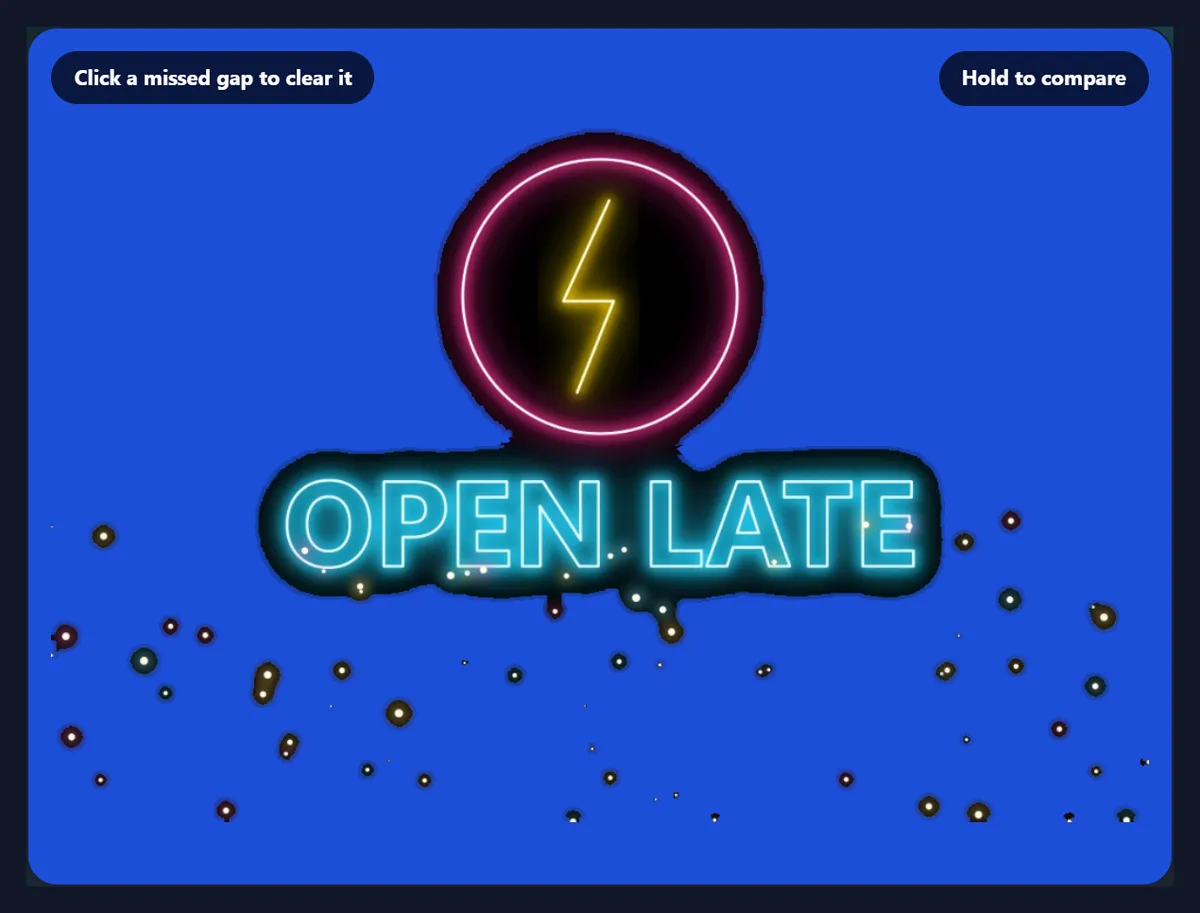
On the sample, a neon sign on black, Light on black cleared 74.2% of the image and kept 24.6% as see-through glow; the PNG was 1200 × 800 pixels and 513,038 bytes.
The image never leaves your device: the black is removed with exact colour maths in your browser, with no AI and no upload.
How to remove a black background
- Open the image Choose a JPG, PNG or WebP on black, drop it on the preview, or try the neon sample.
- Pick the method Light on black for glows, fire and smoke; Object on black for logos and products.
- Check it on a colour Preview on blue or light, and raise Clean-up if a faint veil remains.
- Download Save a transparent PNG or WebP at full size.
Make black transparent
A real recording of this tool: the neon sample with its black removed, previewed on dark, blue and checks, both methods compared, the clean-up slider, and the PNG downloaded.
- The neon sample opens with its black already removed.
- The preview is switched to dark, blue and checks.
- Object on black is compared with Light on black on blue.
- Clean-up is raised and set back, and the PNG is downloaded.
Which method keeps a glow?
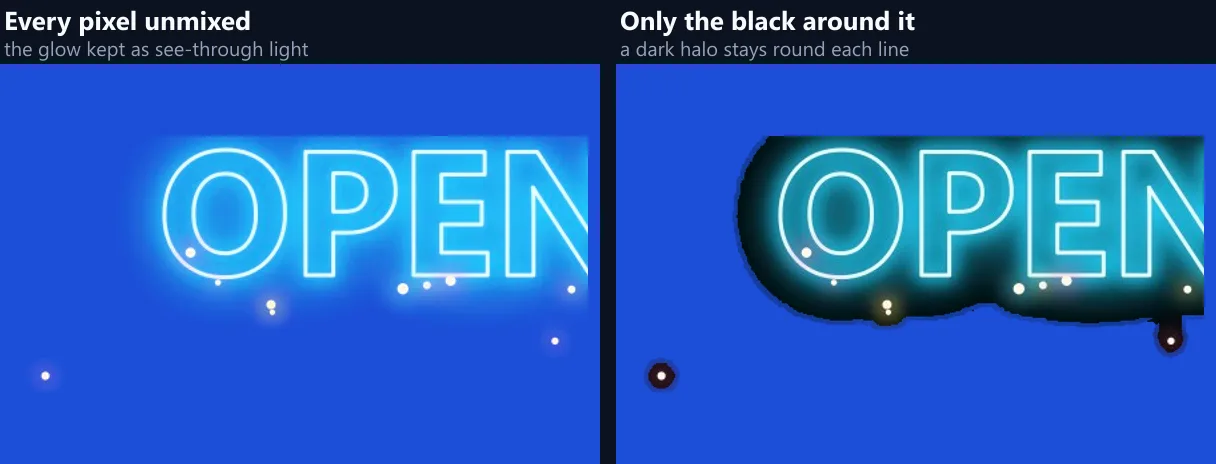
Only one of them. Light on black unmixes every pixel: a glow pixel that is a dim pink over black becomes a bright pink that is only partly opaque, so on any new background it still glows. On the neon sample, at the default 4% clean-up, 24.6% of the image came out partly see-through, which is the glow and the haze around each tube, and 74.2% fully clear.
Object on black works the other way: it floods the black in from the edge and only treats the outline of each shape as partly clear. It has no way to know that the dim glow round a tube is light rather than part of the object, so it keeps the glow solid, black and all: only 2.1% of the image was partly clear, and 23.9% stayed solid. On a coloured background that shows as a dark halo round every line.
| Method | Partly see-through | Fully clear | PNG bytes |
|---|---|---|---|
| Light on black, clean-up 0% | 33.6% | 65.2% | 609,493 |
| Light on black, clean-up 4% (default) | 24.6% | 74.2% | 513,038 |
| Light on black, clean-up 10% | 18.8% | 80.0% | 428,377 |
| Object on black, tolerance 4 | 2.1% | 74.1% | 480,513 |
How does unmixing every pixel work?
Light on black is the exact reverse of the Screen blend that video editors use to lay fire, sparks and light leaks over a picture. Each pixel is treated as some colour laid over black with the least opacity that could produce it: the brightest of its red, green and blue values sets the opacity, and dividing by that opacity gives the colour back at full strength. A pixel of 128, 64, 32 becomes 255, 128, 64 at 50% opacity.
Nothing is guessed. With clean-up at 0%, put the result back on black and every pixel comes out as it was, to within one level, which is why the glow survives; put it on blue, a photo or a gradient and the light adds to whatever is behind it, as it would have if it had been filmed there.

When should I use Object on black?
When the black is a backdrop behind something solid: a logo or badge on black, a product photographed against black velvet, white text on a black slide. There the black around the object should go and the object, including any black parts of its own, should stay solid. Light on black would make those black parts see-through, because to it anything dark is simply less light.
Object on black fills the black in from the image's edge through every connected pixel close to it, keeps anything the outline encloses, and unmixes only the pixels along the edge so curves stay smooth. If the fill misses a gap, such as the inside of a letter, choose Click: clear a missed gap and click it.
What does the clean-up slider do?
It clears what is nearly black but not quite: JPEG noise, a faint haze, the very edge of a glow. Every pixel less opaque than the setting becomes fully clear, and the rest are stretched so full brightness stays full. On the sample, 0% left 33.6% of the image partly see-through, 4% left 24.6% and 10% left 18.8%; the PNG shrank from 609,493 to 428,377 bytes as the faint pixels went.
Keep it low for soft effects such as smoke and fog, where the faint parts are the effect. Raise it for footage or downloads with noisy blacks, which would otherwise leave a faint veil over whatever you put the image on.
What does Solid from do?
It makes everything at least that opaque fully solid and stretches the softer range below it to match. With Light on black the brightest parts of an effect are often not quite white, so they come out slightly see-through; lowering Solid from to about 80% makes the cores of flames, sparks and tubes solid while their glow stays soft.
Leave it at the top for the exact unmix, which is what you want when the image will be laid over something and should add light the way the original did.
Which images is it made for?
Light effects shot or rendered on black: fire, sparks, smoke, steam, lens flares, light leaks, bokeh, stars, particles, lightning, neon, glowing text and laser lines. Many stock effects and video overlays are supplied on black exactly so that editors can screen them over a picture; this turns one frame of them into a PNG that works in any app, including the many that have no Screen blend.
It also suits glowing logos and UI elements exported on black, and astrophotography where the stars should keep their soft edges.

Why preview on a colour?
Because a black background hides exactly the problems you are trying to avoid. A leftover dark halo, a faint veil of noise or a glow cut short all disappear against black and all show on a colour. The Preview on buttons draw the result over checks, dark, light or blue, so you can see it as it will look where you use it.
The preview only changes what is behind the picture on screen; the download is always the transparent image itself.
Does it work on smoke, fog and steam?
Yes, and they are where it matters most. Smoke shot on black is grey of every shade, and each shade is light of some strength: unmixed, the thick parts become nearly solid white and the wisps become faint, see-through white, so the smoke drifts over whatever you put it on. A method that cuts an outline cannot do that; it has to decide where the smoke ends, and smoke has no edge.
For coloured smoke, the colour is recovered at full strength and the opacity carries the density, so a thin purple haze stays purple rather than turning grey.
How do I remove a black box around a logo?
Choose Object on black. The black around the logo is filled in from the image's edge and cleared, the logo itself stays solid even where it has black in it, and the pixels along its outline are unmixed so the curves stay smooth on a light page. Black inside letters such as O or A is enclosed by the letter, so it stays: choose Click: clear a missed gap and click inside each one.
Preview it on Light to check for a dark fringe; if there is one, raise the tolerance a little.
Should I save PNG or WebP?
Both keep every level of transparency. PNG is lossless and works everywhere: the neon sample came out at 1200 × 800 pixels and 513,038 bytes. WebP is usually several times smaller and is supported by every current browser and most design apps; choose it for websites. JPG has no transparency at all, so it puts the result back on white, which for a glow is rarely what you want.
For video, use the PNG in your editor as an image layer, or keep using the original on black with a Screen blend if the editor has one.
Which files work, and is anything uploaded?
You can open JPG, PNG and WebP images up to 40 megapixels (above about 16 megapixels the result is saved slightly smaller, the largest canvas iPhone browsers allow); convert iPhone HEIC photos to JPG first. For video, export a frame as an image first. Nothing is uploaded and no AI is involved: the black is removed with exact colour maths inside your browser tab, so the same image and settings always give the same file.
The sample is a neon sign drawn for this page by a script and saved as a JPG, so its black carries ordinary JPEG noise like a downloaded effect would.
Why is there a dark halo or a grey veil?
A dark halo round glowing shapes means Object on black is selected: switch to Light on black. A grey veil over the whole image means the black is not pure black, from noise or compression: raise Clean-up until it clears, or click the darkest part of the backdrop to pick its colour. Colours that look washed out on a light background are expected: light added to white can only stay white, which is how glows behave in real life.
If a solid dark object disappears, it is being treated as light on black: use Object on black for that image.

Frequently asked questions
How do I make a black background transparent?
Open the image, choose Light on black or Object on black, check it on a colour, and download a PNG.
Can I remove the black from fire or smoke?
Yes. Light on black keeps their soft, see-through edges instead of cutting them out.
Why does my glow have a dark halo?
Object on black is selected; switch to Light on black, which unmixes every pixel.
Will it work for dark products on black?
Use Object on black, which keeps anything the outline encloses; where a dark edge melts into the black, lower the tolerance.
Is it the same as a Screen blend?
It is the exact reverse: the PNG on black looks just like the original.
Which format keeps the transparency?
PNG and WebP; JPG has no transparency and goes back on white.
Is my image uploaded?
No. The black is removed in your browser, with no AI.
Which files can I use?
JPG, PNG or WebP; export video frames as images first.
Is it free?
Yes, with no account, watermark or limit.
Related tools
- Remove White Background — The same for white and paper.
- Remove Background from Logo — Logos on any plain colour.
- Overlay Images — Screen an effect over a photo.
- Background Remover — AI cutouts for photos.
- Create Transparent PNGs — Fade or lighten a whole image.
- Remove Color From Image — Clear any colour, not just black.